

An updated report has been prepared with the results of a study on the impact of popular Chrome extensions on browser performance and user comfort. Compared to the review conducted last year, the new study evaluated changes in performance when opening the websites apple.com, toyota.com, The Independent, and Pittsburgh Post-Gazette, in addition to using a simple placeholder page.
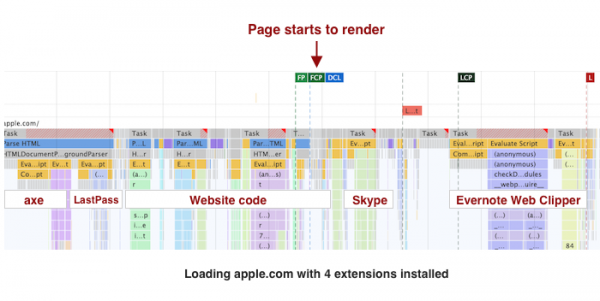
The findings of the study remain unchanged: many popular extensions, such as Honey, Evernote Web Clipper, and Avira Browser Safety, can significantly decrease the performance of website loading in Chrome. On the other hand, it is noted that ad-blocking and privacy-focused extensions can significantly enhance performance when browsing sites that contain a large number of ads.
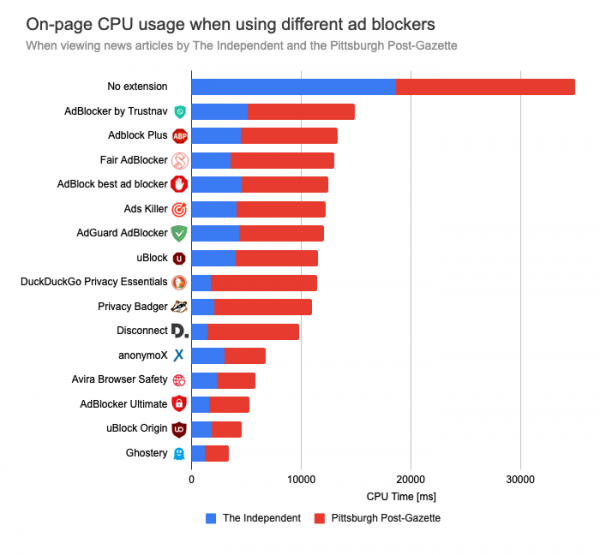
Of particular interest is the study of the impact of ad blockers on page loading speed. By disabling the code responsible for rendering ads and counters, the CPU time consumption when opening The Independent and Pittsburgh Post-Gazette websites using the most effective ad blocker, Ghostery, was reduced from 17.5 seconds to 1.7 seconds, i.e., by a factor of 10. For the less effective of the tested blockers, Trustnav, CPU time consumption decreased to 7.4 seconds, i.e., by 57%.
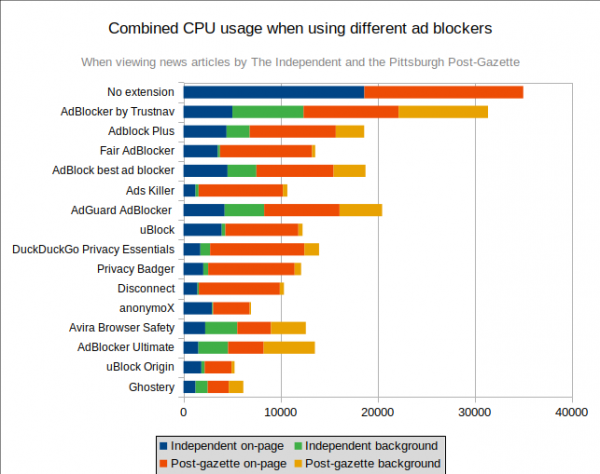
Some ad-blocking extensions actively consume CPU resources in the background, which, despite accelerating page processing, can increase the overall system load. In a combined test that considered CPU load during page opening and in the background, Ghostery and uBlock Origin showed the highest efficiency.
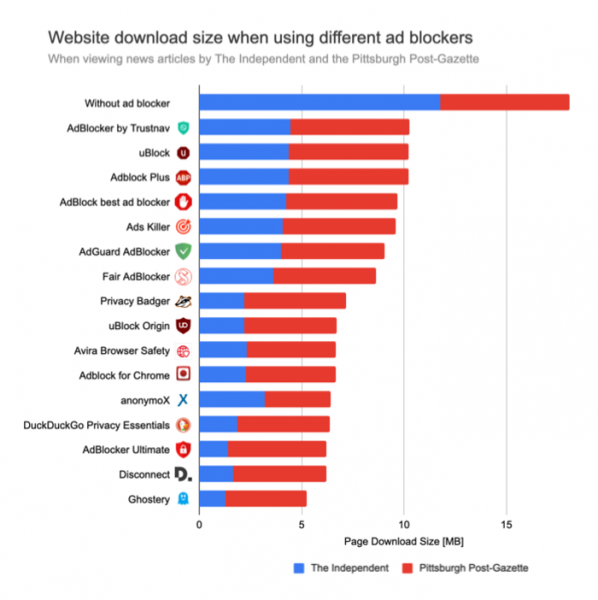
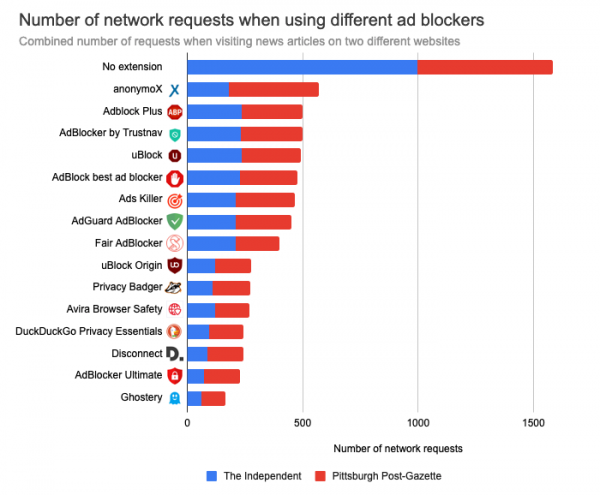
In addition to accelerating page processing, using ad blockers significantly reduces traffic (by 43% to 66%) and the number of network requests sent (by 83% to 90%).
Ad blockers also help to reduce memory consumption; for instance, using the Disconnect extension reduces the memory consumption of the browser when opening The Independent and Pittsburgh Post-Gazette pages from 574 MB to 260 MB, i.e., by 54%, which compensates for the memory costs of maintaining block lists.
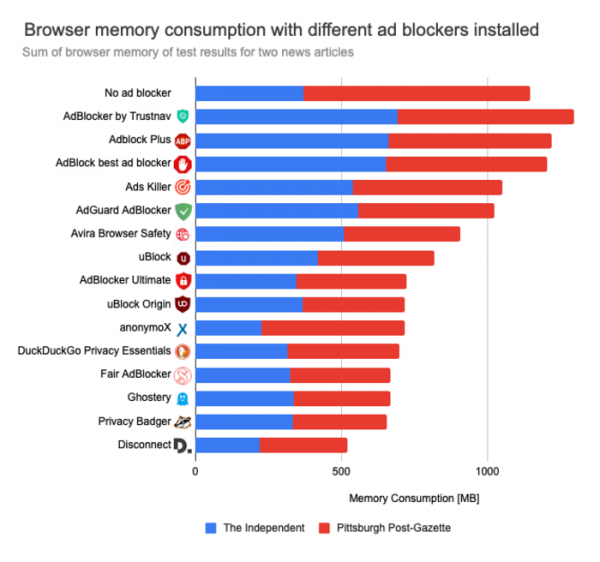
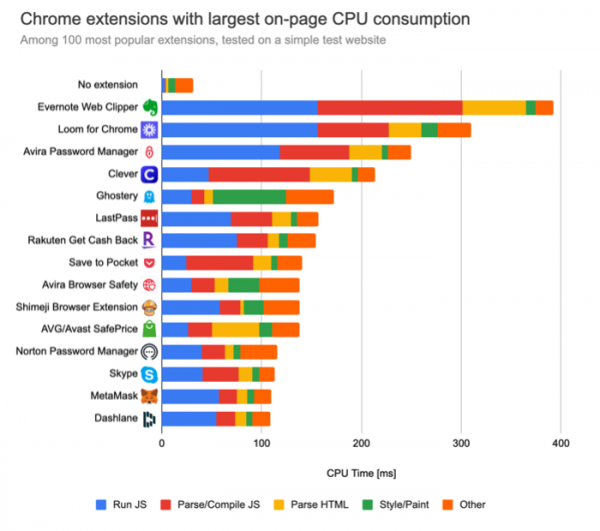
When testing the performance of extensions, considering the 100 most popular ones, the highest resource consumption is observed with Evernote Web Clipper (which consumes 368 ms of CPU time). Other resource-intensive extensions include the privacy tool Ghostery, video messenger Loom for Chrome, the student tool Clever, and password managers Avira and LastPass, each having over a million installations.
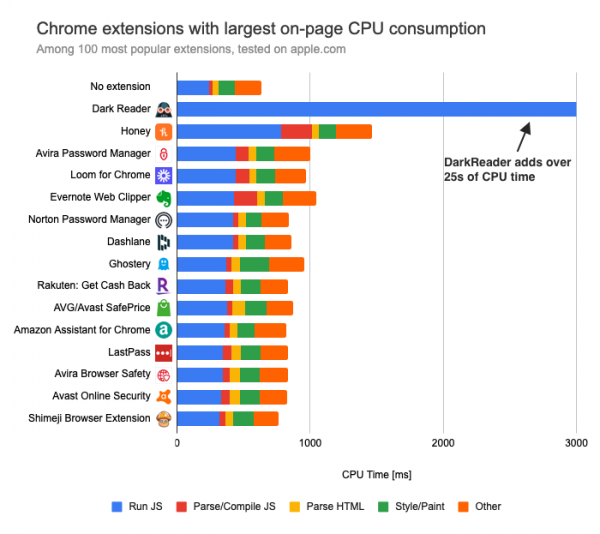
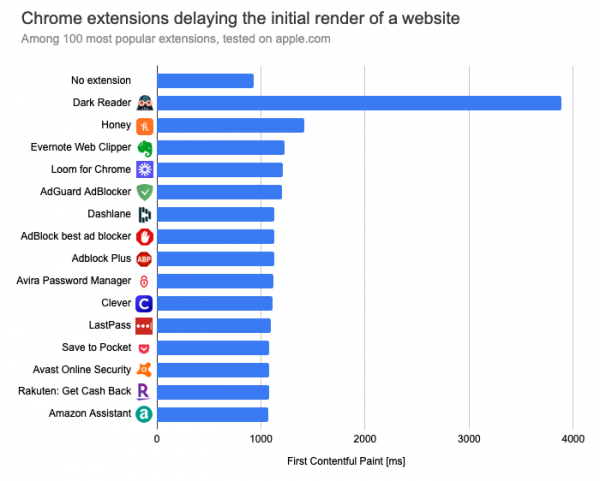
In the test involving the opening of the site apple.com, the situation changes and the Dark Reader extension emerges as the top performer, consuming about 25 seconds of CPU time (mainly due to adjusting images for dark mode). Significant resources are also consumed by the coupon-finding extension Honey (+825 ms).
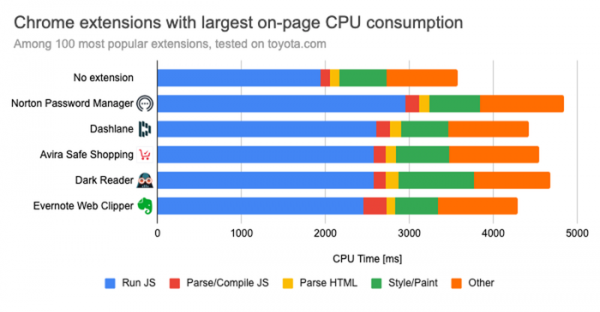
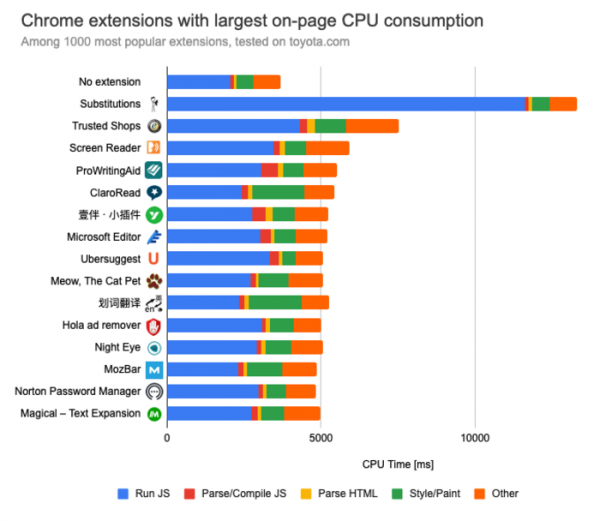
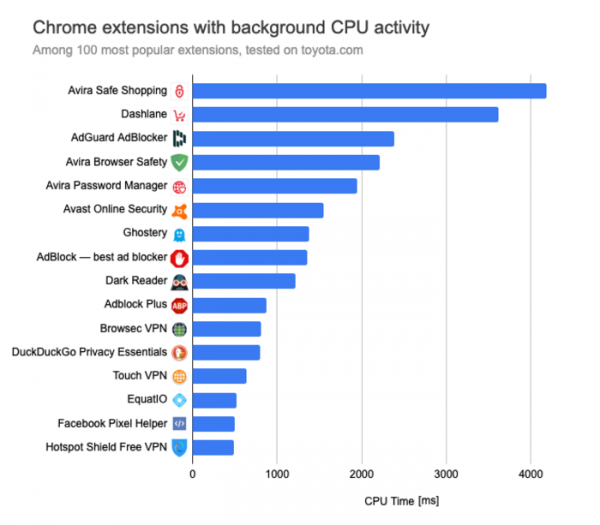
When opening the Toyota website, the leader in creating a parasitic load on the CPU is Norton Password Manager.
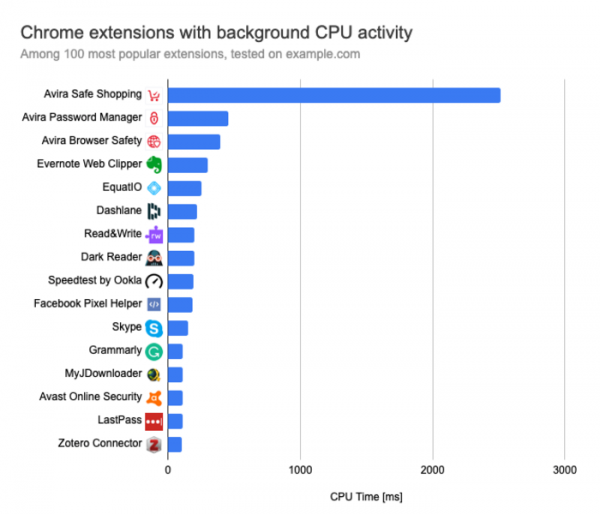
In a sample of the 100 most popular extensions based on CPU resource consumption during page handling, the leaders are: Ubersuggest (consuming 1.6 seconds of CPU time), ProWritingAid Grammar Checker (+658 ms), Meow (637 ms), and MozBar (+604 ms). For background resource consumption, the leaders are: Avira Safe Shopping (+2.5 seconds), TrafficLight (+1.04 seconds), Virtru Email Protection (+817 ms), and Stylebot (655 ms). The highest memory consumption is observed in the extensions: AdBlocker by Trustnav (+215 MB), Ad-Blocker Pro (+211 MB), Hola ad remover (198 MB), and Xodo PDF Viewer & Editor (197 MB). In comparison, uBlock Origin consumes 27 ms of CPU time during page handling, spends 48 ms of CPU time in the background, and occupies 77 MB of memory.
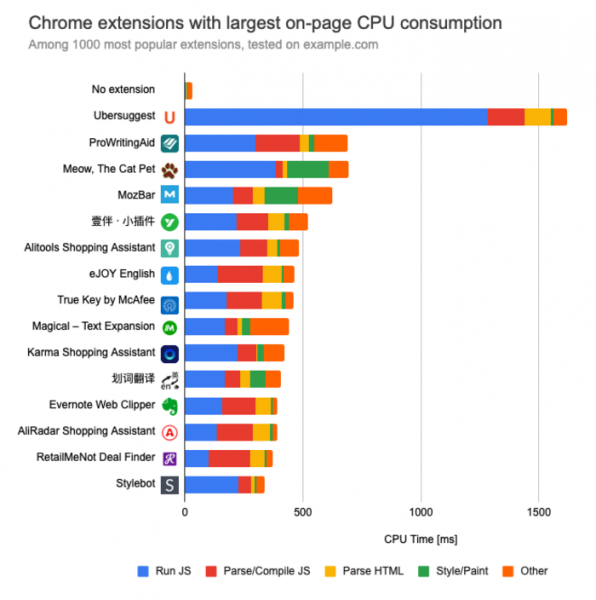
When testing on real websites, the situation worsens. For example, the Substitutions extension, which automatically replaces code on the page, consumes 9.7 seconds of CPU time.
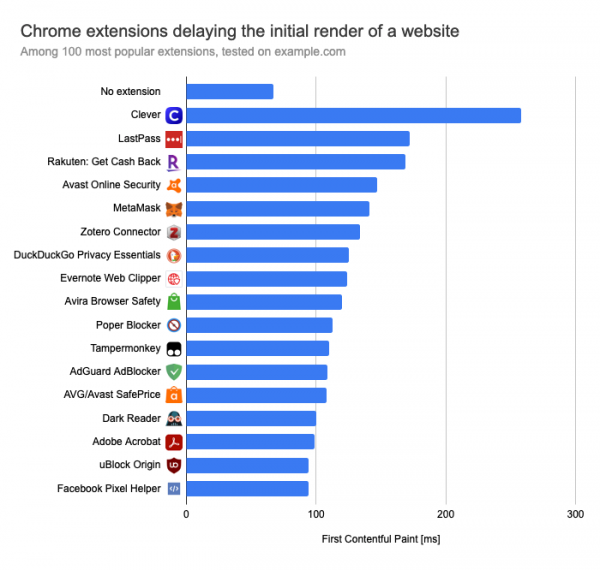
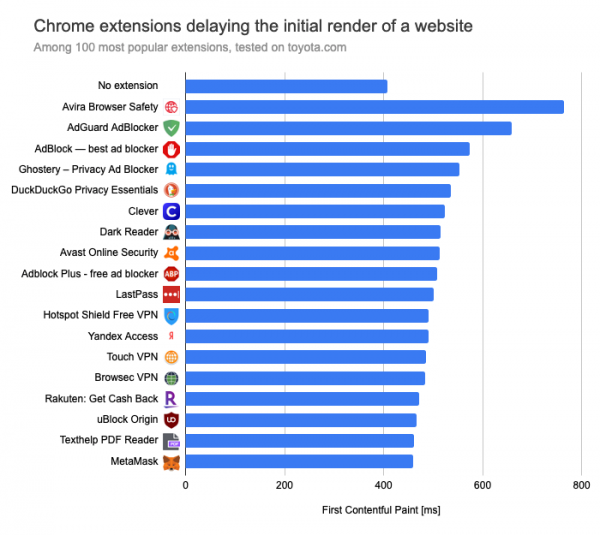
When measuring the delay before the rendering of the placeholder page, the worst performance among the 100 most popular extensions was observed with Clever, Lastpass, and DuckDuckGo Privacy Essentials.
In a repeated test on the apple.com site, significant issues were observed with Dark Reader, which delayed the start of rendering by 4 seconds.
On the Toyota site, the delays from Dark Reader were not as significant, and the leaders were the content blockers.
The resource consumption test showed that the worst performance came from the Avira Safe Shopping extension, which used over 2 seconds of CPU time while the tab was in the background.
In a repeated test on the Toyota website, CPU time consumption of more than 2 seconds was also noted for the Dashlane password manager and the AdGuard AdBlocker.
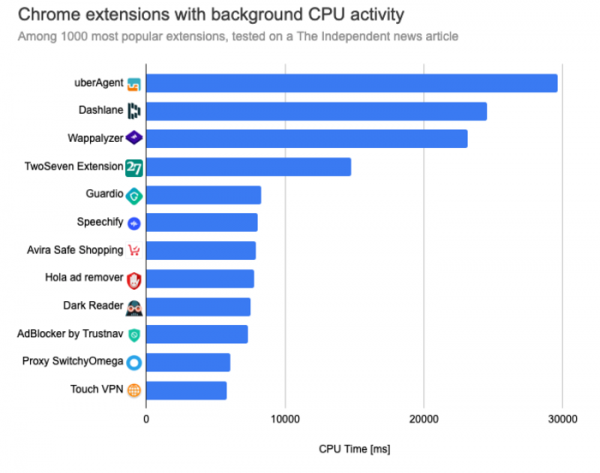
When testing 1000 extensions on The Independent website, the CPU time consumption in the background for the uberAgent, Dashlane, and Wappalyzer extensions exceeded 20 seconds.
Regarding memory consumption, ad-blocking and privacy extensions lead in this category as they need to keep databases with block lists in memory. However, when opening a large number of ad-heavy websites in the browser, the total memory consumption may be lower than without ad blockers.
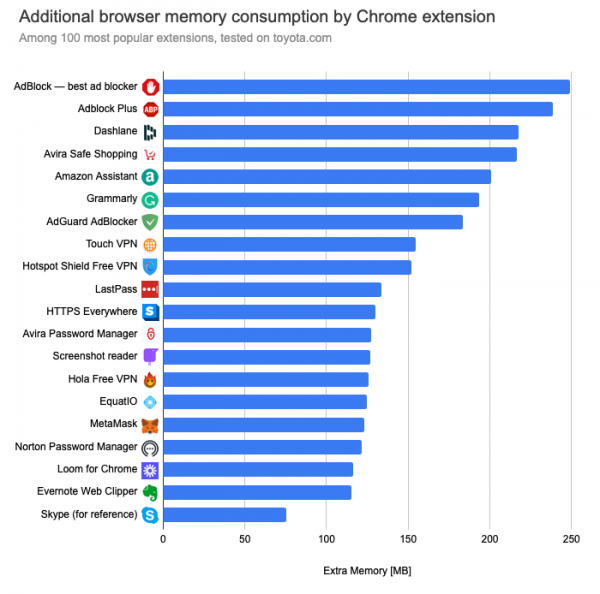
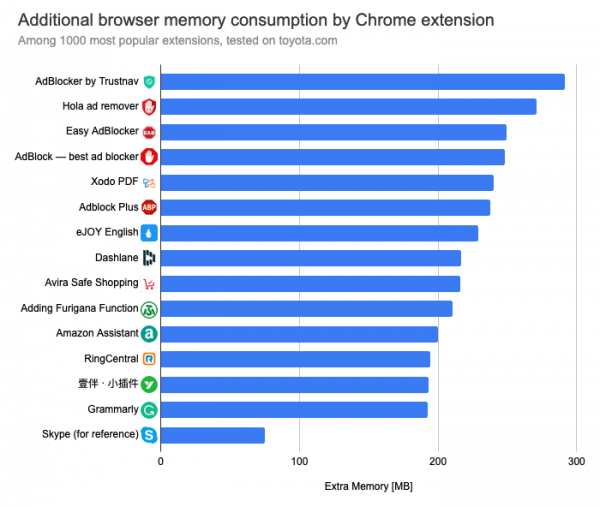
When multiple extensions are installed, their resource consumption adds up.
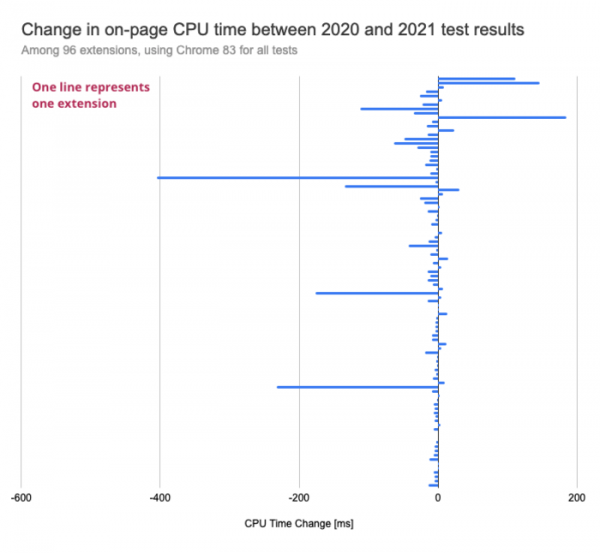
Comparing the results with last year's research, the most significant progress is noted in the extensions Grammarly, Microsoft Office, Okta Browser Plugin, Avira Safe Shopping, and Avira Browser Safety, for which CPU time consumption has decreased by more than 100 ms. The greatest deterioration in resource consumption is observed in the Save to Pocket, Loom, and Evernote extensions.
Source: opennet.ru
