

Introduction
It so happened that at my current job, I had to get acquainted with this technology. Let me start with a brief backstory. During a recent meeting, our team was told that we needed to create an integration with a well-known system. The integration meant that this well-known system would send us requests via HTTP to a specific endpoint, and we, strangely enough, would send back responses in the form of a SOAP message. It seems simple and trivial. From this, it follows that we need to...
Task
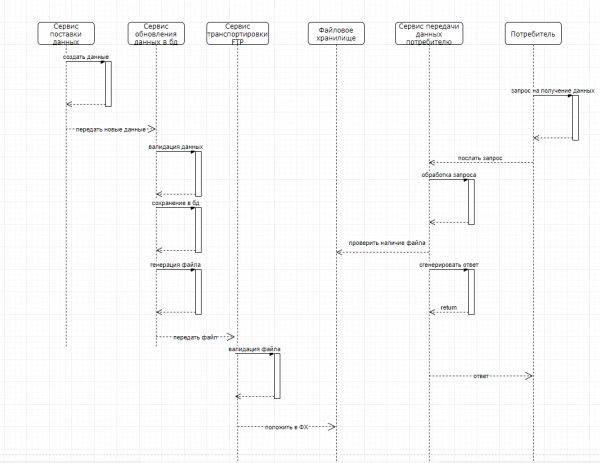
Create 3 services. The first of these is the Database Update Service. This service updates the data in the database and generates a file in CSV format when new data arrives from an external system, to be sent to the next system. The endpoint of the second service – the FTP Transfer Service – is called, which receives the transmitted file, validates it, and stores it in file storage via FTP. The third service – the Data Delivery Service – works asynchronously with the first two. It accepts a request from an external system for the file mentioned above, takes the prepared response file, modifies it (updates the fields id, description, linkToFile), and sends the response as a SOAP message. So, the overall picture is as follows: the first two services start their work only when data for updating arrives. The third service works constantly since there are many information consumers, about 1000 requests for data retrieval per minute. The services are available constantly, and their instances are located in different environments such as testing, demo, pre-production, and production. Below is a diagram illustrating the operation of these services. I should clarify that some details are simplified to avoid unnecessary complexity.
Technical deep dive
When planning a solution to the task, we initially decided to create applications in Java using the Spring framework, with Nginx as a load balancer, a Postgres database, and other technical and non-technical components. Since the time allocated for developing the technical solution allowed us to consider other approaches to this problem, we took a look at the trendy technology Apache NIFI, which is popular in certain circles. I must say that this technology enabled us to notice these 3 services. This article will describe the development of the file transport service and the data transfer service to the consumer; however, if the article resonates well, I will write about the data updating service in the database.
What is it?
NIFI represents a distributed architecture for fast parallel loading and processing of data, a large number of plugins for sources and transformations, configuration versioning, and much more. A nice bonus is that it is very easy to use. Trivial processes, such as getFile, sendHttpRequest, and others, can be represented as squares. Each square represents a certain process, the interaction of which can be seen in the illustration below. More detailed documentation on how to interact with and configure processes is provided , for those who prefer Russian — . The documentation is well-written, detailing how to unpack and run NIFI, as well as how to create processes, the so-called squares.
The idea to write this article arose after extensive searching and structuring of the gathered information into something coherent, as well as the desire to make life a bit easier for future developers.
Example
This example examines how squares interact with each other. The overall scheme is quite simple: We receive an HTTP request (theoretically with a file in the body of the request. For demonstration purposes in NIFI, in this example the request starts the process of retrieving a file from the local storage), then we send back a response that the request has been received, while simultaneously initiating the process of retrieving the file from the storage and then the process of moving it via FTP to the storage. It is worth explaining that the processes interact with each other through what is called a flowFile. This is a basic entity in NIFI, which stores attributes and content. The content is the data presented in the stream file. So, roughly speaking, if you received a file from one square and are transferring it to another, the content will be your file.
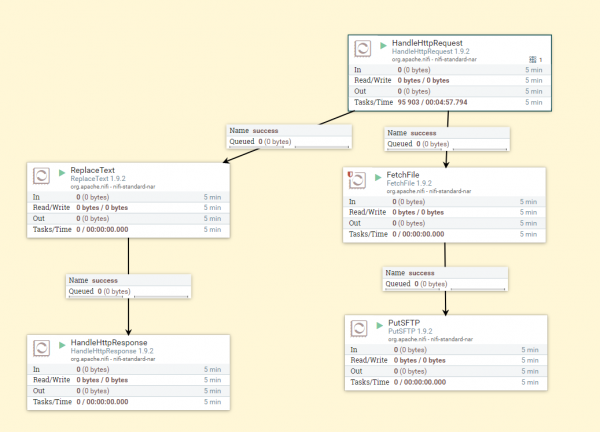
As you can see — this diagram depicts the overall process. HandleHttpRequest — receives requests, ReplaceText — generates the response body, HandleHttpResponse — sends back the response. FetchFile — retrieves the file from the storage and passes it to the PutSftp square — which places the file on FTP at the specified address. Now let's take a closer look at this process.
In this case — request is the start of everything. Let's take a look at its configuration parameters.
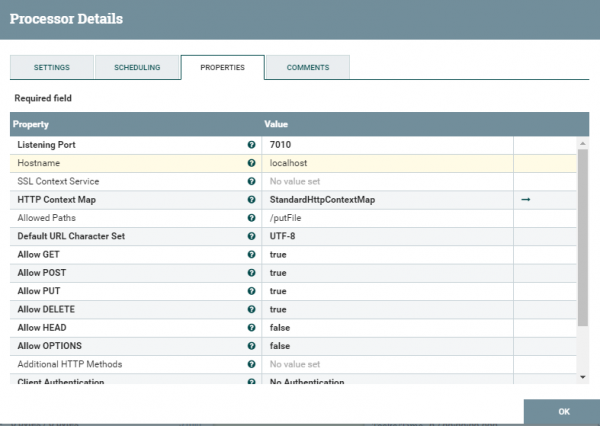
Everything here is quite trivial except for StandardHttpContextMap — this is a service that allows sending and receiving requests. More details and even examples can be found —
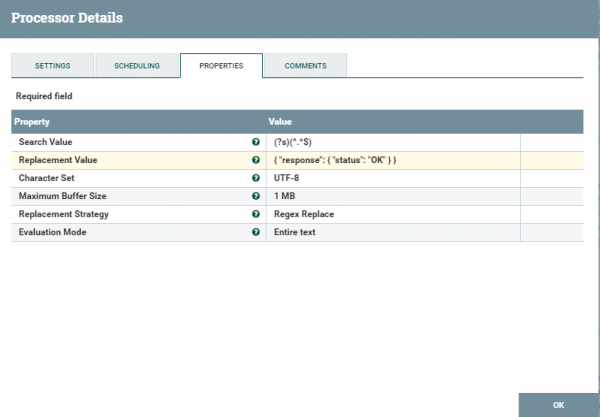
Next, let's look at the configuration parameters of the ReplaceText square. Pay attention to ReplacementValue — this is what will be returned to the user as a response. In settings, you can adjust the logging level; the logs can be viewed at {where you unpacked nifi}/nifi-1.9.2/logs where there are also parameters for failure/success — based on these parameters, you can regulate the process as a whole. So, in case of successful text processing — the process of sending a response to the user will be triggered, while in another case we will simply log the unsuccessful process.
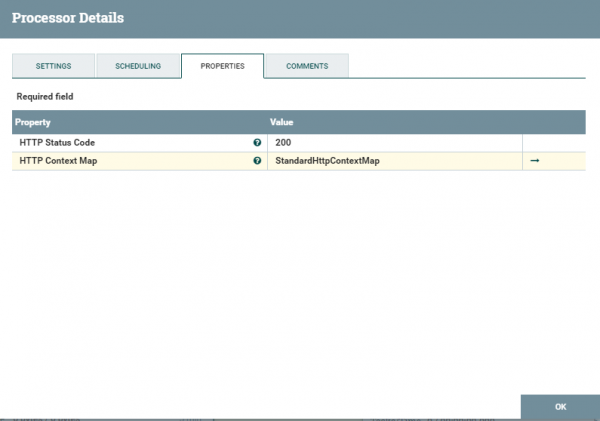
In the properties of HandleHttpResponse, there is nothing particularly interesting except for the status upon successful creation of the response.
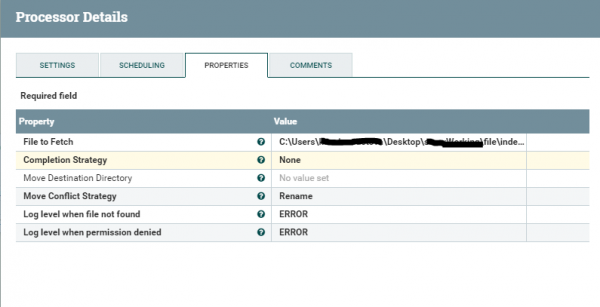
Having dealt with the request and response — let’s move on to retrieving the file and placing it on the FTP server. FetchFile — retrieves the file from the path specified in the settings and transfers it to the next process.
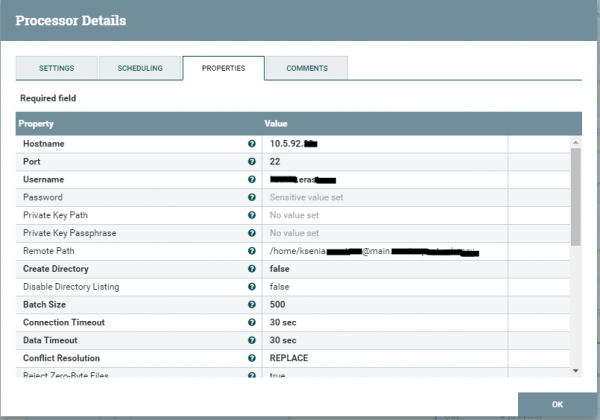
The PutSftp block places the file in the file storage. The configuration parameters can be seen below.
It is important to note that each block is a separate process that must be initiated. We examined the simplest example, which does not require any complex customization. Next, we will discuss a slightly more complicated process, where we will write a bit in Groovy.
A more complex example
The data transfer service to the consumer has become somewhat more complex due to the process of modifying the SOAP message. The overall process is depicted in the diagram below.
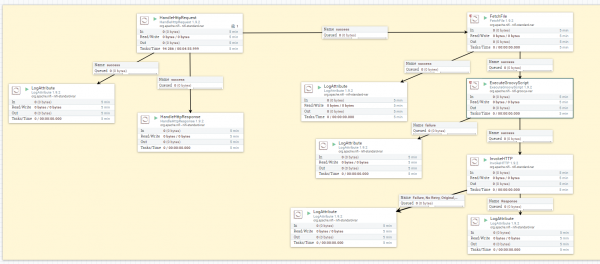
Here, the idea is also not particularly complicated: we received a request from the consumer for data, sent a response confirming the message receipt, initiated the process of obtaining the response file, then edited it with certain logic, after which we transmitted the file to the consumer as a SOAP message to the server.
I don't think it's necessary to describe the blocks we've seen above again — let's move directly to new ones. If you need to edit any file and standard blocks like ReplaceText are not suitable, you will have to write your own script. This can be done using the ExecuteGroovyScript block. Its settings are presented below.
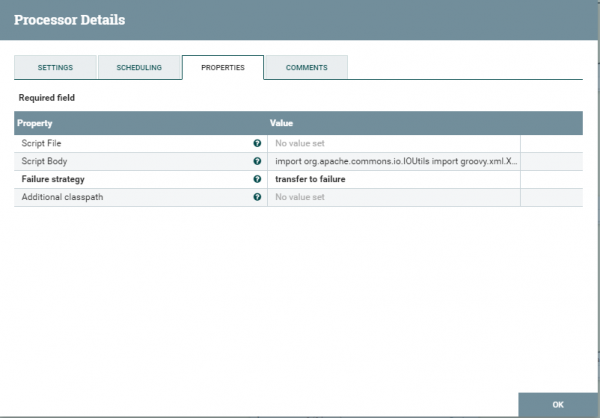
There are two ways to load a script into this square. The first is by uploading a file with the script. The second is by inserting the script into scriptBody. As far as I know, the executeScript square supports several programming languages — one of them is Groovy. I must disappoint Java developers — you cannot write scripts in Java in such squares. For those who really want to — you need to create your own custom square and add it to the NIFI system. This entire operation involves quite lengthy rituals, which we won't delve into in this article. I chose the Groovy language. Below is a test script that simply incrementally updates the id in the SOAP message. It's important to note that you take a file from flowFile, update it, and don’t forget to put the updated file back. It’s also worth mentioning that not all libraries are connected. It may turn out that you will still have to import one of the libraries. Another downside is that debugging the script in this square is quite difficult. There is a way to connect to the NIFI JVM and start the debugging process. Personally, I launched a local application and simulated receiving a file from the session. I also performed debugging locally. The errors that arise when loading the script can be easily Googled and are logged by NIFI itself.
import org.apache.commons.io.IOUtils
import groovy.xml.XmlUtil
import java.nio.charset.*
import groovy.xml.StreamingMarkupBuilder

def flowFile = session.get()
if (!flowFile) return
try {
    flowFile = session.write(flowFile, { inputStream, outputStream ->
        String result = IOUtils.toString(inputStream, "UTF-8");
        def recordIn = new XmlSlurper().parseText(result)
        def element = recordIn.depthFirst().find {
            it.name() == 'id'
        }

        def newId = Integer.parseInt(element.toString()) + 1
        def recordOut = new XmlSlurper().parseText(result)
        recordOut.Body.ClientMessage.RequestMessage.RequestContent.content.MessagePrimaryContent.ResponseBody.id = newId

        def res = new StreamingMarkupBuilder().bind { mkp.yield recordOut }.toString()
        outputStream.write(res.getBytes(StandardCharsets.UTF_8))
} as StreamCallback)
     session.transfer(flowFile, REL_SUCCESS)
}
catch(Exception e) {
    log.error("Error during processing of validate.groovy", e)
    session.transfer(flowFile, REL_FAILURE)
}
This is where the customization of the square ends. The updated file is then passed to the square that sends the file to the server. Below are the settings for this square.
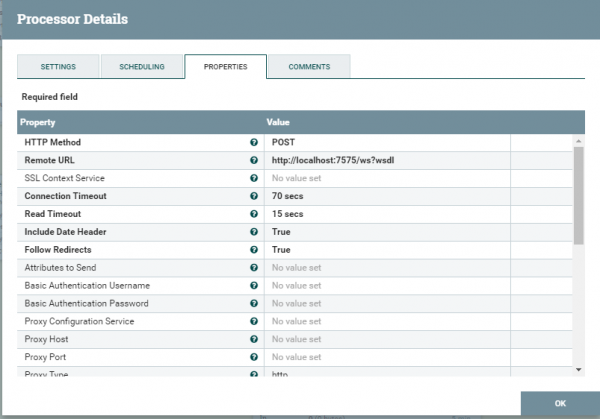
We describe the method by which the SOAP message will be sent. We specify where to send it. Next, we need to indicate that this is specifically SOAP.
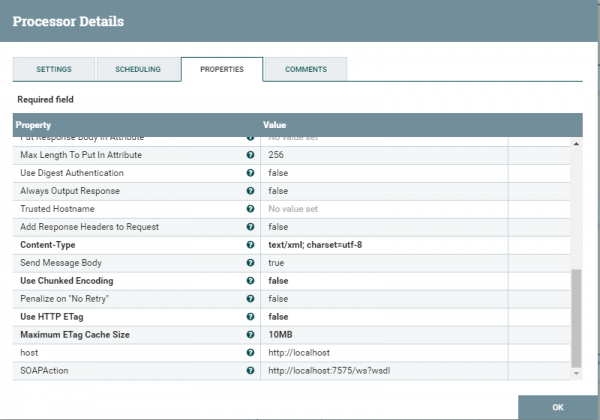
We are adding several properties such as host and action (soapAction). We save and check. For more details on how to send SOAP requests, you can take a look.
We explored several use cases of NIFI processes. How they interact and what real benefits they provide. The examples discussed are test cases and slightly differ from what is actually in production. I hope this article will be somewhat useful for developers. Thank you for your attention. If you have any questions, feel free to reach out. I'll do my best to respond.
Source: habr.com
