

At DEF CON 33, a method of attack on browser extensions was introduced, which inject their interface elements into the viewed page. Applying the attack to extensions with password managers may lead to the leak of information stored in password managers, such as authentication credentials, credit card details, personal data, and one-time passwords for two-factor authentication. This issue affects all tested password managers, including 1Password, Bitwarden, LastPass, KeePassXC-Browser, NordPass, ProtonPass, and Keeper.
The attack method is based on the fact that browser extensions insert a dialog requesting password autofill directly onto the displayed page, integrating their elements into the DOM (Document Object Model) of that page. If an attacker is able to execute their JavaScript code on the page, for example, by exploiting an XSS vulnerability on the site, they can manipulate all elements in the DOM, including those placed by browser extensions.
Among other things, it is possible to make the confirmation dialog transparent and spatially align the button in this dialog with a button from a fake dialog created by the attacker to prompt the user to click. Such fake dialogs may include bogus permission requests for cookie access, ad banners, or forms with CAPTCHAs. By placing a spoofed dialog under the transparent password manager dialog and aligning the button locations on the screen, it can be achieved that the user's click will occur on the confirmation button for filling in the authentication parameters in the password manager dialog, even though the user believes they clicked, for example, on a close button for an ad window.
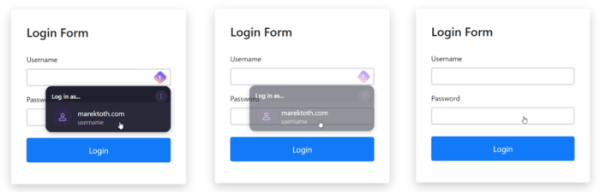
The attack boils down to the following steps:
- Creating an intrusive element on the page that encourages clicking.
- Adding a web form to the page for logging in or filling out personal data.
- Setting transparency for the web form (‘opacity: 0.001’ in CSS).
- Using the focus() method to set the focus on the input field in the form, leading to the activation of the password manager's autofill dialog.
- Searching for the newly appeared password manager dialog in the DOM and setting its transparency.
- Waiting for a user click on a visible intrusive element on the page, which, with a proper combination of visible and invisible elements, will lead to pressing the button in the transparent dialog and filling fields with the password manager.
- Extracting data from the filled web form and sending it to the attacker's server.
As autofill for authentication parameters in the password manager is triggered only for sites where these parameters were saved, to organize an attack, it is necessary to run custom JavaScript code on the attacked site or its subdomain. Therefore, to launch the attack, one must either obtain a subdomain in the same domain as the attacked site or find an XSS vulnerability on the site that allows injecting code into the content displayed to the user.
It is noted that many users utilize a single password manager for both storing login credentials and generating one-time passwords for two-factor authentication, enabling the described attack method during autofill of one-time passwords. An attack on the site issuetracker.google.com, which contains an XSS vulnerability, is demonstrated as an example. To obtain login credentials and the code for two-factor authentication, it is sufficient to send the user a link exploiting the XSS vulnerability and achieve three clicks through the insertion of fake intrusive requests (cookie processing permission, personalization permission, and acceptance of the privacy policy).
In addition to sites with XSS vulnerabilities, the attack can be conducted on services that provide subdomains to anyone — most password managers by default autofill login parameters not only for the main domain but also for subdomains.
An attack can also be used to determine the personal data stored in the password manager and credit card information of the user. In this case, there is no need to execute JavaScript code in the context of someone else's site; it is sufficient to lure the victim to the attacker's page — for personal data, the web forms are filled based on their type (address, credit card number, full name), without linking to domain. The most dangerous is the leakage of credit card parameters, as password managers not only input the card number but also the expiration date and security code.
The researcher who identified the problem tested 11 browser extensions with password managers, which collectively have 39.7 million active installations, and all of them were found to be unprotected against this type of attack. Some manufacturers released updates (NordPass 5.13.24, ProtonPass 1.31.6, RoboForm 9.7.6, Dashlane 6.2531.1, Keeper 17.2.0, Enpass 6.11.6, Bitwarden 2025.8.1), which attempted to block the attack through a workaround. Other extensions (KeePassXC-Browser, 1Password, iCloud Passwords, Enpass, LastPass, LogMeOnce) remain unpatched for now. A set of test pages has been published to check the manifestation of vulnerabilities in various password managers.
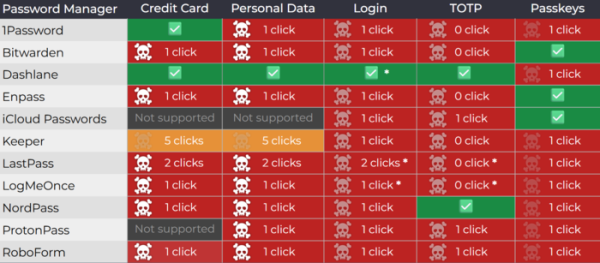
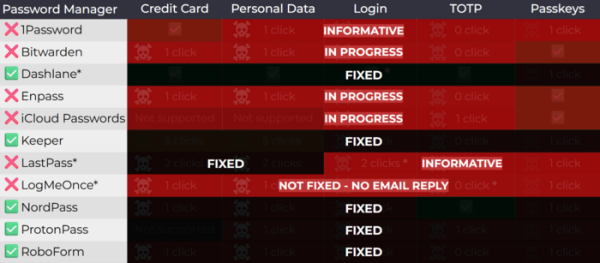
The position of the developers of 1Password, who have not released a fix, is that the vulnerability is fundamental and not directly related to a specific browser extension. Therefore, attempts to resolve it from the extension side only block certain attack vectors but do not eliminate the underlying problem, which needs to be addressed in the browser or by requiring separate confirmation before auto-filling fields. It is noted that 1Password already supports prompting for confirmation before auto-filling payment parameters, and the next release will add an option to display such a prompt for all types of auto-fillable data (due to the reduction in usability, this option will not be enabled by default).
Among the protection methods proposed by the study's author, there is mention of tracking changes to styles applied to page elements using the MutationObserver API, blocking changes through a closed Shadow DOM, monitoring element transparency settings, using the Popover API for dialog output, checking layer overlaps, and temporarily disabling pointer event handling (pointer-events: none) for all floating elements when displaying the password manager dialog. This is in order to fully block the described class. attacks, it is recommended to implement a separate API for protection at the browser level. against clickjacking.
As a universal protection method in browsers based on the Chromium engine, users are advised to enable the site access confirmation mode for extensions (Extension Settings → 'site access' → 'on click'), in which the extension gains access to the site only after clicking on the icon in the right corner of the address bar. As a workaround for protection, disabling autofill for forms and manually copying passwords through the clipboard is also mentioned, but this raises the issue of data leakage from the shared clipboard and the danger of missing phishing attempts.
Source: opennet.ru
