


In our office, we use Fanvil devices for IP telephony. Whether choosing cheaper Chinese products is justified will be revealed over time, but I will explain how I implemented the auto provisioning mechanism on Fanvil BW210P models.
For those unfamiliar with this term but somehow managed to read this far, auto provisioning is a mechanism that allows centralized management of IP phone settings.
Here's how it looks.
The phone connects to the FTP server, finds its configuration file, and checks the configuration file version against server its own. If the numbers differ, the configuration file is applied.
Four files are used in the process:
dsc.exe — the dsCrypt utility. It is used for encrypting ready-made configurations.(This utility is Windows-based. Unfortunately, neither aescrypt, nor aespipe, nor other Linux utilities could create encryption compatible with the phone device. If anyone knows of such alternatives and can talk about them, I would be very grateful.)
genconf.sh — a script for generating the final configuration.
key.txt — a file containing the encryption key. The key consists of 64 HEX characters.
users — this can be considered as the phone database. It contains the device's MAC address, SIP number, and password.
A Pure-FTPd server is set up on Ubuntu 10.04.
Since a Windows utility is used, I had to install Wine.
Contents of genconf.sh
#!/bin/bash
uspath=/opt/pathtousersfile/
usfile=(`cat $uspath/users`)
macdir=/home/pathtoconfigfiles/
a=0
b=1
c=2

while [ ${usfile[$a]} ]
do
dfile=$macdir${usfile[$a]}.txt

cat <<EOF >>$dfile
<<VOIP CONFIG FILE>>Version:2.0007

<GLOBAL CONFIG MODULE>
Static IP          :192.168.1.179
Static NetMask     :255.255.255.0
Static GateWay     :192.168.1.1
Default Protocol   :2
Primary DNS        :202.96.134.133
Alter DNS          :202.96.128.68
DHCP Mode          :1
DHCP Dns           :1
Domain Name        :
Host Name          :VOIP
Pppoe Mode         :0
HTL Start Port     :10000
HTL Port Number    :200
SNTP Server        :209.81.9.7
Enable SNTP        :1
Time Zone          :44
Enable Daylight    :0
SNTP Time Out      :60
DayLight Shift Min :60
DayLight Start Mon :3
DayLight Start Week:5
DayLight Start Wday:0
DayLight Start Hour:2
DayLight Start Min :0
DayLight End Mon   :10
DayLight End Week  :5
DayLight End Wday  :0
DayLight End Hour  :2
DayLight End Min   :0
MMI Set            :-1
MTU Length         :1500
Register WD Time   :0

<LAN CONFIG MODULE>
Lan Ip             :192.168.10.1
Lan NetMask        :255.255.255.0
Bridge Mode        :1

<TELE CONFIG MODULE>
Dial End With #    :1
Dial Fixed Length  :0
Fixed Length       :11
Dial With Timeout  :1
Dial Timeout value :5
Dialpeer With Line :0
Poll Sequence      :0
Accept Any Call    :1
Phone Prefix       :
Local Area Code    :
IP call network    :.
--Port Config--    :
P1 No Disturb      :0
P1 Mute            :0
P1 No Dial Out     :0
P1 No Empty Calling:0
P1 Enable CallerId :1
P1 Forward Service :0
P1 SIP TransNum    :
P1 SIP TransAddr   :
P1 SIP TransPort   :5060
P1 CallWaiting     :1
P1 CallTransfer    :1
P1 Call3Way        :1
P1 AutoAnswer      :0
P1 No Answer Time  :20
P1 Warm Line Time  :0
P1 Extention No.   :
P1 Auto HandDown   :0
P1 Auto Handdown Ti:3
P1 Hotline Num     :
P1 Record Server   :
P1 Enable Record   :0
P1 Busy N/A Line   :0

<DSP CONFIG MODULE>
Signal Standard    :1
Handdown Time      :200
G729 Payload Length:1
G723 Bit Rate      :1
G722 Timestamps    :0
VAD                :1
Ring Type          :1
Dtmf Payload Type  :101
Disable Handfree   :0
RTP PROBE          :0
--Port Config--    :
P1 Output Vol      :5
P1 Input Vol       :3
P1 HandFree Vol    :5
P1 RingTone Vol    :5
P1 Codec           :-1
P1 Voice Record    :0
P1 Record Playing  :1
P1 UserDef Voice   :0
P1 First Codec     :0
P1 Second Codec    :1
P1 Third Codec     :17
P1 Forth Codec     :15
P1 Fifth Codec     :23
P1 Sixth Codec     :9

<SIP CONFIG MODULE>
SIP  Port          :5060
Stun Address       :
Stun Port          :3478
Stun Effect Time   :50
SIP  Differv       :0
Extern Address     :
Url Convert        :1
Reg Retry Time     :32
Strict BranchPrefix:1
--SIP Line List--  :
EOF
">>$dfile1 Phone Number  :${usfile[$b]}
">>$dfile1 Display Name  :${usfile[$b]}
">>$dfile1 Sip Name      :
">>$dfile1 Register Addr :voip.server.net
">>$dfile1 Register Port :5060
">>$dfile1 Register User :${usfile[$b]}
">>$dfile1 Register Pwd  :${usfile[$c]}
">>$dfile1 Register TTL  :32
">>$dfile1 Enable Reg    :1
">>$dfile1 Proxy Addr    :voip.neoflex.ru
">>$dfile1 Proxy Port    :5060
">>$dfile1 Proxy User    :${usfile[$b]}
">>$dfile1 Proxy Pwd     :${usfile[$c]}
cat <<EOF >>$dfile
SIP1 Signal Enc    :0
SIP1 Signal Key    :
SIP1 Media Enc     :0
SIP1 Media Key     :
SIP1 Local Domain  :
SIP1 Fwd Service   :0
SIP1 Ring Type     :0
SIP1 Fwd Number    :
SIP1 Hotline Number:
SIP1 Enable Detect :0
SIP1 Detect TTL    :60
SIP1 Server Type   :0
SIP1 User Agent    :Voip Phone 1.0
SIP1 PRACK         :0
SIP1 KEEP AUTH     :0
SIP1 Session Timer :0
SIP1 Gruu          :0
SIP1 DTMF Mode     :1
SIP1 DTMF SIP-INFO :0
SIP1 Use Stun      :0
SIP1 Via Port      :1
SIP1 Subscribe     :0
SIP1 Sub Expire    :300
SIP1 Single Codec  :0
SIP1 CLIR          :0
SIP1 Strict Proxy  :0
SIP1 Direct Contact:0
SIP1 History Info  :0
SIP1 DNS SRV       :0
SIP1 Transfer Expir:0
SIP1 Ban Anonymous :0
SIP1 Dial Without R:0
SIP1 DisplayName Qu:0
SIP1 Presence Mode :0
SIP1 RFC Ver       :1
SIP1 Signal Port   :0
SIP1 Transport     :0
SIP1 Use Mixer     :0
SIP1 Mixer Uri     :
SIP1 Long Contact  :0
SIP1 Auto TCP      :0
SIP1 Click to Talk :0
SIP1 Mwi No.       :
SIP1 Park No.      :
SIP1 Help No.      :
SIP2 Phone Number  :
SIP2 Display Name  :
SIP2 Sip Name      :
SIP2 Register Addr :
SIP2 Register Port :5060
SIP2 Register User :
SIP2 Register Pwd  :
SIP2 Register TTL  :60
SIP2 Enable Reg    :0
SIP2 Proxy Addr    :
SIP2 Proxy Port    :5060
SIP2 Proxy User    :
SIP2 Proxy Pwd     :
SIP2 Signal Enc    :0
SIP2 Signal Key    :
SIP2 Media Enc     :0
SIP2 Media Key     :
SIP2 Local Domain  :
SIP2 Fwd Service   :0
SIP2 Ring Type     :0
SIP2 Fwd Number    :
SIP2 Hotline Number:
SIP2 Enable Detect :0
SIP2 Detect TTL    :60
SIP2 Server Type   :0
SIP2 User Agent    :Voip Phone 1.0
SIP2 PRACK         :0
SIP2 KEEP AUTH     :0
SIP2 Session Timer :0
SIP2 Gruu          :0
SIP2 DTMF Mode     :1
SIP2 DTMF SIP-INFO :0
SIP2 Use Stun      :0
SIP2 Via Port      :1
SIP2 Subscribe     :0
SIP2 Sub Expire    :300
SIP2 Single Codec  :0
SIP2 CLIR          :0
SIP2 Strict Proxy  :0
SIP2 Direct Contact:0
SIP2 History Info  :0
SIP2 DNS SRV       :0
SIP2 Transfer Expir:0
SIP2 Ban Anonymous :0
SIP2 Dial Without R:0
SIP2 DisplayName Qu:0
SIP2 Presence Mode :0
SIP2 RFC Ver       :1
SIP2 Signal Port   :0
SIP2 Transport     :0
SIP2 Use Mixer     :0
SIP2 Mixer Uri     :
SIP2 Long Contact  :0
SIP2 Auto TCP      :0
SIP2 Click to Talk :0
SIP2 Mwi No.       :
SIP2 Park No.      :
SIP2 Help No.      :

<IAX2 CONFIG MODULE>
Server   Address   :
Server   Port      :4569
User     Name      :
User     Password  :
User     Number    :
Voice    Number    :0
Voice    Text      :mail
EchoTest Number    :1
EchoTest Text      :echo
Local    Port      :4569
Enable   Register  :0
Refresh  Time      :60
Enable   G.729     :0

<PPPoE CONFIG MODULE>
Pppoe User         :user123
Pppoe Password     :XXXXXXX
Pppoe Service      :ANY
Pppoe Ip Address   :

<MMI CONFIG MODULE>
Telnet Port        :23
Web Port           :80
Remote Control     :1
Enable MMI Filter  :0
Telnet Prompt      :
--MMI Account--    :
Account1 Name      :admin
Account1 Pass      :XXXXXXXXX
Account1 Level     :10
Account2 Name      :guest
Account2 Pass      :XXXXXXXX
Account2 Level     :5

<QOS CONFIG MODULE>
Enable VLAN        :0
Enable diffServ    :0
DiffServ Value     :0
VLAN ID            :0
802.1P Value       :0
VLAN Recv Check    :0
Data VLAN ID       :0
Data 802.1P Value  :0
Diff Data Voice    :0
Enable PVID        :0
PVID Value         :0

<DEBUG CONFIG MODULE>
MGR Trace Level    :0
SIP Trace Level    :0
IAX Trace Level    :0
Trace File Info    :0

<AAA CONFIG MODULE>
Enable Syslog      :0
Syslog address     :0.0.0.0
Syslog port        :514

<ACCESS CONFIG MODULE>
Enable In Access   :0
Enable Out Access  :0

<DHCP CONFIG MODULE>
Enable DHCP Server :0
DHCP Relay Target  :
Enable DNS Relay   :1
DHCP Update Flag   :0
TFTP  Server       :0.0.0.0
--DHCP List--      :
Item1 name         :lan
Item1 Start Ip     :192.168.10.1
Item1 End Ip       :192.168.10.30
Item1 Param        :snmk=255.255.255.0:maxl=1440:rout=192.168.10.1:dnsv=192.168.10.1

<NAT CONFIG MODULE>
Enable Nat         :1
Enable Ftp ALG     :1
Enable H323 ALG    :0
Enable PPTP ALG    :1
Enable IPSec ALG   :1

<PHONE CONFIG MODULE>
Keypad Password    :XXXX
LCD Logo           :t
Time 12hours       :0
MWI Number         :*97
Display PhoneNum   :0
Memory Key 1       :
Memory Key 2       :
Memory Key 3       :
Memory Key 4       :
Memory Key 5       :
Memory Key 6       :
Memory Key 7       :
Memory Key 8       :
Memory Key 9       :
Memory Key 10      :
Missed Call Led    :1
Voice Message Led  :1

<AUTOUPDATE CONFIG MODULE>
Download Username  :admin
Download password  :XXXXXXXXXX
Download Server IP :voip-set.server.net
Config File Name   :
Config File Key    :fffffffffffffffffffffffffffffffffffffffffffffffffffffffffffffffffffffffffffffffffffffffffffff
Download Protocol  :1
Download Mode      :2
Download Interval  :1
DHCP Option 66     :0

<VPN CONFIG MODULE>
VPN mode           :-1
L2TP LNS IP        :
L2TP User Name     :
L2TP Password      :
Enable VPN Tunnel  :0
VPN Server IP      :0.0.0.0
VPN Server Port    :80
Server Group ID    :VPN
Server Area Code   :12345
<<END OF FILE>>
EOF

./dsc.exe key.txt e $dfile $macdir${usfile[$a]}
rm $dfile

a=`expr $a + 3`
b=`expr $b + 3`
c=`expr $c + 3`

done
To tailor the file to your settings, you need to change the values of the following fields:
uspath=/opt/pathtousersfile/
macdir=/home/pathtoconfigfiles/
In the section --SIP Line List--, fields
">>$dfile1 Register Addr		#VOIP server address
">>$dfile1 Register Port		#VOIP server port
">>$dfile1 Proxy Addr
">>$dfile1 Proxy Port
Partition --MMI Account--, fields
Account1 Name		#administrator of the phone settings
Account1 Pass		#administrator password
Account2 Name
Account2 Pass
Partition
, field


Keypad Password		#access password to settings directly via phone
MWI Number          #access number to voicemail
Partition
, fields


Download Username	#FTP server user
Download password	#FTP password
Download Server IP	#FTP server address
Config File Key		#Encryption key
However, I would recommend first setting up the phone via the web interface to your liking, then saving the configured settings in the MAINTENANCE — CONFIG — Backup Config section. After that, insert your file into genconf.sh, not forgetting about the block.
--SIP Line List--  :
EOF
">>$dfile1 Phone Number  :${usfile[1]}
">>$dfile1 Display Name  :${usfile[1]}
">>$dfile1 Sip Name      :
">>$dfile1 Register Addr :voip.server.net
">>$dfile1 Register Port :5060
">>$dfile1 Register User :${usfile[1]}
">>$dfile1 Register Pwd  :${usfile[2]}
">>$dfile1 Register TTL  :32
">>$dfile1 Enable Reg    :1
">>$dfile1 Proxy Addr    :voip.server.net
">>$dfile1 Proxy Port    :5060
">>$dfile1 Proxy User    :${usfile[1]}
">>$dfile1 Proxy Pwd     :${usfile[2]}
The format of the users file is simple and straightforward. MAC address, number, and password separated by spaces.
xxxxxxxxxxxx 101 password
xxxxxxxxxxxx 102 password
xxxxxxxxxxxx 103 password
The server setup is complete. Check that necessary files are created in the right place upon running genconf, and we'll move on to the phone.
In the phone settings, under the MAINTENANCE menu, in the AUTO PROVISION section, adjust the settings as follows.
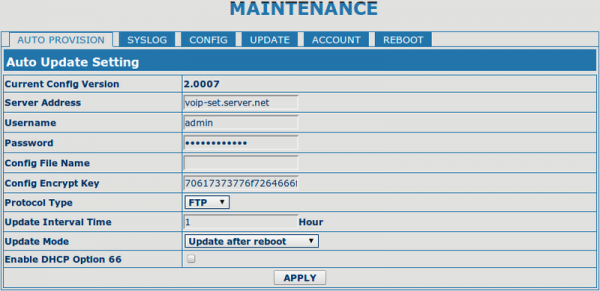
It's better to leave the Config File Name field empty. By default, the phone looks for files
in the form of its MAC address, which are generated after running genconf.sh.
In my case, after applying the new settings, the Update Mode field value becomes Update at time interval. This will allow, in the case of settings changes, to avoid configuring each device manually and wait about an hour for the phone to update itself.
After adjusting the settings to the appropriate format, be sure to click Apply and restart the phone.
Pay attention to the Current Config Version field. This parameter determines whether the phone applies the firmware or not. To ensure changes are applied, it's necessary to increase the value Version: in the genconf.sh file.
To check if anything is happening, you can run the following command - iftop -f "dst port 21" -n. The Current Config Version field, which will differ from the default 2.0002, will indicate that the settings have been successfully applied. server, you can run the following command - iftop -f "dst port 21" -n. The Current Config Version field, which will differ from the default 2.0002, will indicate that the settings have been successfully applied.
P.S. Huge thanks to Andrey Volovik from Vimcom for his invaluable advice and recommendations.
Source: habr.com
