

The Blender Foundation has released version 5.3 of the free 3D modeling package Blender, suitable for various tasks related to 3D modeling, 3D graphics, game development, simulation, rendering, compositing, motion tracking, sculpting, animation, and video editing. The code is distributed under the GPL license. Ready builds are available for Linux, Windows, and macOS. The LTS branches of Blender 5.2 and 4.5 continue to be supported, with updates provided until July 2027 and 2028 respectively.
Among the added improvements:
- In Linux and Windows, the backend that uses the Vulkan graphics API is enabled by default.
- Added built-in support for the 3D Gaussian Splats technique, allowing for the recreation of 3D scenes based on photos and videos, formatted as a point cloud instead of a polygonal mesh, achieving photorealistic quality in rendering. Each point in the cloud represents a miniature elongated 3D sphere containing information about size, orientation, and color. Point cloud import is supported from files in PLY, SPZ, and glTF formats, processed through geometry nodes, previewed in the 3D viewport, and rendered in the EEVEE and Cycles engines.
- The Cycles rendering engine has implemented support for dispersion in the 'Principled BSDF' shader (Bidirectional Scattering Distribution Function), which allows for realistic rendering of glass with iridescence or reflections like precious stones. The rendering of glass also supports anisotropic roughness, where reflection blurring is elongated in one direction, as seen on polished metal.

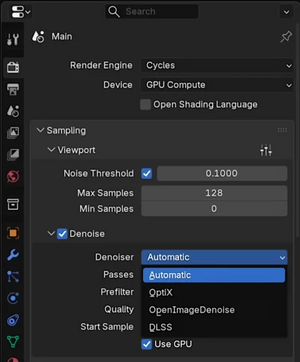
- In Cycles, support for NVIDIA's DLSS 4.5 Ray Reconstruction noise reduction technology has been added, which uses AI models to repaint missing details when scaling images from low resolution. When previewing, the use of DLSS allows for quality close to final render and removes frame noise during animation. This mode is supported only with NVIDIA GPUs and proprietary drivers of the 620.x series. Additionally, support for NVIDIA RTX Spark chips has been implemented on the Windows platform.

- The EEVEE rendering engine has implemented nodes for adjusting the responsiveness of materials to individual light sources, which can be used to account for color, intensity, direction, and distance from the light source to achieve complex effects, such as rainbow highlights.
- EEVEE has added support for panoramic cameras and 360° rendering using equirectangular lenses (for virtual reality headsets), cubemap projection, and effects like 'fisheye' and 'mirror ball'.
- The compositing system (Compositor) has implemented modifier effects that can be applied over the scene, allowing you to avoid setting up node chains for effects such as glow, corner darkening, and colored halo. Additionally, 17 nodes have been adapted for use in the Compositor, including bundle nodes like Combine Bundle, and nodes for mathematical and logical operations. Playback speed has been increased by up to two times when using GPU for calculations. The oil painting style effect (Anisotropic Kuwahara) has been accelerated up to 10 times on Apple GPU, 2 times on NVIDIA GPU, and by 25-30% on CPU. A playback cache has been implemented.
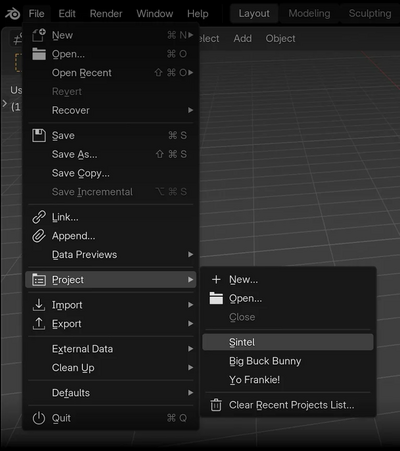
- Support for projects has been added, allowing predefined settings, asset libraries, variables, and a splash screen to be linked (support for linking add-ons to projects is promised for the next version).

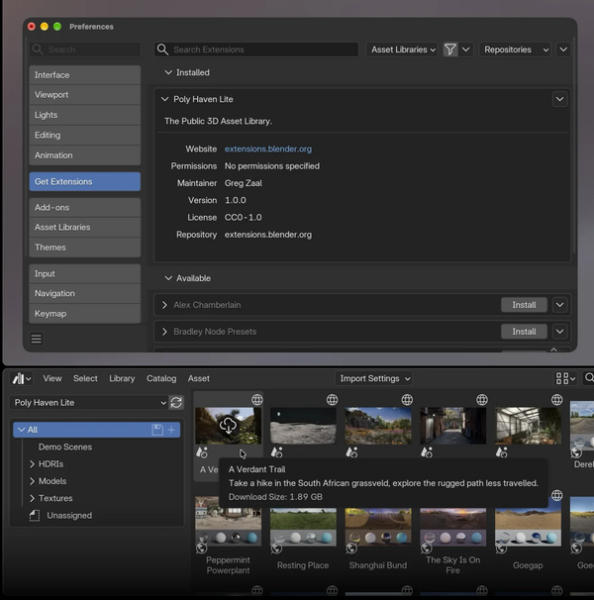
- Asset libraries are now processed as extensions and are accessible through the 'Get Extensions' tab alongside add-ons and themes.

- The capabilities of the 2D drawing and animation system Grease Pencil have been expanded, allowing for sketches to be created in 2D and then used in a 3D environment as three-dimensional objects (a 3D model is formed based on several flat sketches from different angles). Support for selecting areas in drawing mode without needing to switch to edit mode has been added.
The 'Carver' tool has been added, allowing users to carve out selected areas while leaving an outline along the contour, unlike erasing.
The ability to flood fill several areas at once by drawing a fill vector along closed areas has been added. Full gradient fill has also been implemented with unlimited colors and transition points.
- A flip view camera mode has been added, allowing you to preview the scene as if in a mirror to spot distortions and asymmetry.
- Settings can now be remembered when importing USD files into collections, enabling one-click re-import of updated files.
- In the non-linear video editor (Video Sequencer), a ripple edit mode has been implemented, where deleting and trimming elements causes all subsequent elements on the timeline to automatically shift left without leaving 'gaps', while inserting elements shifts them right to free up necessary space. Additionally, there are modes for rearranging elements with shifting of the remaining contents and overwriting over other elements.
A new version of the video cutting tool — Blade 2.0 — has been proposed, clearly showing where the cut will be made, displaying the frame number at the cut point, and showing a thumbnail of the frame under the cursor.
- The Outliner interface (navigator of the scene structure and hierarchy) now allows for arranging objects in any order, not just alphabetically.
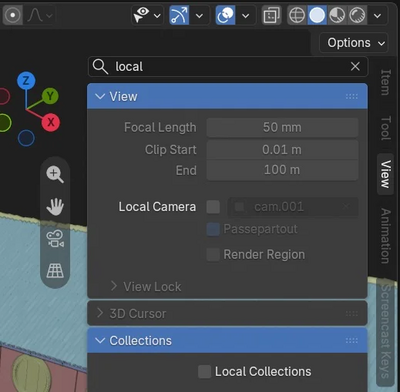
- The side panels of all editors now support property or operator search by pressing Ctrl+F.

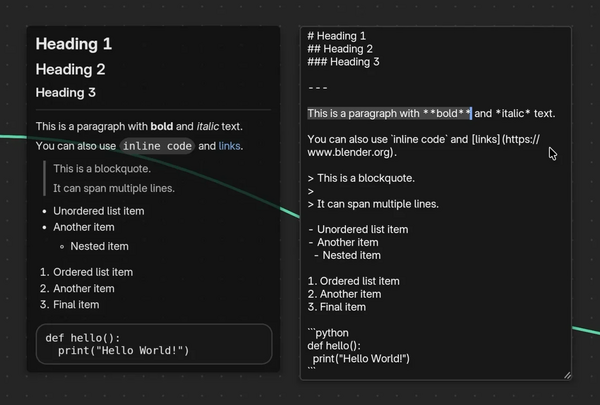
- The interface now includes the ability to use Markdown formatting for text, including comments in node editors.


Source: opennet.ru

 Russian
 Italian
 German
 Polish
 Estonian
 Albanian
 Bulgarian
 Croatian
 Czech
 Danish
 Dutch
 English
 French
 Hungarian
 Latvian
 Lithuanian
 Norwegian
 Portuguese
 Romanian
 Slovak
 Slovenian
 Spanish
 Swedish