


Hello everyone, this is ! Many might know us from . For those who just joined: we are developing an IDE for working with the TestMace API. The most frequently asked question when comparing TestMace with competing products is, "How do you differ from Postman?" We decided it was time to provide a comprehensive answer to this question. Below, we outline our advantages over .
Node separation
If you are working with Postman, you know that the request interface contains all the necessary functionality. It has scripts, tests, and the requests themselves. This simplifies the work for beginners; however, this approach is not flexible in larger scenarios. What if you want to create several requests and aggregate them? What if you want to run a script without a request or several logically separated scripts consecutively? Ultimately, it would be nice to separate tests from regular utility scripts. Additionally, the approach of "adding all functionality to one node" is not scalable—the interface quickly becomes overloaded.
TestMace initially divides all functionality into different types of nodes. Want to make a request? Here’s your node. Want to write a script? Here’s your node. Need tests? Here you go – node. Oh, and you can wrap all of this in a node. And everything easily combines with each other. This approach is not only very flexible but also, in accordance with the principle of single responsibility, allows you to use only what you really need at the moment. Why do I need scripts and tests if I just want to make a request?
Human-readable project format
There is a conceptual difference between TestMace and Postman in how data is stored. In Postman, all requests are stored somewhere in local storage. If you need to share requests among multiple users, you have to utilize the built-in synchronization. In fact, this is a common approach that is not without its drawbacks. What about data security? After all, the policy of some companies may not allow storing data with third parties. However, we believe that TestMace can offer something better! And this improvement is called "human-readable project format."
First of all, TestMace has the concept of a 'project'. The application was originally developed with the intent of storing projects in version control systems: the project tree is almost perfectly mirrored in the file structure, it uses YAML as the storage format (without unnecessary brackets and commas), and the file representation of each node is detailed in the documentation with comments. However, in most cases, you won’t need to look there — all field names have logical titles.
What does this offer the user? It allows for very flexible workflow changes for the team, utilizing familiar approaches. For example, developers can store the project in the same repository as the backend. In branches, in addition to modifying the codebase itself, the developer can also update existing request scenarios and tests. After committing changes to the repository (git, svn, mercurial — whatever you prefer), the CI (your favorite, non-imposed one) runs our command-line utility , and the report generated after execution (for example, in the JUnit format, which is also supported in testmace-cli) is sent to the corresponding system. Moreover, the aforementioned security question is no longer a problem.
As you can see, TestMace does not impose its ecosystem and paradigm. Instead, it easily integrates into already established processes.
Dynamic Variables
TestMace adheres to the no-code concept: if a problem can be solved without using code, we strive to provide that option. Working with variables is one of those functionalities where in most cases programming can be avoided.
Example: we received a response from the server and we want to save part of the response in a variable. In Postman, we would write something like this in the test script (which is itself strange):
var jsonData = JSON.parse(responseBody);
postman.setEnvironmentVariable("data", jsonData.data);
However, in our opinion, writing a script for such a simple and frequently used scenario seems excessive. Therefore, in TestMace, you can assign a piece of the response to a variable using the graphical interface. Take a look at how simple it is:
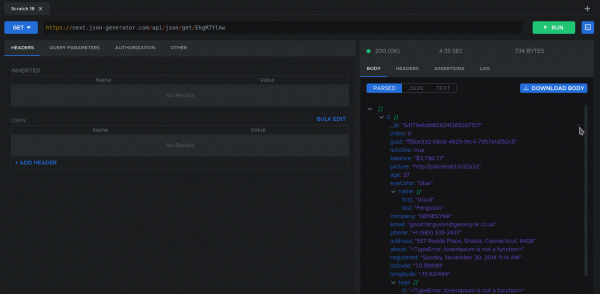
Now, with each request, this dynamic variable will be updated. However, you might argue that the Postman approach is more flexible, allowing not only assignments but also some preprocessing. Here's how you can modify the previous example:
var jsonData = JSON.parse(responseBody);
postman.setEnvironmentVariable("data", CryptoJS.MD5(jsonData.data));
Well, for this, TestMace offers a node that covers this scenario. To replicate the previous case but in TestMace, you need to create a script node after the request and use the following code as the script:
const data = tm.currentNode.prev.response.body.data;
tm.currentNode.parent.setDynamicVar('data', crypto.MD5(data));
As you can see, the composition of nodes has served well here too. And for such a simple case as described above, you can simply assign the expression ${crypto.MD5($response.data)} to the variable created through the graphical interface!
Creating tests via GUI
Postman allows creating tests by writing scripts (in the case of Postman, this is JavaScript). This approach has numerous advantages — almost unlimited flexibility, availability of ready-made solutions, etc.
However, the reality is often such (it's not us, it's life) that testers do not have programming skills, yet would like to contribute to the team right now. For such cases, following the no-code concept, TestMace allows for creating simple tests via a graphical interface without resorting to scripting. Here's what the process of creating a test that compares values for equality looks like:
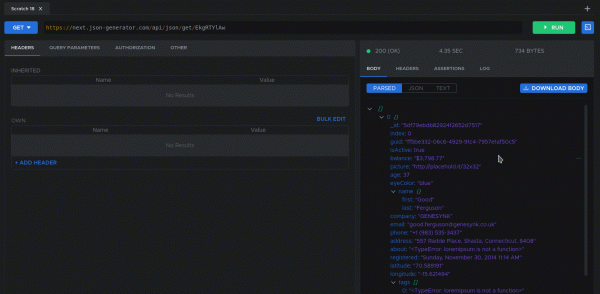
However, creating tests in the graphical editor does not eliminate the ability . Here, the same libraries apply as in the script node, and for writing tests.
The ability to run an existing scenario via a link (Link node)
Often, there are situations where a certain request or even an entire scenario needs to be executed multiple times in different parts of the project. Examples of such requests may include custom multi-stage authorization, setting the environment to the desired state, etc. In programming terms, it would be desirable to have functions that can be reused in different parts of the application. In TestMace, this function is performed by The node is very easy to use:
1) Create a request or script
2) Create a node of type Link
3) In the parameters, specify the link to the script created in the first step
In a more advanced version, you can specify which dynamic variables from the script to pass to the parent node relative to the link. Sounds confusing? Let's say we created a Folder named create-post, inside which a dynamic variable is assigned to this node postId. Now in the Link node create-post-link you can explicitly specify that the variable postId is assigned to the ancestor create-post-link. This mechanism (again, speaking in programmer language) can be used to return a result from a 'function.' Overall, it's great, fully DRY, and once again, not a single line of code has been harmed.
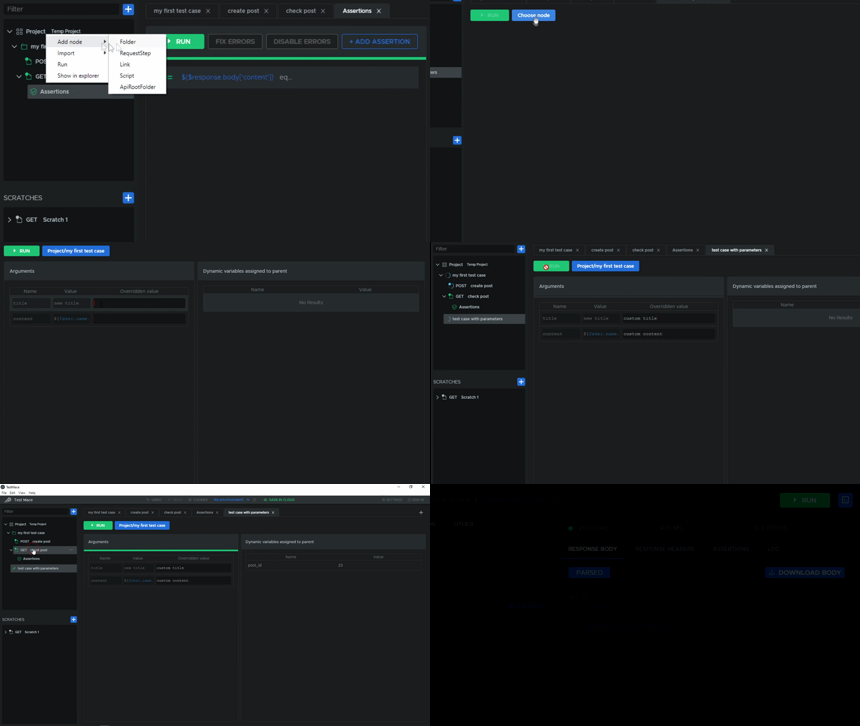
As for Postman, the feature request for reusing requests , and there are even , suggesting that this problem is being worked on. In its current form, Postman does have the capability to change the flow of execution, which theoretically might allow for such behavior, but this is more of a dirty hack than a truly working approach.
Other differences
- Greater control over variable visibility. The smallest scope within which you can define a variable in Postman is the collection. TestMace allows you to define variables for any request or folder. In Postman, sharing a collection only allows for exporting collections, while in TestMace sharing works for any node.
- TestMace supports , which can be automatically applied to child requests. In Postman, there is , and it is even closed, but the proposed solution is... . In TestMace, everything is configured through the GUI, and there is an option to disable inherited headers in specific descendants.
- Undo/Redo. Works not only when editing nodes but also when moving, deleting, renaming, and performing other operations that change the project structure.
- Files attached to requests become part of the project and are stored together with it, perfectly synchronized, unlike in Postman. (Yes, no longer needing to manually select files each time or send them to colleagues in archives.)
Features that are already on the way
We couldn't resist the temptation to unveil a bit of mystery about the upcoming releases, especially when the features are enticing and already undergoing pre-release refinement. So, let's welcome them.
Features
As is known, dynamic variables are used to generate values in Postman. and the overwhelming majority of functions serve to generate fake values. For instance, to generate a random email, you need to write:
{{ $randomEmail }}However, since these are variables (even if dynamic), they can't be used as functions: they are not parameterizable, so you can't get a hash from a string.
At TestMace, we plan to add 'honest' functions. Right inside ${}, you will be able not only to reference a variable but also to call a function. That is, if you need to generate the infamous fake email, we simply write
${faker.internet.email()}In addition to being a function, you can notice that there is an option to call object methods. Instead of a large flat list of dynamic variables, we have a set of logically grouped objects.
And what if we want to calculate a hash from a string? Easy!
${crypto.MD5($dynamicVar.data)}It can be noted that you can even pass variables as parameters! At this point, the curious reader might suspect something is amiss...
Using JavaScript in Expressions
... and rightly so! When the requirements for the functions were being formulated, we suddenly realized that valid JavaScript needed to be allowed in expressions. Therefore, you are now free to write expressions like:
${1 + '' + crypto.MD5('asdf')}And all this without scripts directly in the input fields!
As for Postman, you can only use variables here, and when trying to write any expression, the validator complains and refuses to evaluate it.

Advanced Autocomplete
Currently, TestMace features standard autocomplete that looks like this:
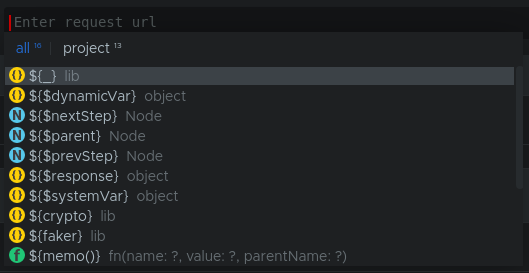
Here, in addition to the autocompleting string, the context of the string is indicated. This mechanism only works in expressions enclosed in the ${} brackets.
As you might notice, visual markers have been added to indicate the type of variable (for example, string, number, array, etc.). You can also change autocompletion modes (for instance, you can choose autocompletion for variables or headers). But even this is not the most important thing!
First of all, autocompletion works even in expressions (where possible). Here's what it looks like:
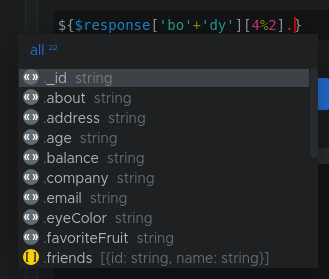
And secondly, autocompletion is now available in scripts as well. Check out how this works!
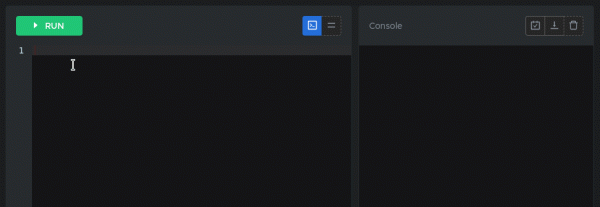
There's no point in comparing this functionality with Postman — there, autocompletion is limited only to static lists of variables, headers, and their values (correct me if I forgot something). Scripts are not autocompleted 🙁
Conclusion
In October, a year has passed since we started developing our product. During this time, we've managed to accomplish a lot and have caught up with our competitors in some aspects. Nevertheless, our goal is to create a truly convenient tool for working with APIs. We have a lot of work ahead, and here's a rough development plan for our project for the upcoming year: .
Your feedback will help us better navigate the abundance of features, and your support gives us strength and confidence that we are doing the right thing. It so happens that today is an important day for our project — the day of TestMace's launch on . Please support our project; it is very important to us. Especially since there’s an enticing offer on our PH page today, and it’s limited.
Source: habr.com
