


Google Corporation has published the study "How Effective Is Basic Account Hygiene in Preventing Its Theft" about what account owners can do to prevent their accounts from being stolen by attackers. We present to you a translation of this study.
However, the most effective method used by Google itself was not included in the report. I had to write about this method myself at the end.
Every day we protect users from hundreds of thousands of account hacking attempts. come from automated bots with access to third-party password cracking systems, but phishing and targeted attacks are also present. Previously, we discussed how , such as adding a phone number, can help you secure yourself, but now we want to prove it in practice.
A phishing attack is an attempt to deceive the user so that they willingly provide the attacker with information useful for the hacking process. For example, by mimicking the interface of a legitimate application.
Bot-based attacks are mass hacking attempts not aimed at specific users. They are typically carried out using publicly available software and can be utilized even by untrained 'hackers'. Attackers know nothing about the specifics of individual users—they just run a program and 'catch' all poorly protected accounts around.
Targeted attacks are hacks of specific accounts, during which additional information about each account and its owner is collected, attempts to intercept and analyze traffic are possible, as well as the use of more sophisticated hacking tools.
(Translator's Note)
We teamed up with researchers from New York University and the University of California to find out how effective basic account hygiene is in preventing account 'thefts'.
An annual study on and was presented on Wednesday at a gathering of experts, politicians, and users called .
Our research shows that simply adding a phone number to your Google account can block up to 100% of automated bot attacks, 99% of mass phishing attacks, and 66% of targeted attacks that occurred during our investigation.
Google's Automatic Proactive Protection Against Account Hijacking
We implement automatic proactive protection to better secure all our users from account hijacking. Here’s how it works: if we detect a suspicious login attempt (for instance, from a new location or device), we will ask for additional proof that it’s really you. This confirmation can be checking your access to a trusted phone or answering a question only you know the correct answer to.
If you've logged into your phone or provided a phone number in your account settings, we can offer the same level of protection as two-step verification. We found that the SMS code sent to a recovery phone number helped block 100% of automated bots, 96% of mass phishing attacks, and 76% of targeted attacks. Additionally, prompts on your device asking to confirm an action, which are a safer replacement for SMS, helped prevent 100% of automated bots, 99% of mass phishing attacks, and 90% of targeted attacks.
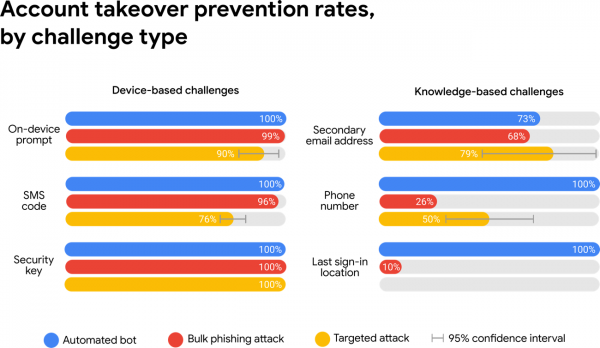
Protection based on both owning certain devices and knowing specific facts helps counter automated bots, while protection based on owning certain devices helps prevent phishing and even targeted attacks.
If your account does not have a phone number set up, we may resort to weaker knowledge-based protection methods, such as the location of your last account login. This works well against bots, but the level of protection against phishing may drop to 10%, and against targeted attacks, protection is practically non-existent. This happens because phishing pages and attackers in targeted attacks can compel you to disclose any additional information that Google may request for verification.
Considering the advantages of such protection, one might ask why we don’t require its use for every system login. The answer lies in the fact that it would create additional complexities for users (especially for the unprepared — ed. note.) and increase the risk of account lockout. Experiments have shown that 38% of users did not have access to their phone when logging into their account. An additional 34% of users could not remember their backup email address.
If you’ve lost access to your phone or can’t log in, you can always go back to a trusted device from which you previously logged in to access your account.
Understanding 'hired hacking' attacks
While most automatic defenses block the majority of bots and phishing attacks, targeted attacks have become more harmful. As part of our ongoing efforts to , we continually identify new 'hired hacking' criminal groups who charge an average of $750 to hack a single account. These criminals often rely on phishing emails that impersonate family members, colleagues, government officials, or even Google. If the target does not give in on the first phishing attempt, subsequent attacks may continue for over a month.
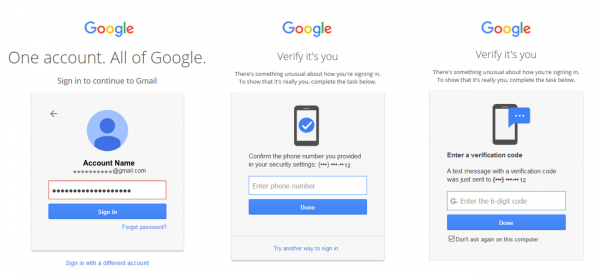
An example of a 'man-in-the-middle' phishing attack that checks the password in real-time. After that, the phishing page prompts victims to enter SMS authentication codes to access the victim's account.
Our estimates suggest that only one in a million users faces such a high risk. The attackers are not targeting random individuals. While studies show that our automatic protection can help delay or even prevent up to 66% of targeted attacks we’ve investigated, we still recommend that high-risk users enroll in our . As noted during our investigation, users who rely solely on security keys (that is — two-step authentication using codes sent to users — ed.), became victims of targeted phishing.
Take a little time to secure your account
You use seatbelts to protect your life and health while traveling in cars. And with our you can ensure your account's safety.
As our research shows, one of the easiest things you can do to protect your Google account is to set a phone number. For high-risk users, such as journalists, social activists, business leaders, and political campaign teams, our program will help ensure the highest level of security. You can also protect your third-party service accounts (non-Google) from password breaches by installing the .
Interestingly, Google does not follow the advice it gives to its users. for two-factor authentication for more than 85,000 of its employees. According to company representatives, there has been no recorded account theft since the introduction of hardware tokens. Compare this to the figures presented in this report. Thus, it is evident that using hardware access tokens for two-factor authentication is the only reliable way to protect both accounts and information (and in some cases even money).
To protect Google accounts, tokens created according to the FIDO U2F standard are used, such as . For two-factor authentication in Windows, Linux, and MacOS operating systems, cryptographic tokens are used. .
(Translator's Note)
Source: habr.com
