

On May 17, 2024, the new version 9 of Cinelerra (HV) was released.
Cinelerra is software for audio/video editing and compositing (based on tracks) in Linux. This news is about the original Cinelerra by Adam Williams — the oldest Linux video editor (still in existence), tracing its lineage back to Broadcast the 90s.
Key Innovations (the description also includes some minor changes that Adam deemed unnecessary to note in the Changelog; for changes already present in Cin-GG, references were made):
- The user manual "Secrets of Cinelerra", which underpins the guides for Cin-CV and Cin-GG (forks of Cinelerra).
- Preview for files in the 'Load' window (audio, video). Preview is possible for EDL provided it contains 1 video track with 1 video file. There can be multiple audio tracks.
- Preview for transitions (audio and video): in the main window under the ‘Video’, ‘Audio’ menu -> ‘Attach Transition’
- Updated plugins ‘Chroma Key HSV’, ‘Swap Channels’:
- Algorithm Chroma Key HSV is now a replica of the Spectramatte algorithm in AVID. However, unlike Spectramatte, the plugin does not have an Alpha Blur section. Adam has made a suggestion for the TODO list. Patches are welcome. More details about ‘Chroma Key HSV’ in Cinelerra in Russian here.
- The ‘Swap Channels’ plugin (similar to the ‘Shift Channels’ effect in Adobe After Effects), allows for taking information (value) for R, G, B, A channels from another channel (in the same image), now has the ability to take information for a specific channel from a channel of another image (another track). In this modification, the plugin works similarly to the ‘Set Channels’ effect in Adobe After Effects. However, unlike AAE, the plugin cannot work with Luminance, Hue, Lightness, Saturation. Adam has made a suggestion for the TODO list. Patches are welcome. More details about ‘Swap Channels’ in Cinelerra in Russian here.
- New plugins have been added:
- ‘Curves’ — color correction using curves for Value, R, G, B.
- Stabilizer — video stabilization.
- audio plugin ‘Clip’.
- audio transitions ‘Mute’, ‘Dropout’.
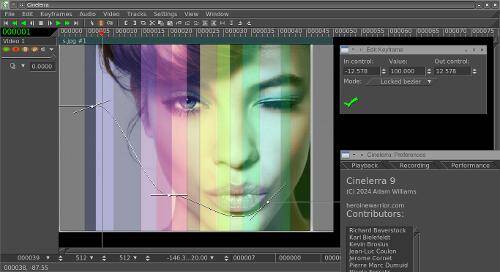
- Added GUI (in the screenshot) for editing keyframe parameters of the envelopes Camera, Projector, Fade:
- right-click on the keyframe on the envelope -> a menu will appear -> in it the item ‘Edit keyframe’ -> clicking LMB will bring up a window (editing the keyframe located to the left of the cursor). First, you should select the envelope range at the bottom in the ‘Automation zoom’ tab
- Added modes Locked bezier/Unlocked bezier (related, unrelated guides) for keyframes of the envelope:
- in the ‘Edit keyframe’ window, in the main window in the ‘Keyframes’ menu, and in the context menu of the keyframe envelope on the track (right-click on the keyframe) (the context menu also now includes ‘Paste keyframe’). These modes are present in Cin-GG as ‘tangent edit/disjoint edit’. The GUI ‘Edit keyframe’ (for editing the parameters of keyframe envelopes) is not available in Cin-GG.
- Added the ability to save the selected part of the project as a separate project: in the main window under the ‘File’ menu -> ‘Save selection…’
- In the ‘Mask’ tool in the Compositor added (available in Cin-GG):
- interface for navigating between editable mask nodes (previously, you had to click the left mouse button on the node on the screen in the Compositor)
- function ‘Make linear’ (transforms segments of the Bézier curve into linear ones)
- function ‘Delete point’ (removes the selected mask node).
- In the text field a context menu (right-click) has appeared with standard Undo, Redo, Cut, Copy, Paste, Select All (available in Cin-GG).
- Expanded context menu (right-click) for transitions: added ‘Copy/paste settings’, ‘Change transitions’
- Hotkeys for envelopes have been added Camera, Projector (in the main window under the ‘View’ menu) (available in Cin-GG).
- In the context menu (right-click) of the track the options ‘Collapse/Expand track’ have appeared, collapsing/expanding the ‘ladder’ of effects. (available in Cin-GG as ‘Roll up/down’).
- In the ‘Recording’ tool (File -> Recording) a frame showing the boundaries of the recording area on the screen has appeared (available in Cin-GG). Previously, the recording area could only be controlled in the Video Monitor. The size of the recording area is set (as before) in Settings -> Preferences -> Recording.
- Numerous fixes, bug fixes, new font ‘Linux Libertine’ in the Title effect.
Packages are recommended to be downloaded not from Sourceforge, but from GitHub (code, binary). The packages presented on SF are not updated between releases.
Source: linux.org.ru
