

System76, the company behind the Pop!_OS Linux distribution, has released the COSMIC desktop environment version 1.10.0. Packages for COSMIC 1.10.0 are available in Pop!_OS 24.04 and are expected soon in Fedora, NixOS, Arch Linux, openSUSE, Aeyrin OS, Redox, and CachyOS. The code is written in Rust and is distributed under the GPLv3 (applications) and MPL-2.0 (libraries) licenses.
COSMIC is evolving as a universal project, not tied to any specific distribution, and complies with Freedesktop specifications.
The interface in COSMIC is built using the Iced library, which employs safe types, modular architecture, and a reactive programming model, and also offers an architecture familiar to developers acquainted with the declarative interface building language Elm. Several rendering engines are provided, supporting Vulkan, Metal, DX12, OpenGL 2.1+, and OpenGL ES 2.0+. Developers are offered a ready-to-use set of widgets, the ability to create asynchronous handlers, and utilize adaptive layout of interface elements based on window and screen size.
In addition to using Rust, notable features of COSMIC include hybrid tiled window layout modes and stacked window anchoring (grouping windows like browser tabs), which can be enabled in conjunction with virtual desktops. The project is also developing a compositor server cosmic-comp based on Wayland.
Among the changes:
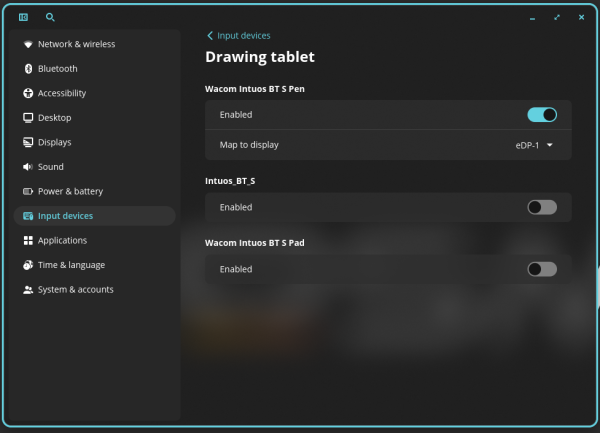
- The ability to identify graphic tablets with a specific display has been added.

- In the compositor server Support for focusing on windows based on touch screen events has been implemented in cosmic-comp. The build system has been transitioned from make to the just utility. The issue with the panel's operation has been resolved. virtual desktops On systems with hybrid graphics that combine NVIDIA video cards with integrated GPUs.
- In cosmic-launcher, the WGPU API, which operates over Vulkan, Metal, D3D12, and OpenGL, is enabled by default to enhance rendering performance.
- In cosmic-monitor, the search for processes and applications has been separated.
- In cosmic-player, auto-hiding of interface elements is disabled when the mouse pointer is over the playback control buttons.
- In cosmic-session, support for defining environment variables in the subdirectory ~/.config/environment.d has been added, and the use of custom SSH agents has been allowed.
- In the cosmic-store application directory, local caching of screenshots has been implemented, and a gallery mode has been offered, activated by clicking on the screenshots.
- In the cosmic-term terminal emulator, key combinations have been added.
"Ctrl+Shift+Left Arrow" and "Ctrl+Shift+Right Arrow" to move tabs left and right.
Source: opennet.ru
