

A new major update of digiKam has been released – a program for working with digital photographs, cataloging, and editing for Linux, macOS, and Windows.
With digiKam, you can easily transfer photographs, raw files, and videos directly from your camera or external storage devices (SD cards, flash drives, etc.). The application allows you to configure parameters and import rules that process and catalog imported objects 'on the fly.'
The application also has powerful tools for tagging and rating photographs. You can use the filtering feature to quickly find images that meet specific criteria. In addition to filtering, digiKam has robust search capabilities that allow you to search the library based on a wide range of criteria. You can search for photographs by dates, tags, labels, ratings, locations, and other metadata such as EXIF, IPTC, or XMP.
The application provides a full set of editing tools. These include basic tools for adjusting colors and cropping, as well as advanced tools for tweaking curves, panorama stitching, and much more. A special tool based on the Lensfun library allows you to automatically apply lens corrections to images. Lensfun automatically applies lens corrections to images.
Significant changes and innovations in this release:
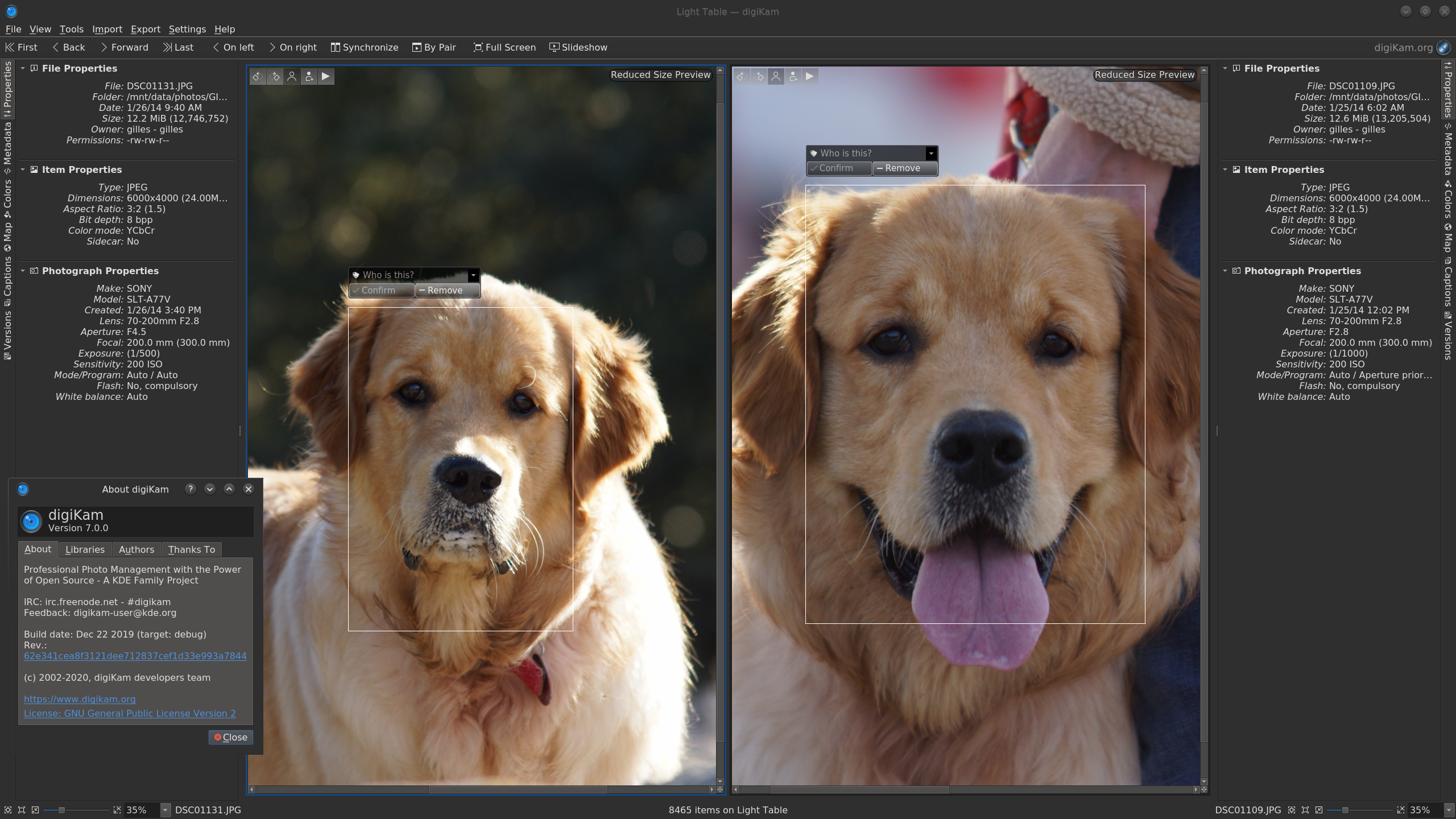
The facial recognition feature has been significantly overhauled.
Previously, facial recognition in the collection was performed using a classic cascade classifier from the OpenCV library. It works fairly well but does not achieve more than 80% successful recognitions. Additionally, according to user feedback in the bug tracker, it struggled with grouping by faces.
The new code, based on a Deep Neural Network from the OpenCV library, utilizes neural networks with pre-trained models. The percentage of successful recognitions has increased to 97%. Another advantage is that the new mechanism is capable of recognizing pets, such as dogs.
Face grouping has also been improved. The user interface now allows specifying to the algorithm when a face has been incorrectly recognized or to completely exclude it from grouping.
Improved support for RAW formats.
The libraw library version has been updated to 0.20. This has added support for over 40 new cameras:
Canon: PowerShot G5 X Mark II, G7 X Mark III, SX70 HS, EOS R, EOS RP, EOS 90D, EOS 250D, EOS M6 Mark II, EOS M50, EOS M200
DJI Mavic Air, Osmo Action
FujiFilm GFX 100, X-A7, X-Pro3
GoPro Fusion, HERO5, HERO6, HERO7
Hasselblad L1D-20c, X1D II 50C
Leica D-LUX7, Q-P, Q2, V-LUX5, C-Lux / CAM-DC25
Olympus TG-6, E-M5 Mark III.
Panasonic DC-FZ1000 II, DC-G90, DC-S1, DC-S1R, DC-TZ95
PhaseOne IQ4 150MP
Ricoh GR III
Sony A7R IV, ILCE-6100, ILCE-6600, RX0 II, RX100 VII
Zenit M
A total of more than thousand various cameras.
Improved support for the HEIF format
HEIF is a file format for single images and their sequences. It was developed by the Moving Picture Experts Group (MPEG). The MPEG group claims that a HEIF image can store twice as much information as a JPEG image of the same size, ensuring higher image quality. HEIF also supports animation and can store more information than animated GIFs.
Compression in HEIF is delegated to a special codec, currently supported only by x265. This codec produces excellent results when encoding small-sized images without loss of information. It also supports metadata, previews, and color management.
HEIF can also support HDR if the codec is compiled with a pixel color depth greater than 8 bits. In this case, digiKam can store and edit the image without loss of quality.
Support for reading metadata using libheif has been added.
Other, less significant changes
Support for geolocation in metadata.
The slideshow creation tool has been highlighted as a separate plugin.
The version for Windows now supports network addresses in Universal Naming Convention format and UTF-16.
A new theme 'Html5Responsive' for the HTMLGallery plugin.
Source: linux.org.ru
