

The release of the Deepin 25 distribution has been published, which develops its own Deepin Desktop Environment (DDE) along with around 40 user applications, including the Deepin Music player, Deepin Movie video player, installer, and Deepin Store software center. The project was initiated by a group of developers from China, but it has transformed into an international project and supports the Russian language. The distribution repository includes over 8000 packages. All developments are distributed under the GPLv3 license. The size of the bootable ISO images is 6 GB (amd64, arm64, and loongarch64).
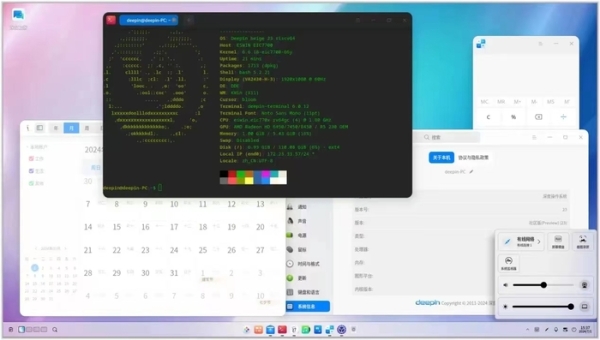
Desktop components and applications are developed using C/C++ and Go languages. The graphical interface is built using the Qt library. A key feature of the Deepin desktop is a panel that supports multiple operating modes. In classic mode, there is a clearer separation of open windows and suggested applications to launch, along with a system tray area displayed. The efficient mode resembles Unity to some extent, mixing indicators of running programs, favorite applications, and control applets (volume/brightness settings, connected drives, clock, network status, etc.). The application launcher interface provides two modes — viewing favorite applications and navigating through the catalog of installed programs.
Among the changes:
- The configurator and notification output interface have been rewritten using QML.
- The visual style of interface elements used in applications for the DDE (Deepin Desktop Environment) has been optimized and unified.
- The configurator features a new interface layout consisting of a sidebar with navigation elements and a main area with settings. Multi-level window effects settings have been added. Taskbar pinning support has been included. In the sound settings, there is an option to merge audio channels. The quick operations block has been expanded with tools for creating and restoring backups.
- In the application launcher interface, a mode has been implemented to sort the application list alphabetically by name.
- The file manager has enhanced search capabilities, ensuring the highlighting of found keywords and displaying results as you type the search query. A new tab creation button has been added. Support for hiding the top menu has been implemented.
- A feature has been provided for laptop users to configure touchpad gesture controls with three and four fingers.
- The capabilities of the AI assistant have been expanded. A separate indicator for the AI assistant has been added to the taskbar. When text is highlighted on any screen, the AI assistant icon now automatically appears, allowing for requests for translation, summarization, and explanation of the selected fragment. The settings for AI models have been unified.
- Support for voice commands has been added, enabling users to perform various system operations by forming tasks in natural language without accessing the menu.
- A combined mode for the AI assistant has been implemented, allowing the use of large AI models such as DeepSeek, Baidu Qianfan, and iFlytek Spark when connected to the internet, and utilizing the compact model 'UnionTech YouRong' on the local system while offline or when privacy is a concern.
- The Agent Store service has been proposed, allowing the download of additional agents for the AI assistant to perform extended tasks.
- Support for secondary snapshots (Second-Level Snapshot) has been added to the system installation and update mechanism that uses atomic replacement of system images — before each system update, backup snapshots are automatically created to preserve previous states, enabling a rollback to the working system in case of a failure during the update. The possibility of installing drivers and applications in the form of system extensions has been implemented. An interface for disabling and updating extensions has been added. A mode for incremental atomic updates has been realized.
- To protect against modification of system components by malware, basic directories such as /usr/bin are mounted in read-only mode.
- A Self-Cleaning Engine has been added, allowing the automatic removal of traces of its operation upon reboot on public devices. Non-cleanable components can be preserved by whitelisting.
- The development of the package management tools and the Linyaps package format has continued. Thanks to the use of isolated containers in Linyaps, which include dependencies, Linyaps packages are not tied to a specific distribution and can be installed without recompilation on Debian, Ubuntu, Arch, Fedora, and openEuler. The supported repository includes over 5000 packages compiled for AMD64, ARM64, and LoongArch64 architectures.
- A Distrobox tool has been added, allowing for the quick installation and launch of any Linux distribution in a container and ensuring its integration with the main system. Images for creating environments based on Debian 12, Ubuntu 20.04/24.04, Arch Linux, and Fedora 41/42 are available in the App Store.
- An experimental composite has been proposed for testing. server Treeland Window Compositor, distinguished by high performance of animated effects and support for gesture control on the touchpad, has been introduced. Treeland supports themes, standard window operations, task management, a task switcher interface with window content previews, and scaling parameter adjustments in multi-monitor configurations.
- The AES algorithm has been used for disk encryption instead of SM4.
- Support for user data backup has been added.
- Voice input support has been added to the text editor and note-taking system.
- A Cross-Device Collaboration component has been added for integration with smartphones, allowing users to respond to SMS messages from their desktop and manage mobile applications from a larger screen.
Source: opennet.ru
