

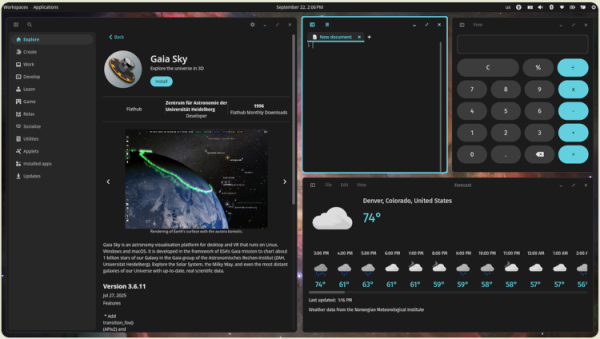
The company System76, which develops the Linux distribution Pop!_OS, has released version 1.1.0 of the COSMIC desktop environment. Packages with COSMIC 1.1.0 are available in the Pop!_OS 24.04 distribution and are expected soon in Fedora, NixOS, Arch Linux, openSUSE, Aeyrin OS, Redox, and CachyOS. The code is written in Rust and is distributed under GPLv3 licenses (applications) and MPL-2.0 (libraries).
COSMIC is evolving as a universal project, not tied to any specific distribution, and complies with Freedesktop specifications.
The interface in COSMIC is built using the Iced library, which employs safe types, modular architecture, and a reactive programming model, and also offers an architecture familiar to developers acquainted with the declarative interface building language Elm. Several rendering engines are provided, supporting Vulkan, Metal, DX12, OpenGL 2.1+, and OpenGL ES 2.0+. Developers are offered a ready-to-use set of widgets, the ability to create asynchronous handlers, and utilize adaptive layout of interface elements based on window and screen size.
In addition to using Rust, notable features of COSMIC include hybrid tiled window layout modes and stacked window anchoring (grouping windows like browser tabs), which can be enabled in conjunction with virtual desktops. The project is also developing a compositor server cosmic-comp based on Wayland.
Key changes compared to version 1.0.0:
- The cosmic-monitor application has been included for obtaining system information, viewing the list of running processes, and visually tracking resource usage.
- In the compositor server Support for naming pinned virtual desktops has been added. Support for using multiple fullscreen windows on one desktop has been introduced (necessary for running games from the Big Picture mode in Steam). Smooth scrolling with the mouse wheel has been implemented. A timeout feature for automatically hiding the cursor has been added.
- Support for rounding corners for all windows, not just COSMIC applications, has been realized. Shadows for windows can now be displayed, including in tiled layouts. A section for selecting the appearance of corners and window shadows has been added to the appearance settings: 'Settings > Desktop > Appearance > Window shadow and corners'.
- X11 clients operating through XWayland can now activate windows, allowing tray indicators to switch focus to windows on other virtual desktops. The size of icons for X11 applications has been adapted to the set scaling level. Opening fullscreen X11 applications within floating or tiled windows has been streamlined. An option '--no-xwayland' has been added for launching without Xwayland.
- The power management applet has added an option to display the battery charge level in percentage.
- Wayland protocols have been implemented: pointer-warp-v1 for instant pointer movement to a specified position and pointer-constraints for pointer restrictions (locks).
- In the file manager, terminal emulator, and text editor, tab regrouping via drag & drop with the mouse has been implemented.
- In the cosmic-launcher, application icons are now displayed in SVG format by default.
- The functionality tied to systemd and logind has been separated, allowing for the handling of laptop lid open or close actions on systems without systemd, such as when using OpenRC with elogind.
- A file association has been added to invoke the cosmic-edit editor when attempting to open empty files corresponding to the MIME type application/x-zerosize.
- The screenshot creation program now remembers the selected screen area.
- In the cosmic-bg service for setting desktop wallpapers, recursive scanning of images in user-defined directories has been implemented.
- The file manager now features a preview of text files. Instead of unicode symbols, separate icons for sorting modes are used. MIME type handling has been improved. Navigation through files with the Page-Up and Page-Down keys has been added. Users can now add custom-defined actions to the context menu. Support for searching in the list of recently opened files and in the trash has been introduced. An option to copy the file path by pressing Shift has also been added.
Support for pasting image files, videos, and text from the clipboard into the file form has been added. A function to open multiple directories in separate tabs has been introduced. An option to preserve the creation and modification times when copying has been implemented. The ability to enter network paths in the panel has been realized. Path input in the panel can now be auto-completed by pressing the Tab or Shift-Tab key. A confirmation dialog for clearing the trash has been added.
- The cosmic-settings-daemon, cosmic-settings, sound applet, and cosmic-osd have been migrated to inter-process communication via the Varlink API.
- The smoothness of the automatic panel hiding has been improved.
- In the cosmic-settings configurator, a dialog for pairing with Bluetooth keyboards via PIN code has been added. Settings for managing input focus switching have been introduced. Support for controlling the brightness of external monitors has been implemented. An option to disable automatic switching when the cursor moves beyond the screen has been added. virtual desktops A function for searching the list of available wireless networks has been added. The ability to assign custom keyboard layouts has been realized.
A quick search activation feature has been implemented — starting to type on the keyboard now brings up the search line in any section of the configurator. The ability to apply themes in RON (Rusty Object Notation) format via the command line interface has been added. A section with parameters for accessibility has been added to the keyboard shortcuts settings page. The Super+Alt+S combination has been added to activate the screen reader. By default, touchpad click simulation is enabled. Support has been added VPN-for connections requiring two-factor authentication.
- The App-List applet has been updated to support filtering displayed applications based on workspaces or displays. The possibility of closing applications by clicking the middle mouse button has been implemented.
- In the interface for switching between virtual desktops, circular scrolling has been implemented when using the mouse wheel, similar to the behavior of the workspace switcher applet on the panel. The scrolling speed of desktop thumbnails has been improved using the touchpad.
Automatic application search activation has been added when starting to type. - Support for using the OpenRC system manager to manage Bluetooth-related services has been added.
- The ability to change brightness, volume, and keyboard layout using hotkeys while the screen is locked has been allowed.
- In cosmic-settings-daemon, theme generation for Qt applications has been implemented using the qt5ct and qt6ct utilities.
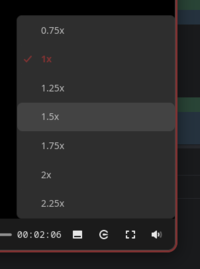
- In the cosmic-player media player, settings to control playback speed have been implemented, and buttons for repeat/cycle playback and fast forward/rewind have been added. Mute has been ensured when showing thumbnails representing the selected position on the scroll bar.

- In the cosmic-store application manager, the rpm-ostree backend and a backend for downloading packages in multiple threads have been added. Support for opening packages in RPM format has been implemented. An option for clearing Flatpak application data after they are removed has been added.
- In the initial setup interface (COSMIC Initial Setup), support for systems with multiple monitors has been added and the screen reader has been activated by default.
- The cosmic-term terminal emulator has introduced an option to open a new window in the current directory. The scrollable content history size has increased to 100,000 lines. A ‘—working-directory’ option has been added. A button for copying links has been added to the context menu. Passwords are now loaded into memory only when opening the password management page and removed from memory when it is closed. Support for selecting content by clicking while holding the Shift key has been added.
- In the libcosmic library, used in many applications,
the ability to assign keyboard shortcuts for non-Latin keyboard layouts has been added. - The cosmic-app-library includes wgpu and supports ico and xpm icons.
- The use of HTML markup in displayed notifications is now allowed.
- To activate VPN, flight mode, and key management agents, the nmrs package (Rust wrapper over NetworkManager) is utilized.
- The application library (cosmic-app-library) now allows regrouping through dragging items with the mouse.
- A new version of the iced library has been implemented, featuring performance optimizations, improved animations, and input method support.
Source: opennet.ru
