

A new version of the open firmware ESP-KVM 0.83.0 has been released, transforming the ESP32-P4 microcontroller board into an IP-KVM providing access to the screen, keyboard, and mouse of a remote computer through a browser. The device connects before the target machine's HDMI and emulates a USB keyboard and mouse for it, transferring video and control to the browser. No installation is required on the target machine; it operates from the BIOS level. The code is written in C and distributed under the Apache 2.0 license.
The new release includes firmware for the JetKVM Mini device with a ready-made KVM, measuring 42x42x23 mm. The JetKVM Mini is equipped with an ESP32-P4X board, 32 MB of PSRAM, an HDMI bridge TC358743, a 100 Mbps Ethernet, a microSD slot, and a square 240×240 display on ST7789. After reprogramming, all tested features work, such as streaming at 1080p50 quality, Ethernet, network updates, keyboard, mouse, display, side buttons, and microSD.
The stock firmware of the JetKVM accepts only signed updates, and to reflash it, you need to enable the "USB Debugging" mode in its settings; otherwise, the flashing port will shut off a few seconds after starting. Connect the JetKVM Mini to the computer using the EXT connector. Before writing, it is advisable to back up the Flash — there is a button on the flasher page for this purpose, which reads all 16 MB directly from the browser via esptool-js. You can restore the factory firmware from the created copy or from a recovery image provided by JetKVM for each model. Subsequently, updates are downloaded over the network, and the old version remains in the second half of the Flash as a fallback.
Unfortunately, the JetKVM Mini does not output sound through HDMI (the TC358743 can output sound via I2S to three outputs, but on this board, they are not connected anywhere). To bypass this limitation, the firmware presents the device to the target machine as a USB speaker. Once configured, the target machine detects the device "ESP-KVM Speaker" — it is UAC2, 48 kHz, 16 bit, stereo, with one isochronous OUT endpoint. The frequency is tied to SOF frames, so a feedback endpoint is unnecessary. The interrupt counts incoming bytes and activates a task every 5 ms, which slices the stream into the same blocks received from I2S.
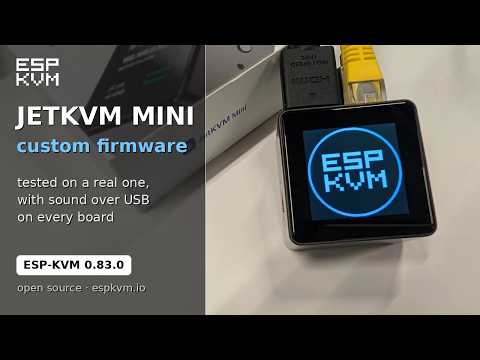
Version ESP-KVM 0.83.0 also provides the option to choose which pages the screen displays on the device (removing all leaves only the logo). A feature to disable the screen after a set time has been added. The program for the target machine, espkvm-agent, has been renamed to ESP-KVM Tools to avoid confusion with AI agents. Among the changes in releases after 0.65:
- 0.66: H.264 video is transmitted to the browser via WebRTC (UDP, DTLS-SRTP) when possible, and via WebSocket if not. This is a custom implementation, without servers STUN and TURN, it also works through Tailscale. If a packet is lost, one frame disappears, but the stream does not stop.
- 0.67-0.68: HDMI audio on boards with TC358743: three I2S wires from the bridge to the P4 pins. It plays in the console and is recorded in Opus. Multimedia keys have been added, pinch-to-zoom functionality on phones, a virtual stick for a pointer, and the computer's gamepad can be used as a mouse.
- 0.69-0.70: PSRAM on revision 3.x chips operates at 250 MHz, and H.264 at 1080p increased from 22 to 27 frames per second. By default, the device requests 1080p50 from the source instead of 1080p30. The encoder starts a frame while it is still incoming, and mouse movements are sent over the WebRTC data channel without retransmissions.
- 0.71-0.73: Profiles for different target machines. The device selects a profile based on how the source identifies itself via HDMI-CEC or USB, so the Switch and Steam Deck in dock mode receive their settings. Up to eight rectangles can be drawn on the screen, and the device will monitor them on its own: changed, frozen, or text appears.
- 0.74: Serial port over the same USB cable, no wires. Through it, the program for the target machine operates: the machine's name and addresses, shared clipboard, and a clean shutdown.
- 0.75: A trial update for devices that are far away. After the update, the console must reconnect and confirm the version. If this is not done within 10 minutes, the device will automatically roll back to the previous version.
- 0.76-0.77: View-only access and hotkeys in the console. Tailscale without an authorization key: the device shows a link, which is confirmed on the Tailscale page. A list of tailnet nodes with paths (directly or through a relay) and a mode where the console only responds to tailnet addresses.
- 0.78-0.79: Redesigned settings and command palette via Ctrl+K: using several letters to find the desired panel, key combination, macro, or script.
- 0.80: ST7789 display driver and up to four buttons on the device, each with its own actions.
- 0.81-0.82: Screen recordings and screenshots are uploaded to the WebDAV directory, such as in Nextcloud or on NAS. The table in the settings determines which event goes to which notification channel. A new channel has been added, ntfy, and the device reports when a new version is released. You can now set three Wi-Fi networks (the one with the best signal level is selected).
Source: opennet.ru

 Russian
 Italian
 German
 Polish
 Estonian
 Albanian
 Bulgarian
 Croatian
 Czech
 Danish
 Dutch
 English
 Finnish
 French
 Hungarian
 Latvian
 Lithuanian
 Norwegian
 Portuguese
 Romanian
 Slovak
 Slovenian
 Spanish
 Swedish