

The release of the web browser Firefox 154 has taken place, and updates for the previous long-term support branches — 153.1.0, 140.14.0, and 115.39.0 have been created. The Firefox 155 branch will soon enter beta testing, with a release scheduled for September 1.
Key features in Firefox 154 (1, 2, 3):
- The application of the LNA (Local Network Access) specification has been extended to WebSocket connections. LNA restricts access to the local system (loopback, 127.0.0.0/8) or internal networks (192.168.0.0/16, 10.0.0.0/8, etc.) when interacting with public websites. To access internal resources, the user must grant the web application special permissions, as this type of activity is exploited by attackers to carry out CSRF attacks on routers, access points, printers, corporate web interfaces, and other devices and services that only accept requests from the local network. A website opening a WebSocket connection to a device on the local network now triggers a confirmation dialog for the user.
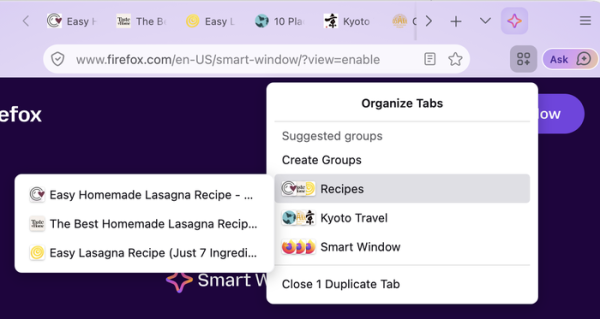
- The 'Smart Window' mode has been enhanced with the ability to use AI for recommending tab grouping and naming each group. Smart Window provides a separate interaction space with AI that complements the existing standard web navigation mode and private browsing mode.

- It is now possible to undo the clearing of cookies and site data for individual sites upon exit, while still maintaining tracking protection and restrictions related to cookies for those sites.
- The feature for translating the content of an entire page now also includes the content of iframe blocks integrated into the page. Language identification has been ensured at the page load stage.
- An action 'Manage AI' has been added to the address bar for quick access to AI settings in the configurator.
- When force-reloading the page (by clicking the 'refresh' button while holding the Shift key), the contents of the favicon cache are now also cleared.
- Significantly accelerated the operation of changing positions in the stream while watching videos.
- The built-in PDF viewer now implements text highlighting in a manner similar to how text is highlighted on web pages.
- By default, when creating new profiles and those that have not been used for a long time, the 'Firefox View' button has been removed from the panel. You can restore the button through the panel customization interface.
- New CSS properties 'text-box-trim' and 'text-box-edge' have been added, allowing precise control over margins before and after the text. The 'text-box-trim' property defines the trim area (top, bottom, or both sides), while 'text-box-edge' sets the method for trimming the edges.
- CSS functions sibling-index() and sibling-count() have been added to style elements based on their position or the number of neighboring elements.
- An input time interface has been implemented, displayed when using and elements.
- The No-Vary-Search HTTP header has been implemented, allowing you to configure caching rules for requests based on the parameters passed in the URL (for example, you can exclude non-essential parameters when determining the existence of a cached version of the page).
- The JavaScript Iterator interface has been enhanced with support for synchronously executed methods: Iterator.prototype.chunks (splits iterator elements into consecutive non-overlapping groups), Iterator.prototype.windows (iterates through iterator elements using a sliding window method), Iterator.prototype.includes (checks for the presence of a specific element in the iterator), and Iterator.prototype.join (joins all iterator elements into a single string).
- In the JSON Viewer, the full path to the selected element is now displayed at the bottom of the screen.
- Firefox for Android has updated its icons, introduced the ability to select the file name and directory for saving downloaded files, enabled automatic saving of addresses in input fields, accelerated bookmark searching, and provided a Firefox Labs section for testing experimental features.
In addition to new features and bug fixes, Firefox 154 has resolved 167 vulnerabilities, most of which were due to memory handling issues such as buffer overflows and access to already freed memory areas. These issues could potentially lead to the execution of malicious code when opening specially crafted pages.
Source: opennet.ru
