Available Release of Firefox 68.
Key Changes:
- The address bar code has been completely rewritten — using HTML and JavaScript instead of XUL. The external differences between the old (Awesome Bar) and new (Quantum Bar) address bar are that the ends of the strings that don't fit in the address bar now fade instead of being truncated (…), and to remove entries from history, you now need to use Shift+Delete/Shift+Backspace instead of Delete/Backspace. The new address bar works faster and allows for extension capabilities.
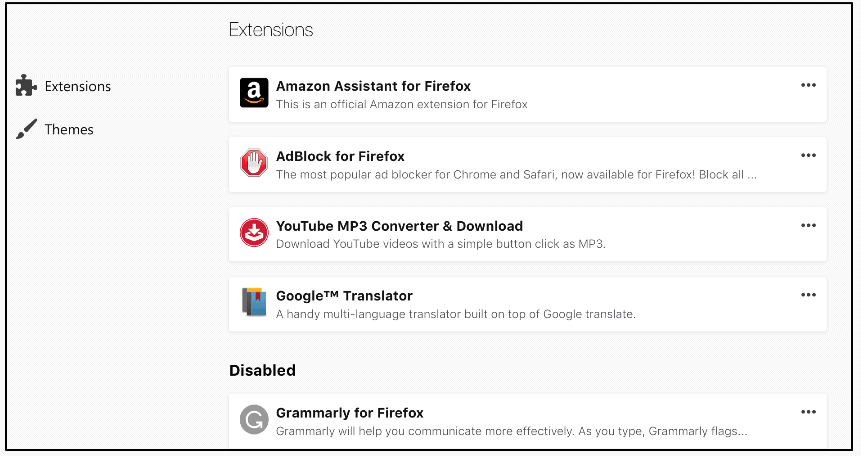
- The add-ons management page (about:addons) has also been completely rewritten using the Web API. The delete/disable buttons have moved to the menu. In the add-on properties, you can see the requested permissions and release notes. A separate section for disabled add-ons has been added (previously, they were just placed at the end of the list), as well as a section for recommended add-ons (each version undergoes thorough security checks). You now have the option to report malicious or slow add-ons.
- The code responsible for restoring the previous session has been transferred rewritten from JS to C++.
- A page about:compat has been added where you can manage site-specific "fixes". These are temporary fixes for incorrectly functioning sites (for example, changing the user agent or running scripts to fix issues in Firefox). about:compat simplifies viewing active fixes and allows web developers to disable them for testing purposes.
- Access to synchronization settings is now available directly from the main menu.
- The dark theme in reading mode applies not only to the page content but also to the interface (toolbars, side panels, controls).
- Firefox will attempt to automatically fix HTTPS errors, caused by third-party antivirus software. Historically, Firefox uses its own certificate store instead of the system's, which positively reflects on security., but it requires the antivirus software to import its root certificate into the browser's storage, which some manufacturers neglect. If the browser detects a MitM attack (which can be triggered by antivirus attempting to decrypt and inspect traffic), it will automatically enable the security.enterprise_roots.enabled setting and try to utilize certificates from the system storage (only certificates added there by third-party software are used; certificates supplied with the OS are ignored). If this helps, the setting will remain enabled. If the user explicitly disables security.enterprise_roots.enabled, the browser will not attempt to re-enable it. In the new ESR release, this setting is enabled by default. Additionally, an icon has been added to the notification area (to the left of the address bar) indicating that the site being viewed is using a certificate imported from the system storage. Developers note that using system certificates does not affect security (only certificates added to the system by third-party software are used, and since third-party software has the right to add them there, it could just as well add them to Firefox's storage).
- Requests for push notification permission will not be displayed until the user explicitly interacts with the page.
- Access to the camera and microphone can now only be granted from a secure context (i.e., from pages loaded over HTTPS).
- After 2 years, the character Κʻ / ĸ (U+0138, *Kra*). In uppercase, it looks like the Latin 'k' or the Cyrillic 'к', which may have aided phishers. All this time, developers have been trying to resolve the issue through the Unicode technical committee (to add this character to the category of 'historical'), but they forgot about it when releasing the latest edition of the standard.
- In official builds, the multi-process mode can no longer be disabled. The single-process mode (in which the browser interface and tab content run in the same process) is less secure and is not fully tested, which may lead to stability issues. For those who prefer single-process mode, there are workarounds..
- Changed behavior when synchronizing settings. From now on, only settings included in a specific list by the developers are synchronized by default. You can revert to the previous behavior (synchronize all modified settings) through about:config.
- The following CSS properties have been implemented: scroll-padding, scroll-margin, scroll-snap-align, counter-set, -webkit-line-clamp.
- Support for the pseudo-element ::marker and its animation has been added.
- Support for the primitive has been enabled by default. BigInt.
- window.open() now respects the passed parameter ‘noreferrer’.
- Support added HTMLImageElement.decode() (loading images before they are added to the DOM).
- Numerous improvements have been made in the developer tools.
- The bn-BD and bn-IN localizations have been merged into Bengali (bn).
- Localizations without maintainers have been removed: Assamese (as), South African English dialect (en-ZA), Maithili (mai), Malayalam (ml), Oriya (or). Users of these languages will automatically switch to British English (en-GB).
- The WebExtensions API now has features for working with user scripts.This may potentially resolve security issues (unlike Greasemonkey/Violentmonkey/Tampermonkey, each script runs in its own sandbox) and stability (eliminates the race between page loading and script insertion), and also allows the script to execute at the desired stage of page loading.
- The view_source.tab setting has been restored, allowing the page source to be opened in the same tab instead of a new one.
- The dark theme can now be applied to browser internal pages (for example, the settings page), controlled by the browser.in-content.dark-mode setting.
- On devices running Windows 10 with AMD graphics cards, WebRender support has been enabled.
- A shortcut will be added to the taskbar on new installations in Windows 10.
- The Windows version now uses the Background Intelligent Transfer Service (BITS)..
Source: linux.org.ru

 Russian
 Italian
 German
 Polish
 Estonian
 Albanian
 Bulgarian
 Croatian
 Czech
Czech Danish
 Dutch
Dutch English
 French
 Hungarian
 Latvian
 Portuguese
 Romanian
 Slovak
 Slovenian
 Spanish
 Swedish