

Hello Habr. Probably everyone who has ever seen off or welcomed relatives or friends at the airport has used the free service Flightradar24. It’s a very convenient way to track the position of an aircraft in real-time.
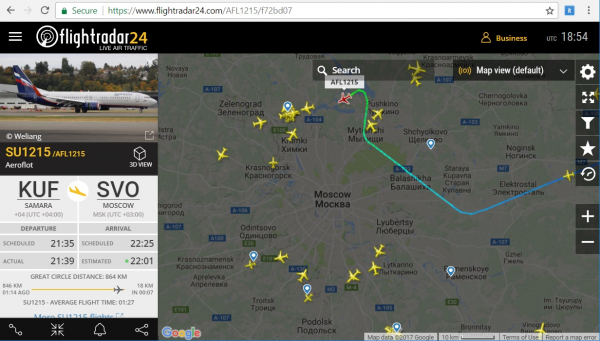
In The principle of how such an online service works was described earlier. Now we will dive deeper, and find out what data is transmitted and received from the aircraft to the receiving station, and we will decode it ourselves using Python.
History
It is clear that the data about airplanes is not transmitted for users to see them on their smartphones. The system is called ADS–B (Automatic Dependent Surveillance—Broadcast), and it serves for the automatic transmission of information about the aircraft to the control center — its identifier, coordinates, direction, speed, altitude, and other data are transmitted. Previously, before such systems appeared, a dispatcher could only see a point on the radar. This became insufficient as the number of aircraft increased significantly.
Technically, ADS-B consists of a transmitter on the aircraft that periodically sends packets of information at a sufficiently high frequency of 1090 MHz (there are other modes, but they are not of much interest to us, as coordinates are only transmitted here). Of course, besides the transmitter, there is also a receiver somewhere at the airport, but for us as users, our own receiver is the interesting part.
By the way, for comparison, the first such system, Airnav Radarbox, designed for regular users, appeared in 2007 and cost around $900, with an annual subscription for network services costing about $250.

Reviews from the first Russian owners can be read on the forum . Now, when RTL-SDR receivers have become widely available, a similar device can be assembled for $30, more details about this were covered in . We will now move on to the protocol — let’s see how it works.
Receiving Signals
First, the signal needs to be recorded. The entire signal lasts only 120 microseconds, so to comfortably analyze its components, an SDR receiver with a sampling rate of at least 5 MHz is desirable.
After recording, we obtain a WAV file with a sampling rate of 5,000,000 samples/sec; 30 seconds of such a recording 'weighs' about 500MB. Listening to it with a media player is, of course, useless — the file contains not sound, but directly digitized radio signals — this is how Software Defined Radio works.
We will open and process the file using Python. Those who wish to experiment on their own can download a sample recording. .
Let's load the file and see what's inside.
from scipy.io import wavfile
import matplotlib.pyplot as plt
import numpy as np

fs, data = wavfile.read("adsb_20190311_191728Z_1090000kHz_RF.wav")
data = data.astype(float)
I, Q = data[:, 0], data[:, 1]
A = np.sqrt(I*I + Q*Q)

plt.plot(A)
plt.show()
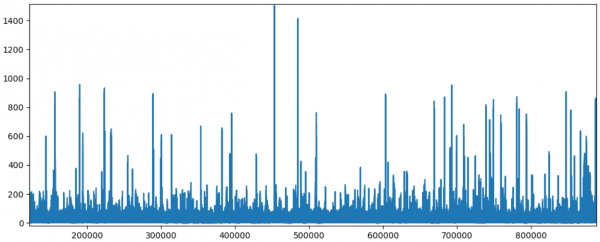
Result: we see clear 'pulses' against the background noise.
Each 'pulse' is the signal whose structure is clearly visible when zooming in on the graph.
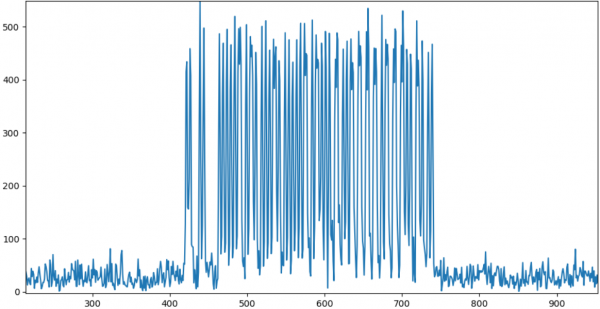
As can be seen, the image corresponds quite well to what is described above. We can proceed with data processing.
Decoding
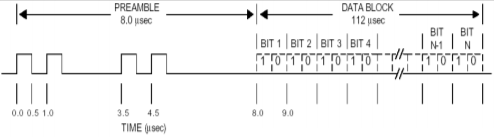
To begin with, we need to obtain the bit stream. The signal is encoded using Manchester encoding:

From the difference in levels in the half bytes, it is easy to get real '0's and '1's.
    bits_str = ""
    for p in range(8):
        pos = start_data + bit_len*p
        p1, p2 = A[pos: pos + bit_len/2], A[pos + bit_len/2: pos + bit_len]
        avg1, avg2 = np.average(p1), np.average(p2)
        if avg1  avg2:
            bits_str += "1"
The structure of the signal itself looks as follows:

Let's examine the fields in more detail.
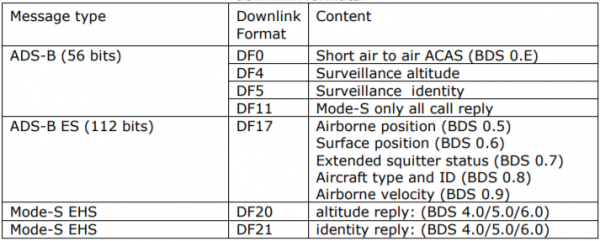
DF (Downlink Format, 5 bits) — determines the type of message. There are several types:
()
We are only interested in type DF17, as it contains the coordinates of the aircraft.
ICAO (24 bits) — the international unique code of the aircraft. You can check the plane by its code (unfortunately, the author has stopped updating the database, but it is still relevant). For example, for the code 3c5ee2 we have the following information:

Correction: in the ICAO code description is provided in more detail; those interested are advised to familiarize themselves.
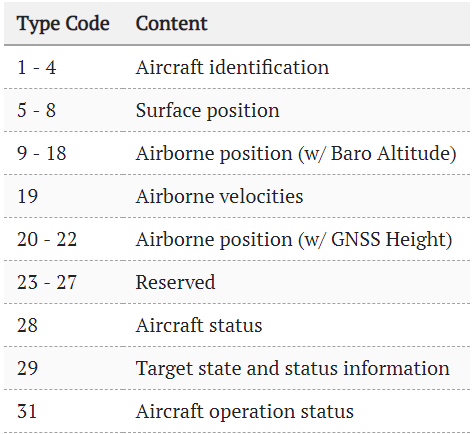
DATA (56 or 112 bits) — the actual data that we will decode. The first 5 bits of the data are the Type Code, which contains the subtype of the stored data (do not confuse with DF). There are quite a few such types:
()
Let's analyze a few examples of packets.
Aircraft identification
Example in binary format:
00100 011 000101 010111 000111 110111 110001 111000
Data fields:
+------+------+------+------+------+------+------+------+------+------+
| TC,5 | EC,3 | C1,6 | C2,6 | C3,6 | C4,6 | C5,6 | C6,6 | C7,6 | C8,6 |
+------+------+------+------+------+------+------+------+------+------+
TC = 00100b = 4, each symbol C1-C8 contains codes corresponding to the indices in the string:
#ABCDEFGHIJKLMNOPQRSTUVWXYZ#####_###############0123456789######
Decoding the string, it’s easy to get the aircraft code: EWG7184
symbols = "#ABCDEFGHIJKLMNOPQRSTUVWXYZ#####_###############0123456789######"
code_str = ""
for p in range(8):
     c = int(bits_str[8 + 6*p:8 + 6*(p + 1)], 2)
     code_str += symbols[c]
print("Aircraft Identification:", code_str.replace('#', ''))
Airborne position
If the name is straightforward, the coordinates are a bit more complicated. They are transmitted in the form of 2, even and odd frames. The field code TC = 01011b = 11.
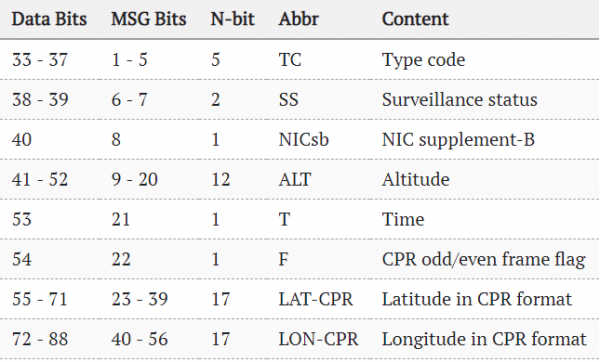
Example of even and odd packets:
01011 000 000101110110 00 10111000111001000 10000110101111001
01011 000 000110010000 01 10010011110000110 10000011110001000
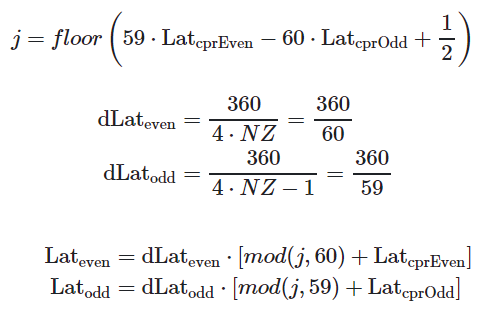
The calculation of coordinates is based on a rather sophisticated formula:
()
I am not a GIS specialist, so I don't know where it comes from. If anyone knows, please write in the comments.
Altitude is calculated more simply — depending on a certain bit, it may be represented as either a multiple of 25 or 100 feet.
Airborne Velocity
Packet with TC=19. The interesting part here is that speed can be either exact, relative to the ground (Ground Speed), or airspeed measured by the aircraft's sensor (Airspeed). There are also many different fields transmitted:
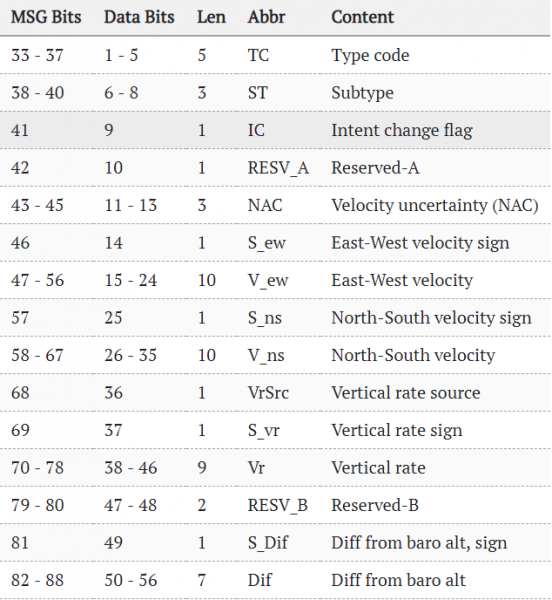
()
Conclusion
As can be seen, ADS-B technology has become an interesting symbiosis, where some standard is useful not only for professionals but also for ordinary users. Naturally, the key role in this was played by the reduction in cost of digital SDR receivers, allowing devices to literally "pick up" signals at frequencies above gigahertz for a fraction of the price.
The standard itself, of course, has much more. Interested parties can view the PDF on the page or visit the previously mentioned .
It’s unlikely that many will find everything written above useful, but at least I hope the general idea of how it works remains.
By the way, a ready-made decoder in Python already exists, it can be studied . And SDR receiver owners can build and run a ready-made ADS-B decoder , more details were discussed in .
The source code of the parser described in the article is provided below. This is a test example, not claiming to be production-ready, but some parts of it work, and it can parse the recorded file above.
Source code (Python)
from __future__ import print_function

from scipy.io import wavfile
from scipy import signal
import matplotlib.pyplot as plt
import numpy as np
import math
import sys


def parse_message(data, start, bit_len):
    max_len = bit_len*128
    A = data[start:start + max_len]
    A = signal.resample(A, 10*max_len)
    bits = np.zeros(10*max_len)
    bit_len *= 10
    start_data = bit_len*8

    # Parse first 8 bits
    bits_str = ""
    for p in range(8):
        pos = start_data + bit_len*p
        p1, p2 = A[pos: pos + bit_len/2], A[pos + bit_len/2: pos + bit_len]
        avg1, avg2 = np.average(p1), np.average(p2)
        if avg1 < avg2:
            bits_str += "0"
        elif avg1 > avg2:
            bits_str += "1"

    df = int(bits_str[0:5], 2)

    # Aircraft address (db - https://junzis.com/adb/?q=3b1c5c )
    bits_str = ""
    for p in range(8, 32):
        pos = start_data + bit_len * p
        p1, p2 = A[pos: pos + bit_len / 2], A[pos + bit_len / 2: pos + bit_len]
        avg1, avg2 = np.average(p1), np.average(p2)
        if avg1 < avg2:
            bits_str += "0"
        elif avg1 > avg2:
            bits_str += "1"
    # print "Aircraft address:", bits_str, hex(int(bits_str, 2))
    address = hex(int(bits_str, 2))

    # Filter specific aircraft (optional)
    # if address != "0x3c5ee2":
    #    return

    if df == 16 or df == 17 or df == 18 or df == 19 or df == 20 or df == 21:
        # print "Pos:", start, "DF:", msg_type

        # Data (56bit)
        bits_str = ""
        for p in range(32, 88):
            pos = start_data + bit_len*p
            p1, p2 = A[pos: pos + bit_len/2], A[pos + bit_len/2: pos + bit_len]
            avg1, avg2 = np.average(p1), np.average(p2)
            if avg1 < avg2:
                bits_str += "0"
                # bits[pos + bit_len / 2] = 50
            elif avg1 > avg2:
                bits_str += "1"

        # http://www.lll.lu/~edward/edward/adsb/DecodingADSBposition.html
        # print "Data:"
        # print bits_str[:8], bits_str[8:20],  bits_str[20:22], bits_str[22:22+17], bits_str[39:39+17]
        # Type Code:
        tc, ec = int(bits_str[:5], 2), int(bits_str[5:8], 2)
        # print("DF:", df, "TC:", tc)

        # 1 - 4  Aircraft identification
        # 5 - 8  Surface position
        # 9 - 18  Airborne position (w/ Baro Altitude)
        # 19  Airborne velocities

        if tc >= 1 and tc <= 4: # and (df == 17 or df == 18):
            print("Aircraft address:", address)
            print("Data:")
            print(bits_str[:8], bits_str[8:14],  bits_str[14:20], bits_str[20:26], bits_str[26:32], bits_str[32:38], bits_str[38:44])

            symbols = "#ABCDEFGHIJKLMNOPQRSTUVWXYZ#####_###############0123456789######"
            code_str = ""
            for p in range(8):
                c = int(bits_str[8 + 6*p:8 + 6*(p + 1)], 2)
                code_str += symbols[c]
            print("Aircraft Identification:", code_str.replace('#', ''))
            print()
        if tc == 11:
            print("Aircraft address:", address)
            print("Data: (11)")
            print(bits_str[:8], bits_str[8:20],  bits_str[20:22], bits_str[22:22+17], bits_str[39:39+17])

            # Bit 22 contains the F flag which indicates which CPR format is used (odd or even)
            # First frame has F flag = 0 so is even and the second frame has F flag = 1 so odd
            # f = bits_str[21:22]
            # print("F:", int(f, 2))

            # Altitude
            alt1b = bits_str[8:20]
            if alt1b[-5] == '1':
                bits = alt1b[:-5] + alt1b[-4:]
                n = int(bits, 2)
                alt_ft = n*25 - 1000
                print("Alt (ft)", alt_ft)

            # lat_dec = int(bits_str[22:22+17], 2)
            # lon_dec = int(bits_str[39:39+17], 2)
            # print("Lat/Lon:", lat_dec, lon_dec)

            # http://airmetar.main.jp/radio/ADS-B%20Decoding%20Guide.pdf
            print()
        if tc == 19:
            print("Aircraft address:", address)
            print("Data:")
            # print(bits_str)
            print(bits_str[:5], bits_str[5:8], bits_str[8:10], bits_str[10:13], bits_str[13] ,bits_str[14:24], bits_str[24], bits_str[25:35], bits_str[35:36], bits_str[36:65])

            subtype = int(bits_str[5:8], 2)
            # https://mode-s.org/decode/adsb/airborne-velocity.html
            spd, hdg, rocd = -1, -1, -1
            if subtype == 1 or subtype == 2:
                print("Velocity Subtype 1: Ground speed")

                v_ew_sign = int(bits_str[13], 2)
                v_ew = int(bits_str[14:24], 2) - 1       # east-west velocity

                v_ns_sign = int(bits_str[24], 2)
                v_ns = int(bits_str[25:35], 2) - 1       # north-south velocity

                v_we = -1*v_ew if v_ew_sign else v_ew
                v_sn = -1*v_ns if v_ns_sign else v_ns

                spd = math.sqrt(v_sn*v_sn + v_we*v_we)  # unit in kts

                hdg = math.atan2(v_we, v_sn)
                hdg = math.degrees(hdg)                 # convert to degrees
                hdg = hdg if hdg >= 0 else hdg + 360    # no negative val
            if subtype == 3:
                print("Subtype Subtype 3: Airspeed")
                hdg = int(bits_str[14:24], 2)/1024.0*360.0
                spd = int(bits_str[25:35], 2)

            vr_sign = int(bits_str[36], 2)
            vr = int(bits_str[36:45], 2)
            rocd = -1*vr if vr_sign else vr         # rate of climb/descend
            print("Speed (kts):", spd, "Rate:", rocd, "Heading:", hdg)
            print()

        # print()

def calc_coordinates():
    def _cprN(lat, is_odd):
        nl = _cprNL(lat) - is_odd
        return nl if nl > 1 else 1

    def _cprNL(lat):
        try:
            nz = 15
            a = 1 - math.cos(math.pi / (2 * nz))
            b = math.cos(math.pi / 180.0 * abs(lat)) ** 2
            nl = 2 * math.pi / (math.acos(1 - a/b))
            return int(math.floor(nl))
        except:
            # happens when latitude is +/-90 degree
            return 1

    def floor_(x):
        return int(math.floor(x))

    lat1b, lon1b, alt1b = "10111000111010011", "10000110111111000", "000101111001"
    lat2b, lon2b, alt2b = "10010011101011100", "10000011000011011", "000101110111"
    lat1, lon1, alt1 = int(lat1b, 2), int(lon1b, 2), int(alt1b, 2)
    lat2, lon2, alt2 = int(lat2b, 2), int(lon2b, 2), int(alt2b, 2)

    # 131072 is 2^17, since CPR lat and lon are 17 bits each
    cprlat_even, cprlon_even = lat1/131072.0, lon1/131072.0
    cprlat_odd, cprlon_odd = lat2/131072.0, lon2/131072.0
    print(cprlat_even, cprlon_even)

    j = floor_(59*cprlat_even - 60*cprlat_odd)
    print(j)

    air_d_lat_even = 360.0 / 60
    air_d_lat_odd = 360.0 / 59

    # Lat
    lat_even = float(air_d_lat_even * (j % 60 + cprlat_even))
    lat_odd = float(air_d_lat_odd * (j % 59 + cprlat_odd))
    if lat_even >= 270:
        lat_even = lat_even - 360
    if lat_odd >= 270:
        lat_odd = lat_odd - 360

    # Lon
    ni = _cprN(lat_even, 0)
    m = floor_(cprlon_even * (_cprNL(lat_even)-1) - cprlon_odd * _cprNL(lat_even) + 0.5)
    lon = (360.0 / ni) * (m % ni + cprlon_even)
    print("Lat", lat_even, "Lon", lon)

    # Altitude
    # Q-bit (bit 48) indicates whether the altitude is encoded in multiples of 25 or 100 ft (0: 100 ft, 1: 25 ft)
    # The value can represent altitudes from -1000 to +50175 ft.
    if alt1b[-5] == '1':
        bits = alt1b[:-5] + alt1b[-4:]
        n = int(bits, 2)
        alt_ft = n*25 - 1000
        print("Alt (ft)", alt_ft)


fs, data = wavfile.read("adsb_20190311_191728Z_1090000kHz_RF.wav")
T = 1/fs

print("Sample rate %f MS/s" % (fs / 1e6))
print("Cnt samples %d" % len(data))
print("Duration: %f s" % (T * len(data)))

data = data.astype(float)

cnt = data.shape[0]
# Processing only part on file (faster):
# cnt = 10000000
# data = data[:cnt]
print("Processing I/Q...")
I, Q = data[:, 0], data[:, 1]
A = np.sqrt(I*I + Q*Q)

bits = np.zeros(cnt)

# To see scope without any processing, uncomment
# plt.plot(A)
# plt.show()
# sys.exit(0)

print("Extracting signals...")

pos = 0
avg = 200
msg_start = 0
# Find beginning of each signal
while pos < cnt - 16*1024:
    # P1 - message start
    while pos < cnt - 16*1024:
        if A[pos] < avg and A[pos+1] > avg and pos - msg_start > 1000:
            msg_start = pos
            bits[pos] = 100
            pos += 4
            break
        pos += 1

    start1, start2, start3, start4 = msg_start, 0, 0, 0
    # P2
    while pos < cnt - 16*1024:
        if A[pos] < avg and A[pos+1] > avg:
            start2 = pos
            bits[pos] = 90
            pos += 1
            break
        pos += 1
    # P3
    while pos < cnt - 16*1024:
        if A[pos] < avg and A[pos+1] > avg:
            start3 = pos
            bits[pos] = 80
            pos += 1
            break
        pos += 1
    # P4
    while pos < cnt - 16*1024:
        if A[pos] < avg and A[pos+1] > avg:
            start4 = pos
            bits[pos] = 70
            pos += 1
            break
        pos += 1


    sig_diff = start4 - start1
    if 20 < sig_diff < 25:
        bits[msg_start] = 500
        bit_len = int((start4 - start1) / 4.5)
        # print(pos, start1, start4, ' - ', bit_len)
        # start = start1 + 8*bit_len
        parse_message(A, msg_start, bit_len)

        pos += 450

# For debugging: check signal start
# plt.plot(A)
# plt.plot(bits)
# plt.show()
I hope someone found it interesting, thank you for your attention.
Source: habr.com
