

Google has announced the inclusion of additional features for device protection in the upcoming Android 16 release. The platform's settings will introduce the 'Advanced Protection' mode, allowing users to enable optional security mechanisms that enhance safety in the event of device compromise risks or targeted attacks. This mode encompasses both previously available options and new features, such as automatic smartphone reboot after 3 days of inactivity, USB attack protection, and backup of logs for auditing in case of hacking.
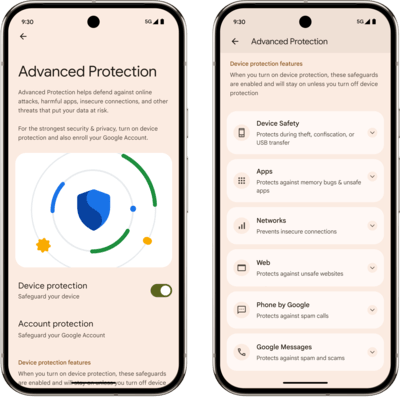
The Advanced Protection mode includes the following security mechanisms:
- Protection against theft, confiscation, and unauthorized physical access to the device.
- Rebooting the device if the screen has not been unlocked for more than 3 days. If the device falls into other hands, automatic rebooting will revert encrypted sections with user data back to their original unencrypted state, which will protect against attacks through memory content analysis and exploitation of vulnerabilities in the screen lock mechanism.
- Protection against attacks or data leakage through USB connection. When the screen is locked, the USB port capabilities for new connections are limited to charging only, while data transfer is blocked.
- Automatic locking of the device upon detecting signs of theft or prolonged offline status.
- Incident analysis.
- Backup of system logs in Google Cloud. The log backup is preserved using end-to-end encryption and is accessible only to the device user. In case of device compromise or hacking, this feature will simplify forensic analysis and prevent the attacker from covering their tracks by cleaning logs on the device.
- Protection against vulnerabilities in applications and installation of malicious apps.
- Activation of the MemTag (MTE, Memory Tagging Extension) hardware protection mechanism present in chips based on the ARMv8.5-A architecture. The MemTag technology allows tags to be tied to memory areas and organizes checks for pointer usage correctness to block exploitation of vulnerabilities caused by accessing already freed memory blocks, buffer overflows, and access before initialization.
- Enabling Google Play Protect to check applications for malware and imposed functionality.
- Blocking the installation of unknown applications. Only apps from official app catalogs that are initially pre-installed on the device are allowed to be downloaded.
- Protection against the installation of unsafe network connections.
- Blocking connections to 2G mobile networks.
- Disabling automatic reconnection to unsecured Wi-Fi networks using WEP or OWE, as well as networks available without a password.
- Protection when dealing with unsafe websites.
- Disabling JIT optimizers in the JavaScript V8 engine, which enhances security when working with potentially dangerous web applications by reducing possible vectors for attacks.
- Enabling Android Safe Browsing to block access to sites with recorded malicious activity.
- Using only HTTPS in Chrome.
- Filtering spam and fraudulent messages.
- Activating Spam Protection and Scam Protection modes in the Google Messages app to filter out unwanted messages.
- Protection against redirection to malicious and phishing sites. Displaying a separate warning when receiving messages from unknown users that contain links.
- Blocking spam calls.
- Identification of unwanted calls using Caller ID, utilizing Google's supported spam phone number database.
- Automatic checking of incoming calls for spam using an AI assistant.
- Displaying warnings when signs of fraud are detected as a result of real-time analysis during a phone call.
Source: opennet.ru
