

The website performance monitoring service DebugBear published the results of an analysis on the impact of browser extensions on performance and user experience. In the course of the study, 5,000 of the most popular Chrome extensions were tested. The evaluation focused on CPU load, the volume of data downloaded, page load speeds, delays during user interaction with web pages, and disk space consumption.
Some findings:
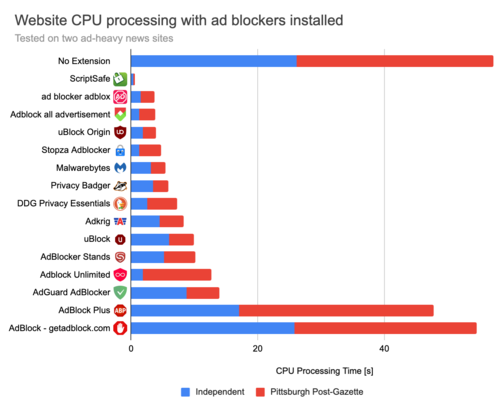
- Using extensions with ad blockers generally reduces CPU load, decreases the amount of data downloaded, and lowers memory consumption. For example, the uBlock Origin extension, which has 37 million users, reduces CPU load from 57 seconds of processing time to just 4 seconds when viewing tested pages on an ad-heavy news site. Meanwhile, the reduction in CPU load when using the more popular ad blockers AdBlock (66 million users) and AdBlock Plus (45 million users) was minimal, not exceeding 15%.

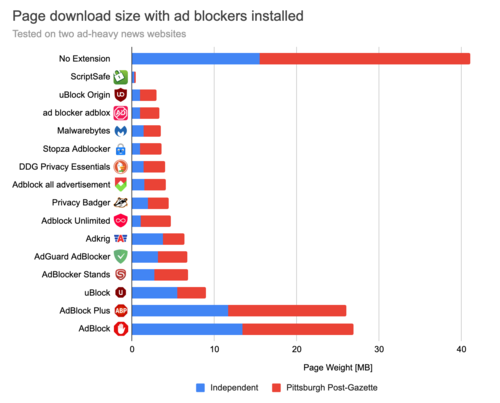
- When evaluating traffic savings with ad blockers enabled, uBlock Origin showed the best results, allowing for a reduction in the size of downloaded data on the tested sites from an average of 41 MB to just 3 MB. The ScriptSafe extension ranked higher, but this was achieved by completely disabling JavaScript.

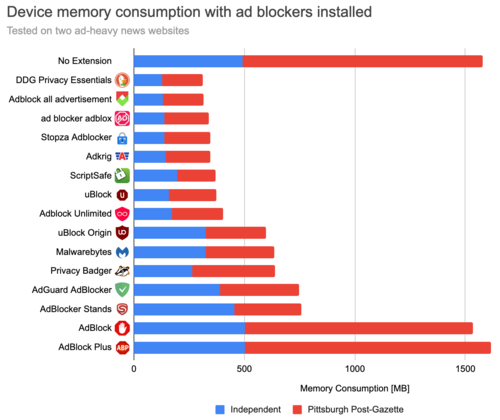
- In testing the impact of extensions on memory consumption, the DuckDuckGo Privacy Essentials extension achieved the best results. When using AdBlock Plus, memory consumption increased.

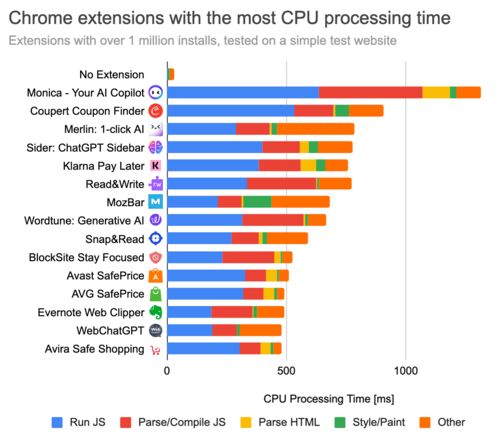
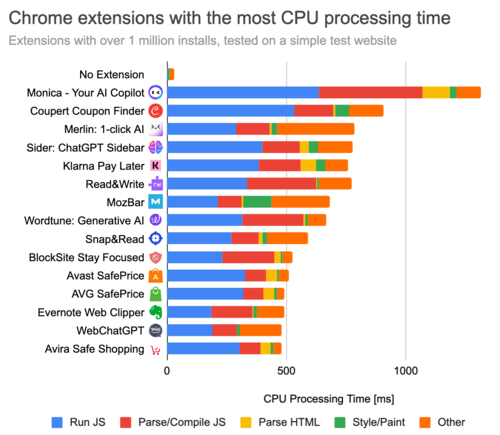
- Of the 336 extensions with over 1 million users, 11 led to an increase in processing time for each page of more than 0.5 seconds of CPU time. The worst performance was noted for the Monica extension, which has 2 million installations — using it resulted in an additional 1.3 seconds of processing time per page. The Read&Write extension, with 17 million installations, consumed 0.8 seconds of CPU time.

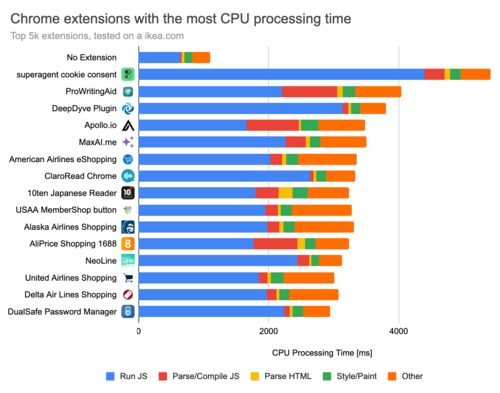
- A repeat test on the Ikea website identified extensions that slow down operations, addressing specific tasks for online stores. For example, the Honey extension, which has 20 million users, created a delay of 1.5 seconds of processing time.
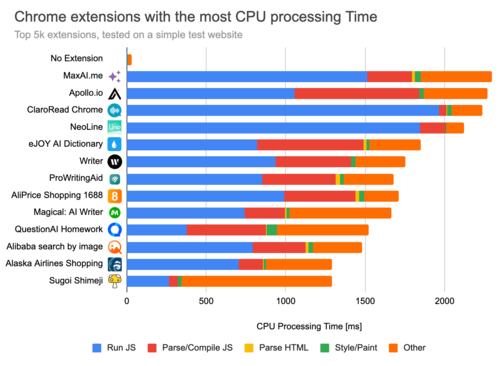
- When expanding the test to 5,000 of the most popular plugins, the worst performance (2.3 seconds of CPU time) was seen with the MaxAI plugin, which has 800,000 users.

- In testing 5,000 plugins on the Ikea site, the worst performance (nearly 5 seconds of CPU time) was recorded by the plugin 'superagent — Automatic cookie consent'.

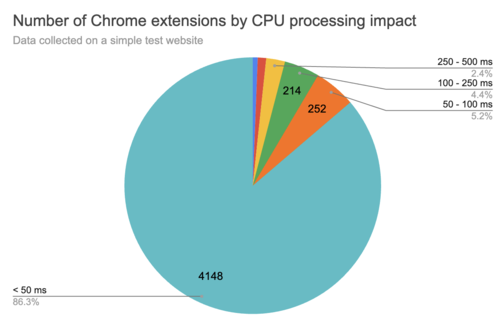
- 86% of the tested plugins created minimal (less than 50 ms) CPU load, while 5.2% caused a load ranging from 50 to 100 ms of CPU time, 4.4% from 100 to 250 ms, 2.4% from 250 to 500 ms, and 1.7% caused more than 500 ms.

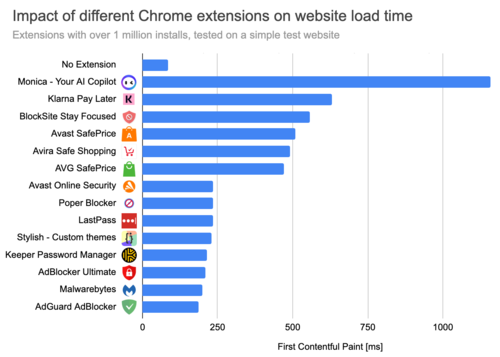
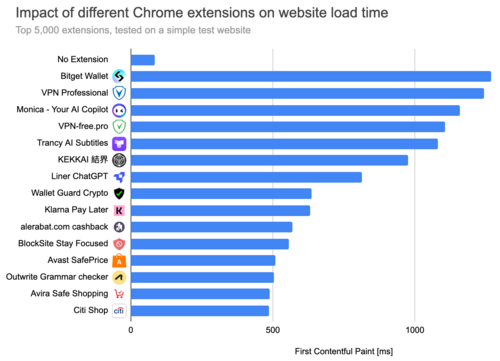
- Testing for page load delays (FCP metric, First Contentful Paint) showed no direct correlation between high CPU load and page load delays. For example, CPU-intensive plugins like Coupert Coupon Finder and Merlin AI did not slow down page loading. The plugins that were noted to slow down page loading the most included Monica AI, Klarna, and Avast Safeprice, which trigger handlers at the start of loading, rather than after it is complete. Delays also occurred with plugins that offer access through VPN.
Sample from plugins with over a million users:

Sample from the 5,000 most popular plugins:

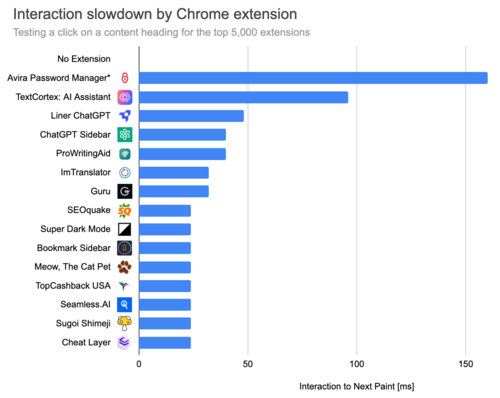
- Testing delays when interacting with pages (INP metric, Interaction to Next Paint). Among plugins with over a million users, Avira Password Manager stood out, causing a delay of 160 ms with each mouse click (the delay only manifests in the first 5 seconds while initialization is completed). The use of the Microsoft Editor extension and Superb Copy introduced delays at the level of 10 ms.

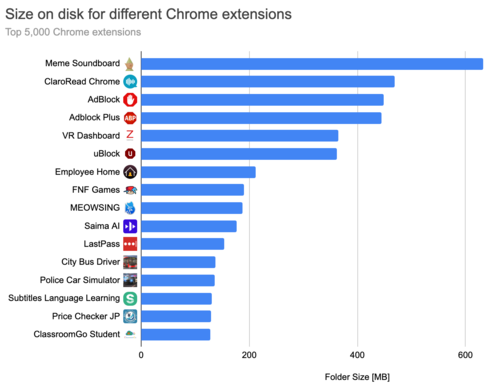
- Testing disk space consumption. Of the 5,000 tested plugins, 27 led to the use of more than 100 MB of disk space. The leader was the Meme Soundboard plugin, which required 600 MB due to the storage of 723 MP3 files. 87% of plugins occupy less than 10 MB, 11.2% more than 10 MB, and 2.2% more than 50 MB.

- 1.7% of plugins block caching between page transitions (back/forward cache). Among such plugins are: LastPass Password Manager, Avast Online Security, Avira Browser Safety, Norton Password Manager, Snap&Read, and Microsoft Editor.
- Pre-loading and pre-rendering are blocked by 8 plugins (0.2%), including uBlock Origin, Windscribe, and Privacy Badger.
Source: opennet.ru
