

Cloudflare has introduced the opkssh (OpenPubkey SSH) toolkit, allowing the integration of centralized authentication into OpenSSH with the ability to log in via OpenID Connect providers. With opkssh, you can eliminate manual tasks for managing and configuring SSH keys and establish connections to servers from any host, without the need to create private keys on each client computer or manually copy public keys to the server. To connect, it is sufficient to bind to the account with the OpenID provider on the server. The toolkit's code is written in Go and is distributed under the Apache 2.0 license.
Opkssh is compatible with OpenID providers Google, Microsoft/Azure, and Gitlab, allowing login through existing accounts in services such as gmail.com, microsoft.com, and gitlab.com. When using opkssh, instead of unlimited duration SSH keys, temporary keys are generated that remain valid for just a few hours and are created based on confirmation from the OpenID provider. The leakage of such keys after their expiration poses no security threat. By default, the duration of the key is 24 hours, after which the user must re-authenticate via OpenID.
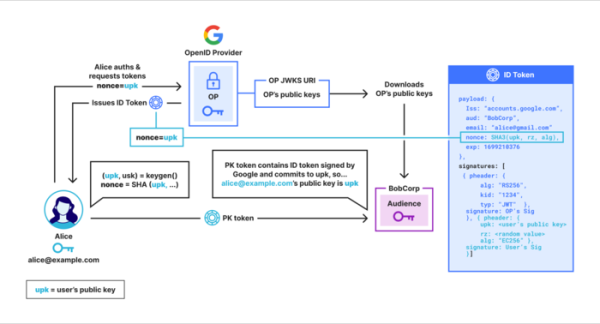
Integration with OpenSSH is based on the ability to create SSH protocol extensions that allow arbitrary data to be attached to SSH certificates. After authentication through OpenID, the client generates a public key containing a PK token that confirms the key's ownership by the asserted user. The token is integrated into the SSH protocol through a field with additional data in the SSH certificate. The creation and verification of PK tokens on the server side is carried out using the OpenPubKey cryptographic protocol.
OpenPubKey allows for the generation of a public key and its association with a token issued by the OpenID provider. Through a digital signature, the provider confirms that this key was created by the authenticated user in question. For example, the Google OpenID provider can confirm that the user is authenticated as test@gmail.com. On the server side, a check is performed to verify whether the attached token was signed by the OpenID provider and if the digital signature corresponds to the claimed public key, which means the server can ascertain that the user test@gmail.com has created the public key for the connecting SSH client.
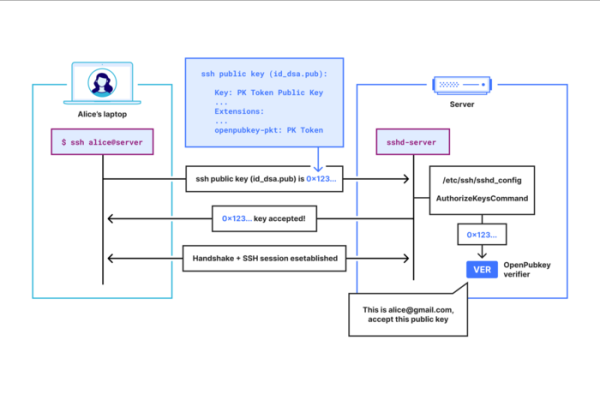
Integration with OpenSSH is organized by specifying the opkssh program in the 'sshd_config' configuration file via the 'AuthorizedKeysCommand' directive (for example: 'AuthorizedKeysCommand /usr/local/bin/opkssh verify %u %k %t'). The setup for linking accounts with OpenID takes place on the SSH server side. No changes to settings are required on the SSH client side, but the command 'opkssh login' must be executed before logging in, where the user will need to select the OpenID provider and authenticate through it in the appearing browser window.
The opkssh utility will generate SSH keys and obtain a PK token that confirms that the user has been authenticated and allows verification that the generated keys belong to the claimed user. The SSH public key, to which the PK token is attached via an additional data field, will be recorded in the file ~/.ssh/id_ecdsas and will begin to be transmitted upon connecting to server the ssh utility.
Connection to the server is established using the standard SSH scheme 'ssh login@server', while server the login must first be associated with the OpenID account used by the user. Thus, the process essentially involves the SSH client sending the public key to the SSH server, which runs the 'opkssh verify' command to verify the key.
To link an account to OpenID, the server administrator executes the command 'opkssh add'. For example, to allow login to the server as the user 'root' with OpenID authentication using the account test@gmail.com in Gmail, the command 'sudo opkssh add root test@gmail.com google' should be executed, after which the client will be able to connect under this account using the command 'ssh root@server_host'.
You can also manually bind the account via the configuration file /etc/opk/auth_id (or ~/.opk/auth_id), in which the string "root test@gmail.com https://accounts.google.com" will be recorded for the above example. Additionally, you can define a list of allowed OpenID providers, their parameters, and a list of authorized client identifiers through the file /etc/opk/providers.
Source: opennet.ru
