

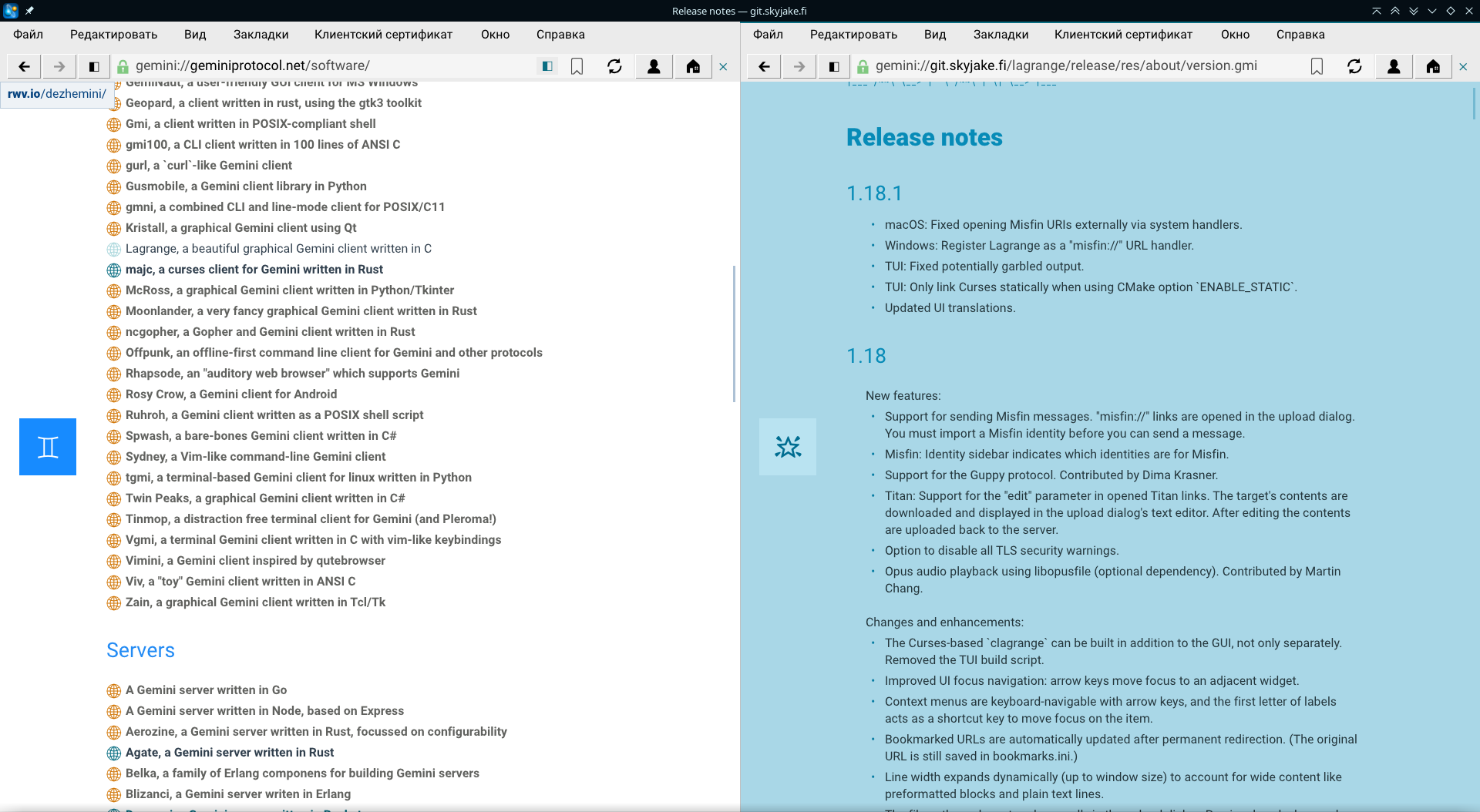
Two weeks ago, a major update took place Lagrange, a client of the Gemini network (Wikipedia article, website), presented as a lightweight alternative to the WWW, created with a nod to Gopher, but with enhancements such as a dedicated markup language Gemtext for basic text formatting and encryption. On September 29, update 1.18.1 was released, fixing several bugs from the previous release.
Lagrange is a cross-platform client that utilizes the capabilities of the SDL libraries for graphics acceleration and OpenSSL encryption. The program supports tabs and split-screen functionality, browsing history, bookmarks, network search, smart suggestions when typing in the address bar, built-in image display on pages, audio file playback, and theme selection, and includes a built-in news aggregator. The Lagrange interface resembles that of modern web browsers but offers extensive customization options. More details about the application features can be found by opening the about:help tab in Lagrange or by reading the file help.gmi
The program's source code is written in C and can be compiled on any modern POSIX-compliant platform. Official 64-bit release builds are for Windows, macOS, and GNU/Linux (AppImage) platforms. Beta releases are available for mobile platforms: iOS, Android (F-Droid repository, APK)
1.18
New Features:
- Support for messaging Misfin. Links misfin:// open in the sending dialog.
- Support Guppy, a lightweight protocol based on UDP. Added by Dima Krasner.
- Titan: Support for the 'edit' parameter in open Titan links. The link's content is loaded and opened in the send dialog's text editor. After editing, the content is sent back to the server.
- Option to disable all TLS unsafe connection warnings.
- Sound playback in Opus via libopusfile (optional dependency). Added by Martin Chang.
Changes and improvements:
- Using Curses The clagrange console client can now be built alongside the GUI version, rather than separately from it. The TUI build script has been removed.
- Improved focus on interface elements: arrow keys move focus to the adjacent widget.
- Context menus can be navigated using the arrow keys, and the first letters of menu item shortcuts are used for quick focus movement by pressing the corresponding key on the keyboard.
- Bookmarks URLs are automatically updated in case of permanent redirects. (The original URL continues to be stored in bookmarks.ini).
- The length of the string changes dynamically (adapts to the window size), including fields such as preformatted blocks and plain text lines.
- The file path can be manually typed in the upload dialog. Previously, only drag-and-drop support was available.
- Right-clicking on the site's banner shows the link context menu (linked to the root URL of the capsule).
- When saving to the downloads folder, a confirmation pop-up is displayed.
- Menu bar: When activated via the keyboard, the last opened submenu reopens, but not necessarily 'File' as before.
- The Return key now focuses on the URL entry field.
- About the page: Clarified the meaning of 'fingerprint'. Displays the hash type (SHA-256) and what was used to compute it (the full certificate or just the public key).
- Updated symbolic representations for the 'Go to Root' action, removed bookmarks, and the bookmarks indicator (button).
- Gopher: Correct parsing of Telnet string types 8 and T.
- The Noto Emoji font has been updated to support Unicode 15.1.
- TUI: Frequently used keyboard shortcuts are displayed in place of the menu bar when it is disabled to make the interface more accessible.
- TUI: The interface layout has been improved, considering usability at a minimum resolution of 80×25.
- TUI: The display of various widgets in text mode has been enhanced.
Fixes:
- Titan URLs erroneously opened the upload dialog when viewing history.
- A request in the open Titan tab was resent with empty content upon launching the application.
- The identification for sending to Titan was sometimes selected incorrectly.
- The upload dialog was missing several lines for errors during drag-and-drop.
- Gopher: Formatting elements of Gemtext found in Gopher page text are ignored to avoid distorting the visual representation of the page.
- Gopher: The port number may be empty on i-lines.
- Query tags that already contain a ? in the prefix had an extra ?.
- Numeric (alphanumeric) link markers shown when navigating with the Alt/Option keys or home row keys now start from the very top of the viewport.
- Incorrect event processing order when multiple windows are present, with one of the widgets in focus.
- macOS: Trackpad navigation on an unfocused window could trigger in another focused window.
- Missing focus indication in empty lists and Snippets lists.
- Holding down Alt/Option (the modifier for showing link numbers) when opening a query link could result in the input focus not appearing in the dialog.
- Incorrect letter spacing in preformatted blocks.
- The first paragraph highlighting did not work correctly with the monospaced body font.
- Text characters occasionally appeared partially clipped.
- TUI: Color escape sequences were not considered in the output.
- TUI: Submenu characters were missing.
- TUI: Possible freezing when displaying wrapped text.
1.18.1
- macOS: Fixed opening the URI Misfin from external sources using the system's resources.
- Windows: Now you can remember Lagrange as the application for opening misfin:// URLs.
- TUI: Fixed possible output distortion.
- TUI: Curses will be linked statically only when using the CMake ENABLE_STATIC option.
- Updated interface translations.
Source: linux.org.ru
