

The release of the console two-panel file manager M-Commander 6.1.0 has been published, evolving as a branch of GNU Midnight Commander, enhanced with support for panel plugins loaded during operation. Through these plugins, archives, external storage (FTP, SFTP, Samba, S3), Git repositories, Docker containers, Kubernetes resources, MongoDB and SQLite databases can be opened in the panels. The subshell mechanism has been replaced with the built-in PTY terminal mcterm. The code is written in C and Lua, and is distributed under the GPLv3+ license. Pre-packaged versions are available for Debian 13, Ubuntu 24.04/26.04 (PPA), Fedora 44, Arch Linux, and macOS.
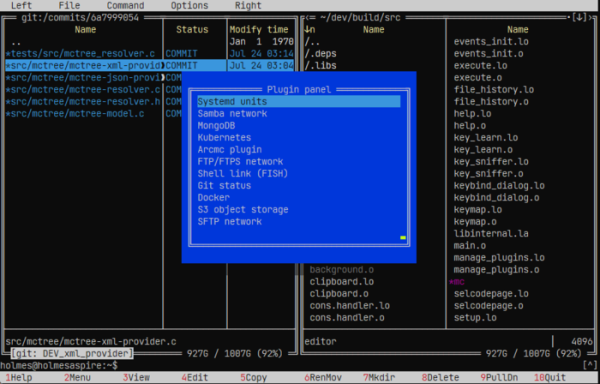
Key Changes:
- The project has been renamed to M-Commander. The main executable file is now mcommander, the editor is provided as mcedit6, the viewer is mview, the diff viewer is mdiff, and the packages collected for distributions are mcommander, mcommander-plugins, and mcommander-lua. The application can be installed alongside GNU Midnight Commander, and the mc settings will not be overwritten in this case.
- The viewer now implements rendering of Markdown markup (headings, lists, tables, links, footnotes, and code blocks with syntax highlighting as in the editor). There is the ability to render Mermaid diagrams (flowchart, sequence, class) and formulas.
- The viewer has added the ability for interactive text navigation using a visible cursor, which allows content to be selected using a keyboard or mouse and copied to the clipboard.
- The viewer features shared syntax highlighting with the reactor. Optimization for large file viewing has been implemented, with the first screen now appearing immediately, while the remaining content loads asynchronously. A separate dialog for the viewer has been added to the Settings menu.
- The lua-pdf plugin enables viewing of PDF pages as text, with images rendered through sixel and Chafa.
- A panel plugin called mcpeek has been added, allowing .NET assemblies to be opened in the form of a tree of references, resources, namespaces, and types, and to view decompiled C# or IL, with the ability to navigate links to other assemblies.
- An interface for viewing and changing skins has been implemented. For all bundled skins, separate sections have been created for mcterm, mctree, and mcstruct, and new skins Mashdark and Tokyo Night have been added.
- The editor now has the option to display control characters as "^X" or hide them. The clipboard in the editor remembers the encoding (when pasting into a file, text in a different encoding is automatically re-encoded).
- The terminal now supports searching through output with the Alt-S key combination and filtering results with Alt+Shift+S.
- Support for editing the user menu on the spot has been added, allowing items and submenus to be added, changed, rearranged, and deleted.
- Local panels can now monitor changes in file and directory states through the inotify system (enabled by the 'Watch directories' setting).
- The process of marking a large number of files has been optimized.
- File attribute operations, such as Chmod, Chown, and Chattr have been moved to a separate 'Attributes' menu.
- The quick access dialog (Hotlist) now supports adding links to VFS addresses and content generated by panel plugins (Git, Docker, Kubernetes, archives).
- Help and man pages have been translated to use Markdown format. Man pages for mctree and mcstruct have been added.
- The ability to use the Ctrl-Space key combination to view the size of directories within archives has been added.
Source: opennet.ru
