

Microsoft has released the WSL 3.0 (Windows Subsystem for Linux) toolkit, allowing Linux applications to run on Windows. This new branch features the ability to run Linux containers on Windows and transitions to using the Linux kernel 6.18. The code of the command-line utilities used in WSL, background processes for Linux environments, container launch services, and the virtual machine, as well as the wslg graphical stack, is open under the MIT license. Changes to the Linux kernel are provided under the GPLv2 license.
WSL provides a virtual machine with a full Linux kernel (based on branch 6.18), in which Linux distributions can run. The kernel includes WSL-specific changes, such as optimizations to reduce startup time and memory consumption, the ability to return memory freed by Linux processes back to Windows, and settings to exclude unnecessary drivers and subsystems. The system is installed in a separate virtual hard disk (VHD) with an ext4 file system and a virtual network adapter.
The new branch includes tools for creating, deploying, and running Linux containers on Windows, including the wslc (WSL Containers) command-line interface and accompanying API, which allows launching Linux containers from Windows programs. Core features of wslc include:
- Operations for managing the lifecycle of containers, such as creating, starting, stopping, exporting, cleaning, inspecting, checking status, reporting container activity events, and copying files to and from the container.
- Limiting the CPU and memory consumption of individual containers.
- Building, uploading, sending, importing, saving, and verifying system images. Commands for viewing lists of available images. Batch operations with multiple images at once. The ability to package multiple images into a single tar archive.
- Creating and managing virtual networks. Connecting containers to multiple networks. Creating custom network types. Port forwarding.
- Creating, viewing, and deleting partitions. Working with virtual disks (VHD).
- Access to the GPU from containers and providing libraries for unprivileged users to work with the GPU.
- Creating sessions as needed, assigning names to sessions, customizable storage location.
- SDK with API for automating container work from C++ and C#/WinRT applications.
- The 'wslc logs' command for viewing and extracting data from logs. Output of statistics about container operation. Syntax highlighting in the 'wslc' utility.
- Integration with MSBuild and CMake.
- Support for management via ADMX group policies.
- Support for the VS Code dev container extension for running and building developed code in a container.
- The ability to use wslc as a runtime for launching containers in the Aspire toolkit.
- The vscode-container-client extension for managing containers from the VS Code code editor.
- Managing wslc containers through the Lazywslc text interface or the WinUI 3 desktop application.
- A wrapper for launching Linux containers from Linux distributions running in WSL.
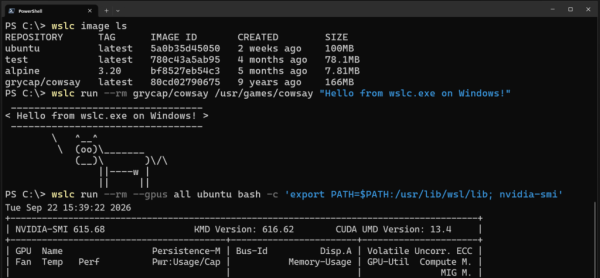
Containers use the 'virtiofs' file system by default, which demonstrates a twofold increase in access speed to Windows files, and the 'consomme' network mode, providing improved compatibility with various network configurations (VPN, proxy, etc.). In "consomme" mode, Linux traffic is routed through Windows, allowing Linux applications to leverage all the capabilities of the Windows network environment, including security policies and tools for integration with corporate systems.
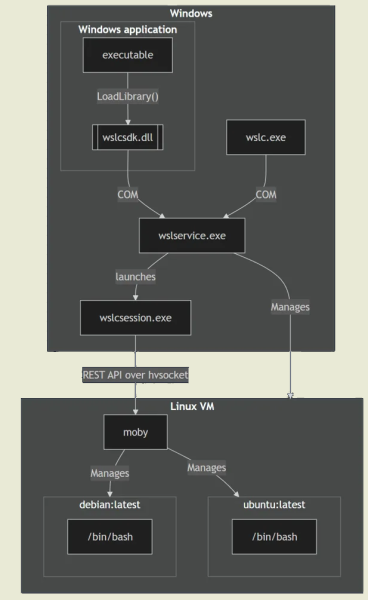
The privileged Windows service wslservice.exe is responsible for running containers, virtual machines and utilizes them to run Linux. Unlike WSL, the wslservice.exe service creates a child process wslcsession.exe for containers, executed with the rights of the current user, handling operations such as creating containers, mounting directories, and forwarding network ports. Different sessions are strictly isolated from each other and run in separate processes. Each session is tied to a separate VHD storage placed in the %AppData%\Local\wslc\sessions directory. It is possible to mount Windows paths in the Linux container for shared file access.
Source: opennet.ru
