

Testing is an integral part of the development process. Sometimes developers need to run tests locally before committing changes.
If the application uses Amazon Web Services, python a library moto it is ideally suited for this.

You can see the full list of resource coverage .
There’s a repo on GitHub Hugo Picado — . It’s a ready-made image; just run it and use. The catch is that after starting, no AWS resources have been created yet.
Well, that's quite easy to fix.
Since you need to specify the service type when starting (env variable MOTO_SERVICE), we just need to describe the resource creation.
Let’s slightly modify start.sh:
Instead of
moto_server $MOTO_SERVICE -H $MOTO_HOST -p $MOTO_PORT
Insert:
if [ -f /opt/init/bootstrap.py ]; then
  moto_server $MOTO_SERVICE -H $MOTO_HOST -p $MOTO_PORT & (sleep 5 && echo "Executing bootstrap script." && python /opt/init/bootstrap.py)
else
  moto_server $MOTO_SERVICE -H $MOTO_HOST -p $MOTO_PORT
fi
wait
The resulting file looks like this:
start.sh
#!/bin/sh

# validate required input
if [ -z "$MOTO_SERVICE" ]; then
  echo "Please define AWS service to run with Moto Server (e.g. s3, ec2, etc)"
  exit 1
fi

# setting defaults for optional input
if [ -z "$MOTO_HOST" ]; then
  MOTO_HOST="0.0.0.0"
fi

if [ -z "$MOTO_PORT" ]; then
  MOTO_PORT="5000"
fi

echo "Starting service $MOTO_SERVICE at $MOTO_HOST:$MOTO_PORT"

if [ -f /opt/init/bootstrap.py ]; then
  moto_server $MOTO_SERVICE -H $MOTO_HOST -p $MOTO_PORT & (sleep 5 && echo "Executing bootstrap script." && python /opt/init/bootstrap.py)
else
  moto_server $MOTO_SERVICE -H $MOTO_HOST -p $MOTO_PORT
fi
# Prevent container from exiting when bootstrap.py finishing
wait
We build the new image and push it to our registry.
Next, we will write a resource initialization script, for example SWF domain, using the library for working with AWS — boto3:
bootstrap_swf.py
import boto3
from botocore.exceptions import ClientError
import os

os.environ["AWS_ACCESS_KEY_ID"] = "fake"
os.environ["AWS_SECRET_ACCESS_KEY"] = "fake"

client = boto3.client('swf', region_name='us-west-2', endpoint_url='http://localhost:5000')

try:
    client.register_domain(
        name='test-swf-mock-domain',
        description="Test SWF domain",
        workflowExecutionRetentionPeriodInDays="10"
    )
except ClientError as e:
    print "Domain already exists: ", e.response.get("Error", {}).get("Code")

response = client.list_domains(
    registrationStatus='REGISTERED',
    maximumPageSize=123,
    reverseOrder=True|False
)

print 'Ready'
The logic is as follows:
- We mount our script on startup in /opt/init/bootstrap.py.
- If the file is mounted, it will be executed.
- If the file is not present, a plain moto-server will simply start.
And, you can mock a complete resource by launching a single container:
docker run --name swf -d
    -e MOTO_SERVICE=swf
    -e MOTO_HOST=0.0.0.0
    -e MOTO_PORT=5000
    -p 5001:5000
    -v /tmp/bootstrap_swf.py:/opt/init/bootstrap.py
    -i awesome-repo.com/moto-server:latest
Let’s try in interactive mode:
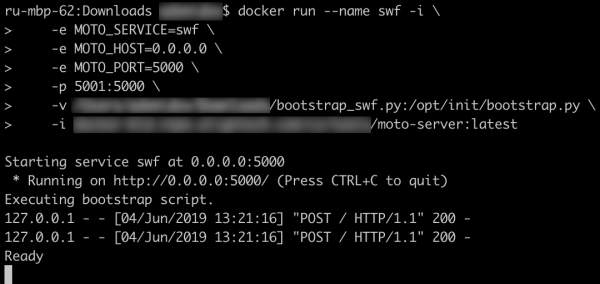
It works!
Thus, we can create a docker-compose.yml that will help save time on testing the changes:
docker-compose.yml
version: '3'
services:
  s3:
    image: picadoh/motocker
    environment:
      - MOTO_SERVICE=s3
      - MOTO_HOST=10.0.1.2
    ports:
      - "5002:5000"
    networks:
      motonet:
        ipv4_address: 10.0.1.2
    volumes:
      - /tmp/bootstrap_s3.py:/opt/init/bootstrap.py
  swf:
    image: picadoh/motocker
    environment:
      - MOTO_SERVICE=swf
      - MOTO_HOST=10.0.1.3
    ports:
      - "5001:5000"
    networks:
      motonet:
        ipv4_address: 10.0.1.3
    volumes:
      - /tmp/bootstrap_swf.py:/opt/init/bootstrap.py
  ec2:
    image: picadoh/motocker
    environment:
      - MOTO_SERVICE=ec2
      - MOTO_HOST=10.0.1.4
    ports:
      - "5003:5000"
    networks:
      motonet:
        ipv4_address: 10.0.1.4
    volumes:
      - /tmp/bootstrap_ec2.py:/opt/init/bootstrap.py
networks:
  motonet:
    driver: bridge
    ipam:
      config:
        - subnet: 10.0.0.0/16
In fact, this approach can be used not only on the developer's laptop. Preliminary tests with mocks after building will help eliminate potential issues during startup in development* environments.
Links:
Motocker repo —
Moto repo —
Boto3 Docs —
Source: habr.com
