

Mozilla has unveiled a new recommendation system called Firefox Suggest, which offers additional suggestions while typing in the address bar. Unlike recommendations based on local data and search engine queries, this new feature is capable of providing information from third-party partners, which can include both non-profit projects like Wikipedia and paid sponsors.
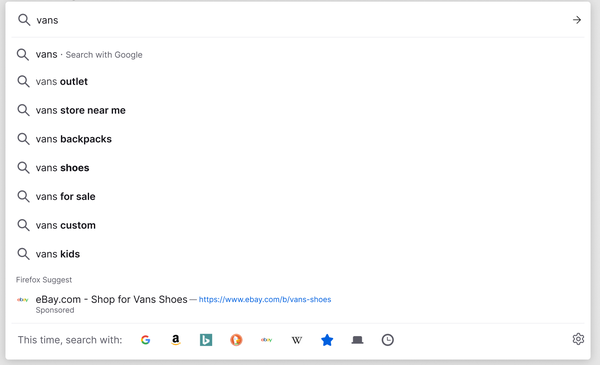
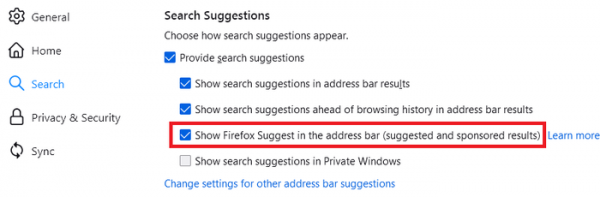
For instance, when a user starts typing a city name in the address bar, a link to a description of the most relevant city on Wikipedia will be suggested; similarly, when typing a product, a link to purchase it on eBay will appear. Suggestions may also include sponsored advertising links obtained through a partnership program with adMarketplace. Users can enable or disable these additional recommendations in the 'Search Suggestions' section of the 'Search' settings.
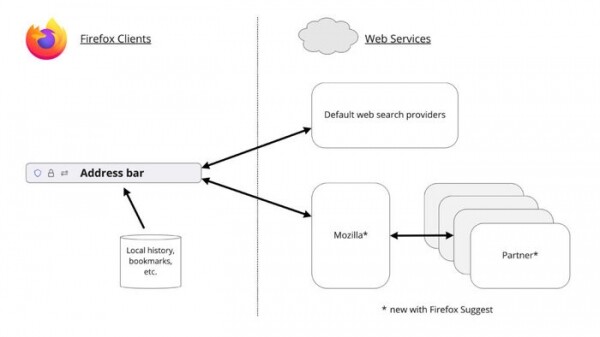
If Firefox Suggest is enabled, the data entered in the address bar, as well as information about clicks on the recommendations, is sent to Mozilla's server, which relays the request to the partner's server in a way that prevents the data from being tied to a specific user. IP addressTo provide recommendations based on nearby events, partners are also sent user location information, limited to city-level data and derived from the user's IP address.
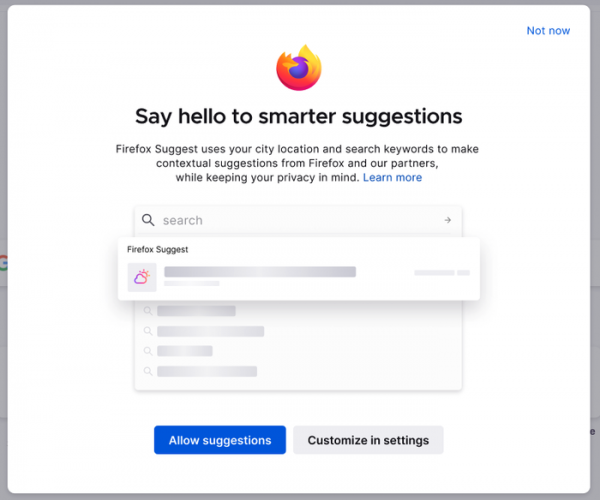
Initially, the Firefox Suggest feature will be activated only for a limited number of users in the US. Before enabling Firefox Suggest, users will see a special prompt asking them to confirm the activation of this new feature. Notably, a prominently displayed button for consent is followed by a button directing users to settings, but there is no explicit option to decline the offer. This creates the impression that the feature is being pushed and that users cannot refuse it—only careful examination of the content reveals a small 'Not now' text in the top right corner, which provides a link to opt out.
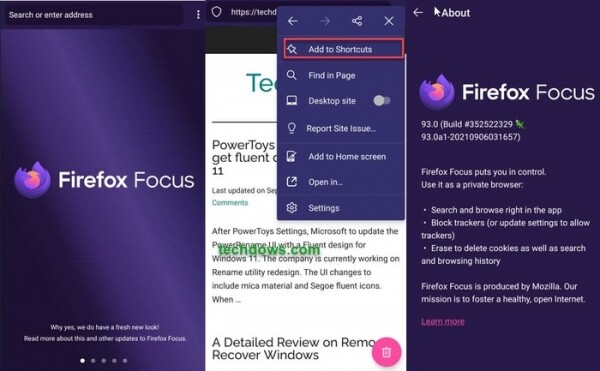
Additionally, it is worth noting the start of testing for the new interface of the Firefox Focus browser for Android. The new interface will be offered in Firefox Focus version 93. The source code of Firefox Focus is distributed under the MPL 2.0 license. The browser is designed to ensure privacy and give users complete control over their data. Firefox Focus includes tools to block unwanted content, including advertisements, social media widgets, and external JavaScript tracking code. Blocking third-party code significantly reduces the amount of data loaded and positively affects page loading speed. For instance, compared to the mobile version of Firefox for Android, pages in Focus load on average 20% faster. The browser also has a button for quickly closing a tab while clearing all associated logs, cache records, and cookies. A downside is the lack of support for extensions, tabs, and bookmarks.
In Firefox Focus, the sending of telemetry data with anonymized statistics on user behavior is enabled by default. Information about the data collection is clearly indicated in the settings and can be disabled by the user. Besides telemetry, upon installation of the browser, information about the source of the application (campaign identifier, IP address, country, locale, OS) is sent. If the data sending mode is not disabled, information about the frequency of application usage is periodically sent afterward. The data includes details about application launch activity, used settings, frequency of opening pages from the address bar, and the frequency of search queries (information about which specific sites are opened is not transmitted). The statistics are sent to servers the third-party company Adjust GmbH, which also possesses data about the device's IP address.
In addition to a complete interface overhaul in Firefox Focus 93, settings related to blocking tracking code for user movements have been moved from the menu to a separate panel. The panel appears when touching the shield icon in the address bar and contains information about the website, a toggle to manage tracker blocking specific to the site, and statistics on blocked trackers. Instead of a missing bookmark system, a shortcuts system has been proposed, allowing users to add frequently visited sites to a separate list (menu '…', button 'Add to shortcuts').
Source: opennet.ru
