

The developers of the Kagi search engine have released the alpha version of the Orion web browser for the Linux platform. The Orion builds for Linux are packaged in the flatpak format. Previously, the browser was only available for macOS and iOS. Orion is built on the WebKit engine and is notable for blocking ads and tracking code by default, the absence of telemetry collection and sending, integration with Kagi's search services, and support for extensions from Safari, Chrome, and Firefox.
Orion offers additional customization options for the interface and viewed pages, beyond just changing themes. For example, users can add custom buttons to the toolbar to invoke JavaScript code or execute browser functions. It allows for font changes, disabling non-scrollable headers, forced dark mode for websites, and selective disabling of JavaScript, cookies, and external fonts. There’s also a quick removal mode for HTML elements on pages through cursor selection, as well as a page editing feature that allows content modification before taking a screenshot or saving to disk.
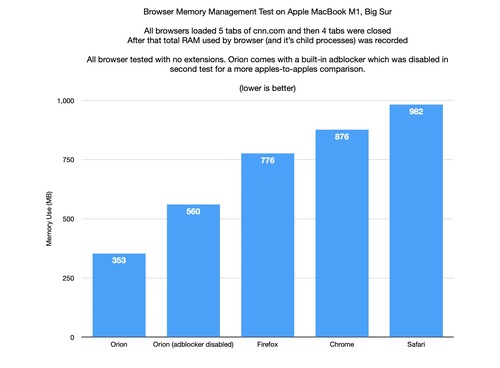
It claims to free up memory more effectively — in a conducted test, after closing tabs, the browser used 3 times less memory compared to Safari, 2.5 times less than Chrome, and 2 times less than Firefox. However, testers of the Linux version of Orion note a higher CPU load in comparison to Firefox.
Other features include: vertical tabs, quick search mode, integration with archive.org for viewing old versions of pages, a compact tab display mode, auto-hiding panels, User Agent modification, link previews, tab grouping, energy-saving mode, and the ability to block autoplay of sound and video, as well as disabling copy protection used on some sites.
The alpha version for Linux has implemented all basic features, including local export/import, a password manager, management of horizontal and vertical tabs (except for the Tab Switcher interface), session saving, automatic state recovery after a restart, bookmarks, grouping saved pages into folders, and navigation history management. WebKit extensions are not yet supported, and there is no infrastructure for synchronization between different user systems.
Source: opennet.ru
