

Everything is permissible for me, but not everything is beneficial
New Testament, 1 Corinthians 10:23
In recent years, NVIDIA graphics cards have not been kind to the average gamer regarding overclocking. On the 10th series boards, the algorithms for automatically managing GPU clock frequencies are set up to use up most of the performance reserve within the calculated TDP and the cooling system's capabilities. The Turing family accelerators have, in turn, thoroughly disappointed overclockers, as even 'extreme' devices designed for liquid nitrogen overclocking—such as —are virtually devoid of software voltage mode functionality. The last bastion where overclocking still thrives is AMD graphics cards. With "Radeons" based on the Polaris and Vega chips, enthusiasts can explore freely, even with the opposite intent—reducing power consumption through undervolting.
New are also ready for experiments. The high energy efficiency provided by the RDNA architecture and the 7nm process alone opens enticing prospects, and the setup of the reference graphics cards isn’t as bad as it might seem at first glance. They have a strong VRM with ample current reserves, and even the elevated GPU power voltage can be seen positively: there’s room for both overclocking and undervolting. The cooler has slightly underperformed, but for now—until the arrival of the first partner graphics cards in mid-August—we’ll have to accept that. In any case, the weak cooling system won’t hinder us from discovering what the Navi chips are capable of in light of the latest overclocking achievements, as we are willing to endure the noise of the turbine running at high speeds for you, dear readers.
PowerPlay software charts promise the Radeon RX 5700 XT clock speeds of up to 2.3 GHz. Tests with liquid cooling conducted by our foreign colleagues have already confirmed that even if it’s not 2.3 GHz, reaching 2.2 GHz is quite achievable. Overclocking the base version of the Radeon RX 5700 seems like a surefire investment since the card operates at initially reduced GPU frequencies. But let’s not pretend these lines were written before we conducted our own tests. In the realm of virtually unlimited overclocking of Navi chips, it turned out there’s less practical sense than we anticipated — at least, this holds true for the top model. Furthermore, it’s not just about the quality of cooling and power consumption, which are often considered last when overclocking to the limit.
However, the experiments with the new ‘Radeons’ have provided plenty of food for thought — regarding the prospects of new GPUs on the 7 nm process and the issues that hinder the performance of modern consumer graphics cards from both manufacturers. As a result, a different task emerged: how much can the power consumption of the Radeon RX 5700 and RX 5700 XT be reduced through undervolting with minimal performance loss (and consequently, reduced heat and noise levels)? It turns out, much more than initially thought.
Thermal interface of reference graphics cards: graphite pad instead of thermal paste
Before we begin overclocking, undervolting, and subsequent performance measurements of the Radeon RX 5700 and RX 5700 XT, let’s settle one secondary issue. It is known that starting from as the thermal interface between the GPU and the cooler for AMD’s reference graphics cards, a graphite pad is used instead of the usual thermal paste. To photograph the printed circuit boards in the initial review of the accelerators, we disassembled the cooling system, and the thermal pad did not survive, tearing into shreds. So, why not check how the operational parameters of the cooler have changed after replacing the thermal interface with the proven ARCTIC MX-2 paste?
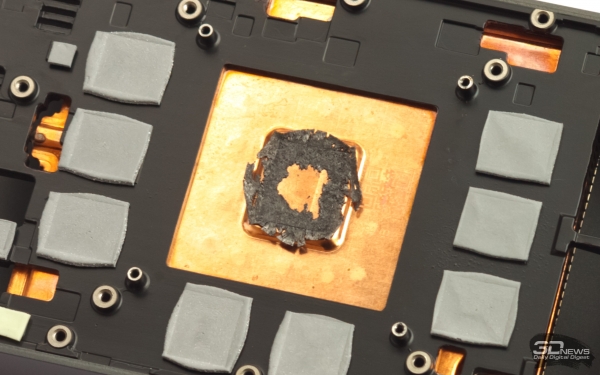
The graphite thermal pad, chosen by AMD for the Radeon VII and Navi, is called Hitachi TC-HM03 and has extremely high thermal conductivity compared to thermal pastes — 40–90 W/(m·K). For comparison, the thermal conductivity of ARCTIC MX-2 is only 5.6 W/(m·K), while that of the high-quality Thermal Grizzly Kryonaut paste is 12.5 W/(m·K). Among all types of thermal interface materials used for heat dissipation from microchips, only liquid metal has better characteristics — such as 73 W/(m·K) for the Thermal Grizzly Conductonaut alloy. However, there are several reasons why materials like Hitachi TC-HM03 have not yet replaced thermal pastes in any cooling systems. Firstly, they are simply expensive, and secondly, the resulting thermal conductivity of the interface is inversely proportional to its thickness, which is obviously greater for the pad than for the paste — provided that the radiator is adequately and evenly pressed. However, it is said that the flaws of the reference coolers in this regard prompted AMD to abandon thermal paste first in the Radeon VII and then in the accelerators based on Navi chips.
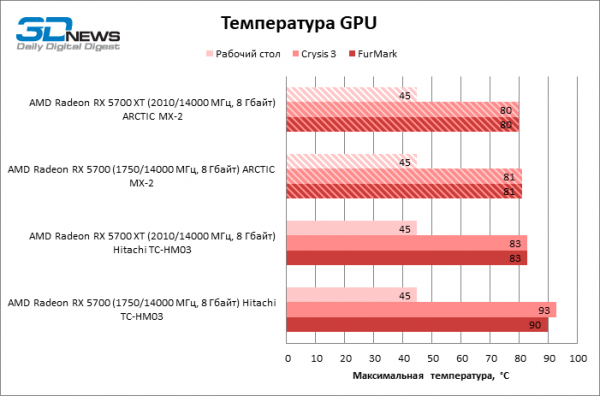
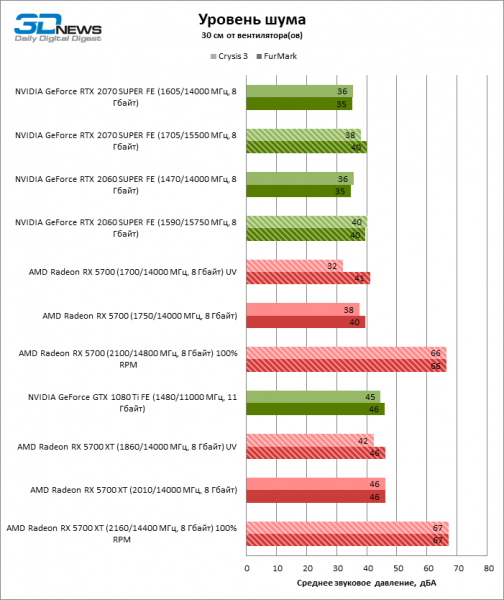
In any case, there is no graphite pad in our graphics cards now, and here is what it has led to. The thermal paste had absolutely no effect on the noise level and stable frequencies under load (they only shifted by 12–37 MHz in the Crysis 3 test), but GPU temperatures did decrease — by 3 °C for the higher model, while the crystal of the standard Radeon RX 5700 became cooler by a full 13! It appears that the test sample originally had some issues with the assembly of the cooling system. In any case, we have now confirmed that using Hitachi TC-HM03 instead of the usual thermal paste is not a problem, but it is also not a miraculous solution that the reference Radeon cards cannot do without. We didn't even have to increase the pressure using washers on the radiator screws to compensate for the thickness difference between the thermal paste layer and the graphite pad. And it certainly isn't worth removing it in hopes of better overclocking the GPU — the clearly weak cooler on the reference boards will not fix that.
Overclocking the Radeon RX 5700 and RX 5700 XT with software PowerPlay tables
Before describing the method that unlocks the clock speeds, power voltage, and power reserve of graphics cards based on Navi chips, let's issue a standard warning. Any overclocking, especially far beyond standard specifications, is done at your own risk, and you are responsible for the consequences. The safety of Navi chips and other components of the graphics card in such conditions is not guaranteed by anyone.
Now, if you're ready to take the red pill of overclocking, feel free to download and apply the files published by the German resource igor’sLAB for the basic version and for . They contain Windows registry keys with PowerPlay software tables that set the initial values of the variables we are interested in and the range within which they can be adjusted. This recipe works because when the AMD graphics driver is installed, a copy of the PowerPlay table from its BIOS is written to the registry, but with each subsequent reboot, the driver refers to the registry. This is how boards with Polaris and Vega chips were overclocked. And Navi — despite AMD's promise to close the loophole — was no exception.
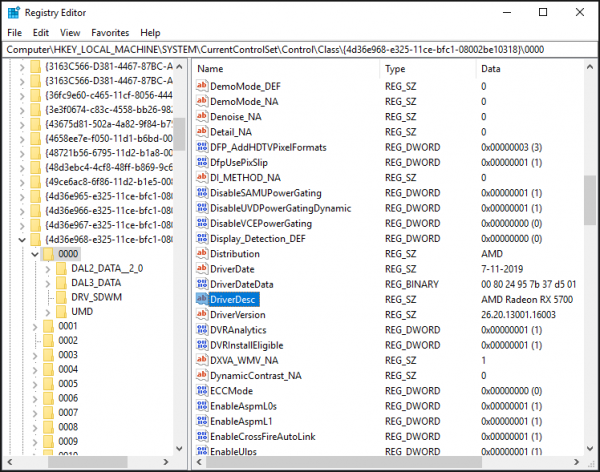
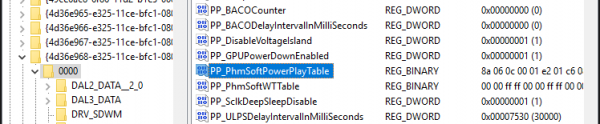
To hack PowerPlay, you need to import one of the reg files prepared by igor’sLAB into the registry and reboot the computer, but first it’s advisable to clean the registry of all entries related to video adapters that have ever been in the system using the Display Driver Uninstaller program, followed by a clean driver installation. Otherwise, you need to ensure that the reg file refers to the correct key by the DriverDesc variable, and correct the address if necessary. After importing into the registry, the substitute PowerPlay table will appear within the 16-bit variable PP_PhmSoftPowerPlayTable, and to restore the settings defined by the board's firmware, it is enough to delete it from the registry — either manually or with the help of .
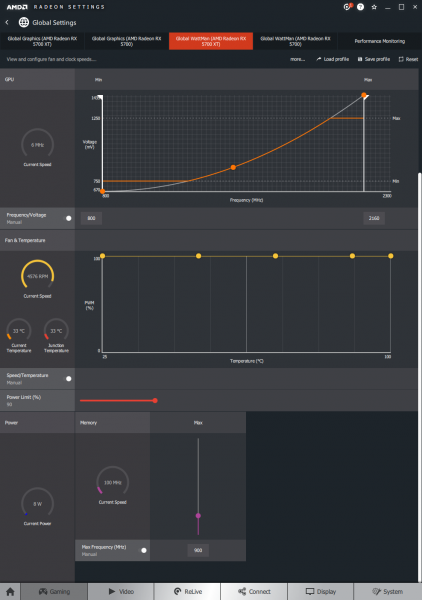
The most aggressive tables for Navi chips allow the Radeon RX 5700 XT graphics processor clock speed to reach 2300 MHz, with a supply voltage of up to 1.25 V and a power reserve of 90%. It's noteworthy that the entire scheme for registering power consumption on AMD graphics cards relies on the GPU voltage regulator and does not account for the energy consumption of other device components or conversion efficiency (unlike NVIDIA boards, which measure current on shunts in the 12 V lines). As a result, the available power slider in the WattMan program pertains only to the graphics processor: with a standard limit of 180 W, the PowerPlay software tables allow it to be expanded to 342.
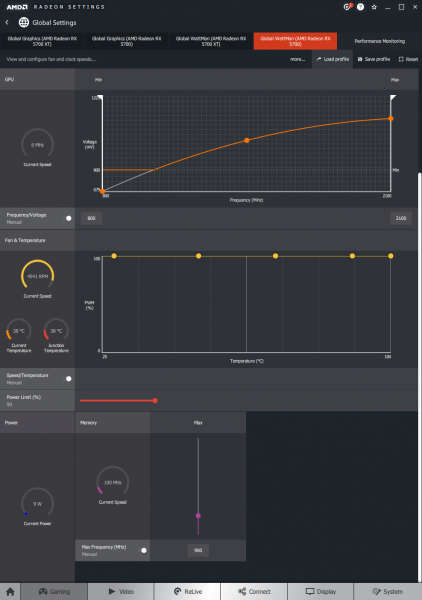
The basic version of the Radeon RX 5700, on the other hand, will be limited to a core clock speed of 2100 MHz, a supply voltage of 2.225 V, and a GPU power of 285 W (+90%). In both cases, the GDDR6 chips can be overclocked to 1 GHz, which corresponds to a bus bandwidth of 16 Gbit/s per contact. It's a pity that there is still no option to flash the Radeon RX 5700 with the firmware from the higher model to put them on equal initial conditions.
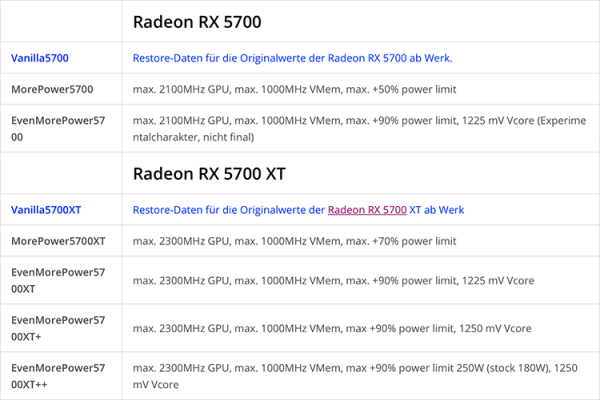
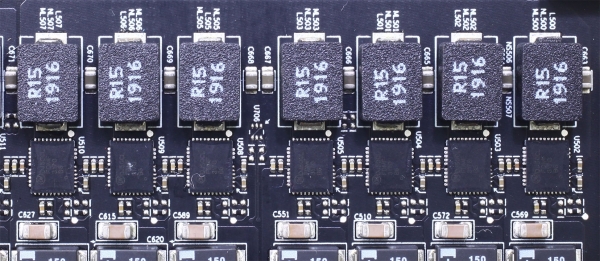
The power limits that have become available for the Radeon RX 5700 and Radeon RX 5700 XT thanks to the PowerPlay software tables look monstrous. AMD itself allows the appetite of both GPU models to increase only to 180 and 270 W, respectively. But strangely enough, the reference graphics cards are quite prepared for such high power consumption — at least in terms of the voltage regulator. The VRM of the reference boards includes 6–7 ON Semiconductor FDMF3170 power stages rated for 70 A each. Such powerful and high-quality components have only been found in the GeForce RTX 2080 Ti and Radeon VII so far. In comparison, the Founders Edition accelerators on TU106 chips (GeForce RTX 2060, RTX 2060 SUPER, and RTX 2070) are satisfied with six power stages rated for 55 A.
However, our warning still stands firm. The voltage regulator MOSFETs are not the only devices on the printed circuit board that will be subjected to increased strain. This is especially true for the Navi 10 graphics processor, which requires a quite high supply voltage for overclocking beyond 2 GHz, according to the standards of 7 nm photolithography chips.
To set the clock frequency of the Radeon RX 5700 XT at 2160 MHz, it was necessary to utilize the entire voltage reserve, which in the available PowerPlay tables reaches up to 1.25 V. Both the Radeon RX 590 and even the water-cooled Radeon RX Vega 64 (referring to chips manufactured using the 12 and 14 nm process) are satisfied with less. We're already confident about the base version of the Radeon RX 570: GPU overclocking reached a limit of 2100 MHz, but maintaining stability requires lower power voltage than the XT at the stock frequency of 2010 MHz — 1.093 V. In terms of operating parameters, the Radeon RX 5700, processed using PowerPlay software tables, is essentially an XT, with simultaneous overclocking, a greater power reserve, and undervolting.
 |  |
However, overclocking the GDDR6 memory to its limit of 1000 MHz on both boards proved impossible. In the case of the higher model equipped with Samsung K4Z80325BC-H14 chips, it was even necessary to sacrifice the achievements we gained in the main review of new products, settling for a resulting bandwidth of 14.4 Gbps. The Radeon RX 5700, on the other hand, allowed for better memory overclocking (Micron 9GA77 D9WCW chips) than before — reaching up to 14.8 Gbps. It seems there were indeed some issues with the cooling system installation on this card.
The key factor for daring experiments with Navi chips is enhanced cooling. In the future, AMD's partners will address this issue, but for now, we only have reference graphics cards at our disposal, so we will have to simply run the turbine at maximum speed — this is the only way to keep the temperature in the hottest point of the core (Junction Temperature), which the card's automation targets, within 110 °C, after which frequency throttling begins.
Moreover, having more airflow under the reference cooler wouldn't hurt the RAM either. Unlike most NVIDIA accelerators, the Radeon RX 5700 (XT) reports GDDR6 temperature sensor readings through the API, which can be observed in GPU-Z and overclocking utilities. Even at stock settings, the memory heats up to 78–82 °C, which is already quite high — at least for Micron chips designed to operate at temperatures up to 95 °C (we couldn't find Samsung's specifications publicly available). There's no need to worry about the voltage regulator. The power stages FDMF3170 have such an excellent efficiency that the temperature under load does not exceed 68 °C on the XT board and 63 °C on the 'regular' Radeon RX 5700 — even though in the overall cooling system, the GPU is effectively heating its own VRM instead of the other way around.
|
|
Undervolting
In our initial review of the Radeon RX 5700 and Radeon RX 5700 XT, we noted that both boards' GPUs operate with excessive power voltage. It seems AMD has decided to overclock the chips at all costs before launching them for sale and has hedged with elevated voltage due to the inevitable variability in silicon quality. Back during the Radeon RX 480 era, the company even promised to cut excess voltage to avoid unnecessarily heating the air. We still have slides from 2016 with these declarations.
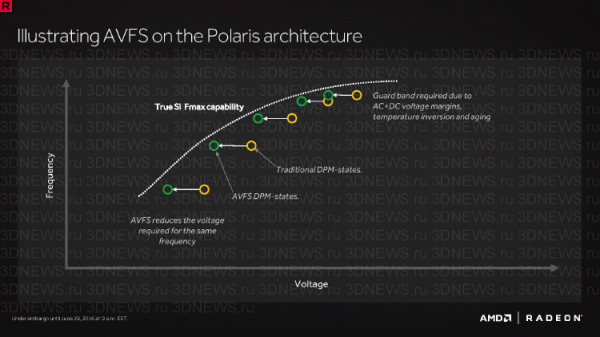
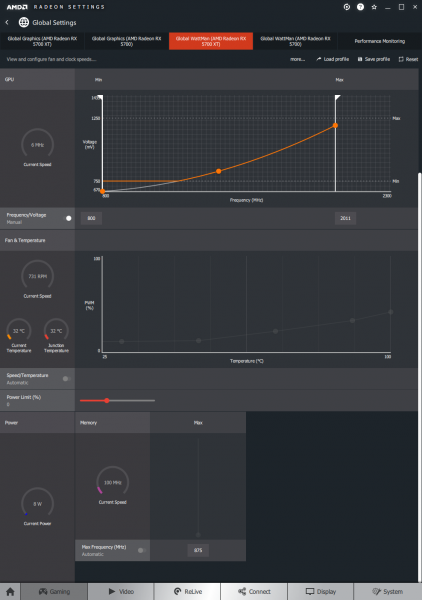
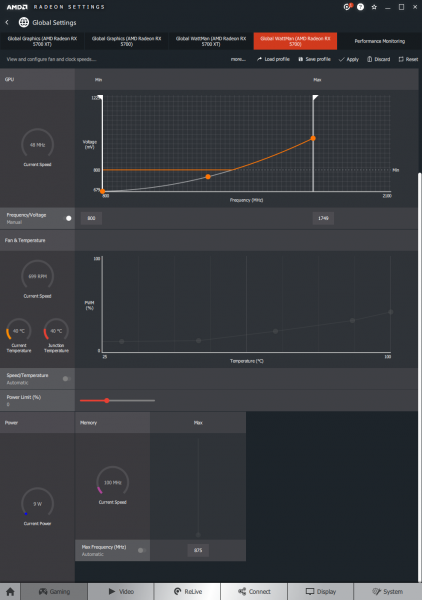
Fortunately, what AMD's engineers overlooked, the GPU buyer can accomplish on their own. In our first attempts at undervolting the Radeon RX 5700 and Radeon RX 5700 XT, we aimed not to lose any FPS in games and achieved a significant reduction in power consumption even then. But the noise from the reference cooling system urges more active measures. To find the sweet spot between performance and power, bringing Navi back to the optimal position on the energy efficiency curve requires lowering the peak GPU frequencies along with the feeding voltage. With the Radeon RX 5700 XT, we reduced the core clock limit from 2010 to 1860, and the power voltage from 1.193 to 0.991 V. Of course, some performance loss is inevitable, but it's not as significant as one might assume based on peak frequencies — we will verify this in due course.
The stock parameters of the junior version of the Radeon RX 5700 are already close to the comfort zone of the Navi chip, but further optimization is still possible. To reduce the GPU voltage from 0.979 to 0.839 V, it is enough to stop at the peak frequency of 1700 MHz instead of the original 1750.
|
|
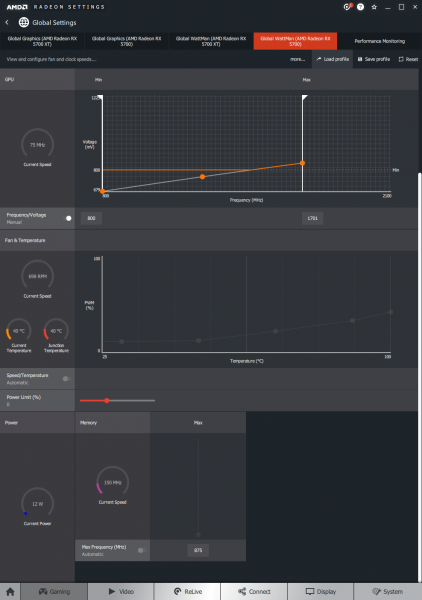
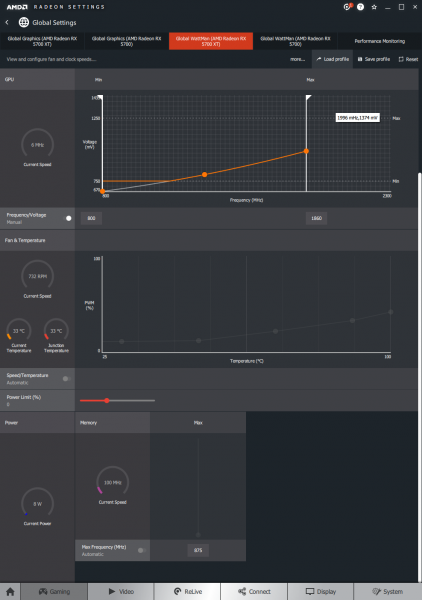
Clock frequencies under load, power consumption, temperature, noise level
Judging by preliminary measurements in Crysis 3 and operational parameters in modern games, the PowerPlay software tables have done their job. With an average GPU frequency of 1864 MHz that the Radeon RX 5700 XT maintains across 12 test games, the senior Navi jumped up to 2100 MHz, while the instantaneous frequency reaches 2141 MHz. The clock frequency delta lies within 153 and 305 MHz depending on the specific application, accounting for a relative increase of 8–17%.
However, as expected, all the energy efficiency of Navi has been thrown out of the window at such overclocking. The chip operates almost continuously at a frankly alarming voltage of 1.245 V (such a voltage was needed seven years ago for overclocking Tahiti graphics processors built on the 28 nm process), while the consumed power in Crysis 3 rose to 325 instead of 222 W in stock mode. No wonder we ran the reference turbine at maximum speed: the GPU temperature according to the edge sensor even dropped from 80 to 77 °C, while the GDDR6 chips decreased from 82 to 78 °C. Nevertheless, the junction temperature still increased from 92 to 101 °C — just a step away from the 110 °C mark, after which automatic throttling occurs.
The noise from the cooling system running at around 4500 RPM, while enjoyable for true overclockers, is totally unacceptable for continuous operation. The overclocked Radeon RX 5700 XT clearly needs a more powerful cooler — preferably something that is three slots wide with multiple fans, or even better, a liquid cooling solution. Fortunately, water blocks for reference cards are already available for purchase.
| Operational parameters under load (Crysis 3) | |||||||
|---|---|---|---|---|---|---|---|
| Graphics Card | Settings | GPU Clock Frequency, MHz | GPU Power Voltage, V | Fan Speed, RPM (% of max.) | |||
| Avg. | Max. | Limit | Avg. | Max. | Avg. | ||
| AMD Radeon RX 5700 XT (2010/14000 MHz, 8 GB) | ARCTIC MX-2 Thermal Paste | 1816 | 1833 | 2010 | 1,083 | 1,193 | 2100 (43%) |
| AMD Radeon RX 5700 XT (1860/14000 MHz, 8 GB) UV | ARCTIC MX-2 Thermal Paste, -201 mV vCore | 1807 | 1812 | 1860 | 0,993 | 0,993 | 1836 (38%) |
| AMD Radeon RX 5700 XT (2160/14400 MHz, 8 GB) | ARCTIC MX-2 Thermal Paste, +58 mV vCore | 2100 | 2106 | 2160 | 1,245 | 1,250 | 4533 (100%) |
| AMD Radeon RX 5700 (1750/14000 MHz, 8 GB) | ARCTIC MX-2 Thermal Paste | 1652 | 1665 | 1750 | 0,952 | 0,981 | 1535 (32%) |
| AMD Radeon RX 5700 (1700/14000 MHz, 8 GB) UV | ARCTIC MX-2 Thermal Paste, -140 mV vCore | 1637 | 1641 | 1701 | 0,843 | 0,843 | 1263 (26%) |
| AMD Radeon RX 5700 (2100/14800 MHz, 8 GB) | ARCTIC MX-2 Thermal Paste, +113 mV vCore | 2033 | 2037 | 2100 | 1,093 | 1,093 | 4473 (100%) |
Note: All parameters are measured after the GPU has warmed up and clock frequencies have stabilized.
The base model Radeon RX 5700, thanks to PowerPlay software tables, overclocks even better, and appears more viable overall by other parameters. Instead of an average stable frequency of 1683 MHz in test games, we achieved 2053 MHz, with the difference in clock speeds during overclocking and standard mode fluctuating between 325 to 353 MHz (19–21%). The overclocked RX 5700 runs at higher than standard XT levels, but the supply voltage remains almost the same at 1.093 V. The power increase from 187 to 250 W is certainly not great news, but when comparing both graphics cards in overclocking, the higher model only gains 72 MHz in average gaming frequencies while consuming 75 W more. This illustrates the sacrifices made for every megahertz when the chip operates near its frequency limit. For Navi 10, the area of rapidly diminishing returns begins around 2 GHz, and anything above 2.1 GHz is of more academic than practical interest.
It is worth noting that NVIDIA graphics cards also struggle to overclock just above 2 GHz at power supply voltages comparable to those of the Radeon RX 5700, even though the Turing chips do not employ as fine a photolithography as the 7-nanometer Navi. However, the increase in transistor density provided by the new TSMC process does not necessarily mean that the supply voltage (especially outside typical operating conditions) must always be lower.
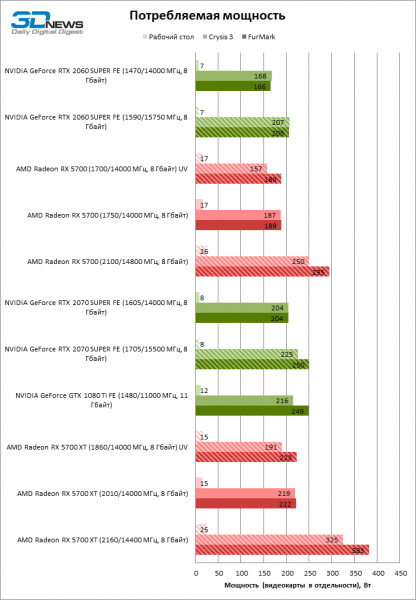
Note: The power of graphics cards is measured separately from the CPU and other PC components using a JUNTEK VAT-1050 ammeter. To simultaneously measure the current passing through the auxiliary power connectors and the motherboard slot, the graphics card is connected through a hard PCI Express x16 riser, in which the power lines are broken and routed to a separate cable.
Enhanced cooling at maximum turbine speeds is not as critical for overclocking the Radeon RX 5700 as it is for the XT model, and it was mostly needed for precautionary measures to avoid throttling. In the Crysis 3 test, the maximum GPU temperature measured at the edge sensor dropped from 81 °C to 66 °C, while the Junction Temperature remained steady at 79–80 °C, and the GDDR6 chips did not exceed 72 °C. However, while it is not essential to endure the noise of the turbine spinning at 4,500 RPM for continuous operation of the overclocked Radeon RX 5700 under the reference cooler, some tweaks to the fan curve will still be necessary (after all, it consumes 14% more power than the XT in normal mode). Out of curiosity, we ran Crysis 3 on the overclocked Radeon RX 5700 with an increased power reserve without making any adjustments to the cooling system's automation, but it did not end well: the GPU quickly heated up to 90 °C at the edge sensor and up to 107 °C at the hotspot. The RAM chips exceeded the calculated parameters with a temperature of 98 °C, resulting in the operating system hanging without the ability to recover the graphics driver processes — typically what happens during a GPU memory failure.
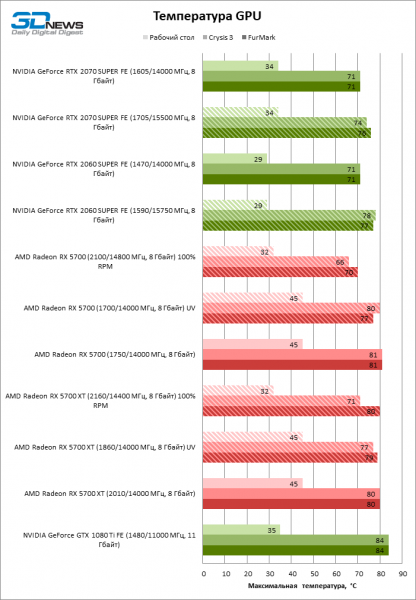
Both graphics cards passed under-volting with acceptable losses in clock frequencies. We reduced the core frequency of the Radeon RX 5700 XT by 200 MHz, but only in three out of twelve test games did the average frequencies suffer more than 100 MHz. The difference varied between -142 and +11 MHz (sometimes under-volting triggers automatic overclocking within the standard TDP), with an average delta of 64 MHz (3% of the stock level). Only the average peak frequency shifted down by 107 MHz. However, we managed to reduce the graphics card's power consumption at lower voltage and clock frequencies from 219 to 191 W. Unfortunately, this had a minimal effect on GPU temperature — just a 3 °C difference, and the fan still operates quite loudly, like the base RX 5700 in standard mode.
It's even harder to notice the underclocking of the Radeon RX 5700 based on clock frequencies under load than with the XT. The average GPU frequency in games dropped by 35–61 MHz (3%), while the maximum fell by 43 MHz. However, the main point is that the power consumption of the RX 5700 under load in Crysis 3 is now 157 W instead of 187 W: even the GeForce RTX 2060 SUPER consumes more. There are absolutely no complaints about the cooling system now: the GPU temperature remained the same, and the noise level is lower than that of the lower-end Founders Edition graphics cards.
Performance after overclocking and underclocking
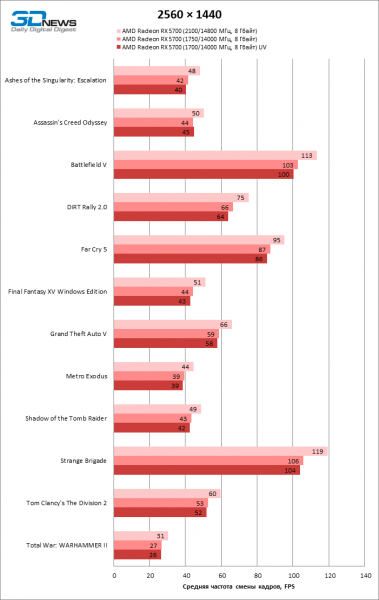
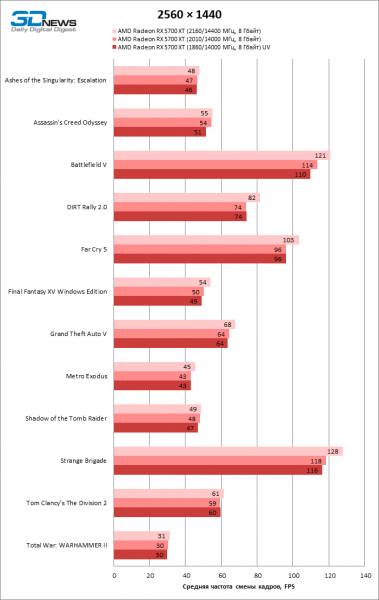
To evaluate gaming performance, we limited our tests to a resolution of 1440p: in this mode, the Radeon RX 5700 and RX 5700 XT are no longer bottlenecked by the central processor, and at 4K with maximum graphics quality settings, graphics cards of this level sometimes provide such a low frame rate that it isn't possible to conduct a comparison of results with the necessary precision. And as you might have guessed from hints scattered in the theoretical part of the review, overclocking Navi chips did not yield the results one might expect when looking at the bare clock frequencies.
The Radeon RX 5700 XT, despite an average GPU clock frequency increase of 13% (and power consumption of 106 W), only achieved an additional 5% in FPS. Analyzing the parameters in individual games, on average only 44% of the theoretical performance gained from overclocking is reflected in the test results. Worse yet, the minimum frame rate measured at the 1st percentile of the frame time distribution actually decreased in several games. Something clearly went wrong with Navi overclocking, but we are confident about clock frequencies — this is evident in power consumption. The main reason that can explain the disappointing results is the lack of memory bandwidth (MB), as the performance of the lower model correlates more closely with clock frequencies.
| AMD Radeon RX 5700 XT (2010/14000 MHz, 8 GB) | AMD Radeon RX 5700 XT (2160/14400 MHz, 8 GB) | Change in average GPU clock frequency, MHz | Change in average frame rate | |||
|---|---|---|---|---|---|---|
| Avg. GPU clock frequency, MHz | Max. GPU clock frequency, MHz | Avg. GPU clock frequency, MHz | Max. GPU clock frequency, MHz | |||
| Ashes of the Singularity: Escalation | 1 801 | 1 913 | 2 104 | 2 125 | +302 (17%) | +2% |
| Assassin’s Creed Odyssey | 1 955 | 1 970 | 2 108 | 2 117 | +153 (8%) | +2% |
| Battlefield V | 1 893 | 1 919 | 2 078 | 2 118 | +184 (10%) | +6% |
| DiRT Rally 2.0 | 1 848 | 1 883 | 2 105 | 2 131 | +257 (14%) | +11% |
| Far Cry 5 | 1 790 | 1 915 | 2 094 | 2 115 | +305 (17%) | +7% |
| Final Fantasy XV | 1 889 | 2 014 | 2 109 | 2 141 | +220 (12%) | +8% |
| GTA V | 1 926 | 1 954 | 2 094 | 2 111 | +168 (9%) | +6% |
| Metro Exodus | 1 824 | 1 906 | 2 094 | 2 114 | +270 (15%) | +5% |
| Shadow of the Tomb Raider | 1 892 | 1 960 | 2 106 | 2 133 | +215 (11%) | +2% |
| Strange Brigade | 1 865 | 1 911 | 2 101 | 2 114 | +236 (13%) | +8% |
| Tom Clancy’s The Division 2 | 1 815 | 1 852 | 2 099 | 2 128 | +284 (16%) | +3% |
| Total War: WARHAMMER II | 1 868 | 1 922 | 2 107 | 2 135 | +239 (13%) | +3% |
| Max. | 1 955 | 2 014 | 2 109 | 2 141 | +305 (17%) | +11% |
| Avg. | 1 864 | 1 927 | 2 100 | 2 124 | +236 (13%) | +5% |
| Min. | 1 790 | 1 852 | 2 078 | 2 111 | +153 (8%) | +2% |
The Radeon RX 5700 achieved a 13% increase in framerate when overclocked, with an average boost in clock speeds of 21% — already, 63% of the additional computational power has reached benchmarks. It's worth noting that the Micron memory on the RX 5700 board overclocked better than the Samsung chips on the Radeon RX 5700 XT (14.8 versus 14.4 Gbps), but the poor scaling of FPS when overclocking the top Navi model can hardly be attributed to the 3% difference in memory bandwidth. For instance, the Radeon VII, almost in a 1:1 ratio with the GPU clock speeds, as the bandwidth of the four HBM2 stacks is much higher compared to the 256-bit GDDR6 bus, and they overclock reasonably well.
| AMD Radeon RX 5700 (1750/14000 MHz, 8 GB) | AMD Radeon RX 5700 (2100/14800 MHz, 8 GB) | Change in average GPU clock frequency, MHz | Change in average frame rate | |||
|---|---|---|---|---|---|---|
| Avg. GPU clock frequency, MHz | Max. GPU clock frequency, MHz | Avg. GPU clock frequency, MHz | Max. GPU clock frequency, MHz | |||
| Ashes of the Singularity: Escalation | 1 672 | 1 696 | 2 026 | 2 057 | +353 (21%) | +14% |
| Assassin’s Creed Odyssey | 1 695 | 1 703 | 2 039 | 2 049 | +344 (20%) | +14% |
| Battlefield V | 1 673 | 1 684 | 1 998 | 2 021 | +325 (19%) | +10% |
| DiRT Rally 2.0 | 1 687 | 1 695 | 2 033 | 2 039 | +346 (21%) | +14% |
| Far Cry 5 | 1 676 | 1 687 | 2 022 | 2 049 | +346 (21%) | +9% |
| Final Fantasy XV | 1 692 | 1 719 | 2 040 | 2 075 | +348 (21%) | +16% |
| GTA V | 1 683 | 1 695 | 2 026 | 2 038 | +343 (20%) | +12% |
| Metro Exodus | 1 669 | 1 693 | 2 018 | 2 041 | +349 (21%) | +13% |
| Shadow of the Tomb Raider | 1 690 | 1 700 | 2 036 | 2 046 | +346 (20%) | +14% |
| Strange Brigade | 1 684 | 1 694 | 2 031 | 2 057 | +347 (21%) | +12% |
| Tom Clancy’s The Division 2 | 1 678 | 1 691 | 2 031 | 2 109 | +353 (21%) | +13% |
| Total War: WARHAMMER II | 1 689 | 1 697 | 2 033 | 2 049 | +344 (20%) | +15% |
| Max. | 1 695 | 1 719 | 2 040 | 2 109 | +353 (21%) | +16% |
| Avg. | 1 683 | 1 696 | 2 028 | 2 053 | +345 (21%) | +13% |
| Min. | 1 669 | 1 684 | 1 998 | 2 021 | +325 (19%) | +9% |
However, one should not mock the Radeon RX 5700 XT and the AMD developers for the card's lack of memory bandwidth. If you take data from NVIDIA's GeForce RTX 20 series and compare theoretical computational power with gaming FPS, it becomes evident that the larger the GPU, the more gigaflops go to waste. The limited memory speed could have played a significant role in this, since all models based on the TU106 and TU104, except for the GeForce RTX 2060, have the same RAM configuration, and the largest jump in the relationship between theoretical performance and results in games occurs precisely between the RTX 2060 and the RTX 2060 SUPER: the base model has a 192-bit memory bus, while the SUPER has a 256-bit one. It’s no wonder NVIDIA has already gone with GDDR6 chips with a bandwidth of 16 Gbps on the GeForce RTX 2080 SUPER.
The Radeon RX 5700 XT has undoubtedly just exposed a problem that both graphics processor manufacturers face, since not a single NVIDIA chip can be overclocked this much without hardware modifications (not counting the 'elite' boards, for which firmware and software are provided only upon special request). However, the fault for overclockers' tears likely also lies with the software team at Radeon Technologies Group. There are issues with frame rendering consistency on Navi even at stock clock speeds. Moreover, RDNA is a completely new graphics architecture, and as is custom for this company, they didn’t manage to refine the driver in time for the premiere of the 5000 series from AMD.
| AMD Radeon RX 5700 XT (2010/14000 MHz, 8 GB) | AMD Radeon RX 5700 XT (1860/14000 MHz, 8 GB) UV | Change in average GPU clock frequency, MHz | Change in average frame rate | |||
|---|---|---|---|---|---|---|
| Avg. GPU clock frequency, MHz | Max. GPU clock frequency, MHz | Avg. GPU clock frequency, MHz | Max. GPU clock frequency, MHz | |||
| Ashes of the Singularity: Escalation | 1 801 | 1 913 | 1 804 | 1 819 | +3 (0%) | −2% |
| Assassin’s Creed Odyssey | 1 955 | 1 970 | 1 813 | 1 826 | -142 (7%) | −6% |
| Battlefield V | 1 893 | 1 919 | 1 782 | 1 794 | -112 (6%) | −4% |
| DiRT Rally 2.0 | 1 848 | 1 883 | 1 805 | 1 812 | -43 (2%) | 0% |
| Far Cry 5 | 1 790 | 1 915 | 1 801 | 1 811 | +11 (1%) | 0% |
| Final Fantasy XV | 1 889 | 2 014 | 1 793 | 1 914 | -96 (5%) | −2% |
| GTA V | 1 926 | 1 954 | 1 796 | 1 810 | -130 (7%) | 0% |
| Metro Exodus | 1 824 | 1 906 | 1 786 | 1 805 | -38 (2%) | 0% |
| Shadow of the Tomb Raider | 1 892 | 1 960 | 1 805 | 1 812 | -87 (5%) | −2% |
| Strange Brigade | 1 865 | 1 911 | 1 807 | 1 815 | -58 (3%) | −2% |
| Tom Clancy’s The Division 2 | 1 815 | 1 852 | 1 799 | 1 805 | -17 (1%) | +2% |
| Total War: WARHAMMER II | 1 868 | 1 922 | 1 805 | 1 812 | -63 (3%) | 0% |
| Max. | 1 955 | 2 014 | 1 813 | 1 914 | +11 (1%) | +2% |
| Avg. | 1 864 | 1 927 | 1 799 | 1 820 | -64 (3%) | −1% |
| Min. | 1 790 | 1 852 | 1 782 | 1 794 | -142 (7%) | −6% |
| AMD Radeon RX 5700 (1750/14000 MHz, 8 GB) | AMD Radeon RX 5700 (1700/14000 MHz, 8 GB) UV | Change in average GPU clock frequency, MHz | Change in average frame rate | |||
|---|---|---|---|---|---|---|
| Avg. GPU clock frequency, MHz | Max. GPU clock frequency, MHz | Avg. GPU clock frequency, MHz | Max. GPU clock frequency, MHz | |||
| Ashes of the Singularity: Escalation | 1 672 | 1 696 | 1 638 | 1 653 | -35 (2%) | −5% |
| Assassin’s Creed Odyssey | 1 695 | 1 703 | 1 650 | 1 658 | -45 (3%) | +2% |
| Battlefield V | 1 673 | 1 684 | 1 629 | 1 638 | -44 (3%) | −3% |
| DiRT Rally 2.0 | 1 687 | 1 695 | 1 641 | 1 645 | -46 (3%) | −3% |
| Far Cry 5 | 1 676 | 1 687 | 1 627 | 1 641 | -49 (3%) | −1% |
| Final Fantasy XV | 1 692 | 1 719 | 1 639 | 1 673 | -53 (3%) | −2% |
| GTA V | 1 683 | 1 695 | 1 639 | 1 650 | -44 (3%) | −2% |
| Metro Exodus | 1 669 | 1 693 | 1 629 | 1 643 | -40 (2%) | 0% |
| Shadow of the Tomb Raider | 1 690 | 1 700 | 1 630 | 1 651 | -61 (4%) | −2% |
| Strange Brigade | 1 684 | 1 694 | 1 642 | 1 653 | -42 (2%) | −2% |
| Tom Clancy’s The Division 2 | 1 678 | 1 691 | 1 641 | 1 676 | -37 (2%) | −2% |
| Total War: WARHAMMER II | 1 689 | 1 697 | 1 644 | 1 650 | -46 (3%) | −4% |
| Max. | 1 695 | 1 719 | 1 650 | 1 676 | -35 (2%) | +2% |
| Avg. | 1 683 | 1 696 | 1 637 | 1 653 | -45 (3%) | −2% |
| Min. | 1 669 | 1 684 | 1 627 | 1 638 | -61 (4%) | −5% |
However, if the performance of Navi in games scales poorly with increased clock speeds, the opposite is also true: you can lower the frequencies while maintaining the same performance level. As a result of undervolting with reduced peak frequencies, both versions of the Radeon RX 5700 lost on average 1–2% FPS and, in the worst case, only 5%. Such modest losses are more than compensated by the 28–30 W savings in power consumption and reduced noise levels.
 |  |
Source: 3dnews.ru
