

If you need to choose the most striking evidence of progress in computer technology, convincing not just to specialists but also to the general public, it would undoubtedly be the mobile gadget — smartphone or tablet. At the same time, even the more conservative class of devices — laptops — has come a long way: from a supplement to desktop PCs, with their limitations that users inevitably have to cope with to be able to work on the go, to a full-fledged replacement for bulky desktops. Sizes are shrinking while performance is increasing. Many users now don’t require any intelligent devices other than a laptop and a smartphone, as compact computers weighing less than 2 kg are sufficient for most everyday needs. Even demanding games, once tied to tower PCs consuming several hundred watts, have become commonplace on laptop screens.
There remains just one area where desktops maintain their unquestionable leadership — professional applications for creating digital content. Unlike the comparatively light software for the average user — office packages and web browsers — as well as games, whose requirements can easily be adjusted to the hardware capabilities, professional video editing tools and, even more so, 3D rendering (and to some extent even photo editing software) consume all available resources for performance. It is considered, and not without reason, that using them on a mobile computer without a connection to a rendering farm in a server room is only feasible when there are no better alternatives or when the computer is not rightfully characterized as truly mobile. But how much longer will the status quo last?
 |  | |
Let’s clarify right away that we have no unlimited optimism regarding this issue: for work tasks with high demands on time and quality, it's impossible to fundamentally change the situation, as a stationary workstation or dedicated farm will always dominate in the commercial sector. However, we won't turn a blind eye to the fact that a laptop has already become a quite capable tool for producing visual content on a small scale. Processing photos from a digital camera, 2D graphic design, or video editing at moderate resolution without sophisticated compression formats—all of this can be handled by a standard portable machine, sometimes even without a discrete graphics processor. The path of development doesn’t lie in these extremes, but somewhere between YouTube clips and Hollywood, and manufacturers now have ample opportunities to make the next significant leap forward.
This article is dedicated to two interconnected tasks. First, we intend to find out what laptops are capable of in work applications, covering a wide range of software resource demands—from casual one-click photo processing to video editing and 3D rendering at a commercial level. The test hardware chosen for this purpose is also quite varied—several laptops running antagonistic operating systems (Windows and macOS), with different processors (ranging from two to six cores) and graphics (integrated Intel or discrete GPUs of various levels). While this approach doesn’t claim scientific validity or precise recommendations that visitors to 3DNews might expect, it will allow us to highlight several reference points within the multitude of possible hardware and software combinations. If readers support our foray into the realm of professional applications, we will further direct our efforts towards broader and more focused research.
On the other hand, let’s take a look at the latest initiative from the well-known company NVIDIA in the field of mobile PCs, which ultimately prompted us to work on this review. Just recently, at the end of May, it was announced from the Computex stage that a range of mobile computers under the RTX Studio brand is on its way to store shelves, through which NVIDIA aims to democratize and at the same time completely dominate the mobile workstation market. Has NVIDIA decided to become a laptop manufacturer, and if not, what does the RTX Studio program actually represent and what advantages does it offer to digital content creators?
NVIDIA RTX Studio Laptops
Honestly, when the author of this article first heard about the RTX Studio program but hadn’t had a chance to read the press release, he really thought that NVIDIA had released laptops under its own brand, and wasn’t too surprised by the news. After all, NVIDIA is known for its bold experiments, the company often seeks to penetrate seemingly unfamiliar market niches, values concepts like "ecosystem" and "vertical integration," and is generally moving from chip production to finished consumer and professional products. For example, rack-mounted farms and standalone workstations for rendering and GP-GPU are already being sold directly to customers. Let’s not speculate on what decisions NVIDIA will make in the future, but, at the moment, it is pursuing a different goal.
RTX Studio is a certification for computers from various manufacturers that meet specific hardware configurations, fault tolerance, and other operational characteristics related to work tasks. Among NVIDIA-approved systems, there are not only laptops but also 3-in-1 machines and desktop PCs. All computers feature a graphics card of at least GeForce RTX 2060 or higher — up to TITAN RTX — and the list of other components includes an Intel Core i7 or i9 processor, at least 16 GB of RAM, and a solid-state drive with a capacity of at least 512 GB. Systems with Quadro graphics (RTX 3000, 4000, and 5000) are categorized separately as workstations — either stationary or mobile.
 |  |
A total of 27 laptops from eight manufacturers have already adopted the RTX Studio sticker: Acer, ASUS, Dell, GIGABYTE, HP, Lenovo, MSI, and Razer. Retail prices for these devices start at $1599 for the base configuration, while the cost of more advanced models, especially those equipped with a Quadro graphics card, can easily reach several thousand dollars.
Thus, from a hardware standpoint, the RTX Studio program serves as a filter that excludes unbalanced configurations—such as those lacking sufficient RAM and SSD capacity—from the many systems claiming high performance. This certification inherently involves verifying and testing the hardware by NVIDIA.
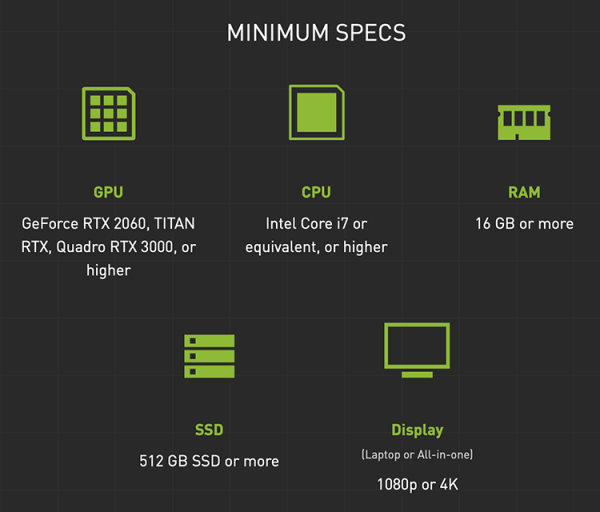
However, in order to qualify for the RTX Studio mark, a laptop or all-in-one PC must also possess a sufficiently good display. The minimum requirements listed on NVIDIA's website only specify a resolution of 1080p or 4K, but other documents suggest that an RTX Studio laptop should stand out in this regard as well—be it through G-SYNC functionality or other features that are more significant in a professional context, such as color gamut, wide dynamic range, PANTONE certification, etc. Therefore, the presence of the RTX Studio badge guarantees a certain level of image quality in a device, but does not completely address this issue. We would like to see a more stringent list of requirements for display specifications, given that NVIDIA is not solely focusing on raw CPU and GPU performance but is also seeking to simplify platform selection for visual content creators.
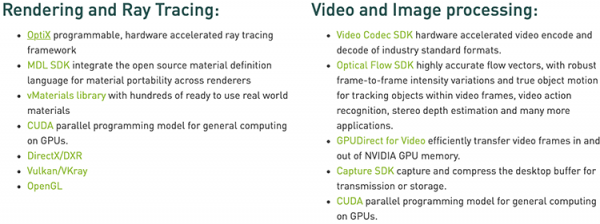
At the same time, the RTX Studio program is not limited to certifying computers and includes a comprehensive set of software that enhances the capabilities of popular design, development, and debugging tools. All APIs and SDKs included in , can be divided into three categories: tools for processing video and still images, packages for 3D modeling and programming (material libraries, profilers, SDKs for various graphical APIs, etc.), and, of course, libraries for the complete training and application cycle of neural networks.
Finally, specifically for professional applications, NVIDIA has developed a separate branch of GPU drivers for Windows 10, which was previously called Creator Ready and is now also referred to as Studio. However, the list of supported graphics cards does not solely include members of the RTX Studio program and extends to formally outdated models from the 10 series, starting from GeForce RTX 1050. According to the developers, the 'studio' driver contains all the optimizations for games typical of Game Ready releases but is verified for stability in key professional applications (including the simultaneous operation of several such programs) and unlocks some features that are unavailable in the gaming driver, such as color support with 10-bit resolution per channel in Adobe applications, which was previously only active in the driver for Quadro accelerators.
In addition to this, Studio promises a certain performance increase in compatible software. In our benchmarks, we did not find statistically significant differences in results between the Game Ready and Studio drivers; however, we do not rule out the possibility that we simply weren't looking for an advantage where it should be, and in software beyond our testing methodology, when using specific features or on different hardware, the Studio driver may indeed utilize GPU resources more effectively.
It is also worth noting that the releases of Game Ready and Studio are numbered according to a common scheme, but the professional package is updated significantly less frequently than the gaming one, as its releases are tied to major updates of content creation applications. At the time of writing this article, version 431.86 was available from September 4, although the newer gaming driver 436.48 was released on October 1. Considering how much game performance (or simply the ability to run it) can depend on the graphics driver, users of RTX Studio computers may sometimes have to juggle drivers to focus on their work.
Here is all the key information about the RTX Studio program that will be useful for buyers of a new generation GPU workstation and, we hope, will help in choosing the right configuration. We still need to determine how NVIDIA's campaign in the realm of professional applications correlates with the broader topic of our research — laptop performance in digital content processing software — and how it may ultimately impact the range of tasks that are already well within the capabilities of mainstream laptops or, conversely, still considered the domain of desktop workstations.
NVIDIA has good reason to seek to expand its already extensive holdings in the professional market right now. Even back when the first graphics cards based on Turing chips were introduced (initially only for desktop computers), there was no reason to doubt that the innovative features of the RTX family — hardware-accelerated ray tracing and neural network data processing (inference) — would sooner or later find their way into professional applications and be in demand in this field, if not more so, than in gaming. This statement might seem ambiguous, considering that most game developers are still hesitant to integrate ray tracing and image scaling via DLSS into their products, and the wave of high-profile releases under the RTX On banner won't hit gamers until late this year or early next. However, it is essential to understand how the market for professional software differs from the gaming industry.
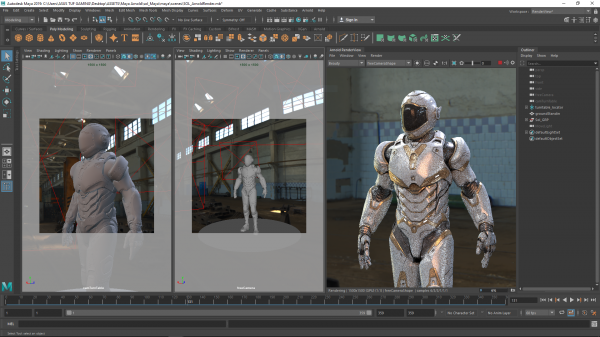
On one hand, it is more conservative: tools for creating digital content are costly for both developers and buyers. Certain software is used for years, maintained over time, and workflows are fine-tuned, so users are not in a rush to upgrade to the next version just for new enticing features. On the other hand, this market quickly embraces useful initiatives and often abruptly ends support for outdated or inconvenient technologies, without concern for customers left behind. Game developers have to consider that there aren't too many owners of GeForce RTX accelerators yet, and each studio needs to do its part to leverage 'rays' and DLSS instead of simply using a fresh build of Unreal Engine or Unity. In contrast, working software for 3D modeling or video editing is tied into a unified infrastructure with many shared components—SDKs, renderers, codecs, etc. Owners (or teams of open source developers) of these tools could not ignore the potential of specialized blocks in NVIDIA's new chips. Integration into high-profile programs may take a long time, but once support from the software community reaches a critical mass, new features will be embedded permanently and rapidly find widespread application. Unlike games, hardware-accelerated ray tracing and neural networks in work tasks do not cause slowdowns; on the contrary, they provide a clear performance boost.
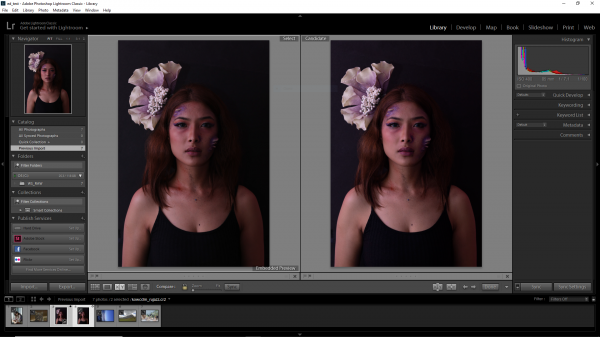
Fortunately, some work programs can already utilize the RT blocks and tensor cores of Turing chips. Some of them are still in beta (like the 3D renderer Arnold with Turing support and GPU acceleration), while others have already brought RTX platform support to commercial implementation—such as Adobe Photoshop Lightroom and the Octane renderer. Among the dozen applications we've selected for testing laptops, these programs make up just under a third. It's a more interesting proportion compared to the gaming methodology used by 3DNews in discrete graphics card reviews.
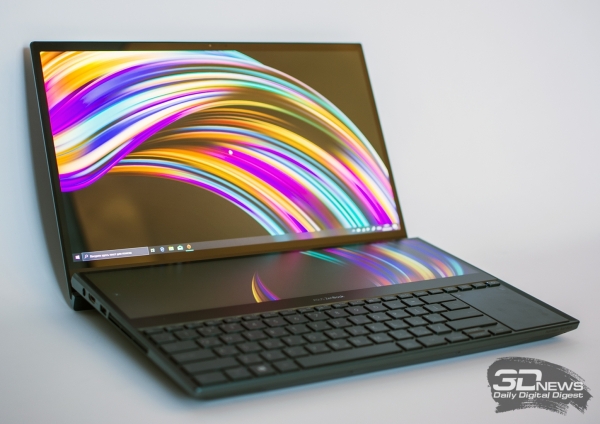
ASUS ZenBook Pro Duo (UX581GV)
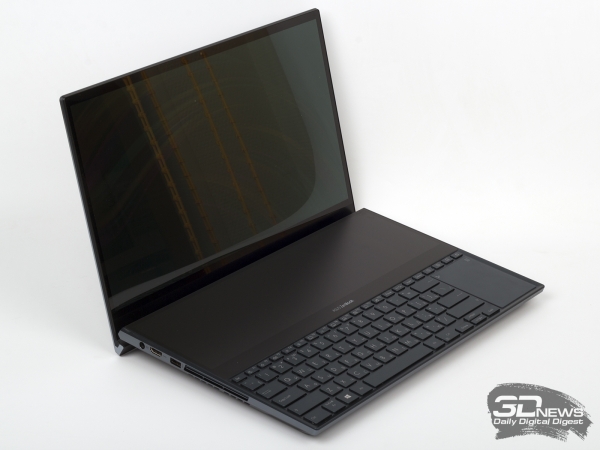
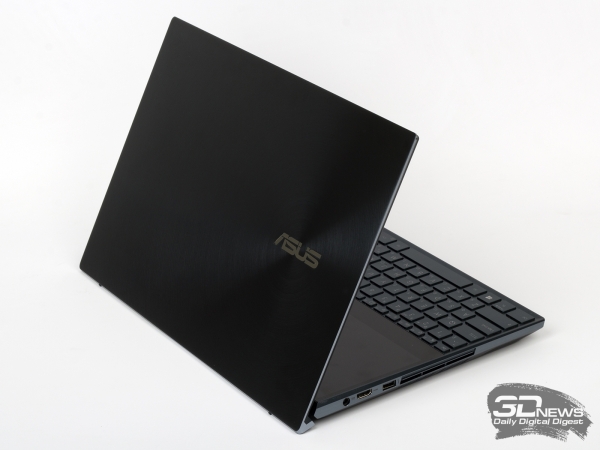
Before we dive into the benchmark results and present the full list of testing participants, we must acknowledge the first device under the RTX Studio brand that has come into our hands — albeit without a logo on the casing, as there simply isn't a suitable place for it. Readers who have noticed a resemblance to a recent guest in our testing lab are correct — , — is indeed the same model, but the list of components has changed slightly: this time instead of the top modification, which includes the Intel Core i9-9980HK processor (eight cores, Hyper Threading, and Turbo frequency up to 5 GHz), we received the version with the Intel Core i7-9750H (six cores, Hyper Threading, and Turbo frequency up to 4.5 GHz), and the RAM here is not 32 but 16 GB.
 |  |
In all other respects, the configuration of the machine has remained unchanged since our last encounter. The SSD is a high-performance Samsung MZVLB1T0HALR with a capacity of 1 TB, a model that ASUS likes to install in its laptops — it's a complete analog of the Samsung 970 EVO that we've studied for a long time, but for OEM supply, not retail. All UX581GV options come equipped with a GeForce RTX 2060 graphics card with 6 GB of RAM. Moreover, according to the laptop's specifications, this version of the NVIDIA discrete graphics does not belong to the Max-Q category, which means it should operate under load at quite high clock frequencies compared to similar chips in more compact machines that are constrained by cooling and battery life requirements.
15.6", 3840 × 2160, OLED + 14", 2840 × 1100, IPS
| ASUS ZenBook Pro Duo UX581GV | |
|---|---|
| Display | Intel Core i9-9980HK |
| Central Processor | NVIDIA GeForce RTX 2060 (6 GB GDDR6) Intel Core i7-9750H |
| Graphics Card | Up to 32 GB, DDR4-2666 |
| Memory | 1 × M.2 (PCI Express x4 3.0), 256 GB — 1 TB |
| Storage Installation | 1 × Thunderbolt 3 (USB 3.1 Gen2 Type-C) |
| Optical Drive | No |
| Interfaces | 1 × 3.5 mm mini-jack 2 × USB 3.1 Gen2 Type-A 230 W 1 × HDMI |
| Built-in Battery | No data |
| External Power Supply | 359 × 246 × 24 mm |
| Dimensions | 2.5 kg |
| Laptop Weight | 2 years |
| Operating system | Windows 10 x64; |
| Warranty; | 237,590 rubles for the test model with Core i7, 16 GB RAM, and 1 TB SSD |
| Price in Russia | 237,590 rubles for the test model with Core i7, 16 GB RAM, and 1 TB SSD |
The main pride of the ASUS laptop is, of course, the display—two of them, to be exact. The primary screen features a luxurious 15.6-inch touchscreen OLED panel with a resolution of 3840 × 2160 pixels. As is expected of organic LED panels, it offers 'infinite' contrast and viewing angles that surpass even standard LCD counterparts. Additionally, in a separate review of the ZenBook Pro Duo, we found that the display is quite well-calibrated by the standards of mass-market devices and boasts an exceptionally wide color gamut. The area opposite the main screen, with the keyboard shifted down, accommodates an additional touchscreen with a resolution of 3840 × 1100. For this purpose, the manufacturer opted for an IPS panel, and even compared to the neighboring OLED, the image quality on it looks excellent, clearly benefiting from calibration.
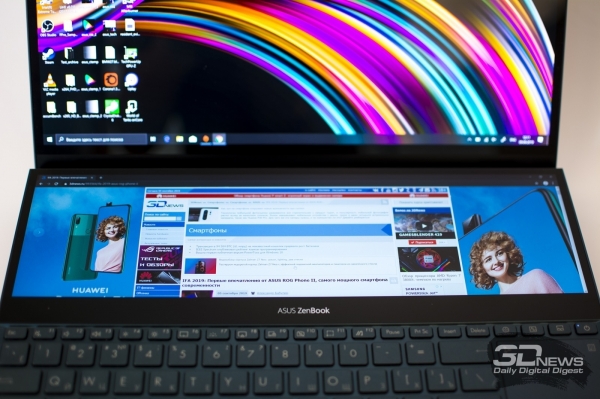
It's a good indication that the first sample of the RTX Studio family we are about to test in professional applications turned out to be as high-quality a product as the ASUS ZenBook Pro Duo. However, we should not overlook that we are dealing with an extremely expensive computer: the tested configuration with an Intel Core i9-9750H processor and 16 GB of RAM cannot be found in Russia for less than 237,590 rubles—in fact, due to market conditions, it is currently even pricier than the top version we tested last month. Furthermore, there are two nuances that may not be as critical for gaming but require attention in the context of professional applications. Firstly, the GeForce RTX 2060 graphics card itself has a solid performance margin even when adjusted for lower clock speeds compared to its desktop counterpart, but its 6 GB of RAM could become a hindrance in tasks that heavily depend on this metric—especially in 3D rendering of complex scenes.
Secondly, despite the fact that the main screen of the ZenBook Pro Duo has passed color reproduction tests with flying colors, OLED displays have known downsides. To keep the energy consumption of the panel within necessary limits, the controlling logic restricts the overall light output of all elements, meaning that an individually lit pixel on a white screen will not be as bright as a white point on a black background. In the context of serious color correction work, this is also problematic. Moreover, no OLED screen is immune to burn-in, which could permanently retain a trace of the OS interface for posterity. Finally, it’s easy to notice that in the design of the ZenBook Pro Duo, the main controls seem to be relegated to secondary roles. The keyboard, shifted closer to the edge, is perhaps a plus when the user is working at a desk, but some key sizes, particularly the placement and modest area of the touchpad, will require some adjustment.
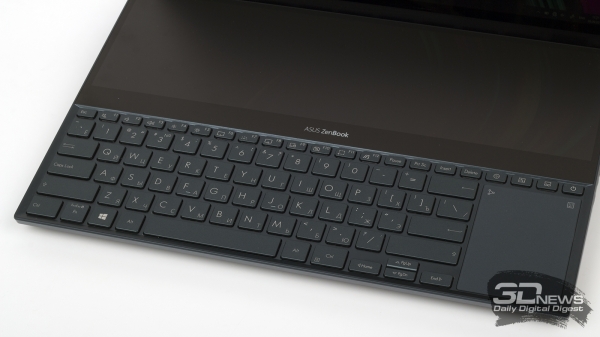
For a closer look at the ZenBook Pro Duo UX581GV and the results of its testing in gaming and everyday tasks, we recommend that readers return to the full of this experimental and, in many ways, extremely intriguing creation from ASUS. Now it’s time for the main course — a comparison of several laptops (including, of course, this one) in professional digital content processing applications.
Testing methodology
To evaluate the performance of the ZenBook Pro Duo and other devices against which the RTX Studio laptop will compete in benchmarks, we have compiled a selection of ten work applications. Some of them have previously served 3DNews in reviews of CPUs, graphics cards, and ready-made computers. Conversely, we have not yet touched upon others until we began working on the article you're currently reading. All the software in the testing methodology is designed for creating various types of visual content, covering a wide range of tasks and computational loads. Two of them are used by photographers and graphic designers — Adobe Photoshop and Lightroom. The second block of applications consists of software for video conversion and editing — Premiere Pro, DaVinci Resolve, and REDCINE-X Pro. Finally, the majority of the tests belong to 3D rendering tools utilizing ray tracing — packages Blender, Cinema 4D, Maya, and the OctaneRender renderer.
| Program | Test | Operating system | Settings | API | |
|---|---|---|---|---|---|
| Intel/macOS | NVIDIA/Windows | ||||
| Adobe Photoshop CC 2019 | Puget Systems Adobe Photoshop CC Benchmark | Windows 10 Pro x64 / macOS 10.14.6 | Basic Benchmark | OpenCL | CUDA |
| Adobe Photoshop Lightroom Classic CC 2019 | Enhance Details Feature | — | OpenCL | CUDA | |
| Adobe Premiere Pro CC 2019 | Puget Systems Adobe Premiere Pro CC Benchmark | Standard Benchmark | OpenCL | CUDA | |
| Blender 2.8 | Classroom Demo | Cycles Renderer | CPU | CUDA | |
| MAXON Cinema 4D Studio R20 | Bamboo Demo from the Cinema 4D Studio R20 distribution | Radeon ProRender | CPU | OpenCL | |
| Coffee Beans Demo from the Cinema 4D Studio R20 distribution | |||||
| Blackmagic Design DaVinci Resolve Studio 16 | Color Correction Effects (source 4K Blackmagic RAW) | H.264 Master Export Profile (4K@23.976 FPS) | Metal | CUDA | |
| Speed Warp (source H.264 1080p) | |||||
| Autodesk Maya 2019 | NVIDIA Sol Demo | Arnold Renderer | CPU | CUDA | |
| OTOY RTX Octanebench 2019 | — | Windows 10 Pro x64 | — | — | CUDA |
| REDCINE-X PRO | Decoding RED R3D files with resolutions of 4K, 6K, and 8K | — | CPU | CUDA | |
Unlike games, which dominate mobile computer reviews on 3DNews, professional software lacks built-in performance measurement tools. For this reason, the testing procedure in most of the programs we selected is built around a resource-intensive (primarily GPU-related) project created specifically for this purpose. Only the Octane renderer has its own benchmark. Finally, for testing Adobe products — Photoshop and Premiere Pro — we utilized comprehensive scripts. , which allow for evaluating hardware performance at various stages of content processing. In the comments for each benchmark, we will explain in more detail about its structure and how to interpret the results.
Since the comparison involved ASUS and Apple laptops, most tests were conducted in their native environments — Windows 10 Pro x64 or macOS 10.14.6. Only REDCINE-X PRO had to be run under Windows even on Macs due to the specifics of the test scripts, and the needed version of Octanebench for Mac simply doesn’t exist. Computers with NVIDIA graphics processors were tested using the Studio driver version 431.86, which was current during the review.
Testing participants
In selecting systems for comparison in work applications, we focused on four laptops spanning a wide range of performance based on key characteristics — parameters such as the central processor (from two to six cores with SMT) and GPU (integrated graphics, entry-level discrete gaming chip GeForce GTX 1050, or the more powerful RTX 2060) and RAM (8–16 GB). At the same time, we did not consider configurations limited by storage speed (all laptops are equipped with solid-state drives for the PCI Express bus), ultra-compact machines like the discontinued 12-inch MacBooks, or on the other hand, multi-kilogram workstations, whose component power is close to desktop PCs.
| The device | CPU | Memory | Integrated GPU | Discrete GPU | Main Storage |
|---|---|---|---|---|---|
| Intel Core i7-9750H (6/12 cores/threads, 2.6–4.5 GHz) | DDR4 SDRAM, 2666 MHz, 16 GB | Intel UHD Graphics 630 | NVIDIA GeForce RTX 2060 | Samsung MZVLB1T0HALR (PCIe 3.0 x4) 1024 GB | |
| ASUS TUF Gaming FX705G | Intel Core i5-8300H (4/8 cores/threads, 2.3–4.0 GHz) | DDR4 SDRAM, 2666 MHz, 8 GB | Intel UHD Graphics 630 | NVIDIA GeForce GTX 1050 (4 GB) | Kingston RBUSNS8154P3128GJ (PCIe 3.0 x2) 128 GB |
| Apple MacBook Pro 13.3″, Mid 2019 (A2159) | Intel Core i5-8257U (4/8 cores/threads, 1.4–3.9 GHz) | LPDDR3 SDRAM, 2133 MHz, 16 GB | Intel Iris Plus Graphics 645 | — | Apple AP1024N (PCIe 3.0 x4) 1024 GB |
| Apple MacBook Air 13.3″, Mid 2019 (A1932) | Intel Core i5-8210Y (2/4 cores/threads, 1.6–3.6 GHz) | LPDDR3 SDRAM, 2133 MHz, 16 GB | Intel UHD Graphics 617 | — | Apple AP1024N (PCIe 3.0 x4) 1024 GB |
Source: 3dnews.ru
