

It has been a while since the 3DNews test lab hosted laptops from the Aspire series. Nevertheless, these mobile PCs are quite popular in our country. Through the example of the Aspire 7 A715-75G model, equipped with a 6-core Core i7 chip and GeForce GTX 1650 Ti graphics, you will learn how successful the new generation of Acer's 'fast' laptops turned out to be.
Technical Specifications, Configuration and Software
As I mentioned, the Aspire 7 series is very popular in our country, so it’s no surprise that a large number of different laptop modifications are available on the Russian market. The Aspire 7 A715-75G laptops are based on the Intel platform, featuring either 4 or 6-core Core i5 or i7 ninth generation (Coffee Lake) chips. However, there is also the A715-41G series available, which uses 4-core AMD Ryzen 3000 processors.
The table presents specifications only for the A715-75G models, as we're dealing with the Intel platform in this review. You can find out about all versions of Aspire 7 A715 .
| Acer Aspire 7 A715-75G | |
| Main Display | 15.6", 1920 × 1080, IPS |
| Central Processor | Intel Core i7-9750H Intel Core i5-9300H |
| Graphics Card | NVIDIA GeForce GTX 1650 Ti NVIDIA GeForce GTX 1650 |
| Memory | Up to 16 GB, DDR4-2666 |
| Storage Installation | 1 × M.2 in PCI Express x4 3.0 mode, up to 1 TB |
| Optical Drive | No |
| Interfaces | 2 × USB 3.1 Gen2 Type-A 1 × USB 3.1 Gen2 Type-C 1 × USB 2.0 Type-A 1 × 3.5-mm mini-jack 1 × RJ-45 1 × HDMI |
| Built-in Battery | 59 Wh |
| External Power Supply | 135 W |
| Dimensions | 363 × 254.4 × 23 mm |
| Laptop Weight | 2.15 kg |
| Operating system | Windows 10 Home |
| Warranty; | 1 year |
| Price in Russia, according to 'Yandex.Markets' | 90,000 rubles for the test model |
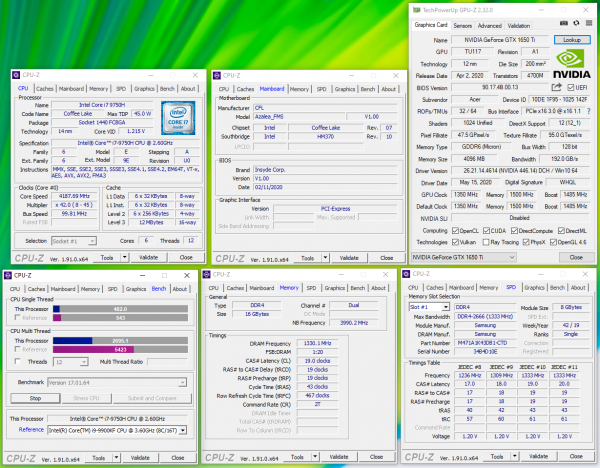
The most advanced modification of the Aspire 7 available at the time of writing this article was sent to us for testing. The laptop version A715-75G-778N (NH.Q88ER.00B) is equipped with a 6-core Core i7-9750H processor, GeForce GTX 1650 Ti graphics, 16 GB of DDR4-2666 RAM, and a 1 TB SSD. At the time of writing, in late June, this laptop . For the model with the Core i5-9300H, GeForce GTX 1650 Ti, 8 GB of DDR4-2666 and 512 GB SSD, they asked for 69,340 rubles.
Wireless connectivity in the Aspire 7 A715-75G is handled by the Intel Wi-Fi 6 AX200 processor, which supports IEEE 802.11b/g/n/ac/ax standards at 2.4 and 5 GHz with a maximum throughput of up to 2.4 Gbps. Additionally, this controller enables Bluetooth 5.1.
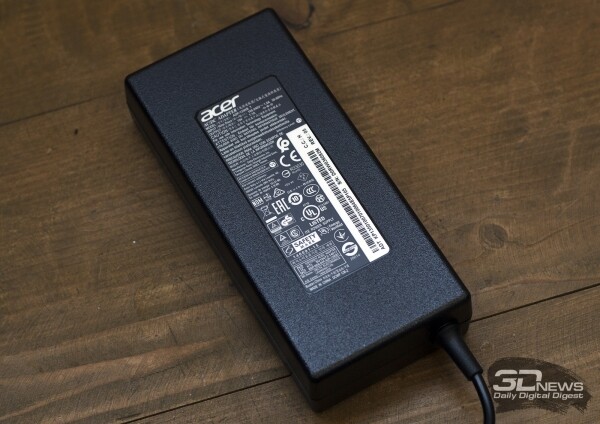
Included with the laptop was a 135 W external power supply weighing 450 g. No additional accessories were found in the box.
Appearance and input devices
The appearance of the Aspire 7 can be described as classic — it has a strict design devoid of any flashy elements. It does not have body lighting or any colorful accents, unlike, for example, the laptops in the .
The chassis of the test sample is entirely made of plastic, and this is where the technical design differences of the Aspire 7 from the previously mentioned Predator series begin. Nevertheless, everything is assembled quite well. The lid with the display only flexes significantly when pressed hard, while the area around the keyboard refuses to bend at all.
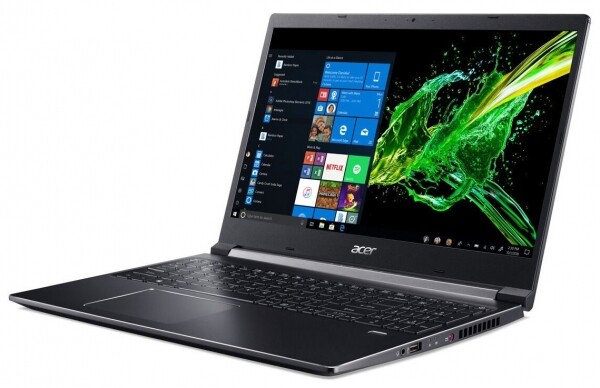
Once again, we have a standard "fifteen" — weighing 2.15 kg, the laptop has a thickness of 23.25 mm. As you can see, taking the laptop with you to university isn't particularly difficult. It's just as easy to bring it to the dacha, packing it in your backpack along with the power adapter.
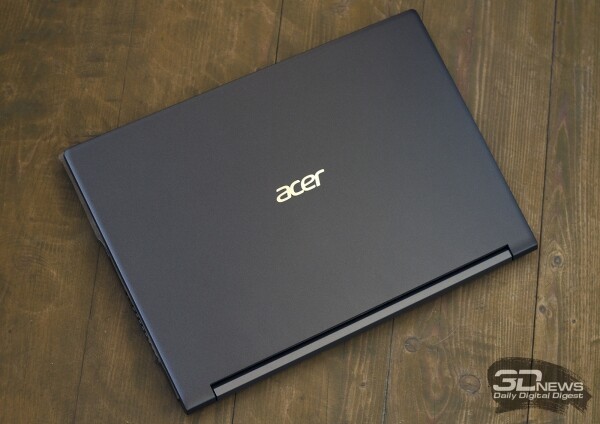
The Acer Aspire 7 A725-75G lid can be easily opened with one hand: just a flick — and you can start working. The hinges allow the screen to open to 180 degrees, which will definitely be useful for some. As for the hinges themselves, there is no doubt about their reliability, as the lid rotates with effort and locks firmly in the position you need. However, you can't really test reliability in a couple of weeks.
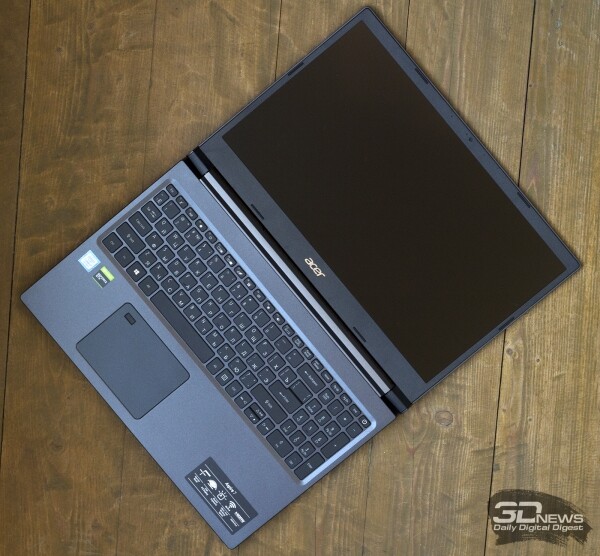
The manufacturer claims that the display occupies 81.61% of the entire lid area. This was achieved by narrowing the bezels, which are only 8 mm thick on the sides. The bezels at the top and bottom of the Aspire 7 display are noticeably thicker.
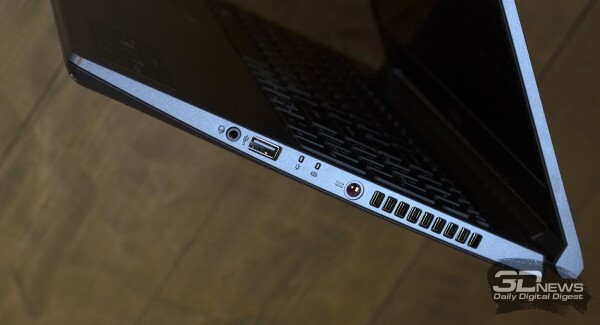
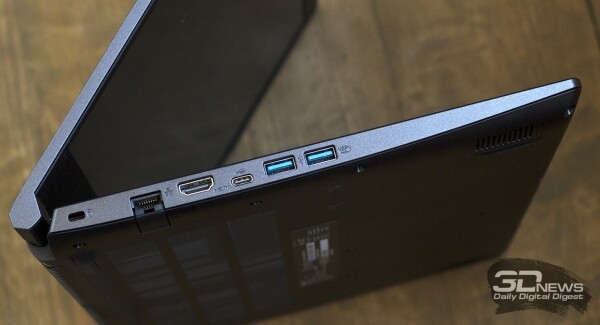
The left side of the laptop features an RJ-45 port, an HDMI output, and three USB 3.1 Gen1 ports, one of which is of type C. On the right side of the Aspire 7, there is an input for connecting an external power supply, a USB 2.0 type A port, and a 3.5 mm jack for connecting a headset. This set of interfaces will be quite sufficient for comfortable use of the device in most situations. Those who work a lot with photography may find the lack of a built-in card reader slightly inconvenient — they’ll have to carry an external SD card reader with them.
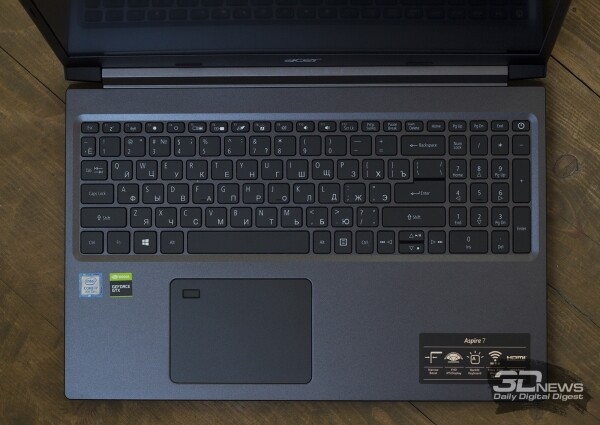
The Acer Aspire 7 keyboard is full-sized, complete with a numeric keypad. The keys feature single-level white backlighting. The brightness of the backlighting is set so that the engravings on the keys are clearly visible both during the day and at night.
Overall, using the keyboard on the Aspire 7 for work and play proved to be quite comfortable. The key travel is short, but the tactile response is clear, accompanied by a distinct and audible click. The only downside was the placement of the power button and the tiny up/down arrow keys. I would make the power button more noticeable and position it farther from the number pad. Once, while working blindly on a calculator, I accidentally powered off the laptop. On the bright side, both Shift keys, Backspace, and Enter are oversized, while the left Ctrl, Tab, and Fn keys are standard-sized.
I had no complaints about the touchpad — it's not as small as those found in 13- and 14-inch ultrabooks. My fingers glide well across the touchpad, gestures are recognized appropriately, and clicks are accompanied by a distinct and loud sound. Additionally, the touchpad is equipped with a fingerprint sensor.
The laptop features an HD webcam. It's not particularly suited for gaming streams, but it's perfectly fine for video calls via Skype, Zoom, and similar platforms. Good image quality can only be achieved in bright sunny weather; otherwise, the picture tends to be unremarkable and quite noisy.
Internal structure and upgrade capabilities
The laptop is easy to disassemble. The bottom panel can be removed completely without hassle — you just need to unscrew a few screws with a standard Phillips screwdriver.
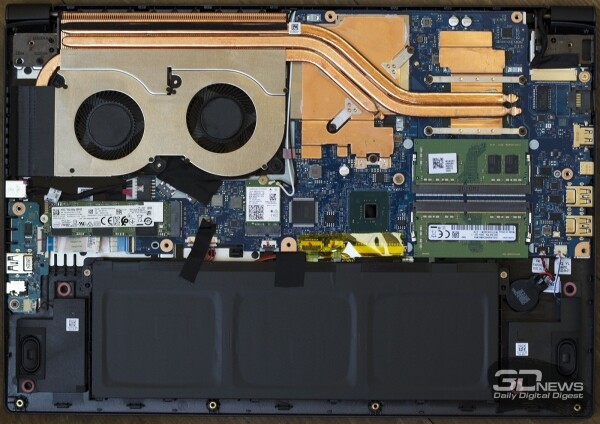
The cooling system for the CPU and GPU in the Aspire 7 is shared. The GPU has more heat pipes than the CPU, but in both cases, a massive copper heatsink and a pair of closely positioned tangential fans are used.
 | 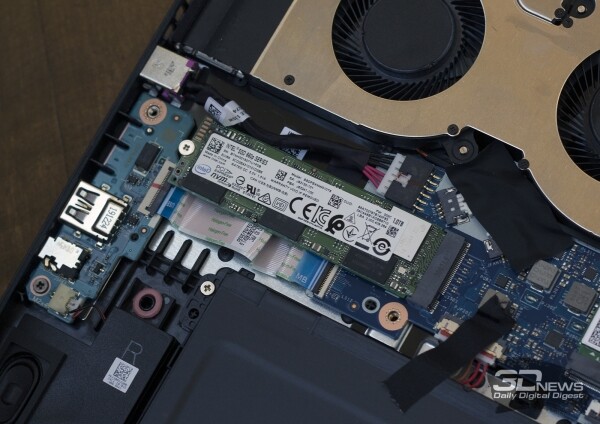 |
Some users may consider this a downside, but the motherboard of the laptop being reviewed today is equipped with just one M.2 slot, supporting SSDs in the 2280 form factor. In our case, it houses a one-terabyte Intel SSDPEKNW010T8 solid-state drive — which is unlikely to be replaced over time. Those who purchase a model with a 256-gigabyte drive and later wish for more space will need to replace it rather than adding an additional SSD to the laptop's motherboard.
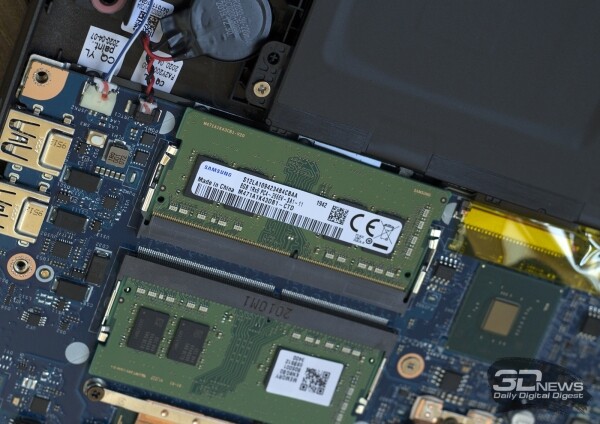
Additionally, both SO-DIMM slots are equipped with two Samsung DDR4-2666 modules. The total memory in the laptop is 16 GB, which will be sufficient for gaming for a long time.
Testing methodology
We conducted testing in games using maximum or near-maximum graphic quality settings. A complete list of the games and settings used for testing is provided in the table below.
| Checkers [Шашки] (Lukasz Oktaba) | ||||
| Title | API | Graphic Quality | Fullscreen Anti-Aliasing | |
| Full HD | Ultra HD | |||
| Far Cry New Dawn, built-in benchmark | DirectX 11 | Maximum quality, HD textures on. | TAA | TAA |
| The Witcher III: Wild Hunt, Novigrad and surroundings | Ultra Quality mode, NVIDIA HairWorks on, HBAO+ | AA | AA | |
| GTA V, built-in benchmark (last scene) | Max. quality, additional quality settings — on, image resolution scaling — off, 16 × AF | FXAA + 4 × MSAA | No AA | |
| Dota 2, match replay | Maximum quality | On | On | |
| Assassin’s Creed: Odyssey, built-in benchmark | Highest mode | High | High | |
| Total War: Three Kingdoms, built-in benchmark | Max mode | TAA | TAA | |
| World of Tanks enCore 1.0, benchmark | Ultra mode | TSSAA HQ | TSSAA HQ | |
| Shadow of the Tomb Raider, built-in benchmark | DirectX 12 | Max quality, DXR off. | TAA | TAA |
| Battlefield V, mission "Last Tiger" | Ultra mode, DXR off. | TAA | TAA | |
| Metro Exodus, built-in benchmark | Ultra mode | TAA | TAA | |
| Red Dead Redemption 2, built-in benchmark | Vulkan | Max quality, additional quality settings — off. | TAA | TAA |
| Counter-Strike: Global Offensive | DirectX 9 | Max quality | 8 × MSAA | 8 × MSAA |
Game performance was measured using the well-known FRAPS program. It provides rendering time for each frame. Then, using the FRAFS Bench Viewer utility, we calculate not only the average FPS but also the 99th percentile. Using the 99th percentile instead of minimum frames per second is due to the aim to eliminate results from random performance spikes caused by factors not directly related to the primary components of the platform.
CPU and memory performance measurements were conducted using the following software:
- Corona 1.3. Rendering speed tested with the program of the same name. It measures the build speed of a standard BTR scene used for performance measurement.
- WinRAR 5.40. Archiving an 11 GB folder with various data in RAR5 format and maximum compression level.
- Blender 2.80 RC1Determining the final rendering speed in one of the popular free packages for creating 3D graphics. It measures the duration taken to build the final model from Blender Cycles Benchmark rev4.
- x264 FHD BenchmarkTesting the transcoding speed of video to H.264/AVC format.
- x265 HD BenchmarkTesting the transcoding speed of video to H.265/HEVC format.
- CINEBENCH R15 and R20Measuring the performance of photorealistic 3D rendering in the animation package CINEMA 4D, CPU test.
- Fritz 9 Chess BenchmarksTesting the performance of a popular chess engine.
- JetStream 1.1 and WebXPRT 3 (browser — Google Chrome)Testing performance when using internet applications built with HTML5 and JavaScript algorithms.
- Adobe Premiere Pro 2019. Rendering a project in 4K resolution.
- PCMark 10. A comprehensive benchmark that determines the performance level of all laptop components.
Display testing is conducted using the X-Rite i1Display Pro colorimeter and the HCFR application.
The battery life of the laptop was tested in two modes. The first load option—web browsing—involves sequentially opening and closing tabs of the websites 3DNews.ru, Computeruniverse.ru, and Unsplash.com at 30-second intervals. For this test, the currently tested version of Google Chrome is used. In the second mode, a video in .mkv format with Full HD resolution is played on the built-in Windows player with the repeat function activated. In all cases, the display brightness was set to 200 cd/m², and keyboard backlighting (if any) and sound were turned off. During video playback, the laptop operated in
In games and other applications, the results of the following laptops were considered:
| Testing participants | ||||||
| Model | Screen | Processor | Memory | Graphics | Drive | Battery |
| ASUS ROG Zephyrus M GU502GU | 15.6", 1920 × 1080, IPS | Intel Core i7-9750H, 6/12 cores/threads, 2.6 (4.5) GHz, 45 W | 16 GB, DDR4-2666, dual channel | NVIDIA GeForce GTX 1660 Ti, 6 GB GDDR6 | SSD, 512 GB | 76 Wh |
| ASUS ROG Zephyrus G14 GA401IV | 14", 1920 × 1080, IPS | AMD Ryzen 9 4900HS, 8/16 cores/threads, 2.9 (4.2 GHz), 45 W | 16 GB, DDR4-3200, dual channel | NVIDIA GeForce RTX 2060 Max-Q, 6 GB GDDR6 | SSD, 1 TB | 76 Wh |
| HP OMEN X 2S (15-dg0004ur) | 15.6", 3840 × 2160, IPS | Intel Core i9-9880H, 8/16 cores/threads, 2.3 (4.8) GHz, 45 W | 32 GB, DDR4-3200, dual channel | NVIDIA GeForce RTX 2080 Max-Q, 8 GB GDDR6 | SSD, 2 TB | 72 Wh |
| MSI GS66 Stealth | 15.6", 1920 × 1080, IPS (IGZO) | Intel Core i7-10750H, 6/12 cores/threads, 2.6 (5.0) GHz, 45 W | 16 GB, DDR4-2666, dual channel | NVIDIA GeForce RTX 2060, 6 GB GDDR6 | SSD, 1 TB | 99 Wh |
| Acer Aspire 7 A715-75G | 15.6", 1920 × 1080, IPS | Intel Core i7-9750H, 6/12 cores/threads, 2.6 (4.5) GHz, 45 W | 16 GB, DDR4-2666, dual channel | NVIDIA GeForce GTX 1650 Ti, 4 GB GDDR6 | SSD, 1 TB | 59 Wh |
Display and Sound
The Aspire 7 features a 60 Hz IPS display with an anti-glare coating and supports Full HD resolution. The display quality can be described as above average—sufficient for both work and entertainment. However, some users working with photo and video content may find the image quality of the LG LP156WFC-SPD5 lacking.
The screen boasts a high (for laptops) contrast ratio of 1076:1. Watching movies on this laptop is quite comfortable and enjoyable, although the brightness level could be better: the maximum white brightness is 245 cd/m², and the minimum is 18 cd/m². The calibration of the matrix is average. The average deviation on the grayscale is 2.01 with a maximum of 5.23. The color temperature of the screen is slightly above the reference 6500 K; the gamma averages 2.26, also fluctuating and slightly above the standard 2.2.
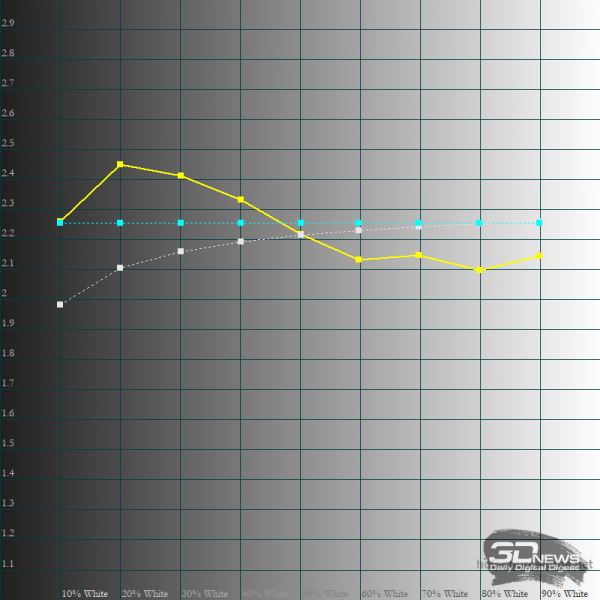 | 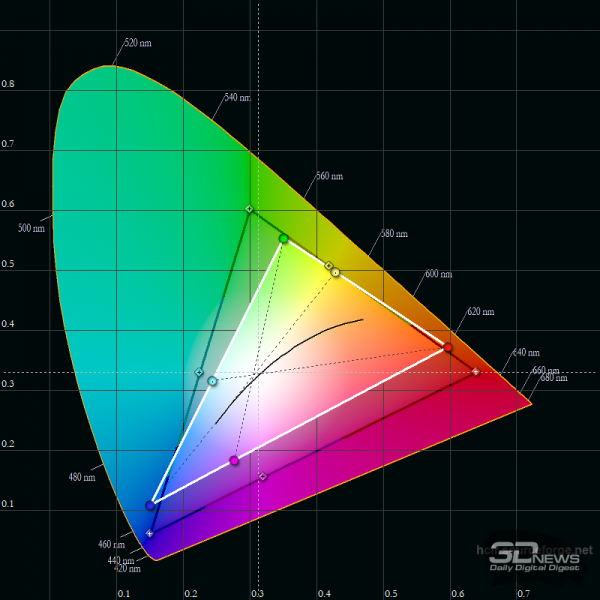 | 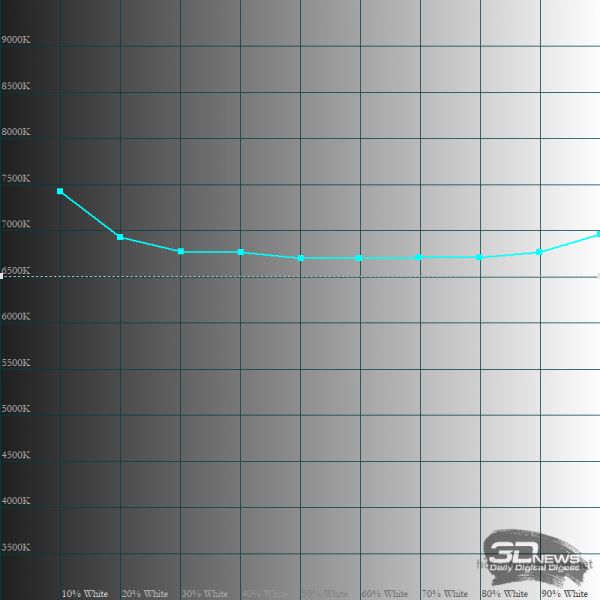 |
The average deviation in the ColorChecker24 test was 5.22 with a maximum of 8.56. The color gamut of the matrix does not meet the sRGB standard—the area of the triangle is noticeably smaller than the reference value.
Otherwise, the LG LP156WFC-SPD5 performs well. The viewing angles in all planes are excellent, although there is some glow effect, which is common in all IPS panels. No edge bleeding has been detected, and importantly, there is no PWM at any brightness level—playing on the Acer Aspire 7 can be done for long periods without serious strain on the eyes.
The sound in the Aspire 7 is impressive with a good volume range, without unwanted distortion, thumping, or vibrations. It has bass, treble, and midrange—while listening to favorite music tracks, your hand won't reach for headphones.
Processor and RAM Performance
The capabilities of the 6-core Intel Core i7-9750H processor are well known to regular readers of 3DNews. Currently, the market has a situation where laptops with Core i7-8750H, Core i7-9750H, and Core i7-10750H chips are often on sale — in all three cases, we're talking about very similar processors, as they all utilize the same microarchitecture and have the same number of threads. As a result, the differences between these processors in various tasks are determined by the individual characteristics of the laptop. It's quite common to see the Core i7-9750H outperforming the Core i7-10750H, even though on paper, it should be the exact opposite.
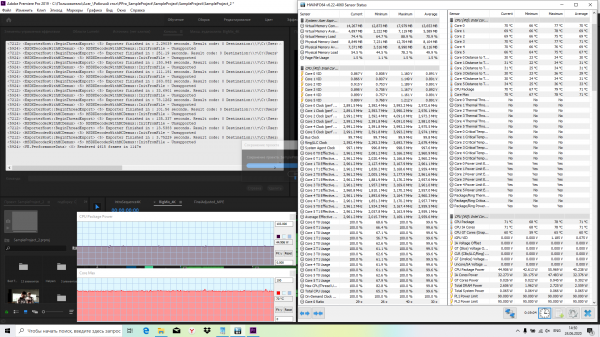
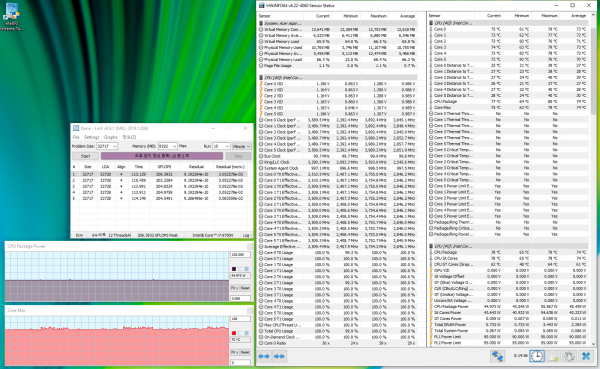
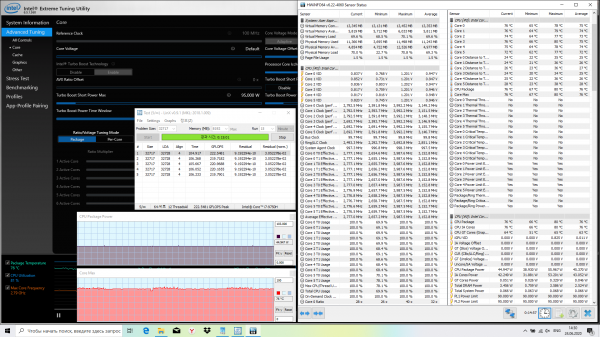
| Cooling system efficiency and CPU performance of the laptop | |||||
| LinX 0.9.1 | Adobe Premiere Pro 2019 | ||||
| Nominal mode | Configuration with Intel XTU | Nominal mode | Configuration with Intel XTU | ||
| CPU frequency | Average | 2.8 GHz | 3.2 GHz | 2.7 GHz | 3.0 GHz |
| CPU temperature | Maximum | 79 °C | 80 °C | 86 °C | 78 °C |
| Average | 75 °C | 76 °C | 68 °C | 71 °C | |
| Noise level | Maximum | 36.4 dBA | 37 dBA | 37.2 dBA | 37.3 dBA |
| CPU power consumption | Average | 45 W | 45 W | 45 W | 45 W |
| Performance: LinX (higher is better), Premier Pro 2019 (lower is better) | 206.39 GFLOPS | 222.55 GFLOPS | 1246 s | 1147 s | |
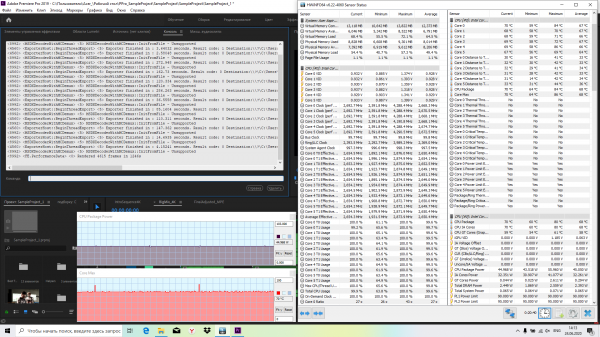
Source: 3dnews.ru
