

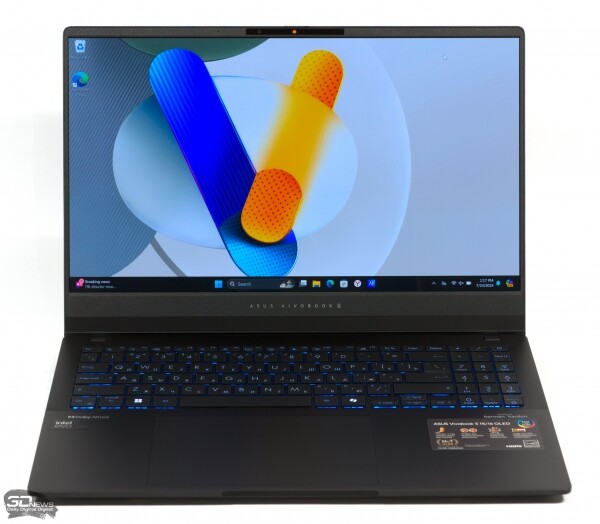
Mobile Core Ultra processors with powerful integrated Arc architecture GPU and NPU block have launched a new wave of upgrades for thin laptops. However, thanks to the OLED display and RGB backlit keys, the upgraded Vivobook S 15 OLED resembles a gaming computer more than a mundane laptop for office applications and web browsing.
Specifications, Pricing
The Vivobook S 15 OLED configuration does not include a discrete GPU but offers a choice among three Meteor Lake family CPUs: the 14-core Core Ultra 5 125H chip, which we already know from reviews of other work laptops, as well as the 16-core Core Ultra 7 155H and Core Ultra 9 185H models. The latter differ in clock speeds and base TDP values. All three CPUs allow stable power regulation up to 65W, but according to official specifications, ASUS engineers settled on a figure of 50W.
As for the integrated GPU, the lower member of the Meteor Lake lineup — Core Ultra 5 125H — contains seven Xe cores from the Arc architecture. The others come with a fully functional GPU with eight Xe cores, which means 1,024 shader ALUs of standard precision. The GPU features the same capabilities as discrete counterparts, including hardware ray tracing, but lacks XMX tensor blocks. Instead, for neural network acceleration, the Meteor Lake chip features a dedicated NPU block.
The laptop carries either 16 or 32 GB of LPDDR5X RAM, operating at a high speed of 7,467 MT/s. The solid-state drive capacity is either 512 GB or 1 TB.
| Manufacturer | ASUS |
|---|---|
| Model | Vivobook S 15 OLED (S5506M) |
| Display | 15.6", 2880 × 1620, OLED |
| CPU | Intel Core Ultra 5 125H: 4/8 cores/threads (1.2–4.5 GHz) + 8/8 cores/threads (0.7–3.6 GHz) + 2/2 cores/thread (1.0–2.1 GHz); Intel Core Ultra 7 155H: 6/12 cores/threads (1.4–4.8 GHz) + 8/8 cores/threads (0.9–3.8 GHz) + 2/2 cores/thread (0.7–2.5 GHz); Intel Core Ultra 9 185H: 6/12 cores/threads (2.3–5.1 GHz) + 8/8 cores/threads (1.8–3.8 GHz) + 2/2 cores/thread (1.0–2.5 GHz) |
| Memory | LPDDR5X SDRAM (7467 MT/s, 4 × 32-bit), 16/32 GB |
| GPU | Intel Arc Graphics (7/8 Xe cores) |
| Drive | SSD (PCIe 4.0 x4) 512/1024 GB |
| External I/O Ports | 2 × Thunderbolt 4; 2 × USB 3.2 Gen 1 Type-A; 1 × HDMI; 1 × TRRS 3.5 mm; 1 × microSD |
| Network | IEEE 802.11ax; Bluetooth 5.3 |
| Battery Capacity, Wh | 75 |
| Weight, kg | 1,5 |
| Dimensions (L × W × H), mm | 354 × 247 × 15,9 |
| Retail price (Russia), rub. | Core Ultra 5 125H, 16 GB, 1 TB — from 101,585 (market.yandex.ru); Core Ultra 7 155H, 16 GB, 1 TB — from 106,580 (market.yandex.ru); Core Ultra 9 185H, 16 GB, 1 TB — from 116,694 (market.yandex.ru) |
The hero of the review is available in Russian retail starting at 101,585 rubles for the minimum configuration with the Core Ultra 5 125H processor. Meanwhile, the intermediate model with the Core Ultra 7 155H costs at least 106,580, while the top model is priced at 116,694 rubles. All offers noted during the review period come with 16 GB of RAM and a one-terabyte SSD.
Appearance and ergonomics
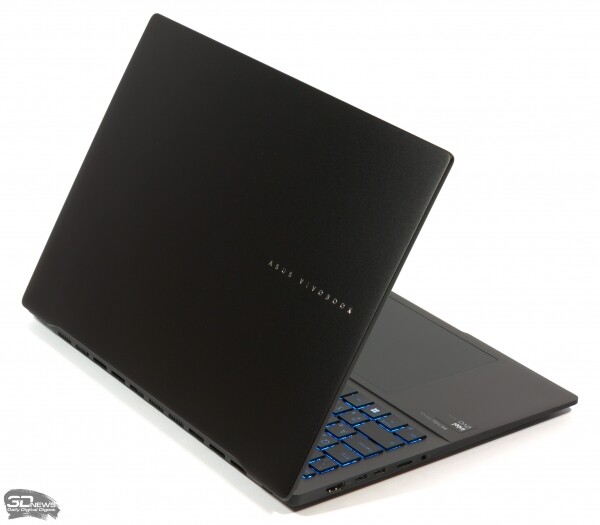
Among laptops with a screen diagonal of up to 16 inches, the Vivobook S 15 OLED stands out for its light weight — just 1.5 kg. The laptop's body is made of metal panels, except for the plastic bezel around the screen, and has adequate rigidity around the edges. The screen lid can be lifted with one hand without holding the top case. The device is available in black or 'misty blue' color.
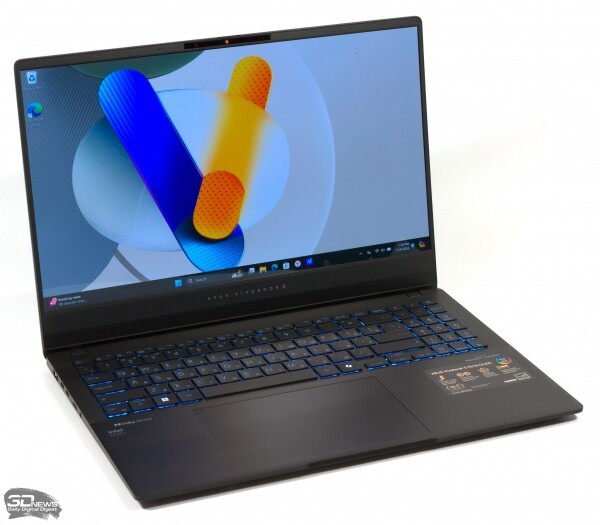
A highlight of the new model is the OLED display with a resolution of 2880 × 1620 and a refresh rate of up to 120 Hz. Thanks to the proprietary MyASUS program, the refresh rate can be adjusted automatically depending on the power source — 120 Hz when plugged in and 60 Hz in battery mode. The screen surface is glossy but not touch-sensitive.
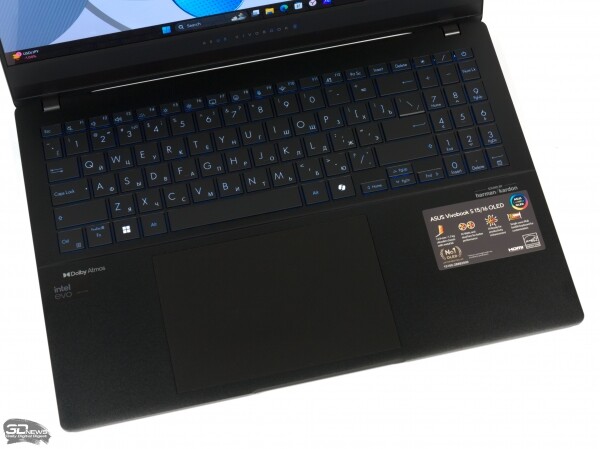
The Vivobook S 15 OLED features a keyboard with a numeric keypad and a dedicated key for launching the Microsoft Copilot intelligent assistant. The key mechanisms provide a clear actuation point but may feel a bit stiff compared to the keyboards of many other laptops. Despite its light weight, the laptop has a sufficiently rigid working surface to minimize flex during typing, although noticeable vibration can be felt. While the Vivobook S 15 OLED is not a gaming computer, the keyboard is equipped with single-zone RGB backlighting that supports various dynamic effects. The brightness of the backlighting is adjustable with a three-step switch.
The laptop lacks a fingerprint scanner, but it does include an infrared camera with Windows Hello support. The lenses of both cameras (IR and standard) can be covered with a physical privacy shutter.
The Vivobook S 15 OLED boasts a large touchpad with a smooth glass surface. Although the controller uses standard physical switches instead of magnetic feedback, its mechanics raise no complaints. The panel does not shake with a light tap, and the switches click with a clear yet quiet sound.
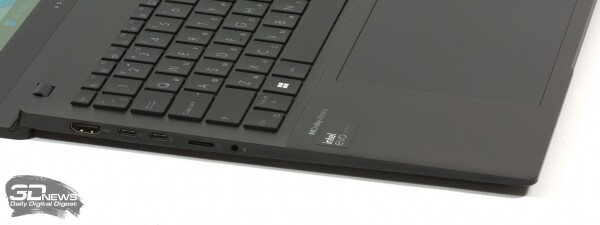
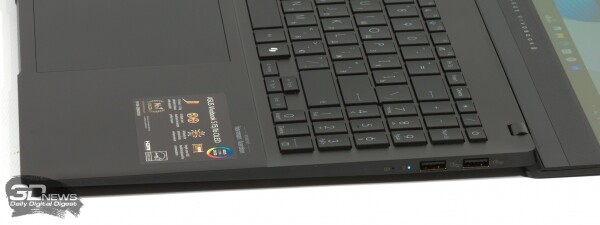
The cable interface ports are spread across the sides of the chassis. Users have access to two Thunderbolt 4 ports and two USB Type-A ports of the 3.2 Gen 1 standard. Additionally, the Vivobook S 15 OLED features a full-size HDMI output, a 3.5mm TRRS audio jack, and a microSD card reader.
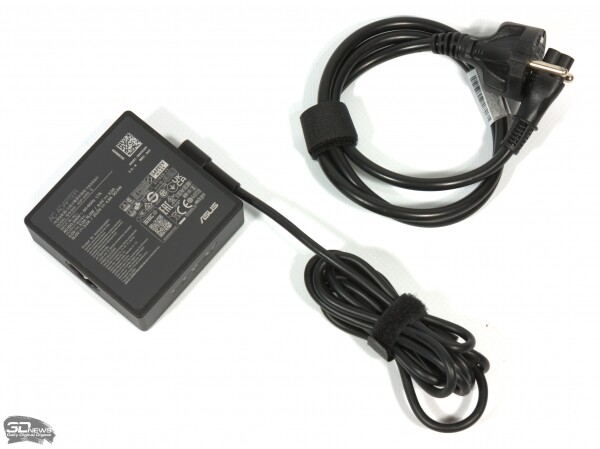
The laptop is charged via a proprietary power supply with a non-removable USB Type-C cable and an extension.
Internal structure and upgrade capabilities
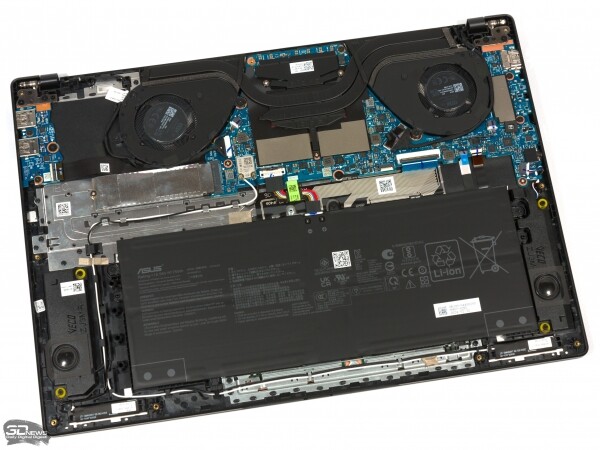
The Vivobook S 15 OLED cools itself by drawing cold air through a grille in the bottom of the chassis, but unlike most business laptops, it expels hot air not upwards between the screen and top case, but backwards—parallel to the table. The CPU cooler consists of two radial fans and two heat sinks connected to the SoC heatsink by two heat pipes.
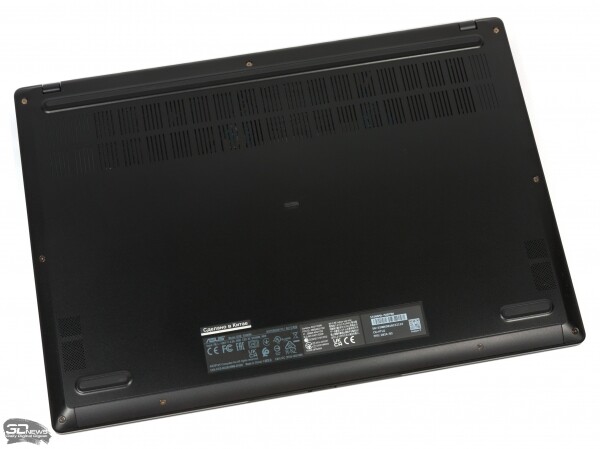
Among all machine components, only the solid-state drive is user-upgradable.
Testing methodology
| Synthetic tests | |
|---|---|
| Application | Settings |
| 3DMark | Time Spy |
| CINEBENCH R23 | N/A |
| Geekbench 6.x | CPU Benchmark; GPU Benchmark: Vulkan (Windows)/Metal (macOS) |
| GFXBench 5.x | Aztec Ruins Test: Vulkan (Windows)/Metal (macOS) |
| fio 3.x | Sequential read/write, random read/write (unbuffered I/O) |
| Productivity applications | ||
|---|---|---|
| Application | Benchmark (latest version used) | Settings |
| Adobe After Effects 24.x | N/A | |
| Adobe Photoshop 24.x | N/A | |
| Adobe Photoshop Lightroom Classic 13.x | N/A | |
| Adobe Premiere Pro 24.x | Standard Benchmark (4K) | |
| Blender 4.x | Demo Classroom from Blender Foundation website | Cycles Renderer |
To demonstrate maximum performance, we disable VBS (Virtualisation-Based Security) and Memory Integrity (Hypervisor-protected Code Integrity) features in Windows 11.
Screen testing is performed using the X-Rite i1Display Pro Plus colorimeter in the DisplayCAL 3 application.
The laptop's battery life is measured at a display brightness of 200 nits in the following usage scenarios:
- sequentially opening and closing websites with a 25s interval in Google Chrome or Safari (cache disabled);
- continuous playback of 4K video in HEVC format.
Testing participants
The following devices participated in the testing:
| Screen | CPU | Memory | GPU | SSD | Battery | |||
|---|---|---|---|---|---|---|---|---|
| ASUS Vivobook S 15 OLED (S5506M) | 15.6", 2880 × 1620, OLED | Intel Core Ultra 9 185H | 6/12 cores/threads (2.3–5.1 GHz) + 8/8 cores/threads (1.8–3.8 GHz) + 2/2 cores/thread (1.0–2.5 GHz) | LPDDR5X SDRAM (7467 MT/s, 4 × 32 bits) 16 GB | Intel Arc Graphics (8 Xe cores) | System RAM | WD PC SN560 (PCIe 4.0 x4) 1024 GB | 75 Wh |
| Apple MacBook Pro 14″, Late 2023 (A2992) | 14.2”, 3024 × 1964, IPS Mini LED | Apple M3 Pro (11 cores) | 5 cores/threads (≤4.05 GHz) + 6 cores/threads (≤2.75 GHz) | LPDDR5 SDRAM, 6400 MT/s, 18 GB (192 bits) | Apple G16S (14 cores) | System RAM | Apple AP0512Z (Apple Fabric) 512 GB | 72.4 Wh |
| Apple MacBook Pro 16″, Late 2021 (A2485) | 16.2”, 3456 × 2234, IPS Mini LED | Apple M1 Pro (10 cores) | 8 cores/threads (≤3.2 GHz) + 2 cores/thread (≤2.1 GHz) | LPDDR5 SDRAM, 6400 MT/s, 16 GB | Apple G13X (16 cores) | System RAM | Apple AP1024R (Apple Fabric) 1024 GB | 99.6 Wh |
| HONOR MagicBook Pro 16 2024 (DRA-54) | 16”, 3072 × 1920, IPS | Intel Core Ultra 5 125H | 4/8 cores/threads (1.2–4.5 GHz) + 8/8 cores/threads (0.7–3.6 GHz) + 2/2 cores/thread (0.7–2.5 GHz) | LPDDR5X SDRAM (6400 MT/s, 4 × 32 bits) 24 GB | Intel Arc Graphics (7 Xe cores) | System RAM | YMTC PC300 (PCIe 4.0 x4) 1024 GB | 75 Wh |
| HONOR MagicBook X16 Plus 2024 (BRI-721) | 16”, 2560 × 1600, IPS | AMD Ryzen 7 8845HS | 8/16 cores/threads (3.8–5.1 GHz) | LPDDR5X SDRAM (6400 MT/s, 4 × 32 bits) 32 GB | AMD Radeon 780M (12 CU) | System RAM | KIOXIA BG5 (PCIe 4.0 x4) 1024 GB | 75 Wh |
| HUAWEI MateBook 14 2024 (FLMH-W5611T) | 14.2”, 2880 × 1920, OLED | Intel Core Ultra 5 125H | 4/8 cores/threads (1.2–4.5 GHz) + 8/8 cores/threads (0.7–3.6 GHz) + 2/2 cores/thread (0.7–2.5 GHz) | LPDDR5X SDRAM (6400 MT/s, 4 × 32 bits) 16 GB | Intel Arc Graphics (7 Xe cores) | System RAM | WD PC SN740 (PCIe 4.0 x4) 1024 GB | 70 Wh |
| HUAWEI MateBook D 16 2024 (MCLG-W9611) | 16”, 1920 × 1200, IPS | Intel Core i9-13900H | 6/12 cores/threads (2.6–5.4 GHz) + 8/8 cores/threads (1.9–4.1 GHz) | LPDDR4X SDRAM, 4266 MT/s, 16 GB (4 × 32 bits) | Intel Iris Xe Graphics (96 EU) | 1 GB from system memory | N/A (PCIe 4.0 x4) 1024 GB | 70 Wh |
Screen quality
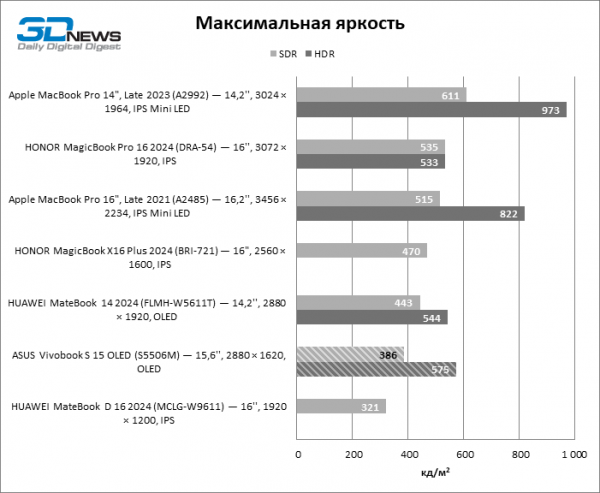
The Vivobook S 15 OLED screen has a brightness of up to 386 cd/m² in SDR mode, which is unaffected by the size of the white patch. In HDR mode, the brightness reaches 575 cd/m² but drops to 475 cd/m² when the screen is fully white. The contrast, like all OLED panels, tends towards infinity.
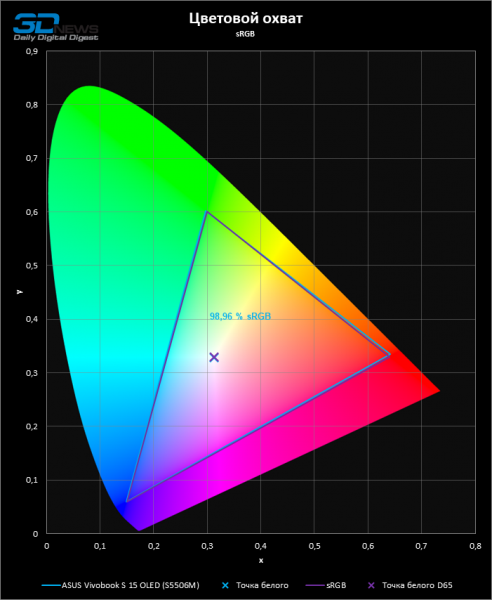
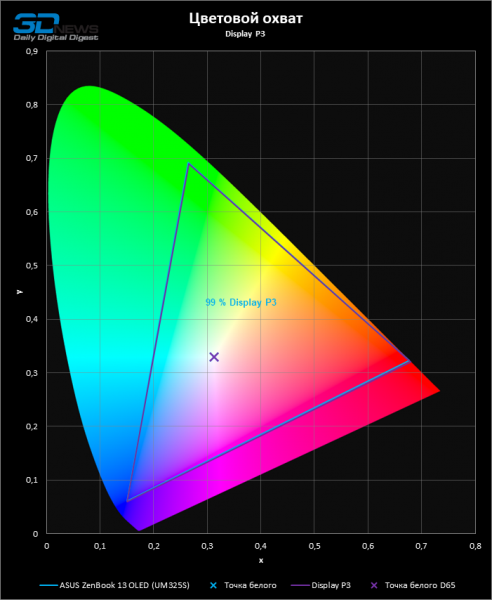
The MyASUS app installed on the laptop offers a choice of four color correction modes: original, sRGB, Display P3, and DCI-P3. Each option not only changes the display but also registers an ICC profile in the operating system that describes the screen's parameters.
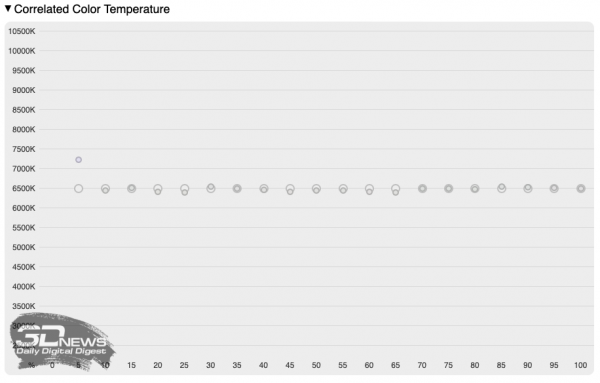
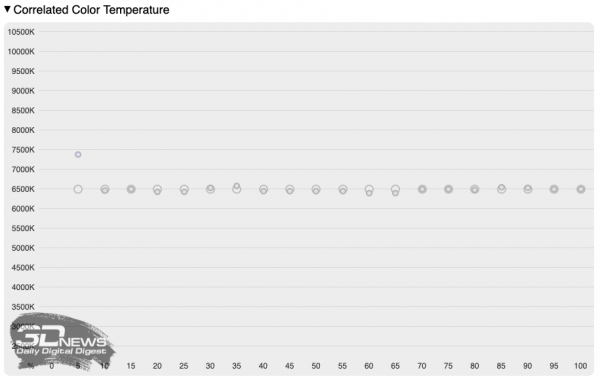
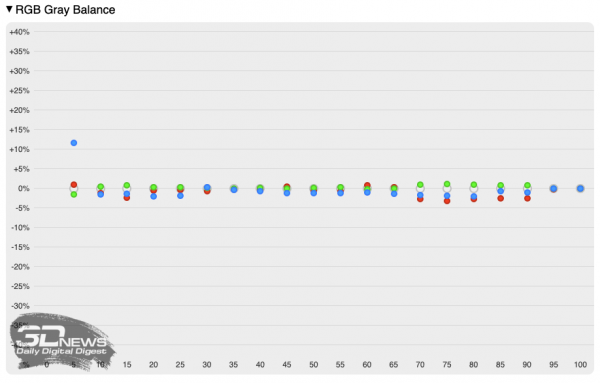
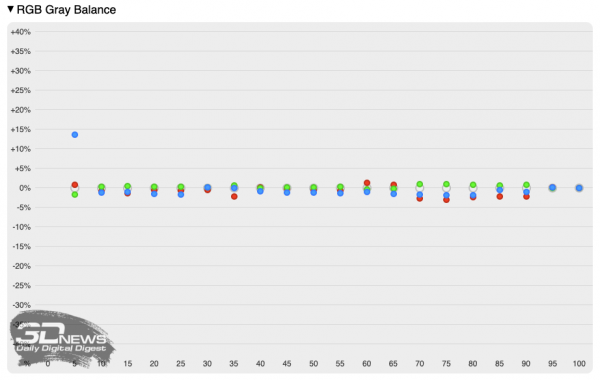
Most users are particularly interested in the sRGB and Display P3 modes. Both modes provide an accurate white point adjustment to the reference value of D65 and cover the corresponding color gamut at 99%.
 |  |
The color temperature showed impeccable stability across nearly the entire brightness scale.
 |  |
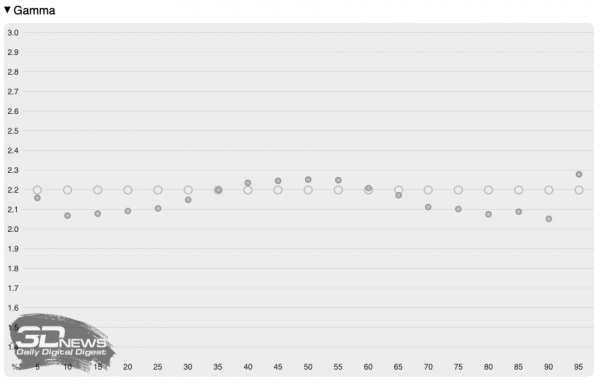
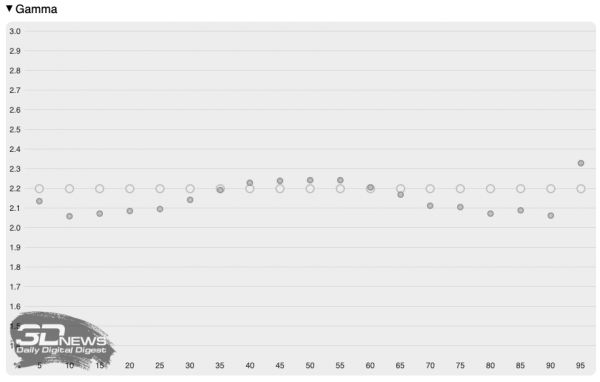
The gamma correction curves are close to a power function with an exponent of 2.2.
 |  |
The gray scale color deviates from the standard by no more than 5% in the brightness range from 10% to maximum.
 |  |
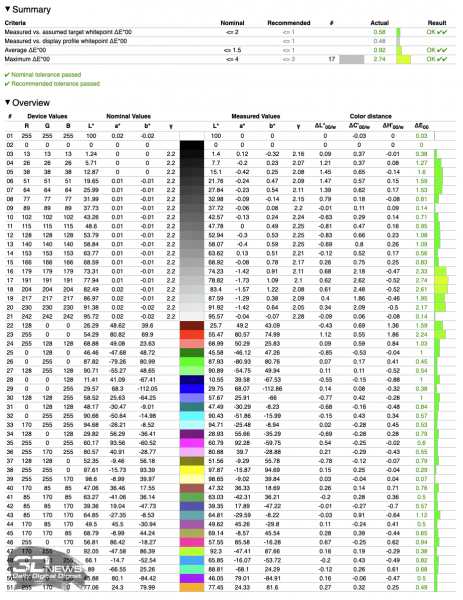
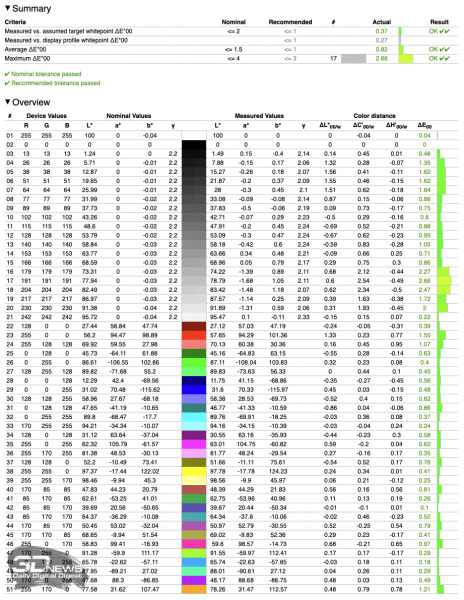
As a result of the precise adjustment of the basic parameters, the Vivobook S 15 OLED screen demonstrated an average Delta E value within one, meeting professional color reproduction requirements.
 |  |
Clock frequencies, temperature, and noise level
The MyASUS program regulates the stable power of the CPU in the range from 17W in Whisper mode to 54W in Full-Speed mode. Maximum power consumption allows the CPU's E-cores to operate at an average clock frequency of 2.8 GHz under prolonged multi-threaded load, while the P-cores maintain a frequency of about 3.4 GHz. The Intel Arc graphics operates at a frequency of 2.2 GHz under isolated load. When the CPU and GPU are fully loaded simultaneously, the high-performance x86 cores throttle down to 3 GHz, and the graphics core to 1.5 GHz.
In turn, the 'Standard' mode locks the chip's stable power at 35W. This is sufficient for the CPU's E- and P-cores to operate at average frequencies of 2.3 and 2.7 GHz, respectively. The stable frequency of the integrated GPU is 2.1 GHz. Under combined load, the frequencies of the x86 cores drop to 2/2.3 GHz, and the frequency of the integrated graphics to 1.2 GHz.
Finally, in Whisper mode, the Core Ultra 9 185H chip is satisfied with 17W of power. Consequently, the frequency of the x86 cores in prolonged multi-threaded tasks is only 1/1.8 GHz, and the GPU frequency, even under isolated load, is 1.4 GHz. In situations where the CPU and GPU are loaded simultaneously, the component clock frequencies drop to 1/1.6 and 0.5 GHz, respectively.
The stable frequency of low-power (LP-E) cores does not exceed 1.1 GHz in all tests, as they do not handle user tasks.
| Clock frequencies | ||||||||
|---|---|---|---|---|---|---|---|---|
| Cinebench (max. no. of threads) | Blender | Cinebench (max. no. of threads) + Blender | ||||||
| CPU clock frequency, MHz | GPU Clock Frequency, MHz | CPU clock frequency, MHz | GPU Clock Frequency, MHz | |||||
| Avg. | Max. | Avg. | Max. | Avg. | Max. | Avg. | Max. | |
| ASUS Vivobook S 15 OLED (S5506M) — Intel Core Ultra 9 185H / Intel Arc Graphics (8 Xe-cores) — Full-Speed Mode | 1065 (LP-E-Core) / 2782 (E-Core) / 3358 (P-Core) | 1098 (LP-E-Core) / 3117 (E-Core) / 3658 (P-Core) | 2193 | 2350 | 519 (LP-E-Core) / 2503 (E-Core) / 3010 (P-Core) | 1097 (LP-E-Core) / 2793 (E-Core) / 3425 (P-Core) | 1493 | 2300 |
| ASUS Vivobook S 15 OLED (S5506M) — Intel Core Ultra 9 185H / Intel Arc Graphics (8 Xe-cores) — Standard Mode | 1064 (LP-E-Core) / 2255 (E-Core) / 2674 (P-Core) | 1147 (LP-E-Core) / 2357 (E-Core) / 2810 (P-Core) | 2110 | 2350 | 1084 (LP-E-Core) / 1957 (E-Core) / 2269 (P-Core) | 1097 (LP-E-Core) / 2145 (E-Core) / 2527 (P-Core) | 1227 | 1800 |
| ASUS Vivobook S 15 OLED (S5506M) — Intel Core Ultra 9 185H / Intel Arc Graphics (8 Xe-cores) — Whisper Mode | 904 (LP-E-Core) / 998 (E-Core) / 1762 (P-Core) | 1097 (LP-E-Core) / 1197 (E-Core) / 1996 (P-Core) | 1444 | 1500 | 828 (LP-E-Core) / 998 (E-Core) / 1629 (P-Core) | 898 (LP-E-Core) / 998 (E-Core) / 1829 (P-Core) | 476 | 900 |
| CPU and GPU power consumption | ||||||||
|---|---|---|---|---|---|---|---|---|
| Cinebench (max. no. of threads) | Blender | Cinebench (max. no. of threads) + Blender | ||||||
| CPU power consumption, W | GPU power consumption (SoC overall, if integrated), W | CPU power consumption, W | GPU power consumption (if discrete), W | |||||
| Avg. | Max. | Avg. | Max. | Avg. | Max. | Avg. | Max. | |
| ASUS Vivobook S 15 OLED (S5506M) — Intel Core Ultra 9 185H / Intel Arc Graphics (8 Xe-cores) — Full-Speed Mode | 54 | 64 | 34 | 40 | 54 | 63 | N/A | N/A |
| ASUS Vivobook S 15 OLED (S5506M) — Intel Core Ultra 9 185H / Intel Arc Graphics (8 Xe-cores) — Standard Mode | 35 | 36 | 31 | 39 | 35 | 36 | N/A | N/A |
| ASUS Vivobook S 15 OLED (S5506M) — Intel Core Ultra 9 185H / Intel Arc Graphics (8 Xe-cores) — Whisper Mode | 17 | 21 | 17 | 18 | 17 | 20 | N/A | N/A |
Example. Measurement is taken after the device has warmed up and stabilized all parameters.
At maximum power consumption, the Core Ultra 9 185H chip heats up to a predictably high temperature of 101 °C. In 'Standard' mode, the chip's temperature does not exceed 90, and in Whisper mode — 70 °C.
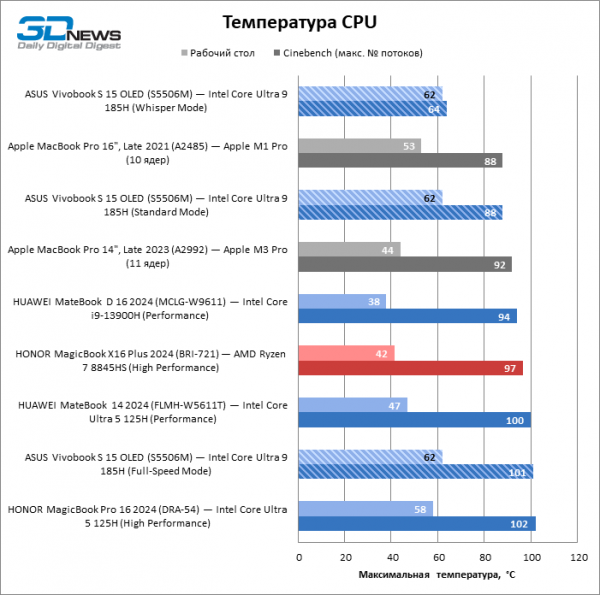
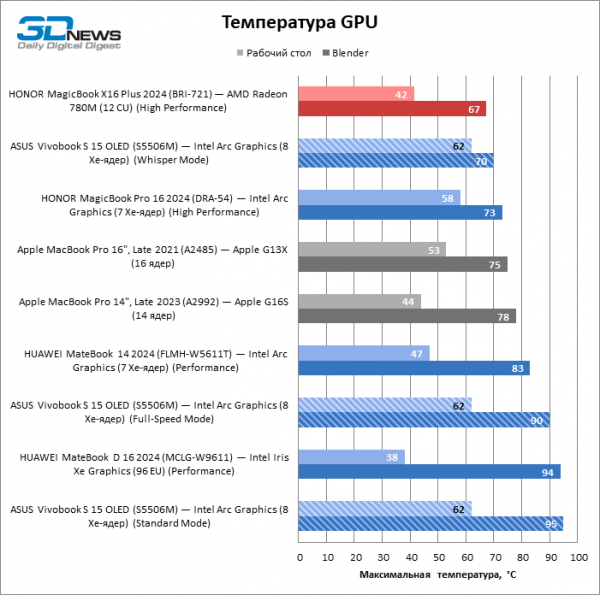
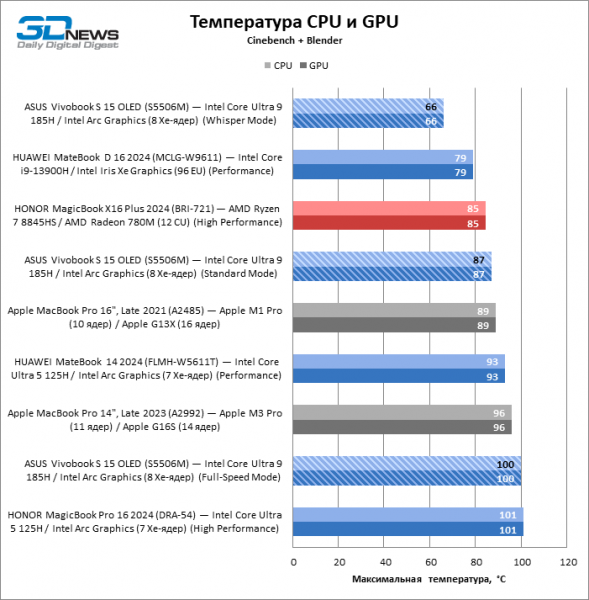
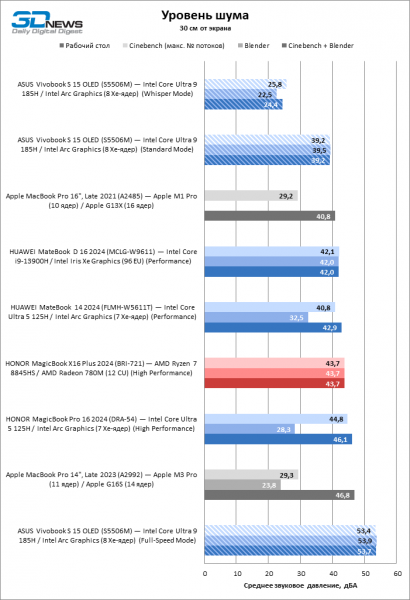
The highest performance achievable by the Vivobook S 15 OLED comes at the cost of high noise levels — up to 54 dBA at a distance of 30 cm from the screen. The 'Standard' mode reduces noise levels to a more typical value of 39 dBA for machines of this form factor, while in Whisper mode the laptop operates nearly silently.
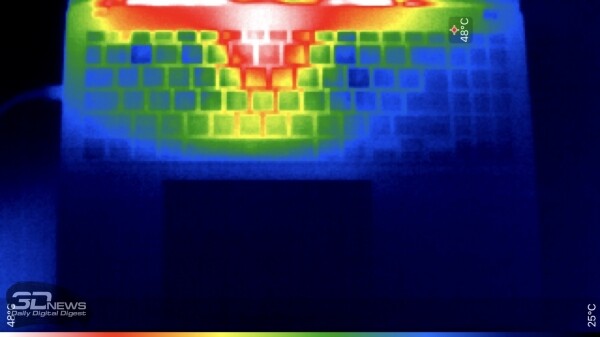
At maximum power consumption, the laptop's top case heats up to 48 °C, but most of the working surface remains cool.
Synthetic performance tests
The Vivobook S 15 OLED gave us a chance to compare the higher-end solution from the Core Ultra line (even if not at the maximum TDP allowed by Intel's specifications) with a powerful Intel 13th-generation CPU, a mid-range Ryzen 8000-series flagship chip, and a medium 11-core Apple M3 variant.
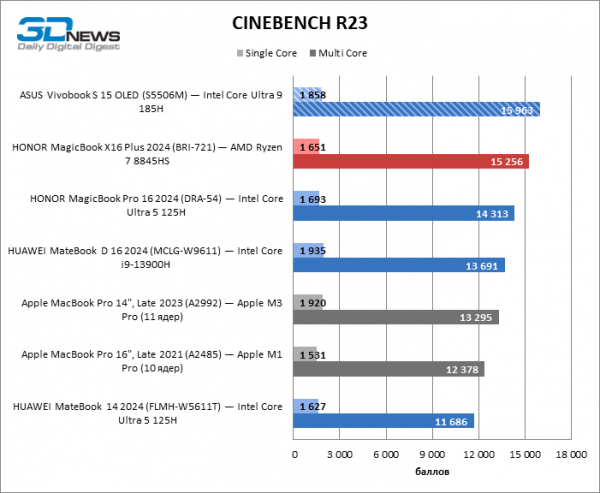
In extended multi-threaded benchmarking with Cinebench R23, the new Intel processor took the lead with a confident advantage over the Ryzen 7 8845HS and significantly outperformed the Apple M3 Pro. It is also notable that single-thread performance has not only not increased in the Meteor Lake chips but has decreased compared to the 13th generation Core.
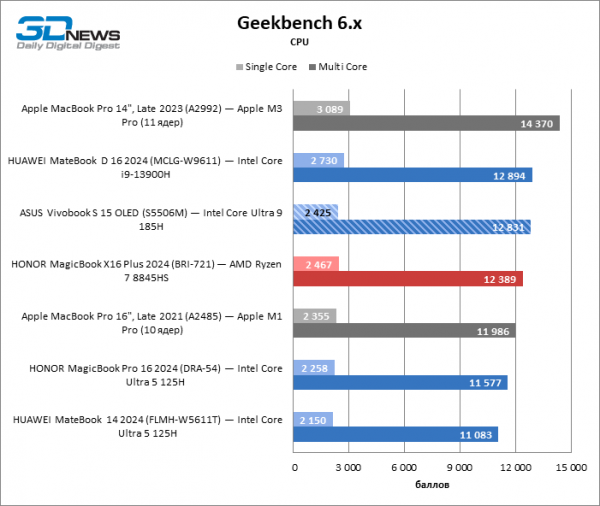
The series of short tests from Geekbench 6 positioned the Core Ultra 9 185H chip on par with the old Core i9-13900H and slightly above the Ryzen 7 8845HS. All these devices lag significantly behind the Apple M3 Pro in both multi-threaded and single-threaded modes.
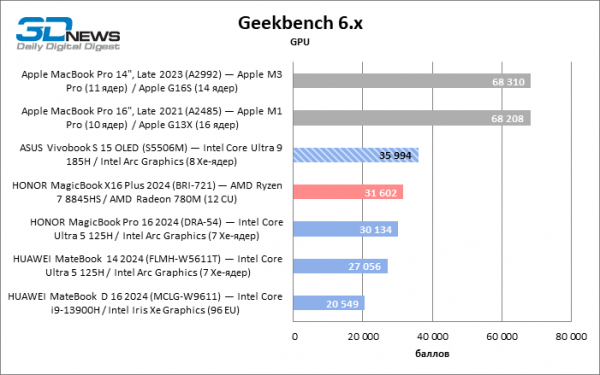
The GP-GPU task test in Geekbench 6 rated Apple products twice as high as fully functional graphics from Arc. On the other hand, the latter unconditionally leads among integrated solutions from Intel and AMD.
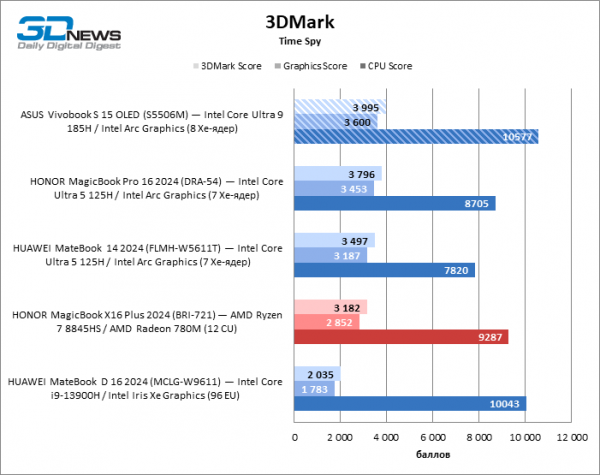
According to 3DMark, the performance of Intel's integrated graphics has doubled compared to the previous generation architecture. The 8-core Arc configuration confidently surpasses both the 'red' GPU on the Ryzen 7 8845HS chip.
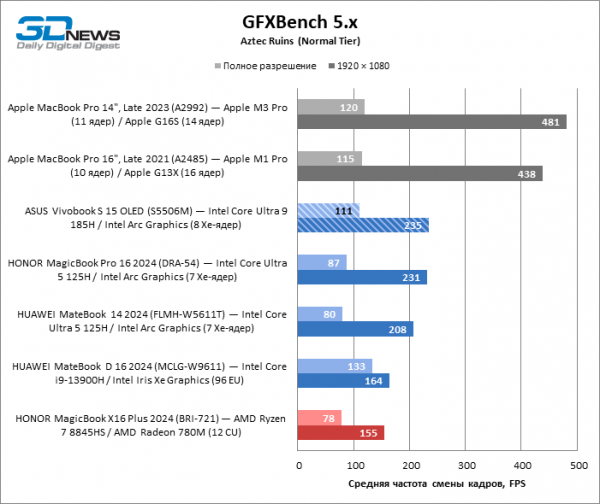
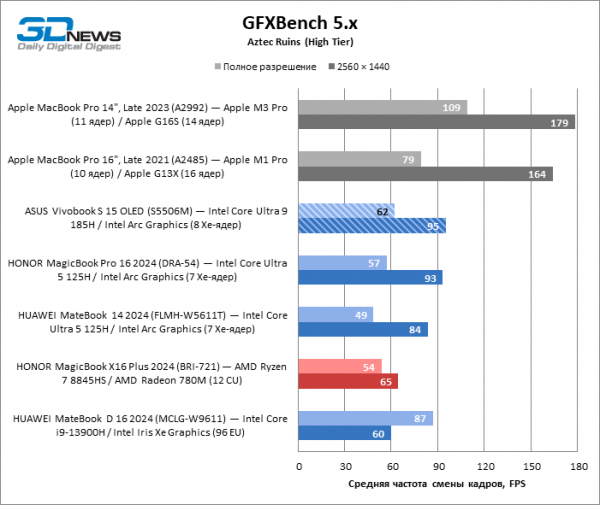
In the GFXBench test, Intel's GPU again doesn't compare to the integrated graphics of the Apple M1 Pro and M3 Pro, but it does show impressive performance gains when migrating from Intel's 13th generation platform or Ryzen 8000.
 |  |
Performance in Work Applications
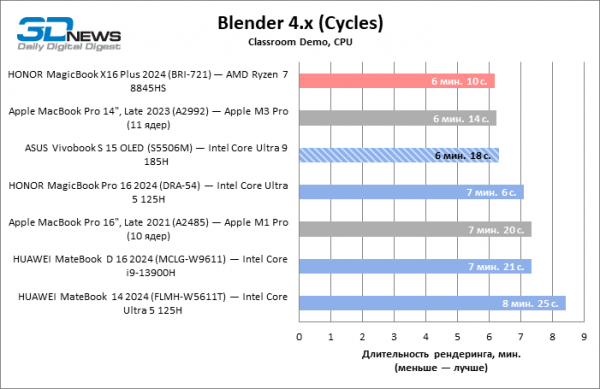
In the Blender benchmark, the Core Ultra 9 185H processor took third place, trailing behind the Ryzen 7 8845HS and M3 Pro, but the gap from the leaders is minimal.
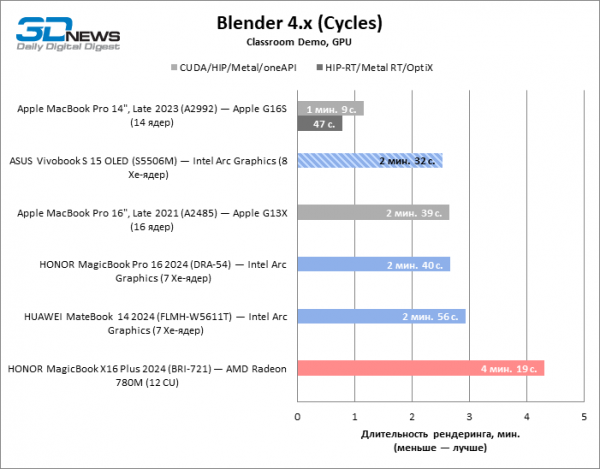
In contrast, Intel Arc's integrated graphics with 8 Xe-cores surpassed the performance of the Apple M1 Pro GPU, not to mention the Radeon 780M, but falls short of the M3 Pro by half.
In the Lightroom Classic test, the Core Ultra 9 185H processor received the highest score among the participants in the testing. The higher model in the series has a slight advantage over the Core Ultra 5 125H, but both chips confidently surpass the Ryzen 7 8845HS.
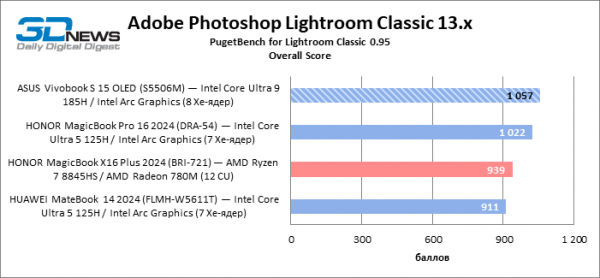
Example. Scores are calculated as a percentage of the performance of a reference workstation with an Intel Core i9-9900K, NVIDIA GeForce RTX 2080, and 64 GB of RAM, multiplied by 10.
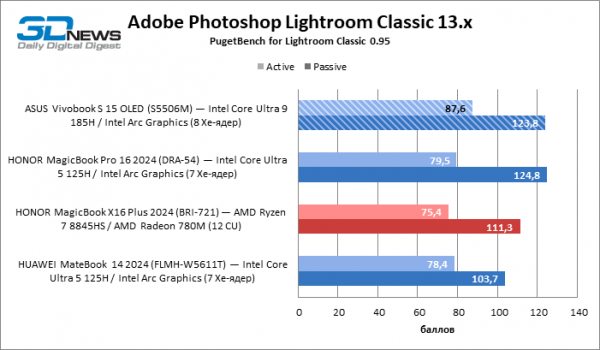
Example. Scores are calculated as a percentage of the performance of a reference workstation with an Intel Core i9-9900K, NVIDIA GeForce RTX 2080, and 64 GB of RAM.
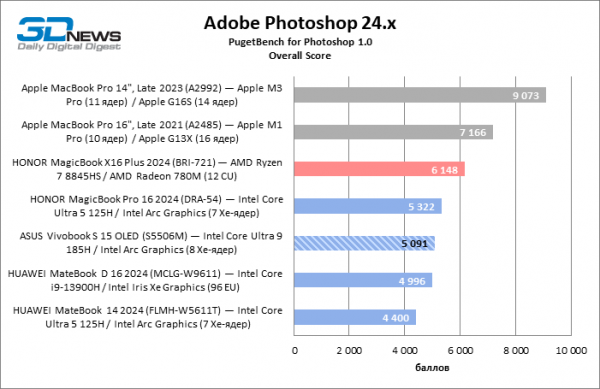
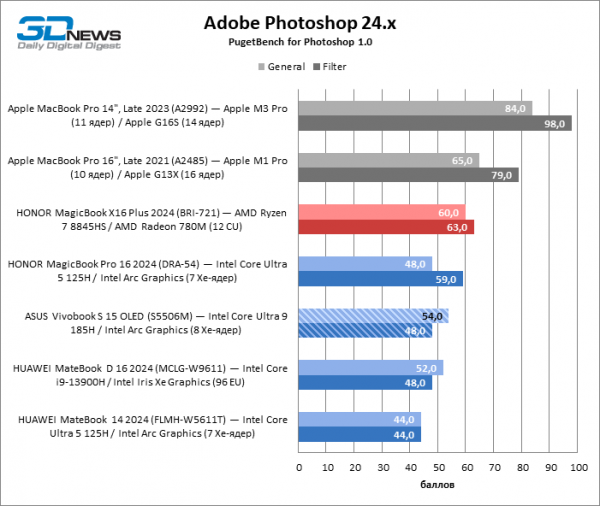
The Vivobook S 15 OLED was overtaken by one of the machines based on the Core Ultra 5 125H in the Photoshop benchmark — likely due to the difference in RAM size, as the test sample of the new ASUS has only 16 GB of RAM. The laptop with the Ryzen 7 8845HS leads among representatives of the x86 architecture, while Apple's computers are the unequivocal leaders in the test.
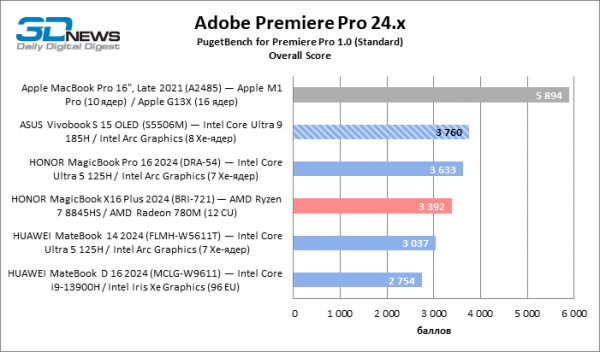
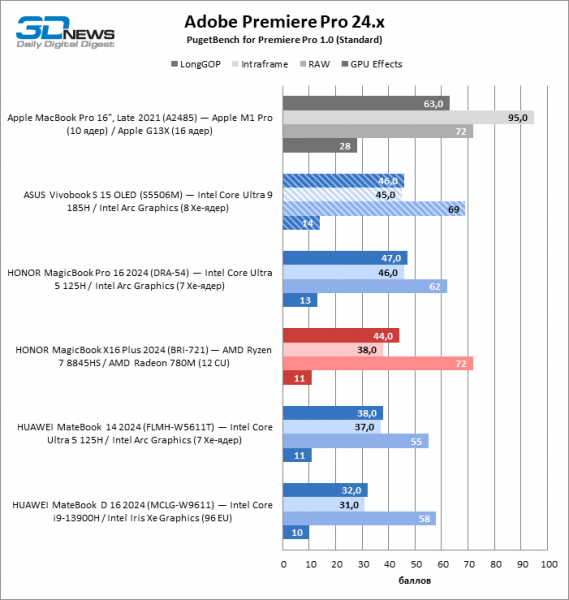
In the Premiere Pro benchmark, Apple's ARM processors again dominate due to their powerful GPU and the ProRes video hardware encoding feature. The Core Ultra 9 185H took first place among x86 architecture chips with a slight edge over the Core Ultra 5 125H and a significant advantage over the Ryzen 7 8845HS.
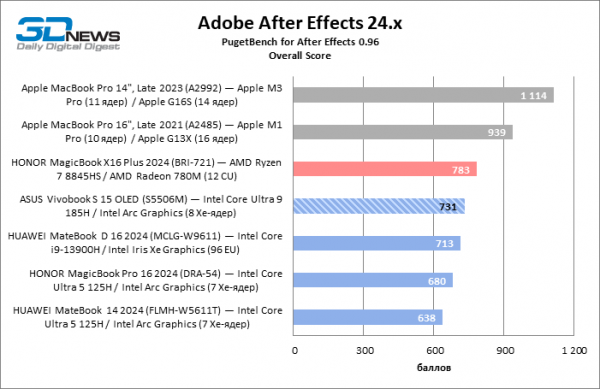
16 GB of RAM was just enough for the Vivobook S 15 OLED to handle all tasks in the After Effects test suite, which may have affected the final score. Nevertheless, the flagship chip in the Core Ultra lineup achieved noticeably better results than the Core Ultra 5 125H paired with 24 GB of RAM, but only slightly outperforms the Core i9-13900H and falls short compared to the Ryzen 7 8845HS laptop with 32 GB of RAM. Apple's silicon once again demonstrates performance levels unattainable for Intel and AMD solutions without a discrete graphics card.
Example. Scores are calculated as a percentage of the performance of the reference workstation featuring an Intel Core i9-11900K, NVIDIA GeForce RTX 3080, and 64 GB of RAM, multiplied by 10.
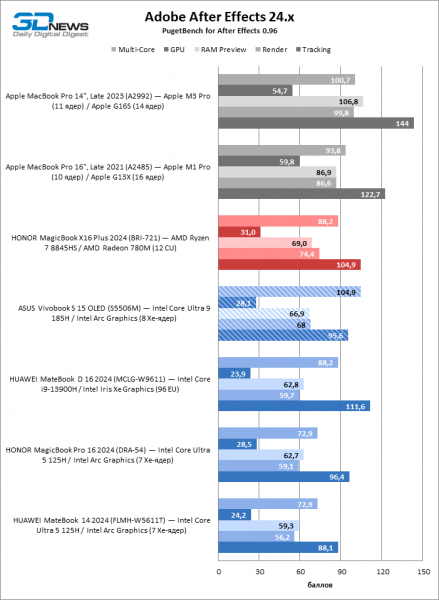
Example. Scores are calculated as a percentage of the performance of the reference workstation featuring an Intel Core i9-11900K, NVIDIA GeForce RTX 3080, and 64 GB of RAM.
SSD Performance
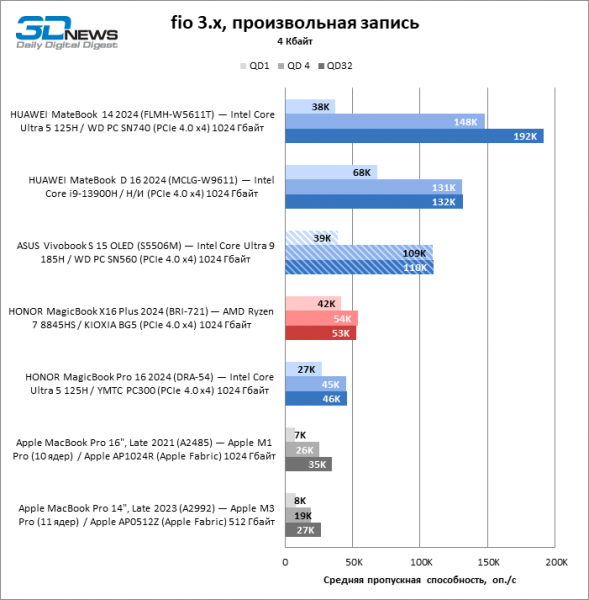
The test unit of the Vivobook S 15 OLED is equipped with a Western Digital PC SN560 solid-state drive, which is a mid-range option among SSDs for the PCI Express 4.0 bus. The storage provides decent speeds for sequential and random block writes, but has low random read speed compared to common alternatives.
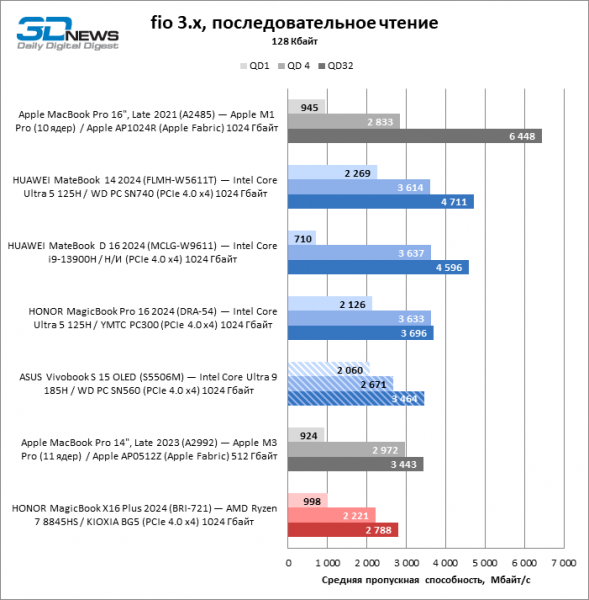 | 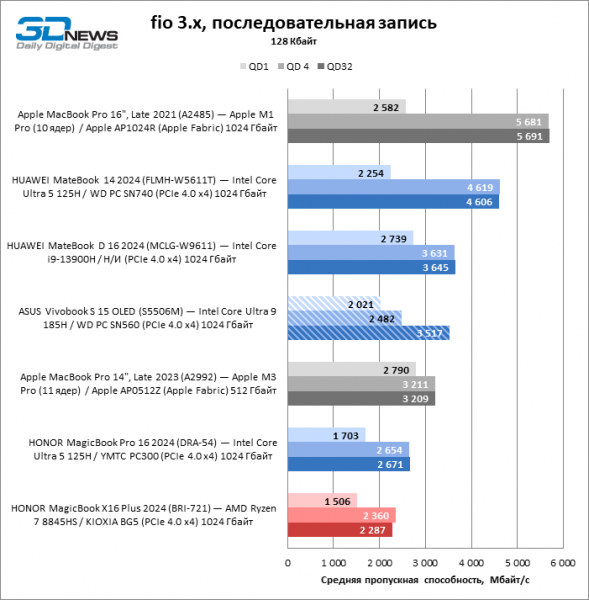 | |
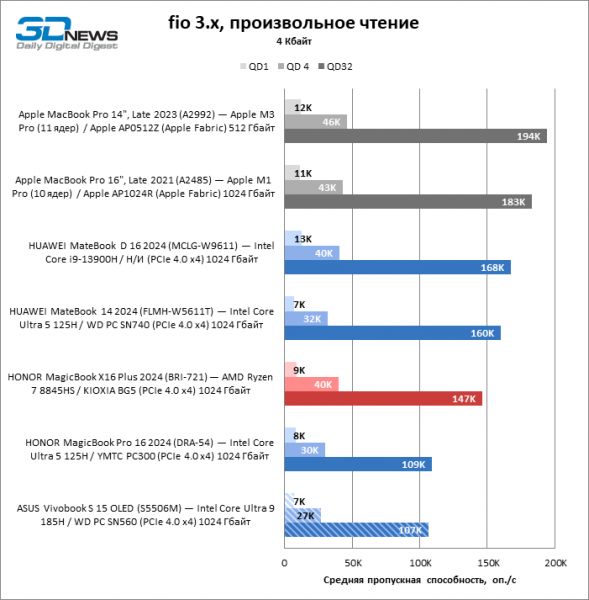 |  |
Battery Life
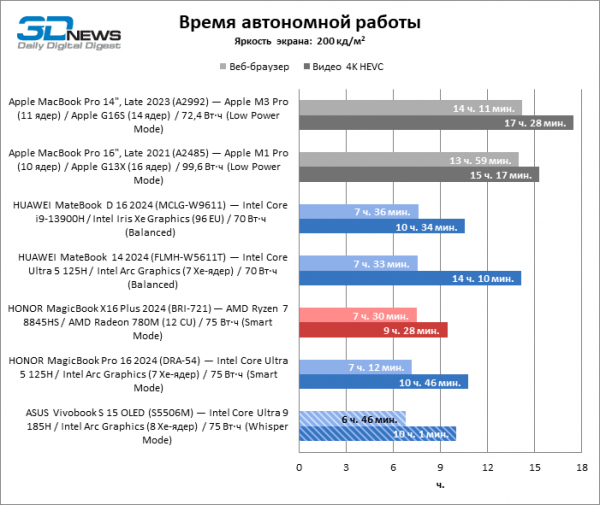
In terms of battery life on a single charge, the Vivobook S 15 OLED generally aligns with laptops of similar specifications powered by Intel's 13th generation Core processors and the new Core Ultra, but still falls behind its competitors. At a brightness level of 200 cd/m², the ASUS laptop lasted nearly 7 hours in web browsing and 10 hours of video playback.
Conclusions
The updated Vivobook S 15 OLED has showcased the full potential of the flagship Core Ultra family processor. The sustained power consumption of the Core Ultra 9 185H in this case is below the maximum allowed by Intel (54 out of 65 W), but work laptops are generally not designed for high TDP values. In most synthetic tests and real applications, the Core Ultra 9 185H delivers a noticeable performance boost compared to the older Core 13th generation models, but it should be noted that its victories in benchmarks are largely due to the increased power. In several tasks, the Core Ultra 9 185H falls short not only to the 'red' Ryzen 7 8845HS, but also to its predecessor — the Core i3-13900H, although both competitors benefit from lower power consumption.
A key innovation of the Core Ultra silicon is the integrated GPU based on the Arc architecture. In this area, Intel's product still cannot compete on equal terms with Apple chips, but it significantly outperforms the old Iris Xe graphics core and AMD's offerings. The Meteor Lake silicon contains a dedicated NPU block for neural network acceleration and also supports LPDDR5X memory with a bandwidth of 7,467 MT/s, which is installed in the Vivobook S 15 OLED.
Nevertheless, the strengths of the Vivobook S 15 OLED go beyond just its hardware platform. The main advantage is reflected in the laptop's name: its screen not only boasts high brightness for OLED panels and a refresh rate of 120 Hz, but also features extremely accurate calibration. Other notable features include an RGB-backlit keyboard and a large touchpad that works excellently despite having physical switches. Finally, although the Vivobook S 15 OLED is quite lightweight for its size, its small weight does not compromise the rigidity of the chassis.
Source: 3dnews.ru
