

Right now, hundreds of thousands of applicants are sending their exam results to universities across our vast country, and many of them are facing additional tests. This period is quite exciting and labor-intensive, as the number of places in higher education institutions is significantly fewer than the number of applicants. Soon, the lucky ones will be faced with the task of choosing a reliable study companion for five, or even seven years. Of course, we are referring to a laptop for studying and, likely, further work. It seems that the most convenient models for this purpose are those with a 17-inch screen and a full-sized keyboard with a numeric pad. Additionally, such a laptop should be fast, autonomous, and affordable. Just such a model is offered by Digma – . Yes, this laptop is not based on the ultra-modern Meteor Lake processor and cannot boast an OLED display, but it has almost everything necessary to be one of the options for purchase. We will tell you about the features of the laptop, its advantages and disadvantages in today’s material.
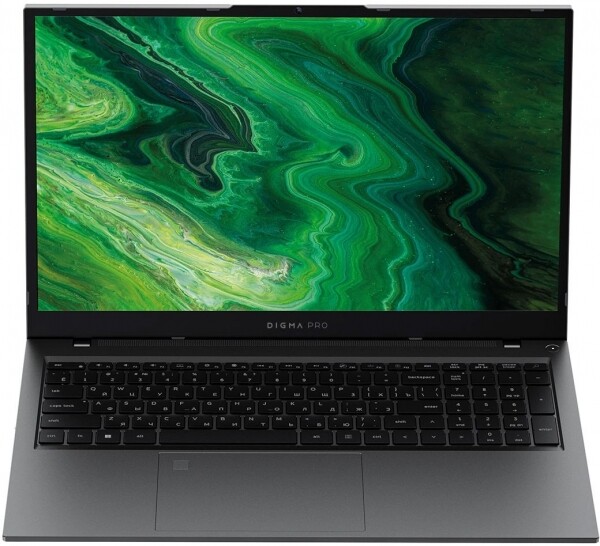
What's in the Box
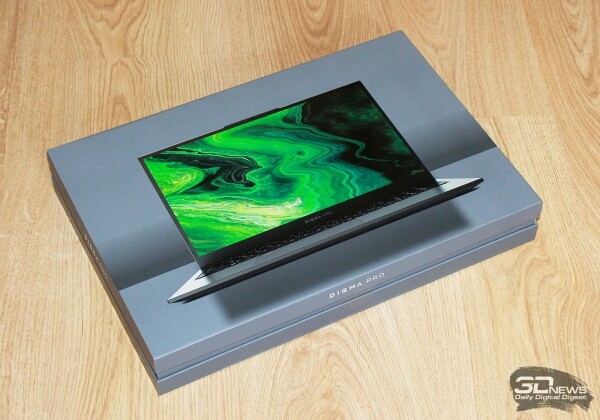
The Digma Pro Fortis M comes in a compact box made of dense glossy cardboard. On the front, it features an image of the laptop in an opened position, while the side displays the series name.
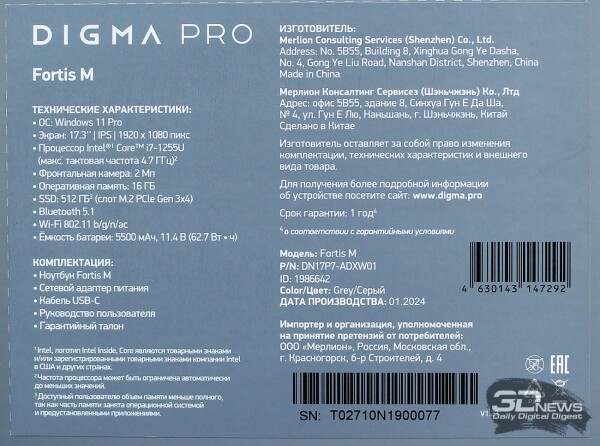
The back of the box is less colorful and contains a sticker with the laptop's configuration, specifications, and manufacturer information.
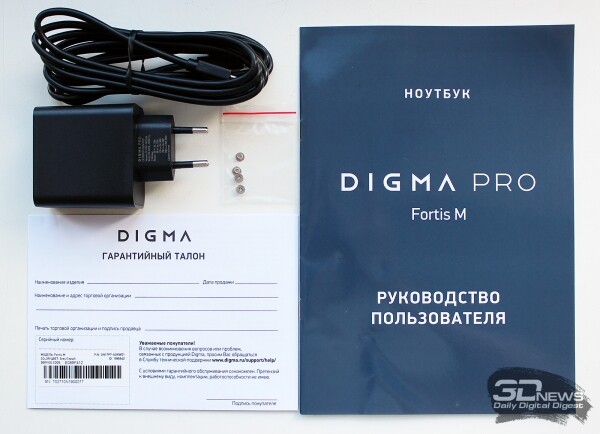
Included with the laptop, you will find a power adapter with a USB Type-C cable, a set of screws for installing a SATA drive, a warranty certificate, and a user manual.
The Fortis M series of laptops with a 17.3-inch screen includes seven models, differing in processors, RAM volume and type, and possibly some other nuances. Therefore, the prices of laptops in this series vary significantly. For example, for the version with the basic Intel Core i3-1005G1 and 8GB LPDDR4x () you will need to pay just under 40,000 rubles, while the top model (), which was sent to us for testing, will cost almost 68,000 rubles. But the main thing is that there is a choice for any needs and financial capabilities. Additionally, Digma Pro laptops are manufactured in China and come with a one-year warranty.
Technical Specifications
| Digma Pro Fortis M (DN17P7-ADXW01) | ||
| Central Processor | Intel Core i7-1255U (Intel 7, Alder Lake-U, 2 P-cores/4 threads 1.7-4.7 GHz + 8 E-cores 1.2-3.5 GHz, L3 cache 12 MB, TDP 15–25 W) | |
| Chipset | Intel Alder Lake PCH | |
| Memory | 16 (2 × 8) GB DDR4 3.2 GHz (SO-DIMM modules), timings 22-22-22-52 CR1; | |
| maximum volume – 64 GB | ||
| Drive | SSD 512 GB, M.2 2280, NVMe 1.4, PCIe 3.0 x4, BiwinTech P3821 (NA80V1M10-512) | |
| Graphics subsystem | Integrated Intel Iris Xe graphics (80 execution units), uses system memory resources | |
| Display | 17.3-inch matte IPS display with a resolution of 1920 × 1080 pixels (16:9), 60 Hz refresh rate, 127 PPI density, viewing angles of 170-178°, color coverage of NTSC 72%, sRGB 99% | |
| Audio subsystem | 2 stereo speakers with a power of 1.5 W, 2 stereo speakers with a power of 0.8 W | |
| Card reader | MicroSD (XC) up to 128 GB | |
| Network Interfaces | Wired network | Intel Realtek RTL8168/8111 Gigabit Ethernet |
| Wireless network Wi-Fi | Intel Wi-Fi 5 AC9560D2W (802.11a/b/g/n/ac, 2.4 GHz and 5 GHz, up to 1.8 Gbit/s) | |
| Bluetooth | Bluetooth 5.1 | |
| Interfaces and ports | USB | 1 × USB 3.0 Type-C (supports DisplayPort, charging and reverse charging); |
| 1 × USB 2.0 Type-C; | ||
| 1 × USB 3.0 Type-A; | ||
| 1 × USB 2.0 Type-A | ||
| Video outputs | HDMI 1.4 | |
| Audio jacks | Combined audio jack for headphones and microphone | |
| Input devices | Keyboard | Membrane keyboard with numeric keypad and two-level backlighting |
| Touchpad | Two-button, sized 141 × 96 mm, with an integrated fingerprint scanner | |
| IP telephony | Webcam | With a resolution of 1080p (2 MP), built into the upper bezel of the display, with mechanical disconnection |
| Microphone | Dual, with smart noise cancellation | |
| Battery | Lithium-ion, capacity 62.7 Wh (5500 mAh), model U596396PV | |
| Power adapter | Power of 65 W (20 V, 3.25 A), weight 100 g, with a separate USB-C cable of 1.99 m and weight 57 g | |
| Dimensions | 401.5 × 260.0 × 28.0 mm including feet (body thickness without feet – 20 mm, at the front edge – 14.5 mm) | |
| Weight without power adapter: declared/measured | 2230 / 2291 g | |
| Case colors | Gray | |
| Operating system | Windows 11 Pro | |
| Warranty (years) / country of manufacture | 1 / China | |
| Cost, ₽ | 67 799 | |
Design and ergonomics of the case
The design of the Digma Pro Fortis M can be described as ordinary, without frills. The dark gray case is mainly made of plastic, but the lid is metal. The panels of the case flex when pressed, but do not produce annoying creaks.
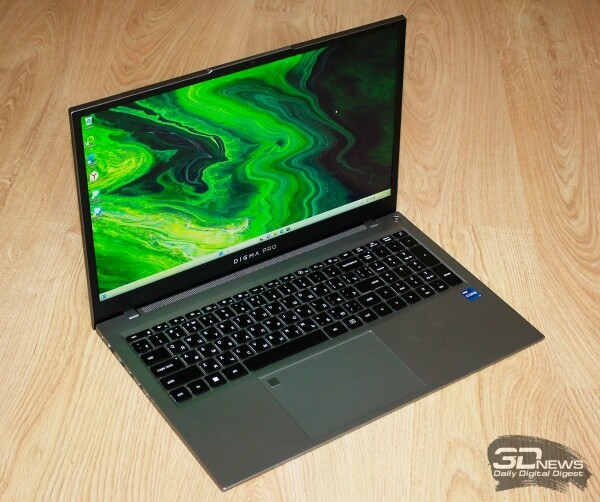 | 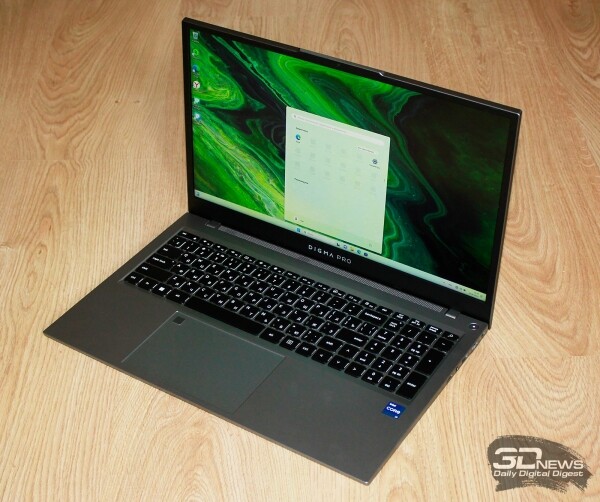 |
The dimensions of the chassis are 401.5 × 260 × 28 mm with a total weight of 2.23 kg – quite standard specifications for a 17.3-inch laptop.
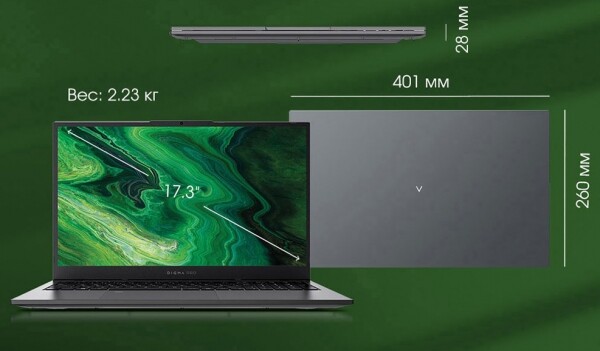
The thickness of the chassis without the feet is 20 mm, while at the front edge it is only 14.5 mm. In other words, despite all its parameters, the laptop does not give the impression of being a bulky device.
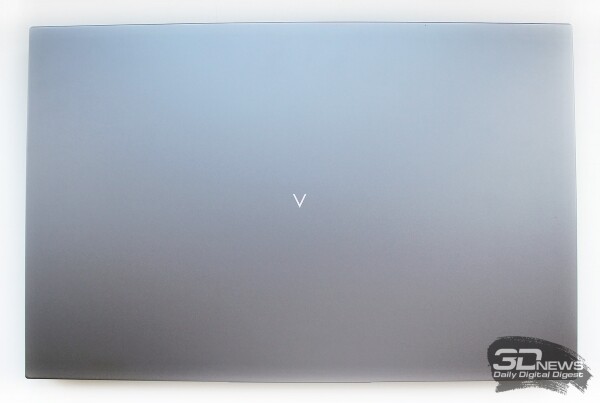
In the center of the lid, there is an upward arrow that turns into a letter V when the device is flipped over. The surface of the chassis is non-marking, leaving no fingerprints on it.
 | 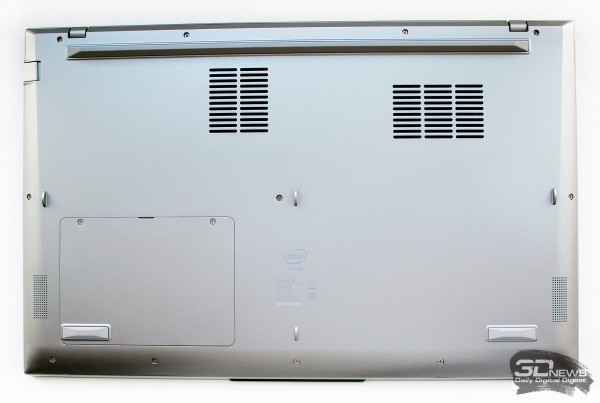 |
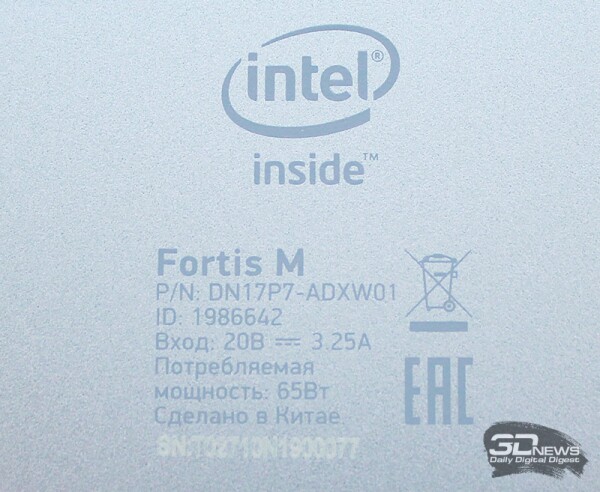
On the bottom of the chassis, we note two ventilation grilles and the model marking of the laptop.
There is also a hatch for installing a 2.5-inch SSD (or HDD).
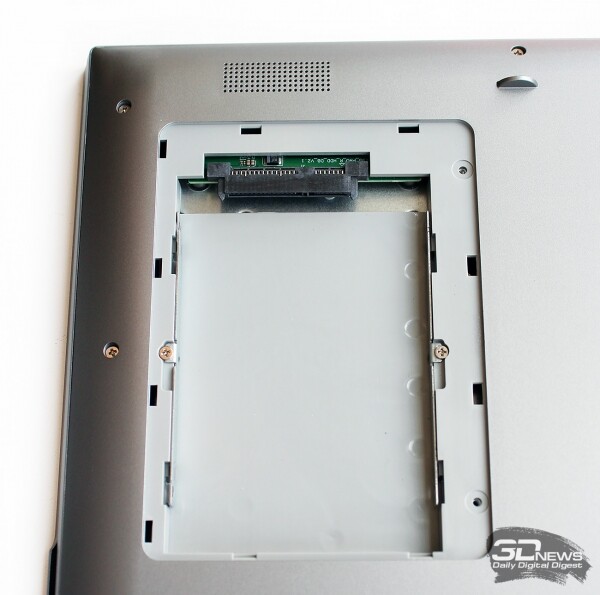
It's convenient that the storage capacity can be increased without opening the entire chassis of the laptop.
The height of the rear rubber foot of the laptop is 8 mm, while the front feet are no more than 3 mm high, so the working panel of the laptop is tilted towards the user, making typing more comfortable.
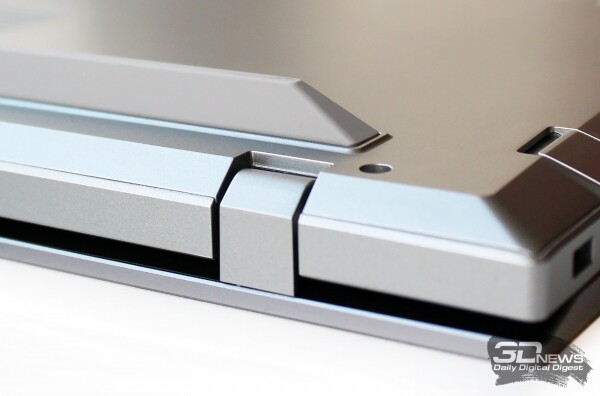
At the front edge, there is a notch for easily lifting the lid with fingers, and at the back, there is a small ventilation grille.


All ports are located on the side edges of the laptop chassis.
 |  |
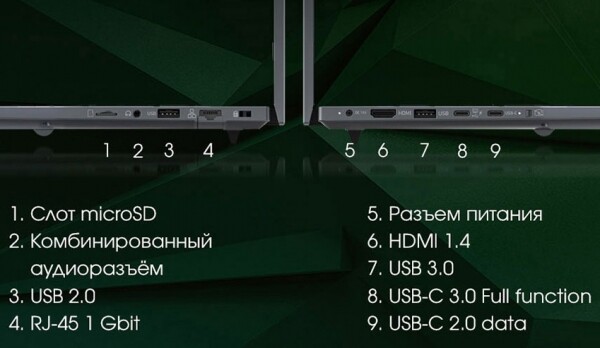
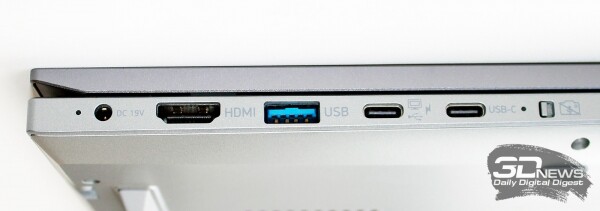
On the left side are: the power connector, HDMI 1.4 video output, USB 3.0 Type-A and Type-C ports (with support for DisplayPort, charging, and reverse charging), as well as a USB 2.0 Type-C port and a mechanical switch for the webcam/microphones.
 | 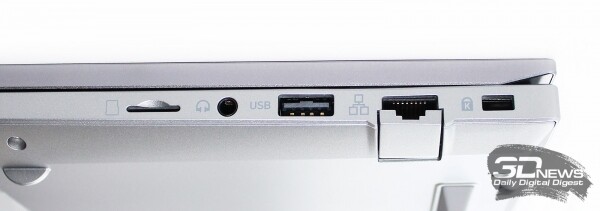 |
On the right side are the Ethernet port, USB 2.0 Type-A port, a combined headphone and microphone jack, and a microSD card slot. The only concern is the USB 2.0, which could have been replaced with a faster port, but otherwise, the set of interfaces is comprehensive for any tasks.
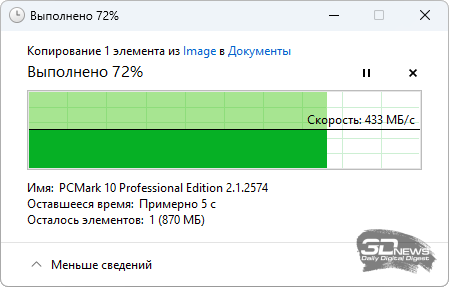
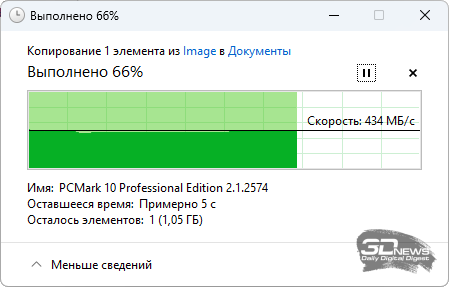
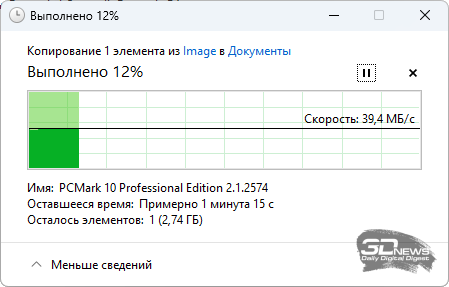
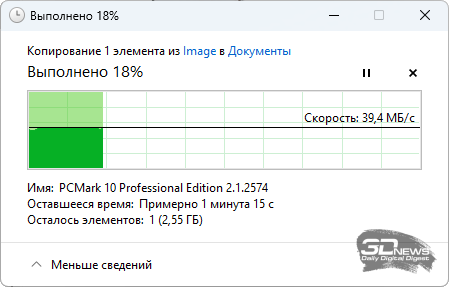
A traditional test of USB throughput with an external SSD showed that all ports meet the stated standards.
 |  | |
 |  |
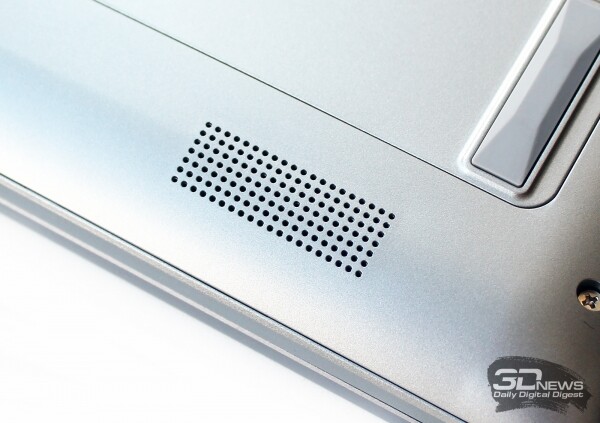
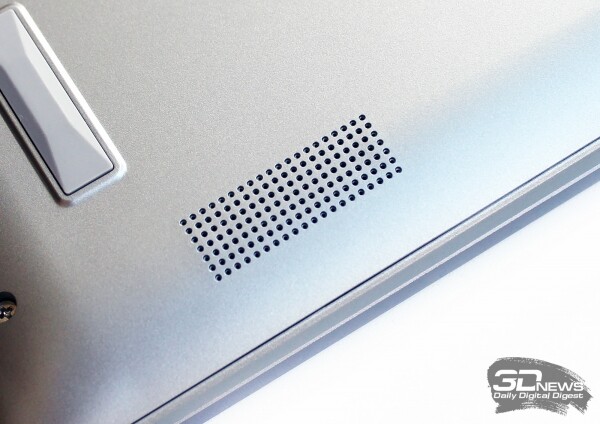
At the corners of the bottom panel of the chassis, you can see two grilles hiding the stereo speakers of the audio system. Another two are located beneath the grille above the keyboard.
 |  |
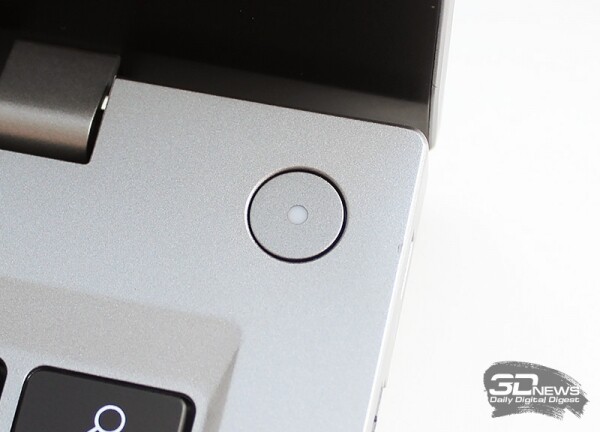
The power button of the laptop is located in the upper right corner of the working panel and is equipped with a white LED.
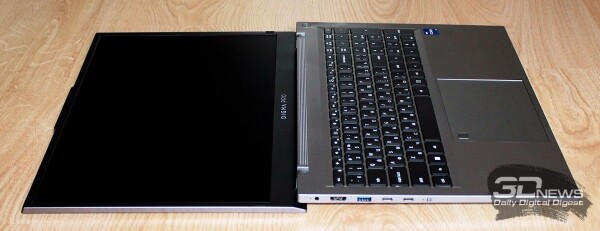
The laptop lid can be tilted back 180 degrees, and you won't need to hold the base with your other hand.
The materials and build quality of the Digma Pro Fortis M do not raise any unpleasant feelings or questions; everything fully matches the price range of this laptop. Of course, one should not expect any premium touches here.
Input devices
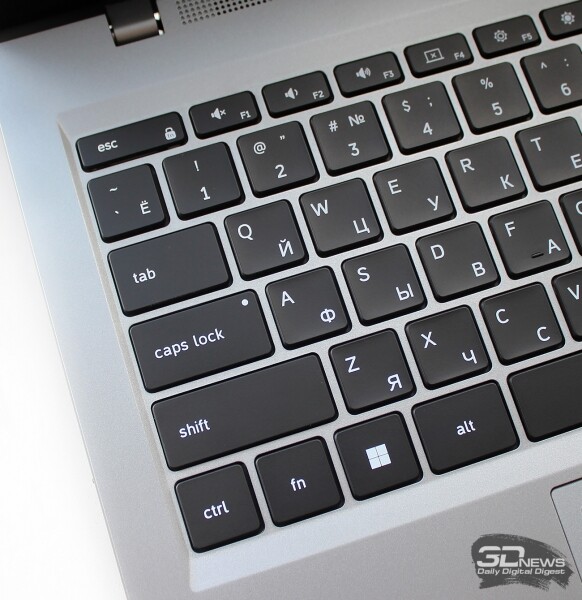
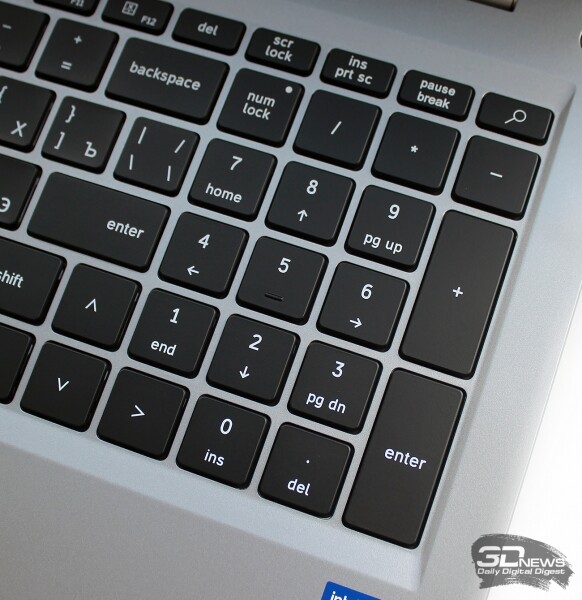
The keyboard on the Digma Pro Fortis M is full-sized, membrane type, with a numeric keypad. The Russian and English layouts are printed in easily readable white font on the black keys. The entire keyboard area is slightly recessed into the work panel.
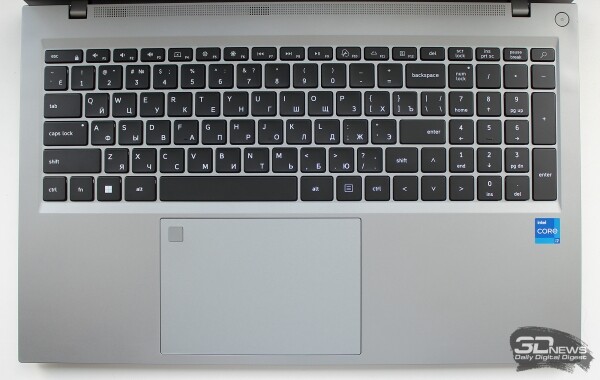
The dimensions of the alphanumeric keys are 17 × 17 mm, functional keys – 17 × 9 mm, and the arrow keys are full-sized.
 |  |
The two-level backlight makes typing at night comfortable. The backlight automatically turns off after 20 seconds of inactivity.
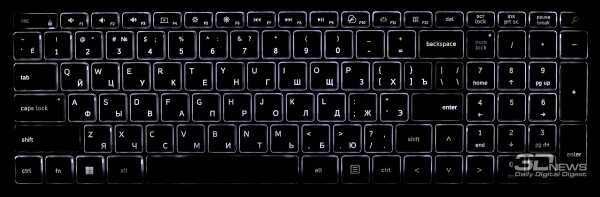
I happened to type on this keyboard for four days, and during that time, only one inconvenience was found – the short right Shift key, which I could not get used to. Otherwise, there are no complaints about working with the Digma Pro Fortis M keyboard.
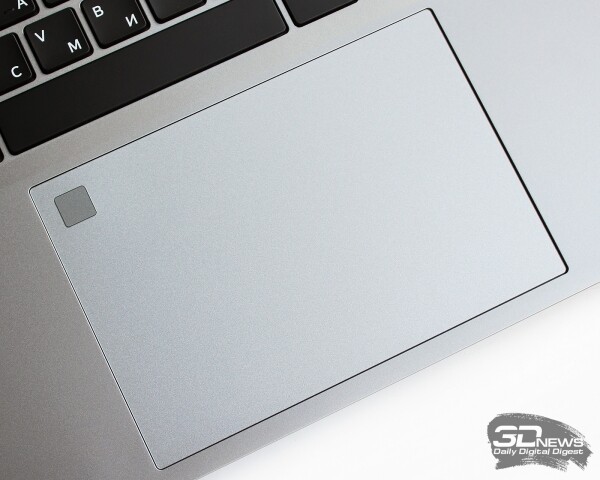
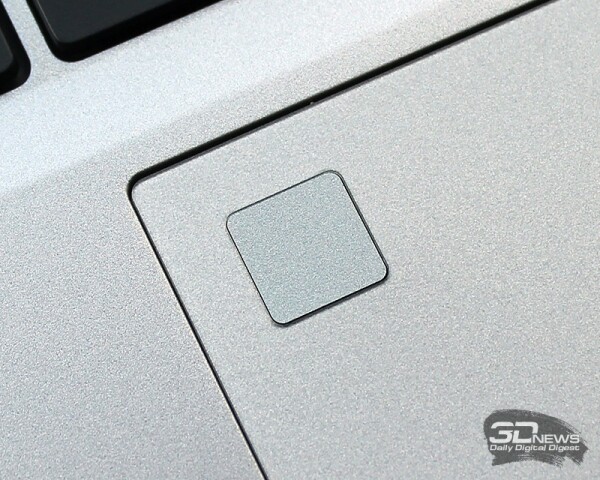
The laptop has a large, convenient touchpad measuring 141 × 96 mm. A fingerprint scanner is integrated in its upper left corner.
 |  |
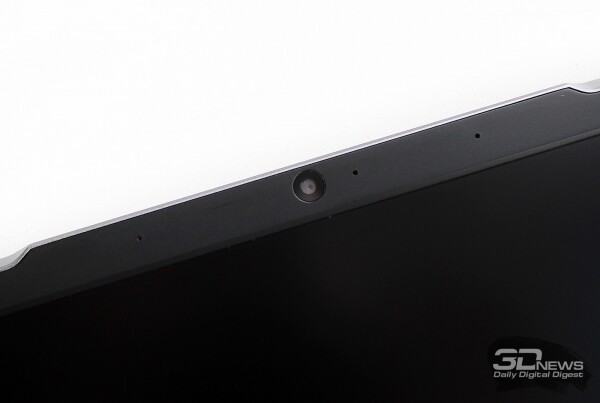
In the top bezel of the screen, there is a two-megapixel webcam with 1080p resolution and two microphones.
In summary, all input devices on the Digma Pro Fortis M meet the class of the laptop and practically do not limit the user in any way.
Display
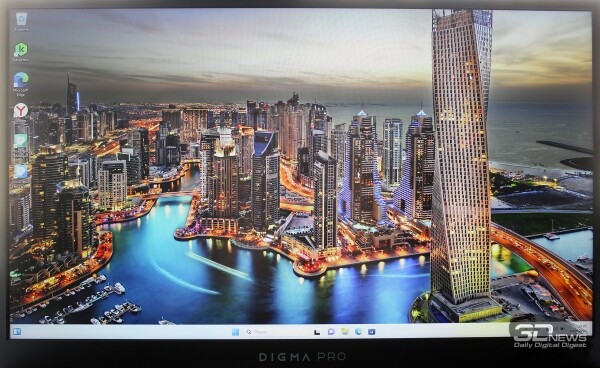
The Digma Pro Fortis M comes equipped with a 17.3-inch IPS screen with a matte finish. The aspect ratio of the screen is 16:9, the resolution is 1920 × 1080 pixels, and the refresh rate is 60 Hz.
The screen matrix (model BOE0С34) is manufactured by BOE.
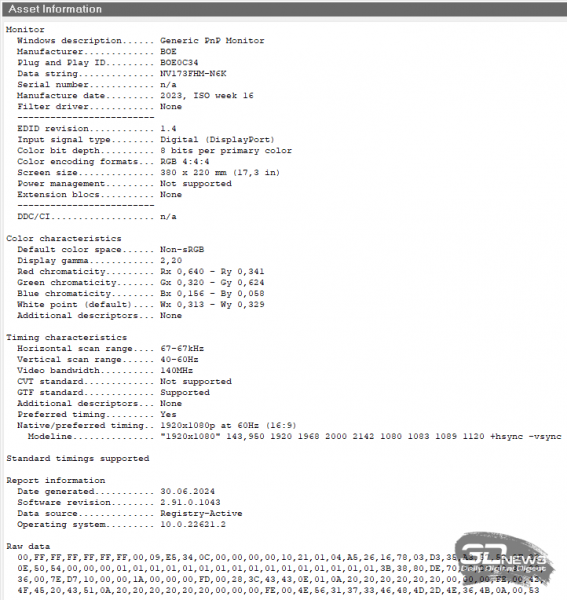
The maximum brightness of the screen is not specified in the laptop's characteristics, and the screen refresh rate can be set to 48 Hz instead of 60 Hz (the second mode is likely needed for watching movies).
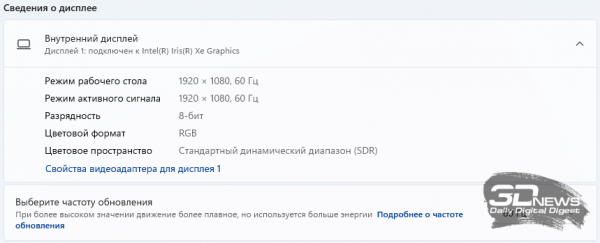
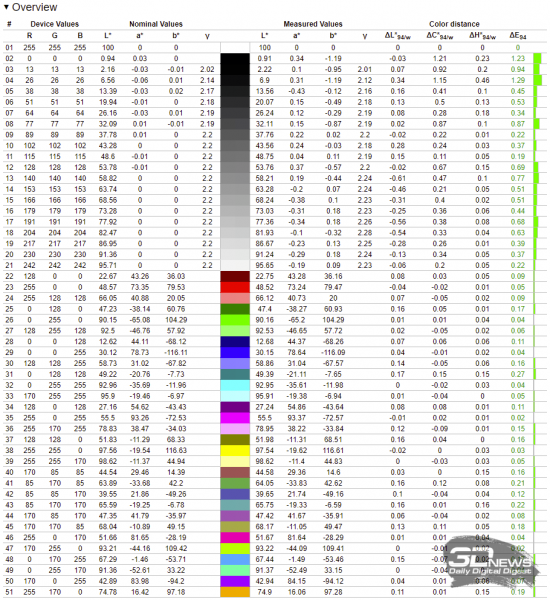
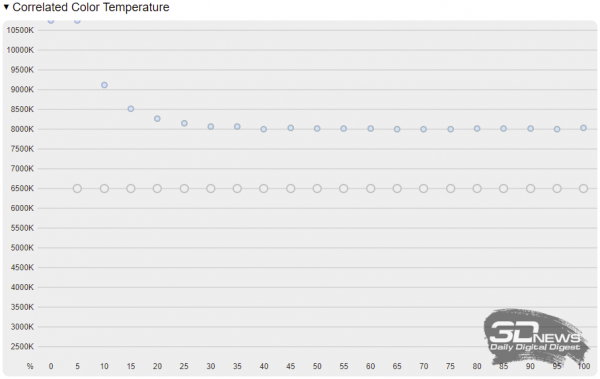
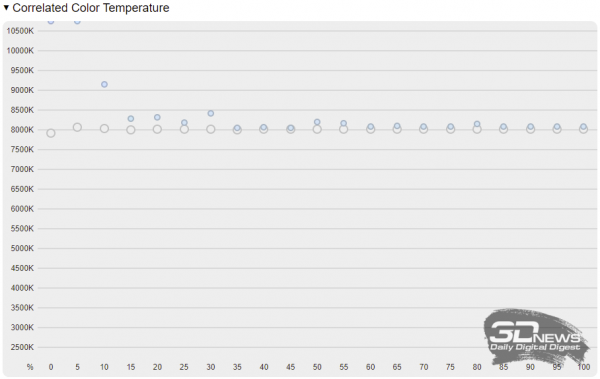
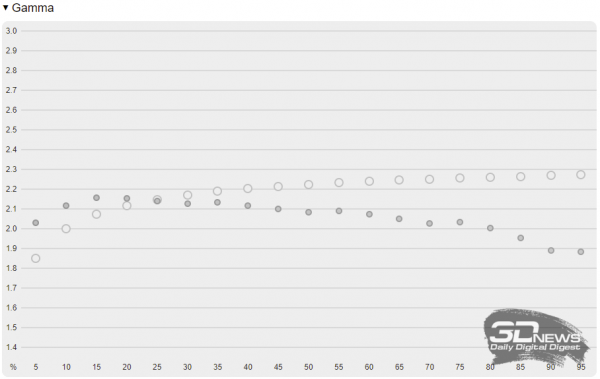
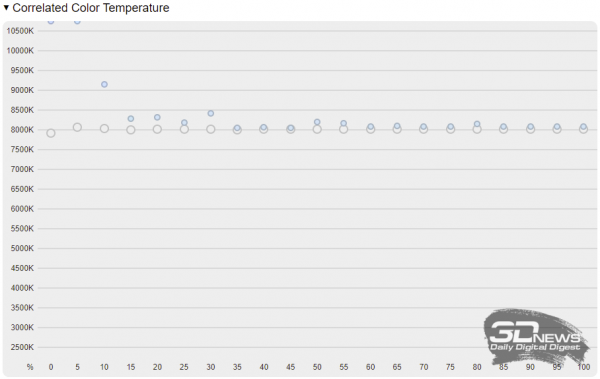
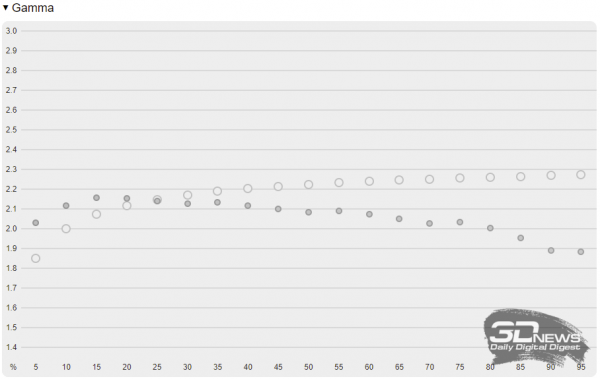
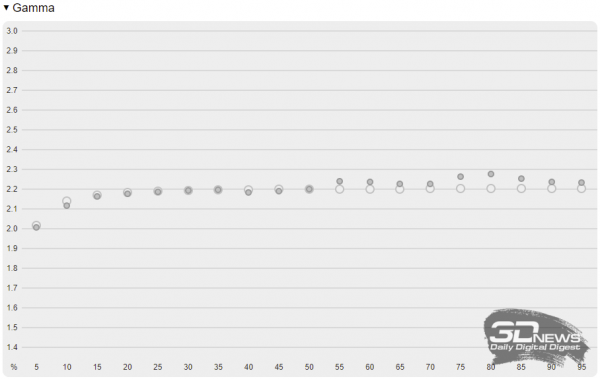
We tested the Digma Pro Fortis M screen using a calibrator and the Argyll CMS software with a graphical interface . All measurements were performed both without display calibration and after it, and the results are presented in pairs of screenshots (left – before calibration, right – after calibration).
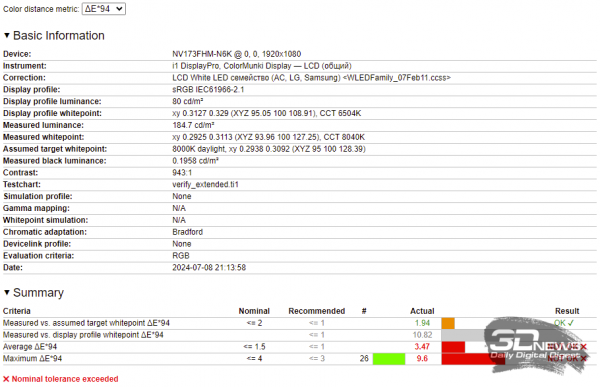 | 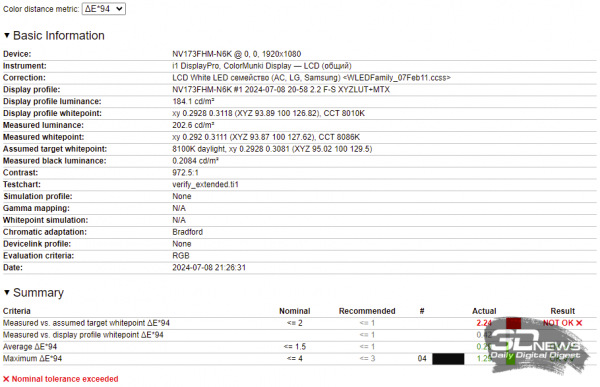 |
According to the measurement results, the display in the Digma Pro Fortis M turned out to be not completely failing, as in the case of , but it still requires calibration.
 |  | |
 |  | |
 |  | |
 |  | |
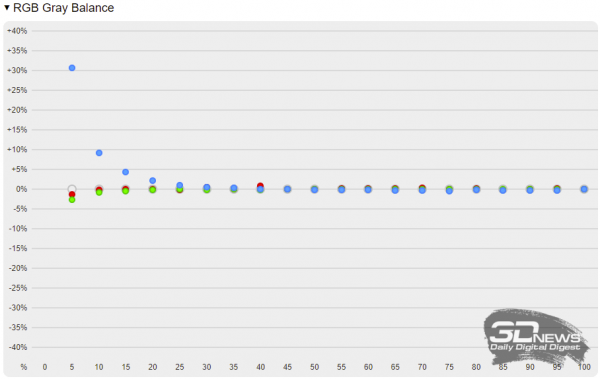 | 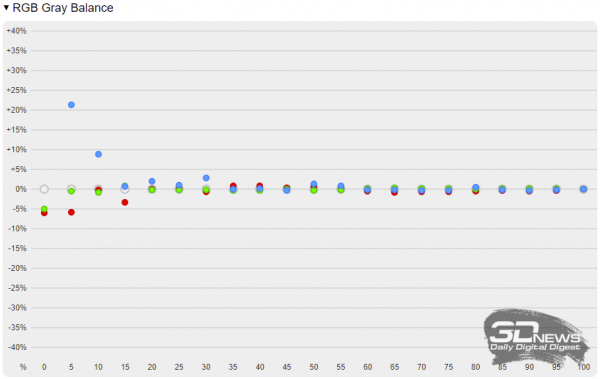 |
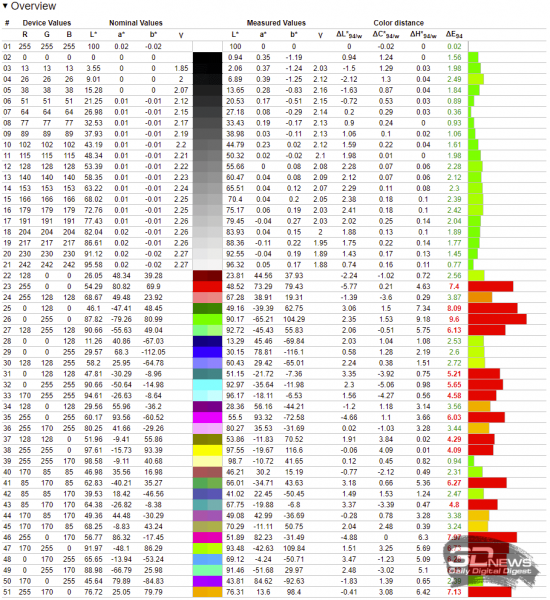
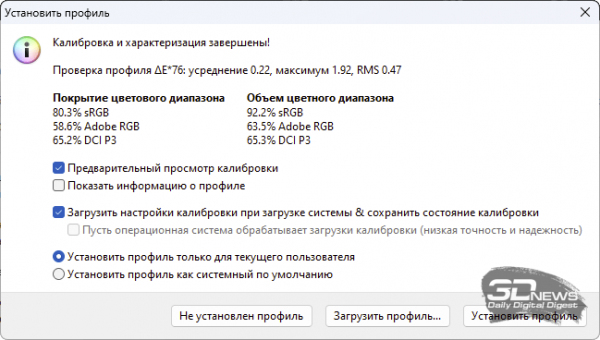
According to the screen testing results, the color gamut coverage was 92.2% sRGB, and the average DeltaE was 0.22 units (with a maximum of 1.92 units).
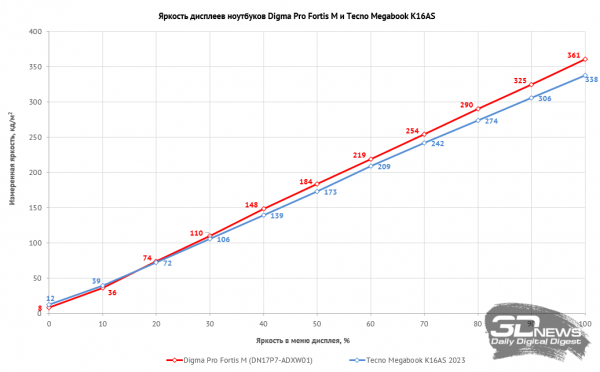
The display pleasantly surprised with its brightness, as we expected results similar to the Digma Pro Breve with its 290 nits, but received a remarkable 361 nits of brightness. These results are comparable to those of its peer, the Tecno Megabook K16AS, as we will demonstrate in the graph below.
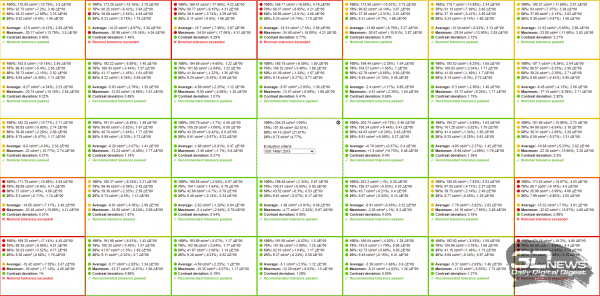
The Digma Pro Fortis M screen has issues with uniformity in the lower corners and upper area. While this is not noticeable to the eye, the calibrator detects deviations.
In summary, the display in the Digma Pro Fortis M is of average quality but has sufficiently high brightness.
Internal Structure and Components
The plastic base of the Digma Pro Fortis M case is secured with screws and clips. The internal volume is divided between the motherboard, cooling system, battery with speakers, and an area for a 2.5-inch drive installation.
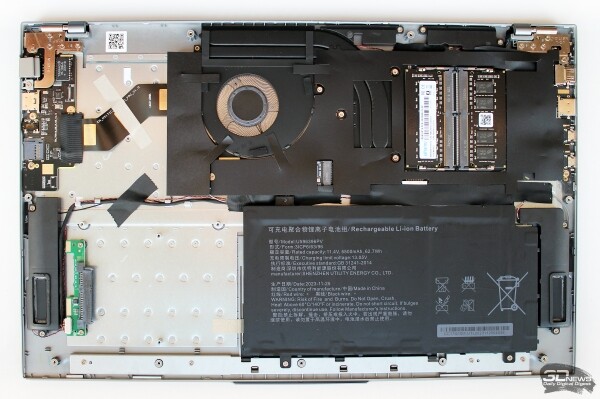 | 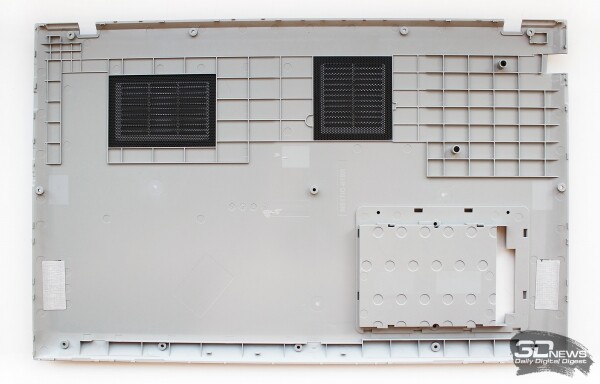 |
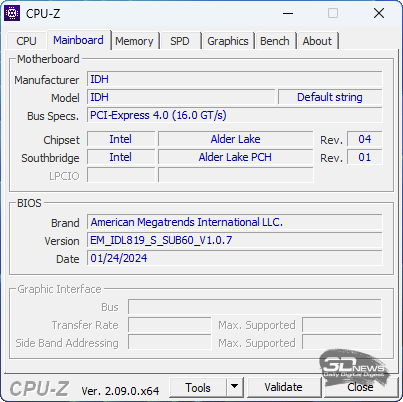
The motherboard is based on the Alder Lake chipset, and the BIOS is dated January 24, 2024.
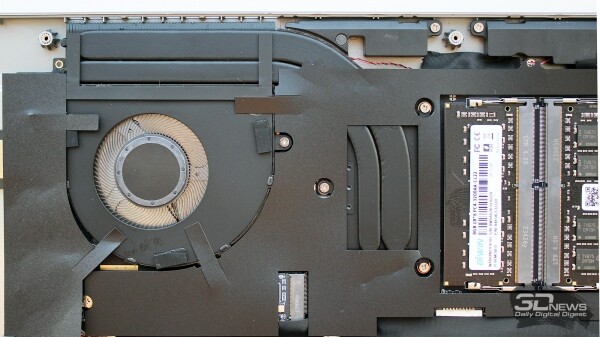
The motherboard, processor, and SSD are almost entirely covered with a thin plastic shield, with only the RAM visible.
All ports on the left side of the case are located on the main board, while those on the right are on a daughterboard connected to the main one via a flexible ribbon cable.
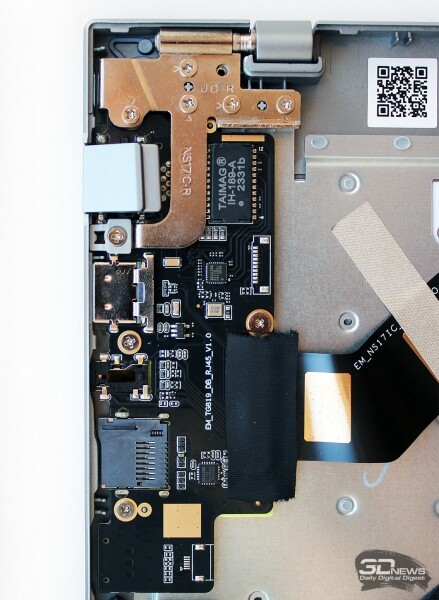 | 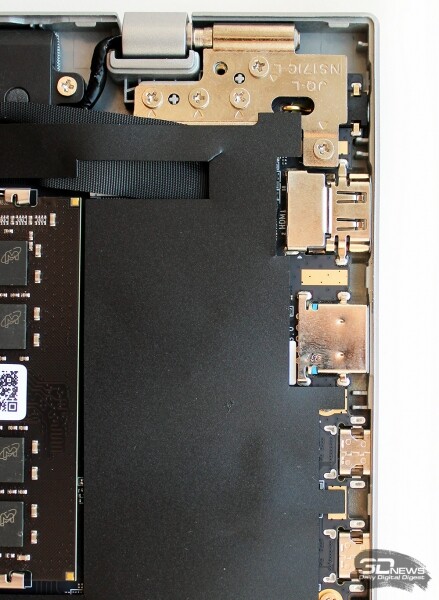 |
In our configuration, the Digma Pro Fortis M utilizes the processor from the Alder Lake family. It features two high-performance cores with Hyper-Threading support, operating at frequencies ranging from 1.7 to 4.7 GHz, and 8 energy-efficient cores with frequencies from 1.2 to 3.5 GHz. The third-level cache is 12 MB.
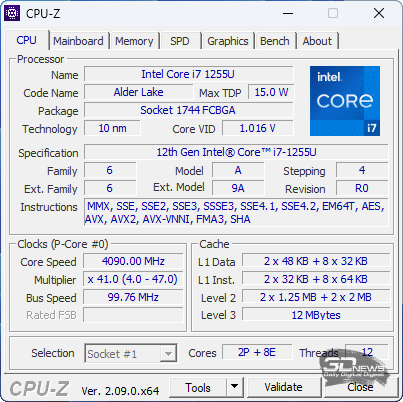
The base power limit for such a processor is 15 watts, with a brief boost capability of up to 25 watts.
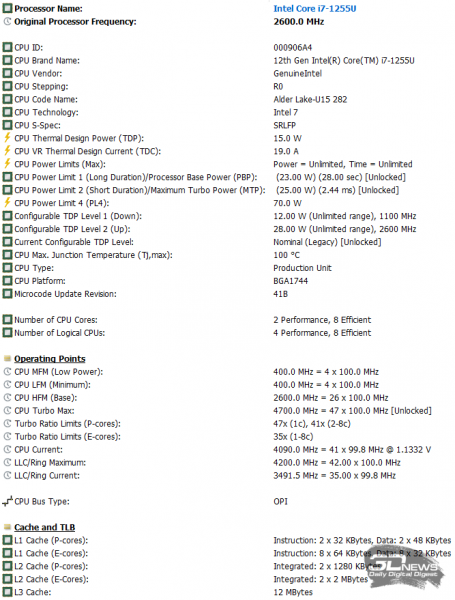
Configurations of the Digma Pro Fortis M with Intel Core i3-1005G1, i5-1035G1, Intel Core i3-1215U, and Intel Core i5-1235U processors are also available.
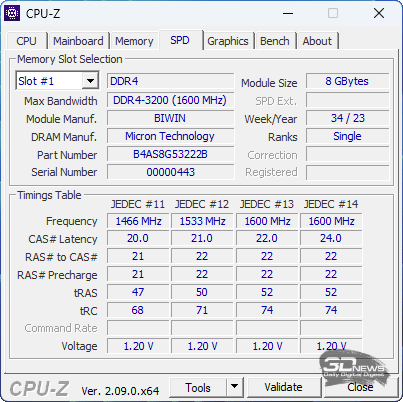
The laptop motherboard has two slots for SO-DIMM RAM modules, populated with 8GB DDR4 modules labeled B4AS8G53222B, produced by BiwinTech.
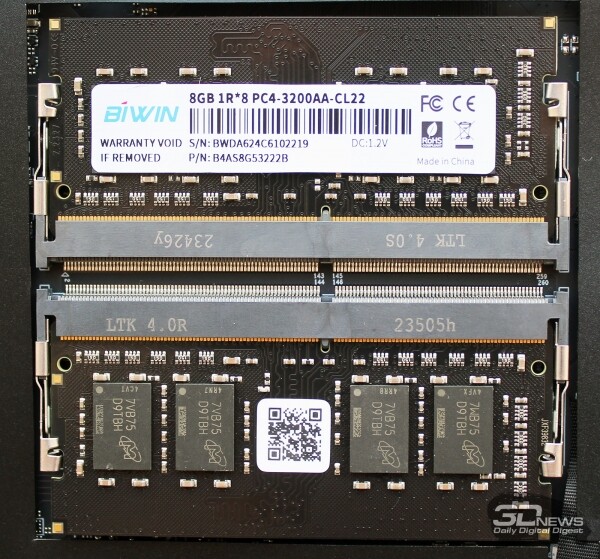
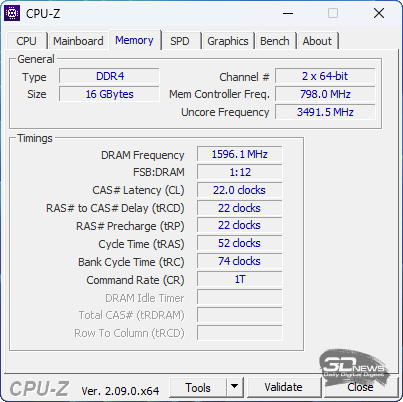
The effective memory frequency is 3200 MHz, with primary timings of 22-22-22-52_1T.
 |  |
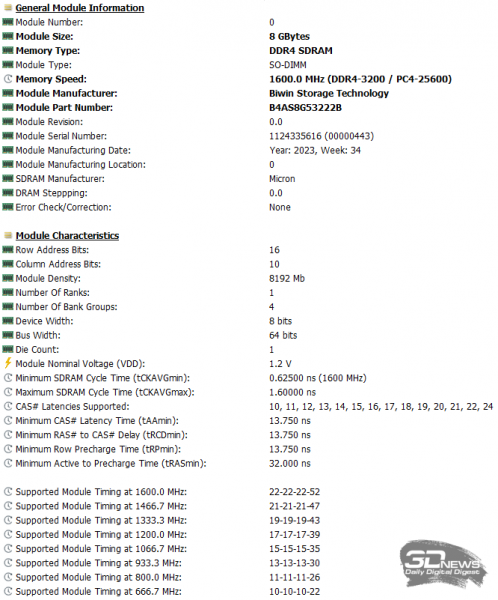
The memory operates in dual-channel mode and demonstrates standard bandwidth and latency characteristics for its frequency and timings.
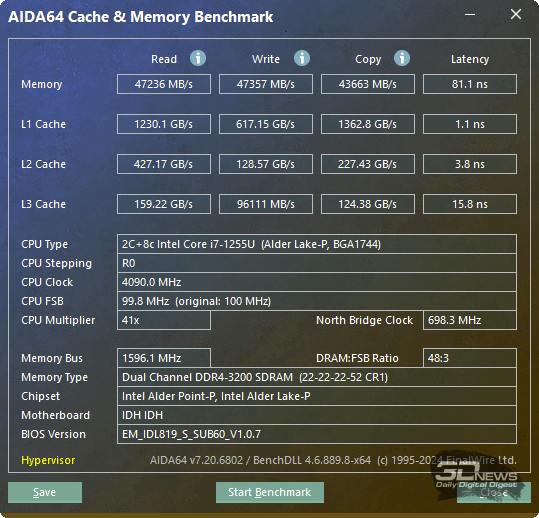
The maximum amount of RAM supported by the laptop is 64 GB, while in the minimum configuration, the Digma Pro Fortis M can be equipped with 8 GB of memory.
The laptop uses an integrated Intel Iris Xe graphics core with 80 execution units and a turbo frequency of up to 2.35 GHz.
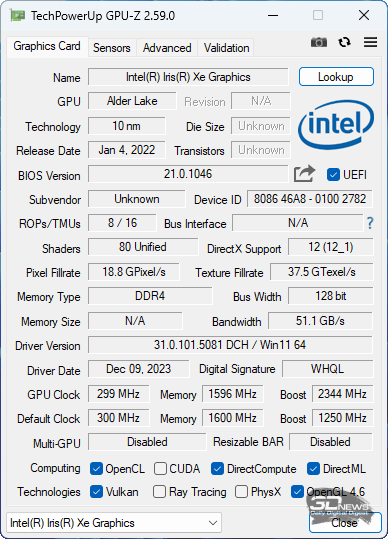 | 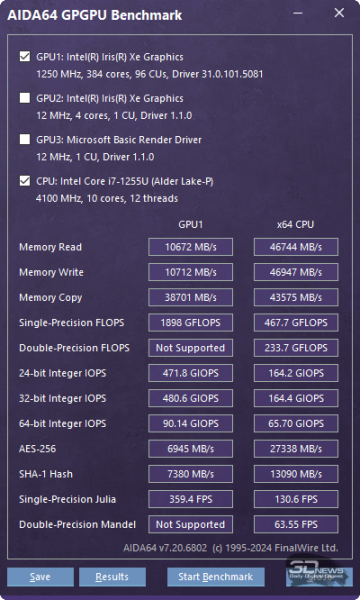 |
It should be noted that it utilizes system memory resources, and the RAM in the Digma Pro Fortis M is rather slow.
The board has only one M.2 slot, which houses an SSD with a PCIe 3.0 x4 interface and a capacity of 512 GB (BiwinTech P3821 NA80V1M10-512).
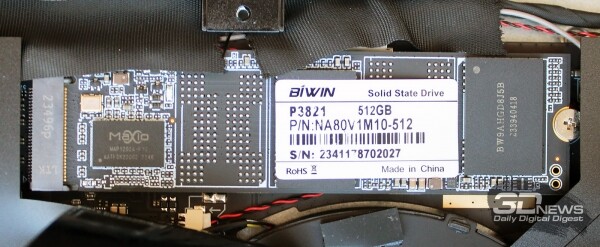
We could not find the specifications of this particular SSD, including its mean time between failures.
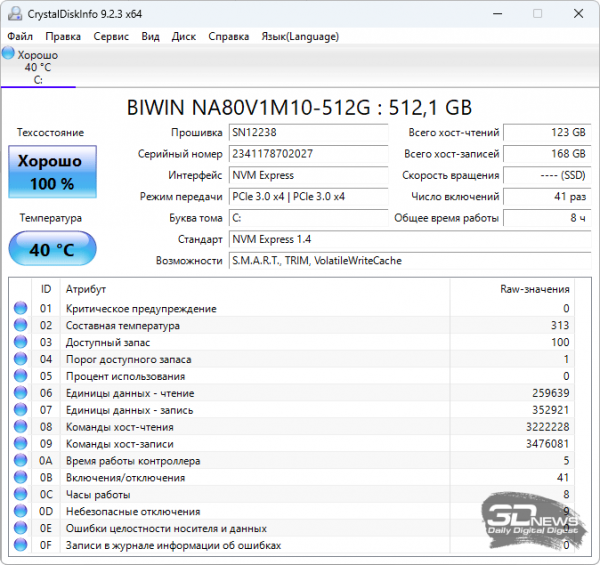
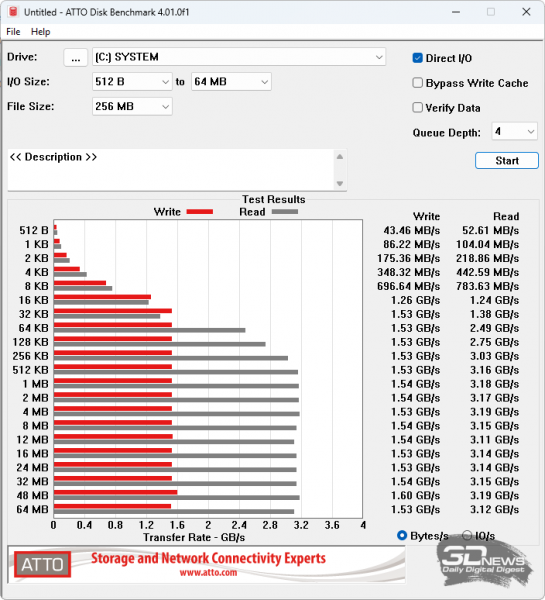
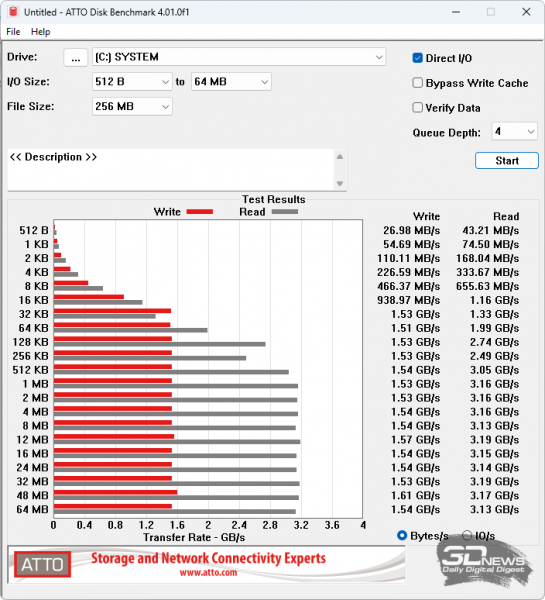
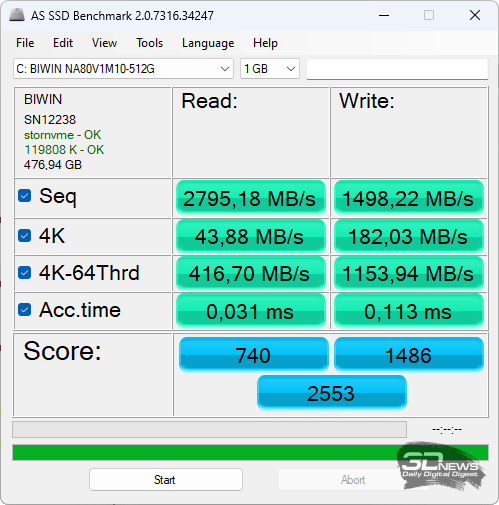
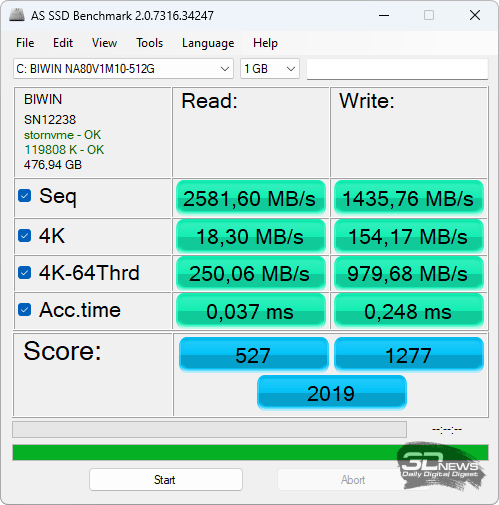
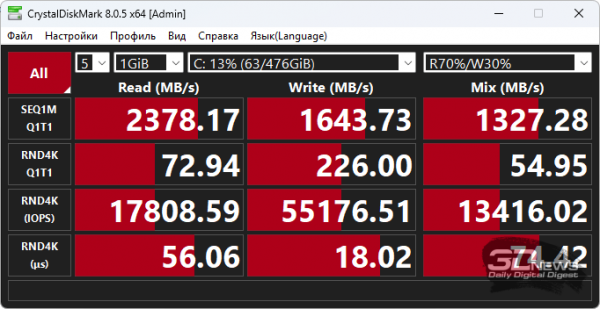
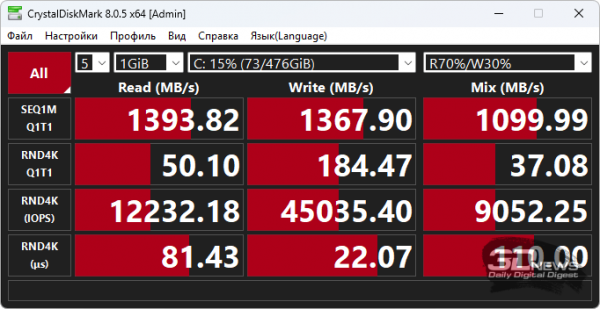
Nevertheless, we were able to check the speed characteristics of the laptop's SSD independently, both when powering the Digma Pro Fortis M from the grid and when working solely on battery power. The results are presented in the form of four pairs of screenshots.
 |  |
 |  |
 |  |
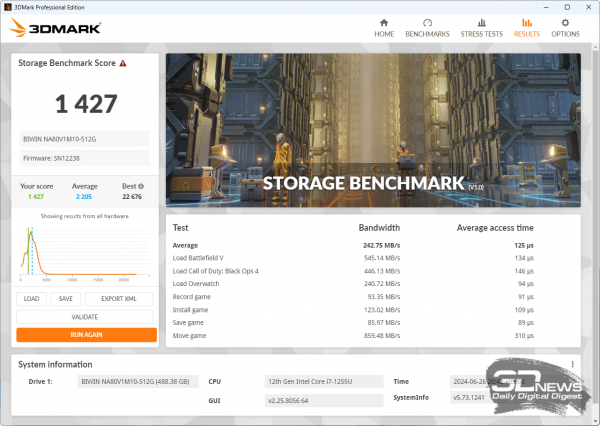 | 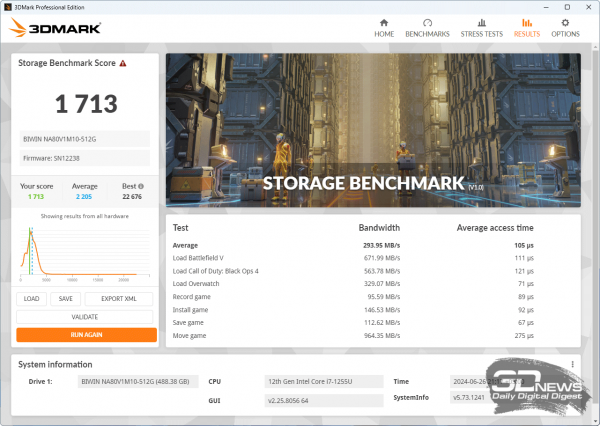 |
Interestingly, ATTO Disk Benchmark and 3DMark storage reported an increase in the drive's performance when the laptop was operating in battery mode, while AS SSD Benchmark and CrystalDiskMark disagreed, showing higher results when the laptop was powered from the grid. In any case, the performance of the drive is at a rather modest level by today's standards, but still sufficient for the tasks for which the Digma Pro Fortis M will be purchased.
Next, we will present the results of the stress test of the drive in AIDA64 Extreme to check the temperature regime of the SSD.
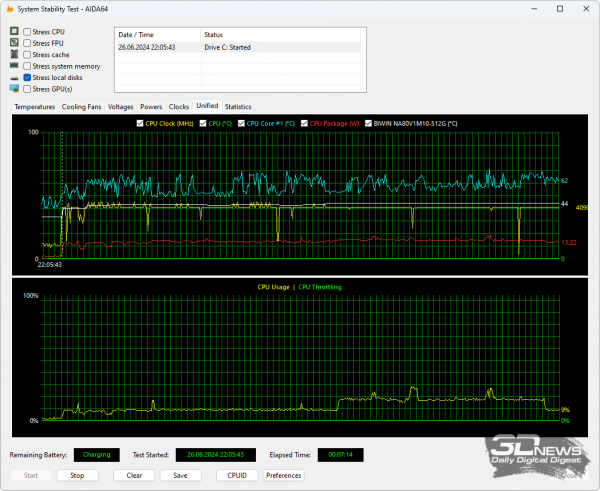 | 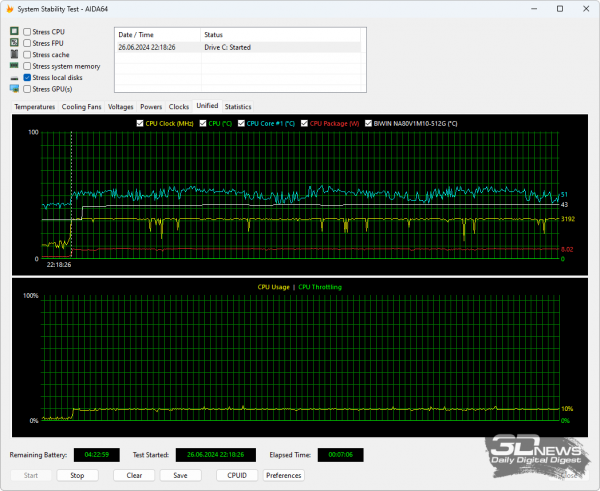 |
As we can see, the SSD does not heat above 44 degrees Celsius in any operating mode, and during everyday use, its temperature is around 37-38 degrees Celsius. This is despite the fact that the room temperature during the tests reached 29 degrees Celsius.
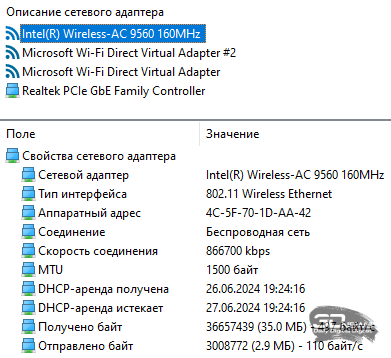
The Digma Pro Fortis M features two network controllers. The wired network is implemented via a Realtek RTL8168/8111 Gigabit Ethernet controller, while the wireless connection uses an onboard Intel Wi-Fi 5 AC9560D2W module that supports 802.11a/b/g/n/ac protocols and frequency bands of 2.4 and 5 GHz.
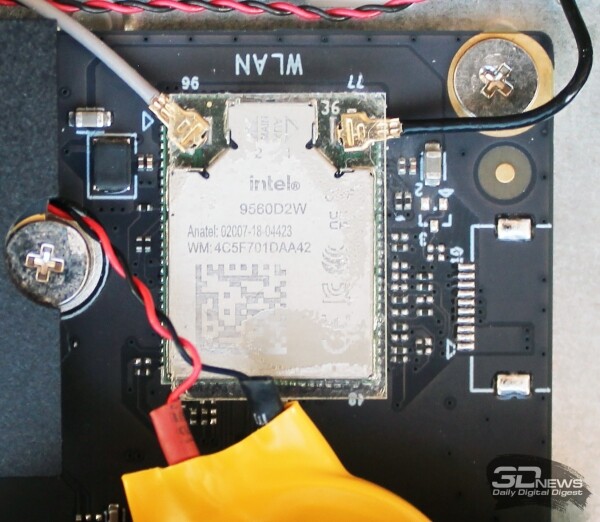
The maximum throughput of this network adapter is 1.8 Gbit/s. Bluetooth version 5.1 is also supported.
The sound in the laptop is managed by a Realtek controller, with a pair of stereo speakers rated at one and a half watts each positioned at the bottom of the chassis, and another two 0.8-watt speakers located above the keyboard.
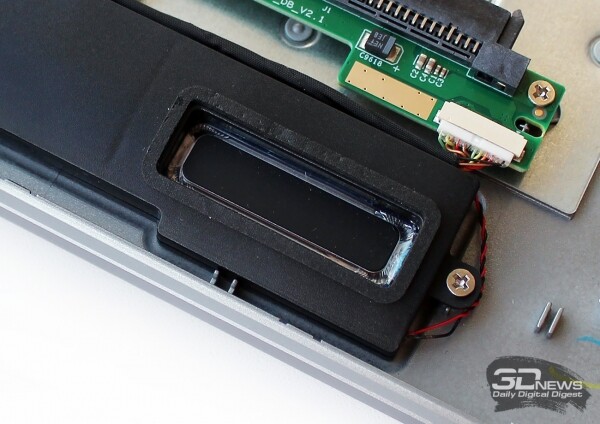 | 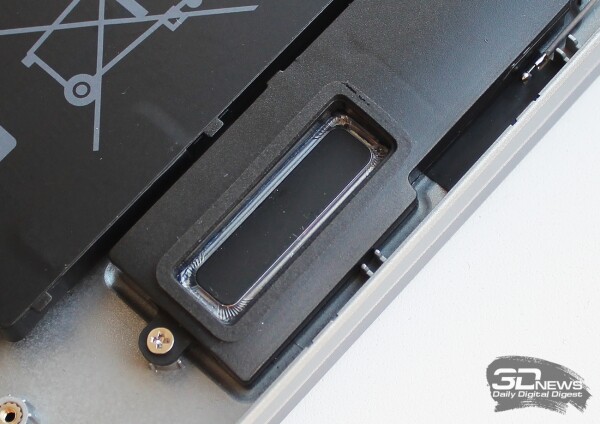 |
The power of these stereo speakers is sufficient, and the laptop does not distort or crackle. However, low frequencies are essentially absent. Overall, the sound is adequate and may sometimes even be useful for the Digma Pro Fortis M user, though we immediately recommend using headphones for audiophiles.
Cooling system, efficiency and noise level
At the base of the laptop's chassis, there are two ventilation grilles: one directly above the fan and the other above the CPU heat dissipation zone.
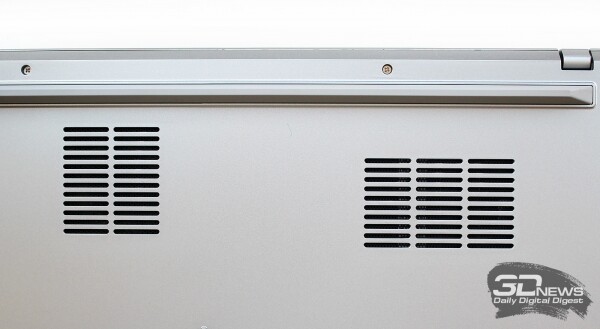
Through the first grille, cold air enters the cooling system and is expelled back through the grille at the rear.
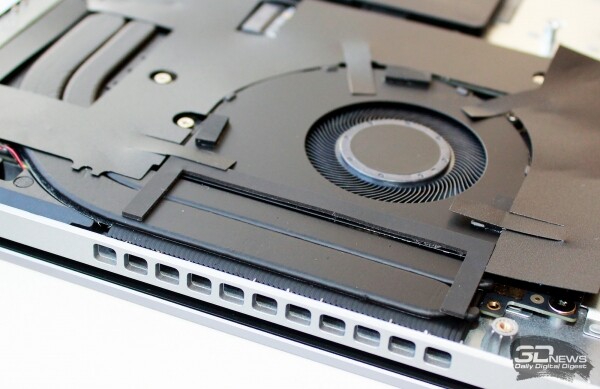
Like the Digma Pro Breve model, the fan speed is automatically regulated by pulse-width modulation depending on the processor temperature and load. There are no separate cooling modes in the Digma Pro Fortis M.
To evaluate the effectiveness of cooling the central processor in the laptop, we used a stress test. in AVX mode. Monitoring all metrics was handled by the utility. version 8.05.5485. The testing was conducted under the Windows 11 Pro operating system with the latest available drivers and updates installed. The room temperature during the tests was 29 degrees Celsius.
We conducted the first stress test of the Digma Pro Fortis M while running the laptop on AC power.
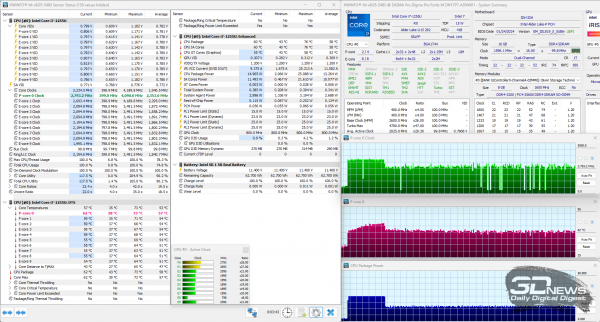
The first thing that is immediately clear is that the thermal package of the Intel Core i7-1255U processor is indeed limited to 25 watts, allowing the cooling system to handle this load easily without throttling. The maximum temperature of the performance cores rises only to 73 degrees Celsius, while the efficient cores reach up to 69 degrees. The frequency of the P-cores initially increases to 4.2 GHz before decreasing and stabilizing at 2.8 GHz. The E-cores start at 3.5 GHz and then stabilize at 2.1-2.2 GHz. It should be noted that the laptop's fan is audible, but its noise does not cause any discomfort.
Now let's see how the laptop performs in battery mode when running solely on battery power.
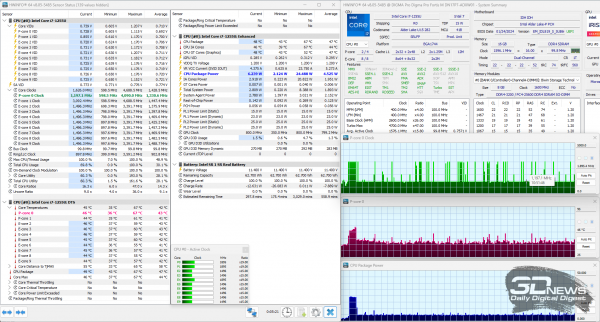
We record a decrease across all metrics of the laptop. After a brisk start, the frequency of the performance cores drops to 1.2 GHz, while the efficiency cores go down to 1.5 GHz. The power consumption of the processor under this load does not exceed 7 watts. The temperatures of the P-cores do not exceed 67 degrees Celsius, stabilizing at 46, and the E-cores stabilize at 44-45 degrees Celsius after peak temperatures of 60 degrees. Under this mode, the laptop's cooling system is barely audible. Clearly, we cannot expect impressive performance from the Digma Pro Fortis M in such an economical mode. This is exactly what we will check now.
Performance Testing
To assess the performance of the Digma Pro Fortis M, we included the laptop in the testing with an Intel Core i5-1235U processor, as well as with an Intel Core i5-12450H processor. The first is slightly cheaper than our today's hero, while the second is a bit more expensive. We will present the performance results of these laptops in a table, both when powered by the adapter/electricity and when running on battery. The difference in performance is shown in percentage in separate columns.
| Test name | Indicator | Digma Pro Fortis M (DN17P7-ADXW01) | Digma Pro Breve DN15R7 (ADXW02) | % | TECNO MEGABOOK K16AS | TECNO MEGABOOK K16AS | % | Honor MagicBook X 16 (BRN-F56) | Honor MagicBook X 16 (BRN-F56) | % | |
| (Intel Core i7-1255U) | (Intel Core i7-1255U) | (Intel Core i5-1235U) | (Intel Core i5-1235U) | (Intel Core i5-12450H) | (Intel Core i5-12450H) | ||||||
| battery | battery | battery | |||||||||
| Announcement date | n/a | n/a | n/a | n/a | n/a | n/a | |||||
| and price: | ~68,000 rub. | ~68,000 rub. | ~50,000 rub. | ~50,000 rub. | ~74,000 rub. | ~74,000 rub. | |||||
| AIDA64 memtest | Read | ↑ | 47 236 | 45 477 | 3,7% | 23 918 | 23 965 | -0,2% | 59 087 | 39 279 | 33,5% |
| Write | ↑ | 47 357 | 46 826 | 1,1% | 23 631 | 23 660 | -0,1% | 66 318 | 63 334 | 4,5% | |
| Copy | ↑ | 43 663 | 43 480 | 0,4% | 23 380 | 23 525 | -0,6% | 62 012 | 54 815 | 11,6% | |
| Latency | ↓ | 81,1 | 94,7 | 16,8% | 90,2 | 102,0 | 13,1% | 107,6 | 114,2 | 6,1% | |
| WinRAR 7.01b1 | KB/s | ↑ | 13 460 | 11 629 | 13,6% | 10 024 | 9 550 | 4,7% | 14 138 | 13 704 | 3,1% |
| 7-Zip 24.04 | Total, GIPS | ↑ | 39 268 | 37 927 | 3,4% | 31 922 | 32 856 | -2,9% | 55 324 | 46 400 | 16,1% |
| CPU-Z 2.09.0 benchmark | CPU Single Thread | ↑ | 667 | 465 | 30,3% | 649 | 471 | 27,5% | 708 | 706 | 0,4% |
| CPU Multi Thread | ↑ | 3 747 | 3 540 | 5,5% | 4 051 | 3 161 | 22,0% | 4 670 | 3 654 | 21,8% | |
| Geekbench 6.3.0 | Single-Core Score | ↑ | 2 328 | 1 740 | 25,3% | 2 168 | 1 709 | 21,2% | 2 254 | 2 224 | 1,3% |
| Multi-Core Score | ↑ | 7 201 | 6 265 | 13,0% | 6 142 | 5 244 | 14,6% | 9 623 | 7 210 | 25,1% | |
| HandBrake 1.8.0 | H.265 MKV 4K, s | ↓ | 744,62 | 761,37 | 2,2% | 862,08 | 1 038,36 | 20,4% | 452,32 | 662,23 | 46,4% |
| CineBench R23 | CPU (Multi Core), pts | ↑ | 6 041 | 5 751 | 4,8% | 5 091 | 5 525 | -8,5% | 9 977 | 7 793 | 21,9% |
| CPU (Single Core), pts | ↑ | 1 356 | 1 188 | 12,4% | 1 524 | 1 210 | 20,6% | 1 625 | 1 589 | 2,2% | |
| Blender 4.1.0 (Classroom) | Classroom, time | ↓ | 0:18:23 | 0:18:54 | 2,8% | 0:20:54 | 0:19:38 | -6,1% | 0:11:51 | 0:12:59 | 9,6% |
| Corona 10 | Score (rays/s) | ↑ | 1 854 312 | 1 798 779 | 3,0% | 1 611 746 | 1 656 480 | -2,8% | 3 021 426 | 2 323 749 | 23,1% |
| V-Ray 5 Benchmark | vsamples | ↑ | 3 922 | 3 755 | 4,3% | 3 381 | 3 498 | -3,5% | 6 442 | 4 985 | 22,6% |
| VeraCrypt 1.26.7 | Encryption, MiB/s | ↑ | 351 | 339 | 3,4% | 304 | 309 | -1,6% | 621 | 466 | 25,0% |
| (Kuznyechik (Serpent(Camellia) | Decryption, MiB/s | ↑ | 317 | 309 | 2,5% | 286 | 299 | -4,5% | 568 | 447 | 21,3% |
| JetStream 2.2 | Score (Chrome 120) | ↑ | 278,456 | 180,747 | 35,1% | 263,903 | 179,664 | 31,9% | 291,740 | 223,369 | 23,4% |
| Passcovery Suite 23.03 | Office 2007, SHA1, 256-bit AES | ↑ | 4 547 | 4 495 | 1,1% | 4 964 | 3 564 | 28,2% | 5 225 | 4 071 | 22,1% |
| RAR 3.x, SHA1, 128-bit AES | ↑ | 2 321 | 2 339 | -0,8% | 2 003 | 2 089 | -4,3% | 3 911 | 3 077 | 21,3% | |
| PDF/R 3, MD5, 128-bit RC4/AES | ↑ | 1 313 726 | 1 319 809 | -0,5% | 1 167 515 | 1 199 972 | -2,8% | 1 820 206 | 1 419 889 | 22,0% | |
| PCMark’10 | Total | ↑ | 5 531 | 4 387 | 20,7% | 5 155 | 4 291 | 16,8% | 5 399 | 3 324 | 38,4% |
| , — which at first glance seems like a reasonable alternative to Professional… but upon closer examination, it turns out that some important features are missing (specifically, it lacks | ↑ | 10 439 | 8 289 | 20,6% | 10 146 | 8 533 | 15,9% | 10 587 | 8 380 | 20,8% | |
| Productivity | ↑ | 7 421 | 5 578 | 24,8% | 7 284 | 5 684 | 22,0% | 7 586 | 3 559 | 53,1% | |
| Digital Content Creation | ↑ | 5 929 | 4 956 | 16,4% | 5 030 | 4 423 | 12,1% | 5 318 | 3 343 | 37,1% | |
| 3DMark CPU Profile | Max threads | ↑ | 3 140 | 3 581 | -14,0% | 2 232 | 2 950 | -32,2% | 4 862 | 3 712 | 23,7% |
| 16 threads | ↑ | 2 541 | 2 895 | -13,9% | 2 189 | 2 513 | -14,8% | 4 848 | 3 706 | 23,6% | |
| 8 threads | ↑ | 2 231 | 2 408 | -7,9% | 1 905 | 2 050 | -7,6% | 4 223 | 3 378 | 20,0% | |
| 4 threads | ↑ | 1 783 | 1 715 | 3,8% | 1 510 | 1 555 | -3,0% | 3 335 | 2 815 | 15,6% | |
| 2 threads | ↑ | 1 429 | 1 208 | 15,5% | 1 230 | 1 185 | 3,7% | 1 820 | 1 588 | 12,7% | |
| 1 thread | ↑ | 912 | 666 | 27,0% | 825 | 666 | 19,3% | 932 | 915 | 1,8% | |
| 3DMark | Night Raid | ↑ | 13 150 | 13 547 | -3,0% | 9 313 | 9 721 | -4,4% | 12 678 | 11 362 | 10,4% |
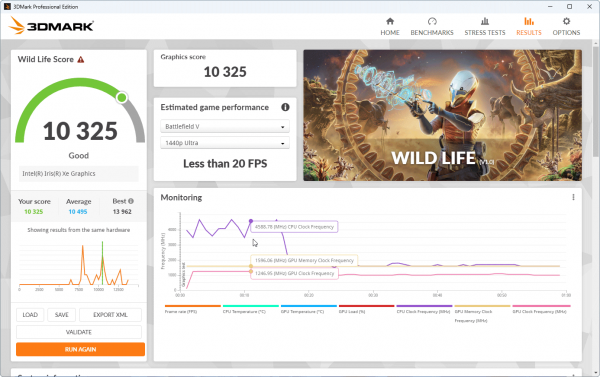
| Wild Life | ↑ | 10 325 | 10 629 | -2,9% | 6 438 | 6 672 | -3,6% | 7 758 | 7 475 | 3,6% | |
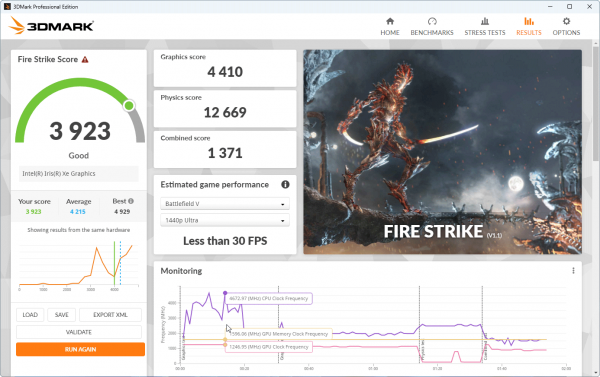
| Fire Strike | ↑ | 3 923 | 4 212 | -7,4% | 2 548 | 2 674 | -4,9% | 3 028 | 2 864 | 5,4% | |
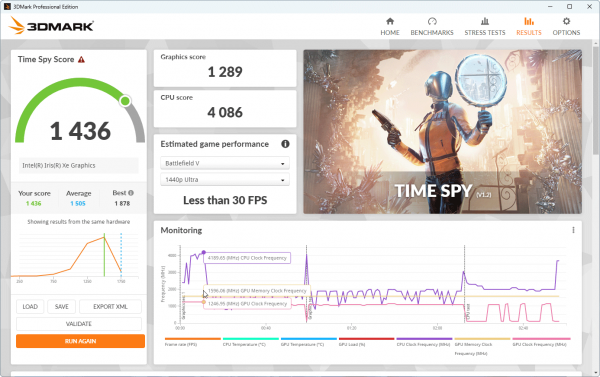
| Time Spy | ↑ | 1 436 | 1 504 | -4,7% | 981 | 1 052 | -7,2% | 1 018 | 963 | 5,4% | |
The results are quite logical: the Digma Pro Fortis M turned out to be slightly faster than the Tecno Megabook K16AS, but a little slower than the Honor MagicBook X 16 (BRN-F56). The latter has an advantage in multi-threaded tests, but we must not forget that the thermal package of the Intel Core i5-12450H is twice as high as that of the Intel Core i7-1255U. However, the decrease in processor performance in the Digma Pro Fortis M when switching to battery mode appears to be less critical than we assumed during the stress tests, reaching a maximum of 30%, while the average across all benchmarks was 7.2%.
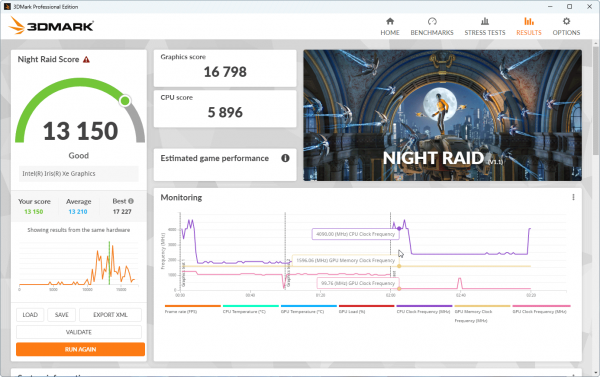
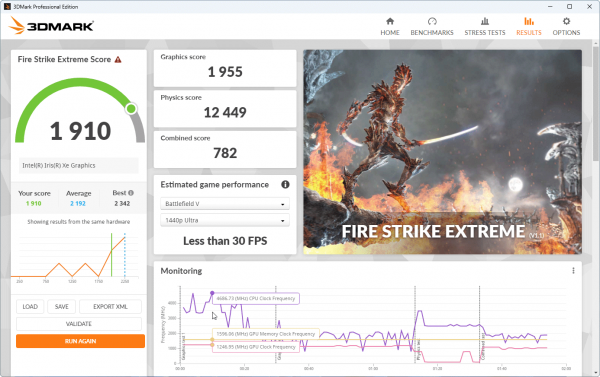
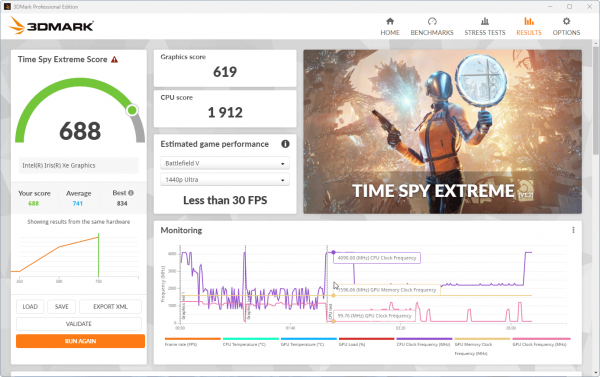
In addition, we present the results of the built-in processor graphics core tests in six 3DMark benchmarks.
 |  |  |
 |  |  |
Autonomy
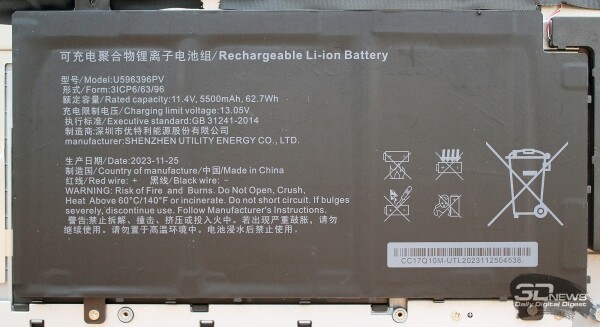
The Digma Pro Fortis M is equipped with a removable lithium-ion battery with a capacity of 62.7 Wh (5500 mAh).
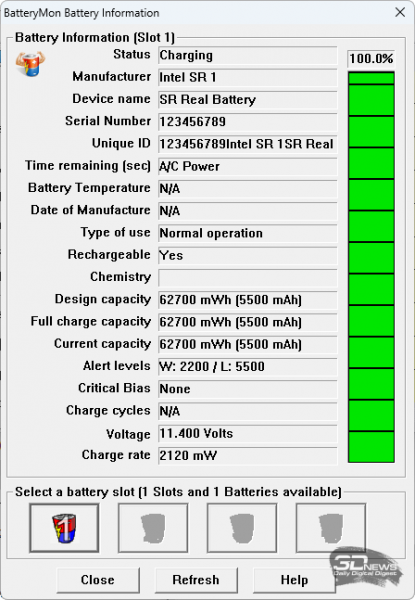
The BatteryMon utility confirmed the stated battery capacity.
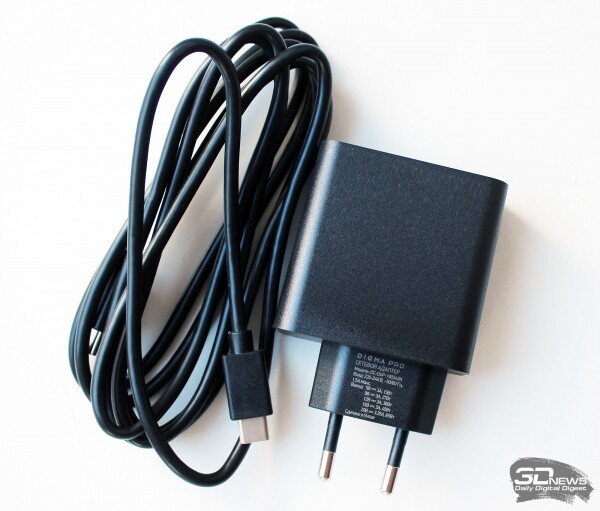
To charge the battery, the laptop comes with a power adapter with a maximum power of 65 W (20 V, 3.25 A) and weighs only 100 grams (noting this as power adapters are often carried). It connects to the laptop via a separate 1.99-meter cable with two USB Type-C connectors.
According to the results from five charging cycles of the battery from 3% to 99%, the average charging time was 2 hours and 19 minutes—not insignificant, it must be acknowledged.
We measured the laptop's battery life at a display brightness of 200 nits, corresponding to 56% on the brightness scale (the graph is shown above in the screen testing section). The tests were conducted using the PCMark'10 suite in three modes. Network connections and sound were kept on, with no artificial optimizations made to extend battery life. The results obtained are presented below.
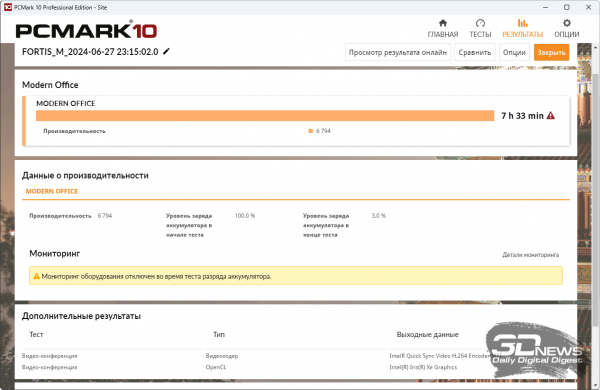 | 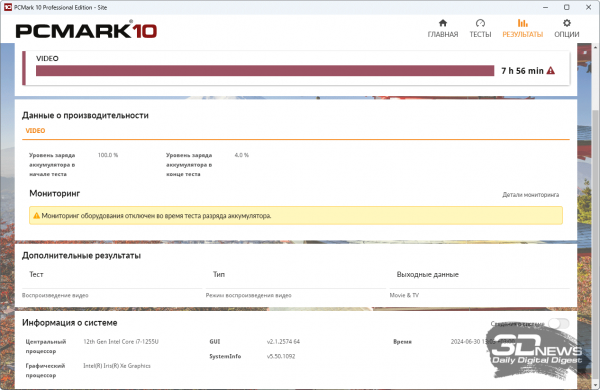 |
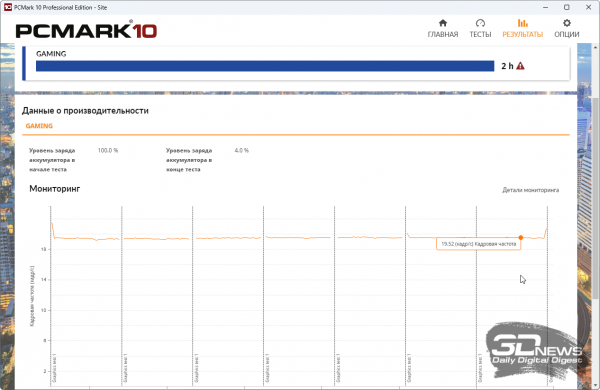
When working in an office or watching videos, the laptop will last for seven and a half to eight hours, which, in our opinion, is not quite enough for confidence in a study or workday. We would like an additional 1.5-2 hours, especially since we previously noted serious limitations on the processor's power consumption in battery mode. In a conditional gaming mode, the Digma Pro Fortis M is ready to last for two hours, which is a standard figure for laptops with Intel Iris Xe.
Conclusion
First, let's list the advantages of the Digma Pro Fortis M laptop with a 17.3-inch screen:
- a wide range of 9 hardware configurations;
- sufficient performance for laptop positioning (speaking of DN17P7-ADXW01);
- high brightness display (for this class of laptops);
- comfortable noise level, including under high load modes;
- full-sized keyboard with a numeric keypad and backlighting;
- comprehensive set of ports;
- webcam with Full HD resolution and a mechanical switch;
- fingerprint scanner and Kensington lock;
- the ability to increase or replace RAM;
- the option to install a second SSD (SATA, 2.5 inches);
- presence of a wired network adapter;
- pre-installed Windows 11 Pro.
However, it is impossible not to mention the drawbacks of this laptop model:
- average battery life;
- an outdated wireless network controller with no upgrade option;
- the screen requires calibration;
- you will need to get used to the short right Shift key on the keyboard.
Almost there, very close to the ideal study or office laptop. If it had better battery life and a faster Wi-Fi module, the choice would be obvious. It’s possible that the Digma Pro Fortis M models with weaker Intel Core i3-1215U and Intel Core i5-1235U processors (we won’t even consider the Intel Core i3-1005G1) could demonstrate higher battery life, but they would also lose in performance. In every other aspect, the Fortis M looks like a strong competitor among laptops in its price range and can be considered a convenient and reliable companion for all five to seven years of higher education.
Source: 3dnews.ru
