

It's amusing how the history of releases of open models for transforming text prompts into images, developed and trained by Stability AI, resembles a series of highs and lows akin to the successive versions of Microsoft's OS. After the legendary success of XP, let's remember, came the problematic Vista; then the magnificent ‘seven’ — followed by the barren Windows 8. Stable Diffusion had an initially unremarkable version 1.5, which was gradually refined by enthusiasts, followed by the frankly unsuccessful SD 2.0 — unsuccessful, in fact, because it included an atypical encoder for such models, OpenCLIP, from . During this selection, not only inappropriate (NSFW) visual references were filtered out, but also paintings and illustrations by popular artists like the notorious Greg Rutkowski. This last point ultimately enraged enthusiasts: whereas for SD 1.5, even in the original version without applying specifically trained checkpoints, simple prompts with styles — “epic medieval fantasy landscape, in the style of Greg Rutkowski” — produced impressive results, SD 2.0 ceased to “recognize” the names of the most widely known illustrators, whose copyrights on their created works remain valid, and who did not consent to provide these works for AI training. It became necessary to use more words to describe the desired outcome, and the model struggled more with overly long prompts.

Sit down — get up, sit down — get up
With the modified encoder (the converter of text prompts into digital tokens, with which the model operates afterwards), the inability to use named styles simply demotivated enthusiasts from improving the 'version 2' on their own. After all, it was necessary to simultaneously understand how to tailor the already refined prompt crafting techniques to the new encoder and further train the model to recognize those images and themes that its creators did not introduce to it during the initial training phase — a quality distinction from 'version 1.5' generated images was still not guaranteed. Yes, a quality leap occurred from the standard 512×512 size for SD 1.5 to 768×768, but by that time, the community was actively using upscalers, outpainters, and other tools to increase the final image size, so SD 2.0 essentially went unnoticed. SDXL (developed by OpenAI and used, in particular, by the DALL-E project) — its code is also open, but the database on which it was trained, , is proprietary. Additionally, the standard canvas size for ‘Oversize’ has increased to 1024×1024, plus a whole range of additional improvements have emerged, so enthusiasts happily took on its enhancement. As of now, SDXL (including less resource-intensive derivatives like and ) can confidently be considered the most popular open-source AI image generator. However, staunch supporters of SD 1.5 argue with this, pointing out that crucial tools like ControlNet have not been adequately transferred to SDXL. .
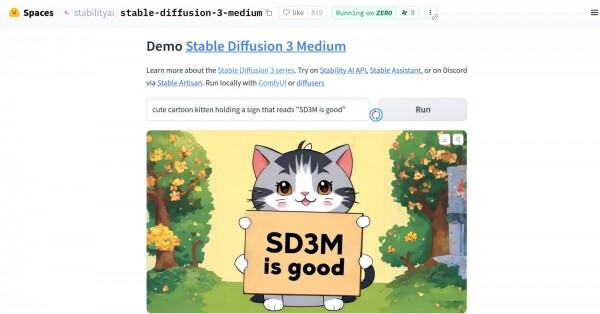
Stable Diffusion 3 Medium Stable Diffusion 3 Large , also known as SD3 8B. SDXL 1.0, we remind you, has , however, SD3M, according to the developers, is . It was meant to be that with lower video memory requirements than 'Oversize', it should be able to generate images 'with a new level of photorealism' even in response to simple prompts. The advantages of 'the three' also included 'unprecedented text typographic quality in the generated images,' 'deep understanding of prompts due to the combined efforts of three encoders,' and 'readiness for effective fine-tuning even on limited datasets.'
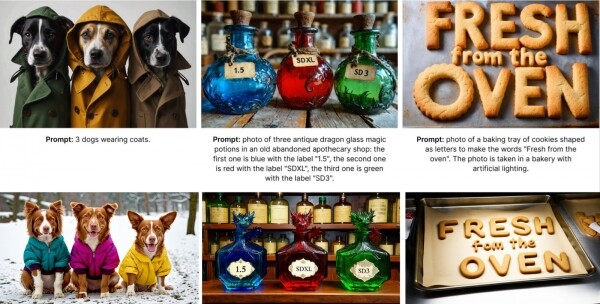
It was assumed, obviously, that the community of enthusiasts, having received this long-awaited toy, would eagerly work on it just as they did with 'the one and a half' and 'Oversize' back in the day. However, right from the start, things went awry: SD3M managed to deeply disappoint The previous creations of Stable Diffusion with open code (more precisely, with open neural network weight values available for free download for local execution), such as SDXL, were accompanied by one of the typical features of generative models
CreativeML Open RAIL++-M License with characteristics such as "perpetual, worldwide, non-exclusive, royalty-free, gratuitous, irrevocable copyright license for reproduction, adaptation, public display, public performance, sublicensing, and distribution of additional materials both for the model itself and its derivatives." "The Triad" provides for two types of licensing: — with rather lenient wording like "Stability AI grants you a non-exclusive, worldwide, non-transferable, non-sublicensable, revocable, gratuitous, and limited license to intellectual property" — and .
The grass won't lead to good.
After a very short time, the community reached a consensus that . And essentially declared a boycott against the developing company, unwilling to spend time and energy on further training an openly raw and poorly refined model — with an understanding that Stability AI could revoke the license earlier granted to a specific enthusiast conducting such training on a whim at any moment. The licensing agreement is formulated in such a way that those studying it without legal expertise get the impression that following the revocation of the permission for commercial use of SD3M, the former licensee will be obliged to delete all derivative works created by them from the licensed intellectual property, including both the trained models (LoRA, text inversions, whole checkpoints) and their derivatives (quote: "Upon termination of this Agreement, you shall delete and cease use of any Software Products or Derivative Works") — i.e., the fruits of the labors of other people who used these derivative models as a starting point for their own work; this work, moreover, was done out of pure enthusiasm and without any payment.
Soon after the wave of outrage on this matter reached stratospheric heights, reports started appearing from professional lawyers, The review with a prohibition on further use is supposed to pertain only to certain auxiliary products with closed code that Stability AI will transfer to commercial users (for example, to speed up and optimize the same SD3M pre-training), — but the company has not yet provided any final clarifications on this matter. The very fact of such oppressive silence for already three weeks (at the time of writing this article) since the appearance of the 'trio' in open access harms the developer's reputation far more significantly than the grass — to the girls generated by its creation.
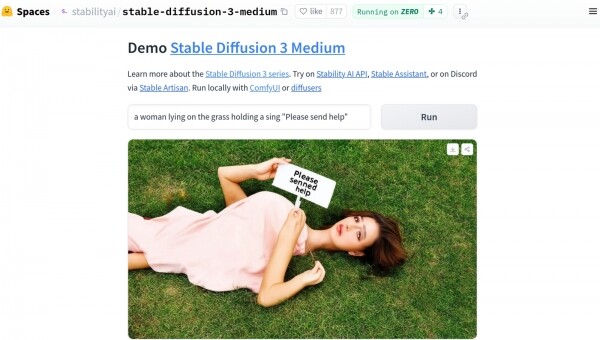
As for the infamous grass, which literally became a meme in just a few hours, , and then on almost all more or less specialized platforms on the Internet, it turned out that including a phrase like 'a girl lying on the grass' in the prompt leads to the generation of 'trio' outputs that are not just hallucinations, but nightmarish creations of a disturbed — in the medical sense — imagination of artists and filmmakers specializing in body horror (we implore you, if your sanity and life are dear to you, — stay away from this and do not even attempt to enter this phrase into the image search with the safety filter turned off). Meanwhile, images of standing — and somewhat less so of sitting — people are done by the 'trio' with a solid four plus, and portraits sometimes turn out to be impeccable; at least, not worse than the basic SDXL 1.0 model, — the catch here lies in some internal taboo on the horizontal position of the human body.
Judging by the comment from Emad Mostaque, the founder and former (until March 2024) head of Stability AI, who left the company to the gross violence against SD3M right before the opening of its weights for limited non-commercial use (the API for the larger SD3 8B model for online generation, let’s remember, but its weights remain hidden) was a result of the current leadership's desire for safety — , articulated back in March this year as In line with this policy using the generative model SD3M, users are not allowed to "commit, promote, facilitate, encourage, plan, incite or further any violence, terrorism, or create content that incites hate against any protected group of people (whether based on gender, ethnicity, sexual identity or orientation, religion, or others)," — so no images of pandas in their birthday suits battling aggressive dragons! Only cute cats in funny hats, dogs in adorable jackets, bottles with mysterious contents, and fresh-out-of-the-oven cookies!
Technically speaking, it seems that the model was perhaps stripped of the ability to understand images of lying people and other pictures implying indecent interpretations, thus the "three" simply does not "understand" the meaning of the word "to lie." Alternatively, the updated SD3 architecture might have allowed for the confident identification of weights on perceptrons that activate during the generation of "unsafe" images — and those weights were selectively zeroed out right before the release, resulting in what is now called "forced hallucination." Probably, : the encoder correctly translates text into tokens, but in a "secured" latent space, these tokens no longer refer to anything specific — and thus the resulting pixels are essentially placed on the image at random.
Given the availability of the API for the complete yet closed SD3 8B model for several months now and the enthusiastic assurances from media managers at Stability AI that the "compactified" 2B , AI drawing enthusiasts greeted the public release of the weights for SD3M on June 12 with great enthusiasm: At the moment, it is still possible to obtain it, although through a slightly more roundabout way than the usual checkpoints SDXL and SD 1.5. Specifically, the usual route is to visit the Civitai website, from which most models can be downloaded without registration, but since June 17, and up until the moment this article is sent for layout, the page dedicated to the "trio" has been . And the reason is simple: the commercial license for SD3M is written in such vague terms that even Civitai's lawyers have taken a pause for a closer study. If some enthusiast trains a LoRA for the "trio" on their PC and uploads it to Civitai, and Stability AI suddenly decides that the result is inappropriate and revokes the license from the culprit, what should the hosting site do in that case? It does not merely host checkpoints, auxiliary cyclegrams, and models, but also provides visitors with the ability for cloud-based image generation and training of the same LoRAs, text inversions, and more. In short, while legal matters are being sorted out, the model files and the three accompanying text-to-token converters can only be obtained .
Let's begin
However, there is a nuance: to access the download links, you need to log in to the site and then confirm acceptance of the aforementioned draconian licensing agreement — however, this procedure is free and fully accessible from Russia. A total of four model options and four text prompt-to-token converters are available to choose from, plus three reference cyclegrams for execution in the ComfyUI working environment, :
models:
- sd3_medium.safetensors
- sd3_medium_incl_clips.safetensors
- sd3_medium_incl_clips_t5xxlfp8.safetensors
- sd3_medium_incl_clips_t5xxlfp16.safetensors
encoders:
- clip_g.safetensors
- clip_l.safetensors
- t5xxl_fp8_e4m3fn.safetensors
- t5xxl_fp16.safetensors
cyclegrams:
- sd3_medium_example_workflow_basic.json
- sd3_medium_example_workflow_multi_prompt.json
- sd3_medium_example_workflow_upscaling.json
In this "Workshop," we will limit ourselves to the basic model sd3_medium.safetensors (4.2 GB), three encoders — clip_g.safetensors (1.3 GB), clip_l.safetensors (234 MB), and t5xxl_fp8_e4m3fn.safetensors (4.7 GB), as well as the workflow sd3_medium_example_workflow_multi_prompt.json. The point is that our test machine is equipped with a GeForce GTX 1070 graphics card with 8 GB of VRAM, and larger models with all integrated converters cannot fit into this memory. Checkpoints based on SD 1.5 and SDXL have encoders built into the main file by default, but in this case, there are not just two, but three converters, totaling over 6 GB. Together with the model itself, it exceeds 10 GB; if we take the 16-bit version of the T5XXL encoder, an even more powerful graphics card is required. However, if the text-to-token converters are first loaded into video memory, and then the model works with these tokens, a 6 GB graphics adapter will suffice. From this perspective, the modular "trio" undoubtedly outperforms the typical SDXL checkpoint of 5-7 GB.
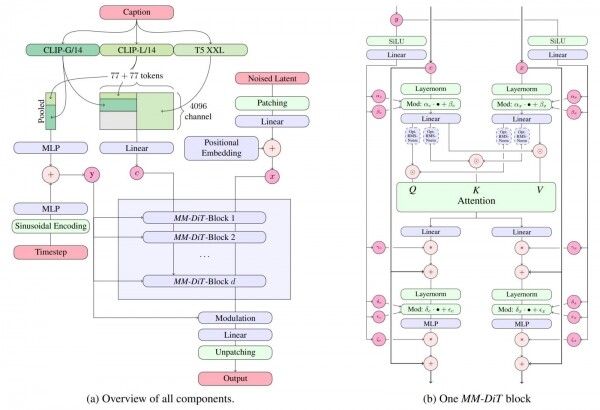
SD3M is a model based on multimodal diffusion transformers () — and thus fundamentally differs from earlier developments of Stability AI (and others), which rely on "Workshop" is not a place for an in-depth study of the differences between these approaches to AI-generated images; let’s just say that , its ability to work with a larger number of tokens (which, in turn, allows the operator to formulate quite extensive text prompts, and the system to follow them accurately), as well as better quality of the resulting images. The full-sized SD3 8B is capable of generating images on a canvas of 4 MP (2048×2048 pixels), and also in such metrics as text reproduction in images, the accuracy of the image matching the text prompt, and overall visual aesthetics. The conversion of text to vector tokens is done here by three encoders ( and one T5-XXL — "T5," by the way, from ) — and, generally speaking, they are not obliged to work with the same prompt.
But enough preamble: let’s get to the point of the 'Workshop' — generating images based on the SD3M model. For this, we will use the ComfyUI environment, which can be downloaded . It should be emphasized that this version is intended only for execution on NVIDIA graphics adapters or directly on AMD or Intel CPUs (which will, of course, be significantly slower): AMD graphics card owners rocm and pytorch, which can be installed via the pip package manager.
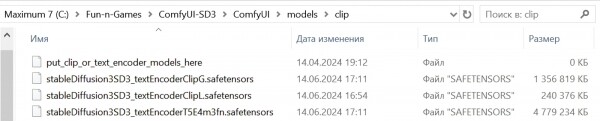
After the installation of the working environment is complete, the previously downloaded .safetensors files should be placed: models in the ComfyUImodelscheckpoints directory, and text-to-token converters in ComfyUImodelsclip. And then — we can get started!
It’s time to speed up
It’s worth mentioning that AUTOMATIC1111, familiar to readers of previous 'Workshops' on AI drawing, has also however, ComfyUI currently offers the most comprehensive support for the new model. It’s no surprise — until very recently, the author of the 'pasta monster', known to the community of enthusiasts under the nickname ComfyAnonimous, or simply Comfy, , where he worked, among other things, on the internal working environment used by the developers themselves. As we will see shortly, the latest version of ComfyUI indeed demonstrates that its author has certain insights into how this controversial model is structured and works — insights that the creators of other local execution environments for Stable Diffusion 3 Medium understandably cannot boast.
Installing ComfyUI in a portable version for Windows is incredibly simple: after downloading the appropriate ZIP archive It is enough to unpack it in any convenient directory; preferably, of course, on a logical partition based on SSD, and not on HDD, because the exchange between the storage and memory, considering the upcoming loading-unloading cycles of models even for generating a single image (the environment will first need to place the text-to-token converters in the video RAM, then clear the video memory and load the actual SD3M) is expected to be all the more considerable the less video memory is available on this computer. By the way, portable installation is also advantageous due to its complete independence: nothing—except for the free space on the logical disk—prevents you from deploying as many copies of ComfyUI locally as you want, allowing you to experiment with various extensions without the fear of ruining the already fine-tuned and perfectly functioning system.
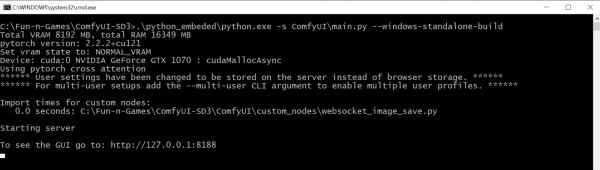
After ensuring that the main model file SD3M without embedded text-to-token encoders (file stableDiffusion3SD3_sd3Medium.safetensors, 4.2 GB) is placed in the subdirectory checkpoints (for our test installation, the full path is C:Fun-n-GamesComfyUI-SD3ComfyUImodelscheckpoints), and all three model encoder files (stableDiffusion3SD3_textEncoderClipG.safetensors, stableDiffusion3SD3_textEncoderClipL.safetensors, and stableDiffusion3SD3_textEncoderT5E4m3fn.safetensors; 1.3 GB, 234 MB, and 4.7 GB respectively) are placed in the subdirectory clip (C:Fun-n-GamesComfyUI-SD3ComfyUImodelsclip), you can start the working environment by double-clicking the run_nvidia_gpu.bat file in the root folder (in our case C:Fun-n-GamesComfyUI-SD3). After starting the server, a new tab will automatically open in the default browser (as indicated by the settings of the BAT file) in the command prompt window, where the web interface will be available at the address 127.0.0.1/8188. (though only in the first approximation) 'pasta monster.'
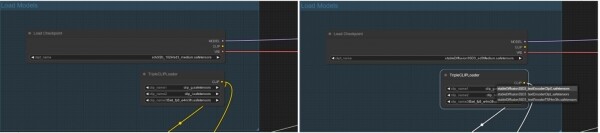
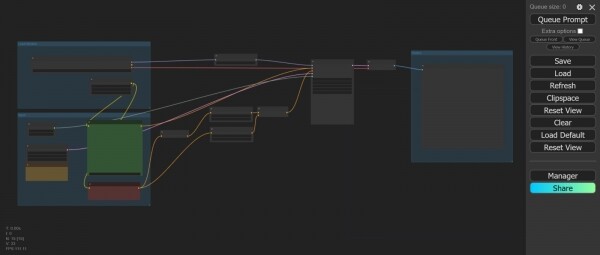
In principle, if you have a more modern NVIDIA graphics card (RTX generation, not GTX, even with just 6 GB of video memory), you can immediately load the reference workflow created by ComfyAnonimous, which has been mentioned earlier — the file comfy_example_workflows_sd3_medium_example_workflow_multi_prompt.json with multiple input prompt windows, one for each of the three encoders, — and work with it. However, you first need to align the four model file names (in the loading nodes) with the available ones. The author of the reference workflow evidently operated at their workstation (at Stability AI, as mentioned) with local files that were named slightly differently, so if you press the 'Queue Prompt' button in the spartan ComfyUI interface right after loading the workflow, the working environment will throw an error message.
Triple Field for AI Generation
However, fixing this is not difficult: what is far more disheartening is the fact that our aging GTX 1070 processes SD3M incredibly slowly — generating an image takes 27-30 seconds for each iteration, and considering that the 'Steps' parameter in the reference workflow is set to '28', it takes an unjustifiable amount of time. Therefore, let's make a small optimization — we will use the Python module venv (, designed to expedite the operation of generative AI models). It is not included in the portable version of ComfyUI, , which ultimately comes down to deploying a full Python environment on a local PC — and activating the necessary module from this environment.

Let’s assume that readers following our 'Workshops' already have an active working installation of AUTOMATIC1111 on their machines. In this case, everything is much simpler: the venv module is already deployed there, and all you need to do to activate it when starting the ComfyUI working environment is to First, you should stop the server by switching to its window and pressing 'Ctrl' + 'C', then typing 'y' to confirm; afterwards, copy the BAT file run_nvidia_gpu.bat to a new one, naming it, for example, run_with_venv.bat. The original launch file is quite concise — it simply calls a portable copy of Python with the parameter —windows-standalone-build:
.python_embededpython.exe -s ComfyUImain.py —windows-standalone-build
pause
This parameter itself is not very clear — it implies certain optimizations that are likely aimed at newer NVIDIA graphics adapters and may therefore hinder those who still remain loyal to their well-deserved GTX. For this reason, we will remove —windows-standalone-build from the command line, and we will also discard another trendy optimization — the active default smart memory manager, , without unloading it. This indeed speeds up the drawing of AI images, but at the same time turns our morally outdated computer into a single-task system — performing web surfing, gaming, or even working with documents and emails on the PC parallel to the activity of the working environment becomes impossible. So for those who do not have a dedicated computer for AI art, an optimal BAT file for launching ComfyUI appears as follows (not only for generating images with SD3M, by the way — it will also work fine for SDXL):
@echo off
call cd C:Fun-n-GamesGitstable-diffusion-webuivenvScripts
echo %
call activate.bat
echo venv activated
call cd C:Fun-n-GamesComfyUI-SD3
echo %
call .python_embededpython.exe -s ComfyUImain.py —disable-smart-memory
pause
It is assumed here that the portable installation of ComfyUI is located in the directory C:Fun-n-GamesComfyUI-SD3, while AUTOMATIC1111 was previously installed in C:Fun-n-GamesGitstable-diffusion-webui. The numerous 'echo' commands are simply for visual control to ensure that the directory changes are proceeding smoothly and the necessary commands are being executed — after everything has been debugged, they can be removed from the BAT file.
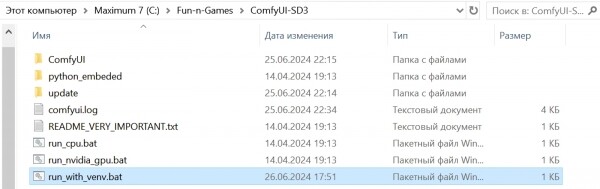
We restart the working environment again, this time by double-clicking on run_with_venv.bat. Since we simply closed the server earlier and did not touch the web interface, the corresponding tab should still have the original ComfyUI flowchart with the adjusted model names. Let's pay attention to the right side: there is a node called 'Preview Image' that does not save the resulting image to disk but merely displays it. If we run the flowchart again each time to generate just one image, evaluate it visually, make changes to the parameters, and then run it again, that's a working option: any liked image can always be saved manually by right-clicking on it. However, if numerous generations are to be done sequentially in the working environment, it's better for their results to be automatically accumulated in permanent memory (in the ComfyUIoutput folder by default).
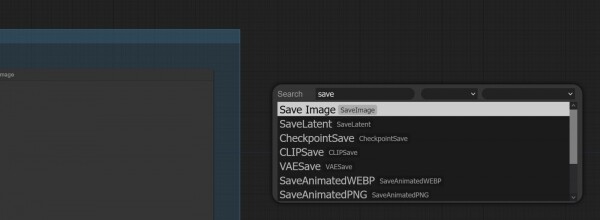
So it’s better to change the 'Preview Image' node to 'Save Image' right away. To do this, double-click on any free space in the flowchart — a node selection window with a search bar will open. In this search bar, we will start typing 'Save…' — and almost immediately we will see the desired name. Then we just need to click on it and connect the input of the newly appeared node to the output 'IMAGE' of the 'VAE Decode' node, where 'Preview Image' was originally connected. We can then remove 'Preview Image' — simply select it by clicking on the header and pressing the 'Del' key on the keyboard.
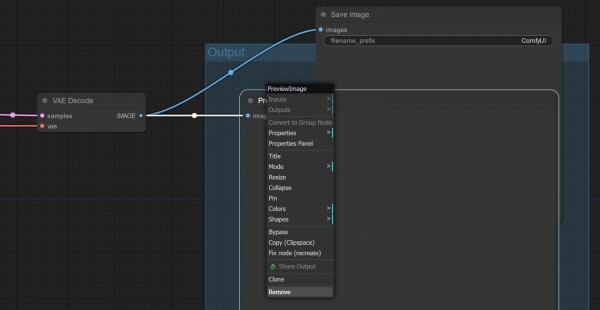
And now is the perfect time to run the original flowchart by ComfyAnonimous (with our modest corrections) for execution. Here’s what we get:
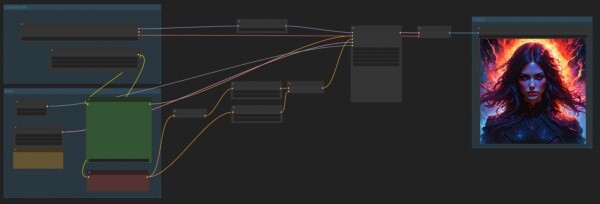
A quite impressive image, even with some mood — and you wouldn't say it was created using the same model that completely fails to draw people lying on the grass. Meanwhile, the system operates quite briskly — about 5-6 seconds per iteration for an image with an area of 1 MP on a GTX 1070 is a respectable figure. For comparison: the same PC with the same ComfyUI and the same BAT file generates SDXL images of similar sizes, taking about 6-7 seconds for each iteration, so we can consider the 'trio' significantly less demanding on the hardware of the PC running AI generation.
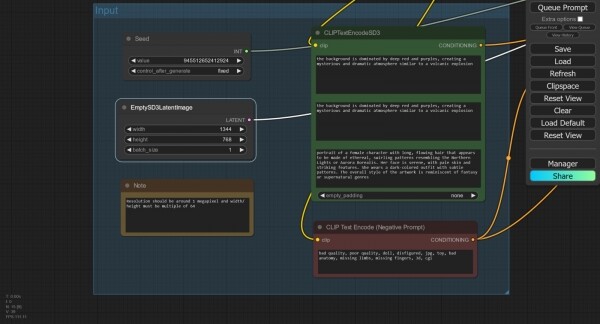
Now let's adjust the canvas size. Not far from the node 'EmptySD3LatentImage', which defines them, there is an 'empty' (in the sense of not being connected to anything on either side) reference node 'Note', where an important reminder is contained: the total area of the image in the case of SD3M should be approximately 1 Mpix, which should guide us in selecting the dimensions of the rectangular canvas. Let's set them to 1344×768 — which is approximately 1.03 Mpix.
Let's note: above is the 'Seed' node, where the seed is set, in this case '945512652412924', and it is indicated that it should not change after generation (the 'fixed' parameter).

We will execute the same cycle with the previous seed, but now for a rectangular canvas. It becomes immediately noticeable that the overall execution time is less, although the rendering speed remains the same — under 6 seconds per iteration. This is logical: since the text prompts did not change, it is not necessary to reload the encoder(s) for them. The output image, of course, differs somewhat from the first square one, but not fundamentally — the overall composition, as expected, has been preserved.
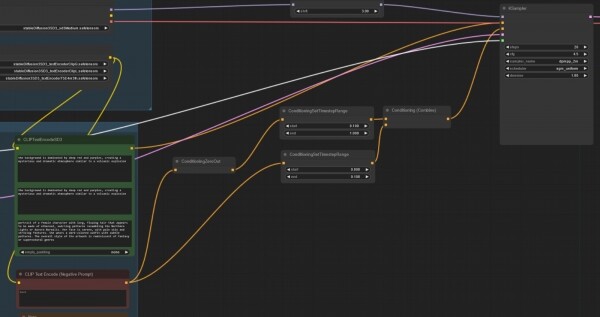
Now let's turn our attention to the nodes 'CLIPTextEncodeSD3' and 'CLIP Text Encode (Negative Prompt)'. The first stands out as it contains three input fields; if the text is removed from them, notes will be visible indicating which encoders they are intended for — from top to bottom, these are CLIP G, CLIP L, and T5XXL. Previously, such nodes were absent in ComfyUI for understandable reasons. The reference cycle contains duplicate short prompts for the first two text fields (for the CLIP G and CLIP L converters) and a much more extensive one for the third — T5XXL. It is clear that the content of these fields can be varied widely, and exploring how changes to the text in them affect the final image presents a non-trivial but highly engaging task. However, for reasons that will become clear shortly, we will not pursue it closely for now.
In the node "CLIP Text Encode (Negative Prompt)" there isn't anything extraordinary; however, consider how complex the path is from here to the corresponding "conditioning" input of the main node "KSampler"! This path splits, and one of its branches (the upper one in this case) indicates that starting from 10% of the generation steps until its completion, the system will not take the negative prompt into account at all (traversing through the node "ConditioningZeroOut" precisely means zeroing out the condition). While the second branch passes the negative prompt (also conditionally with half weight) onto further processing unchanged—but only for the first 10% of the total number of generation steps.
Misty distance
Once again: for the first 10%, i.e., 3 out of 28 assigned in this case, the negative prompt is sent to the "KSampler" node, which is responsible for forming the image in latent space (into pixel space, i.e., into a comprehensible image for a human, the result is then processed by the subsequent node, "VAE Decoder"), in a normal manner: the upper branch (with the condition zeroed) is inactive, only the lower one is working. The remaining 90% of the steps (25 out of 28 in our case) do not utilize the negative prompt at all: the upper condition transmission branch is active—with its zeroing—while movement along the lower one is blocked by the boundary parameter triggering the corresponding node "ConditioningSetTimestepRange". Now it's clear why a number of reviewers assert that , — the effect from them (if we consider precisely this foundational cycle and assume that the same rules apply on websites with online generation using the SD3 Medium model) is minimal.

And yet it exists: if you simply take and directly connect the output of the 'CLIP Text Encode (Negative Prompt)' node to the corresponding input of the 'KSampler' (or mark all intermediate nodes along this path as 'bypass', which will lead to the same effect), the quality of the final image noticeably deteriorates. This can be seen as indirect evidence of the 'incompleteness' of SD3M, since the developers should have been able to adjust the strength and significance of the negative prompt even before the model weights were publicly released. Two branches of cleverly designed conditions for applying the negative prompt are a kind of patch, and in this sense, of the expectations hyped by the marketing department of Stability AI regarding it, seem quite justified.
The lack of at least a brief official guide on working with SD3M has led to rumors circulating online that this model Which is certainly not true, but in any case, these prompts need to be applied quite differently than In particular, enthusiasts seriously claim that adding as many detailed descriptions of various indecencies as possible to the negative field (yes, the old faithful 'nsfw, nude' is not enough — you'll really have to stretch your imagination) even of the infamous girl lying on the grass. Whether this is true or not cannot be determined without thoughtful investigation (and it’s not a given that even the '18+' label on our site's header will protect the publication from lawsuits by furious moral guardians if we dare to publish the 'wonder-prompt' compiled by enthusiasts — even if it’s in English). This amusing situation resembles a case with , through which — precisely because they contained fairly detailed descriptions of what and how upstanding Christians should not do — at least fragmentary written evidence about the beliefs and customs of pre-Christian Rus has reached us.
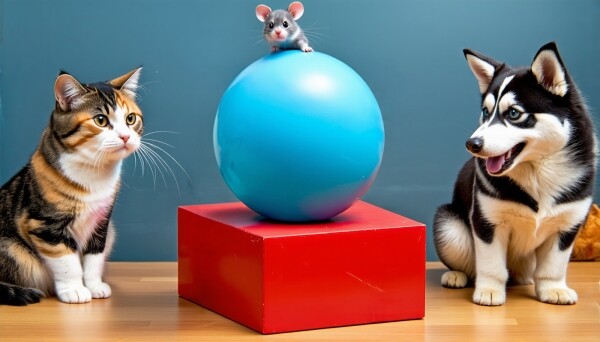
Now, one hopes it has become clearer why delving further into studying SD3M at this point seems to be an unwise expenditure of effort and time. There are indeed several topics to discuss and explore: the strictly recommended generation parameters in the 'KSampler' node (CFG — 4.5-5.0; number of steps — about 28; sampler/scheduler pair — exclusively dpmpp_2m/sgm_uniform, otherwise the output quality noticeably drops); the significant variability in subjective quality of generations under strictly the same initial parameters but with different prompts; and the elimination of the infamous 'curse of lying in/on the grass' (for which quite unconventional solutions are already proposed Especially considering the resignation of Emad Mostaque in March and ComfyAnonimous in June,
not to mention others changed its CEO we're talking about $80 millionenthusiasts predict its quick demise — In such a situation, it is difficult to expect the company to thoughtfully address even such obvious mistakes.

Unfortunately, the poorly thought-out licensing policy keeps the community from independently refining SD3M, as was done with SD 1.5 and SDXL. At least the derivative checkpoints and tools like LoRA for the last two models will certainly remain available for local execution, even when (and if) Stability AI concludes its journey as a commercial entity. Right after the shocking failure of the 'trio,' voices in support of creating a non-commercial project for developing a generative model for converting text into images based on crowdfunding became more frequent on specialized forums, and this movement is now starting to take shape under the name . Already expressing their readiness to actively join are Invoke (one of the platforms for online AI generation, aimed at professional studios), Comfy Org (a team dedicated to the support and development of ComfyUI), Civitai (which needs no introduction), and the team behind LAION (a database of annotated images, primarily used for training such models).
So, in the foreseeable future, new releases of 'The Workshop' will likely focus on working with those models for which the community has already managed to create a wide range of enhancements and additional tools—specifically, the 'one and a half' and 'Oversized.' Perhaps the time of SD3M's triumph will still come, but today it is hard to even guess when that might be. For now, those interested can download the archive with the generations presented in this article (the cycleograms are integrated directly into the PNG files; simply drag the image onto the workspace of ComfyUI from Windows Explorer to replay the entire order and parameters of generation) . Maybe some of our readers will find an optimal way to distribute text across the three prompt fields before the regulars at Reddit and Hugging Face?
Related materials:
.
.
.
.
.
Source: 3dnews.ru
