

I wrote about the Zelenograd company 'TeleSystems', which produces the smallest voice recorders in the world, back in the day. ; at that time, 'TeleSystems' even organized a small factory tour for us. .
Voice Recorder from the new Weeny/Dime line, measuring 29x24 mm, weighing 4 grams, and only 4 mm thick. Additionally, the Weeny line also includes a thinner model, the A112, which is just 2 millimeters thick with dimensions of 38x24 mm. The most miniature model in the line is the Weeny A113, measuring 37x15x4.5 mm, also weighing 4 grams.
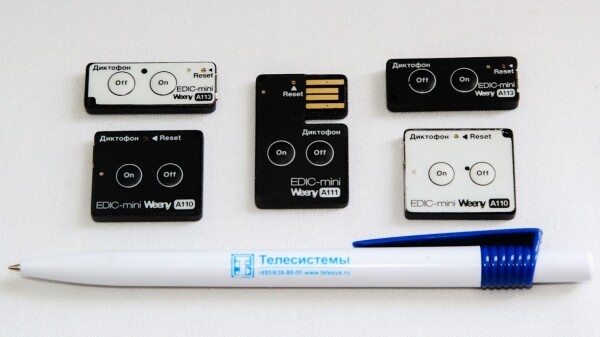
'TeleSystems' has maintained its reputation since 2004, when the Edic Mini A2M voice recorder measuring 43x36x3.2 mm and weighing 8 grams made it into the Guinness World Records, featuring a maximum recording duration of 600 hours. In 2007, the successor model Edic-mini Tiny B21 (8x15x40 mm, 6 grams with a respectable 8 GB memory) also made it into the record book.
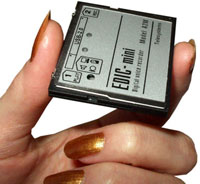
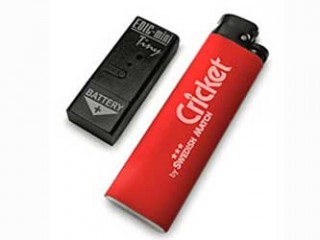
For their compact size, Weeny voice recorders boast quite an impressive list of features. Users of the A110 and other Weeny series voice recorders can:
- set the sampling rate (from 8 to 22 kHz);
- choose the recording quality (from 4 to 24 bits);
- schedule daily or one-time recording activation via timer;
- activate or deactivate sound-activated recording, specifying the sound level for trigger;
- set a password to access the memory contents.
The Weeny A110 features two On and Off buttons, a single-color LED, a microphone, and a reset contact.
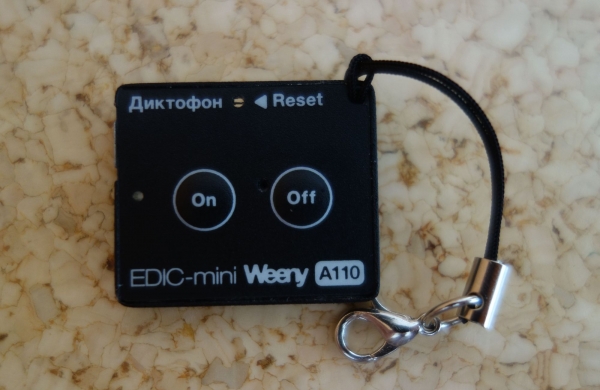
The separate On and Off buttons allow for tactile operation of the recording function. At first glance, it may seem confusing that they are identical in shape and symmetrically positioned, but that’s the price of miniaturization.
When there is a desire to minimize size, sadly, freedom of placement is sacrificed. However, which button is which can be easily discerned by the USB port.
The LED signals the start/stop of recording, memory status, and battery condition during recording and charging. This is quite a lot of tasks for a single light that can only glow one color — as a result, the method of communicating the recorder’s status resembles Morse code: to understand, you have to pay attention to the number and interval of the LED's blinks.
- Three short flashes when the On button is pressed — the recorder is turned on, and recording starts;
- one longer flash when the Off button is pressed — the recorder is turned off, and recording stops;
- two series of short flashes (from one to four in each series) during recording indicate the battery status (first series) and memory status (second series). The more flashes, the less is left (it would make more sense to do the opposite);
- a smooth blinking light every one to four seconds indicates the charging progress when connected to a power source. The shorter the interval, the higher the charge level.
In practice, this mechanism turned out to be not very convenient. If I were at 'TeleSystems',
I wouldn’t reinvent the wheel; I would simply copy any existing successful mechanism. I wouldn't even need to look far for an example: the principle of using an LED on my JBL E25BT headset, which employs a two-color LED, is perfectly suited for use in a recorder: the blue indicates Bluetooth usage mode, while the light blue signals the battery status (it starts blinking when it is low, remains lit during charging, and turns off once charging is complete).
The other settings are 'hidden' in the config_w.ini file, which can be opened with a regular 'Notepad' when connecting the recorder to a computer as a standard USB flash drive.
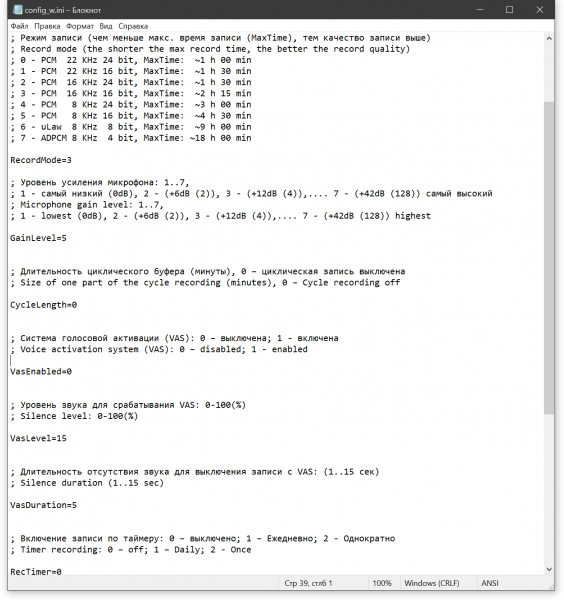
It's not difficult to figure out in principle, although a user accustomed to managing gadgets via special applications may be momentarily thrown off by the suggestion to delve into the configuration file to change settings.
Returning to the task will be facilitated by an online settings configurator with a more familiar and user-friendly interface for 'non-advanced PC users' in the form of a special web page. I've seen this configurator, and it looks quite usable, but 'TeleSystems' has asked not to show it to anyone until the official release.
We are not releasing it right now to allow the configuration file format to stabilize, to avoid a mess with multiple versions of the format.
And who knows, maybe a mobile application will appear as well.
Setting the password
; The password length must not exceed 8 characters (only English letters and numbers are allowed).
; To reset a forgotten password, enter 00000000 as the password.
; Note: all records will be erased and cannot be recovered. Please be cautious.
; Password=
Recording Mode Settings
; Record mode (the shorter the max record time, the better the recording quality)
; 0 - PCM  22 KHz 24 bit, MaxTime:  ~1 h 00 min
; 1 - PCM  22 KHz 16 bit, MaxTime:  ~1 h 30 min
; 2 - PCM  16 KHz 24 bit, MaxTime:  ~1 h 30 min
; 3 - PCM  16 KHz 16 bit, MaxTime:  ~2 h 15 min
; 4 - PCM   8 KHz 24 bit, MaxTime:  ~3 h 00 min
; 5 - PCM   8 KHz 16 bit, MaxTime:  ~4 h 30 min
; 6 - uLaw  8 KHz  8 bit, MaxTime:  ~9 h 00 min
; 7 - ADPCM 8 KHz  4 bit, MaxTime: ~18 h 00 min

RecordMode=3
Microphone Gain Level
; 1 - lowest (0dB), 2 - (+6dB (2)), 3 - (+12dB (4)),.... 7 - (+42dB (128)) highest
; Microphone gain level: 1..7,
; 1 - lowest (0dB), 2 - (+6dB (2)), 3 - (+12dB (4)),.... 7 - (+42dB (128)) highest

GainLevel=5
Loop Recording
Loop recording or the 'black box mode' is one of the most interesting features of tele-system recorders. In loop recording mode, the recorder continuously records, saving the sound from the last time interval upon shutdown. You can set the required interval in the settings.
; Duration of the loop buffer (minutes), 0 – loop recording is off
; Size of one part of the cycle recording (minutes), 0 – Cycle recording off

CycleLength=0
This is probably the most valuable feature for a voice recorder: in normal situations, it might not seem necessary, but unforeseen circumstances are called that for a reason, as you can't predict the moment when 'this would be better recorded.' Additionally, in such situations, you may not have the opportunity to turn on recording at all.
By pre-setting the black box mode, you can document any unclear situation, which can be used as evidence in court.
All information can be divided into legally protected and accessible for recording and use. Consequently, the former cannot be recorded or applied in any way (for example, the use of audio and video recording devices to secretly obtain personal and familial secrets, information transmitted via communication networks, commercial, banking, and state secrets is illegal). However, a conversation between a driver or any citizen with a law enforcement officer in the line of duty is not subject to such restrictions. Recording a conversation by one of its participants is legal, while the ability to record it by a third party is regulated by law.
«»

Voice Activation System
; Voice Activation System (VAS): 0 – disabled; 1 - enabled
; Voice activation system (VAS): 0 – disabled; 1 - enabled

VasEnabled=0

; Sound level for triggering VAS: 0-100(%)
; Silence level: 0-100(%)

VasLevel=15

; Sound absence duration for stopping recording with VAS: (1..15 sec)
; Silence duration (1..15 sec)

VasDuration=5
Timer recording setup
; Timer recording status: 0 – off; 1 – Daily; 2 - Once
; Timer recording: 0 – off; 1 – Daily; 2 - Once

RecTimer=0

; Start and end time/date for timer recording (DD/MM/YYYY HH:MM format).
; For daily timer, the date values are ignored but must be present.
; Start and end time (DD/MM/YYYY HH:MM format) for timer recording.
; For Daily timer the start and the stop date is ignored, but must be present.

TimerStartDateTime=9/05/2019 13:45
TimerStopDateTime=10/05/2019 3:30
Restore to factory settings
; *** Restore to factory settings: 42 - reset. WARNING!!! ***
; All records will be permanently erased, and settings will reset to default.
; *** Reset to factory state: 42 - reset. WARNING!!! ***
; All records will be erased and the settings will be set by default.

ResetToFactoryState=0 
By default, the recorder is set to 16x16 mode (16 kHz/16 bit), which provides approximately two and a quarter hours of recording. It was in this mode that I tested the recorder, first making a short two-minute recording, and then simply turning it on, taking it out for a walk while leaving it to record until the memory was full.
After returning home a few hours later, I checked the contents of the recorder. In addition to config_w.ini, the device's memory held two wav files: one lasting two minutes and sixteen seconds, and another lasting two hours and seventeen minutes.

Thus, the total recording time in 16x16 mode was 2 hours and 19 minutes.
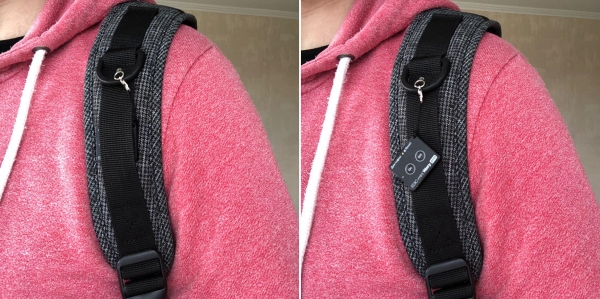
However, hanging the recorder from the strap of a backpack and carrying it as an audio recorder is one of the simplest ways to utilize the capabilities of Edic. In Canada, Tele Systems' recorders , which scientists put on wild lynxes to record how successfully they hunt by tracking the sounds made by their prey and the crunching of bones in the lynx's teeth.

Wav files can be easily played back by standard media players like iTunes, Windows Media Player, and of course, all others such as VLC.
However, to do this, you first need to connect to a computer via cable—which is already a limitation. The included adapter from microUSB to USB 2.0, by the way, does not fit the latest generation Macs that have already switched to USB-C, leading to the resulting inability to view and listen to the contents of the recorder's memory without a computer on hand.
Small size is one thing, but if the Weeny recorders included Bluetooth connectivity to listen to and send recordings on the go, this compact device would become one of the most powerful 'combines' available on the market.
Source: habr.com
