

The release of Zulip 9 is available, a server platform for deploying corporate messengers suitable for organizing communication among employees and developer teams. The project was originally developed by Zulip and made open-source after being acquired by Dropbox under the Apache 2.0 license. The server-side code is written in Python using the Django framework. The client software is available for Linux, Windows, macOS, Android, and iOS, along with a built-in web interface.
The system supports both direct messaging between two individuals and group discussions. Zulip can be compared to the Slack service and can be viewed as an internal corporate equivalent of Twitter, used for communication and discussions on work matters within large employee groups. It provides tools for tracking participation and status across multiple discussions simultaneously, using a threaded message display model, which optimally balances room-specific interactions in Slack with a single public space like Twitter. The simultaneous threaded display of all discussions allows for encompassing all groups in one place while maintaining logical divisions between them.
Zulip also features support for sending messages to users in offline mode (messages will be delivered upon coming online), storing a complete history of discussions on the server, and providing search capabilities within the archive. Users can send files using drag-and-drop, enjoy automatic syntax highlighting for code blocks in messages, use a built-in markup language for quickly formatting lists and text, and utilize tools for sending group notifications. It allows the creation of private groups and offers integration with Trac, Nagios, GitHub, Jenkins, Git, Subversion, JIRA, Puppet, RSS, Twitter, and other services, along with the ability to attach visual tags to messages.
Key innovations:
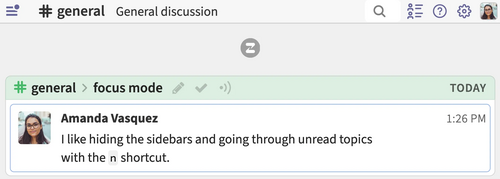
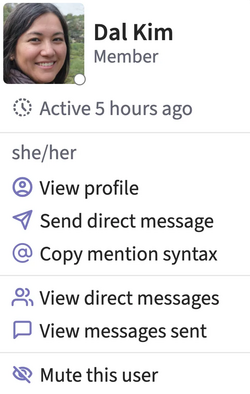
- The user interface layout has been redesigned, featuring larger fonts and more noticeable line spacing. The old style can be reverted in the settings by selecting compact mode. There is an option to hide side panels even when working in full-screen mode. The right panel visually highlights users present in the current channel or private chat. The loading speed of themes and messages has been significantly enhanced when opening the web interface or desktop application.

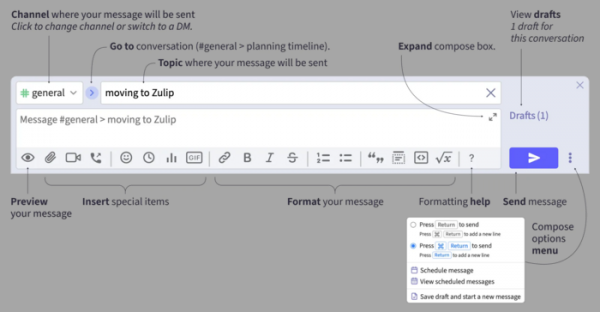
- The layout of the message writing block has been upgraded. It now allows saving typed text as a draft and switching to writing a new message. When you start typing, the recently edited draft in the current discussion is displayed. When pasting from the clipboard, the text style and formatting are preserved (there's also an option to paste plain text). Links to topics and messages are now automatically formatted correctly. It has also added the ability to highlight text for quoting parts of another message in responses.

- Navigation has been simplified. Three discussion list layout modes are offered: 'Combined Feed' (previously 'All Messages'), 'Channel Feed', and 'Personal Messages Feed'. Continuous browsing of different message topics has been simplified (links to the first message of each topic are provided in the left panel). Automatic switching to the discussion is ensured when sending a message to it.
- The design of the main search bar has been changed to display the specified search filters. The option to filter all messages with reactions and quickly view reactions displayed on user messages has been added. Additionally, searching only in followed topics and unread messages is now available. There is an option to show only personal chats or discussions involving a specific user in the sidebar.

- All menus have been redesigned. It now offers the ability to switch themes through the personal menu.

- The design of the message editing history screen has been changed.
- Settings have been added to select the preview method for animated images (animation can be disabled or shown only on hover).
- The ability to disable the typing indicators of other users has been added.
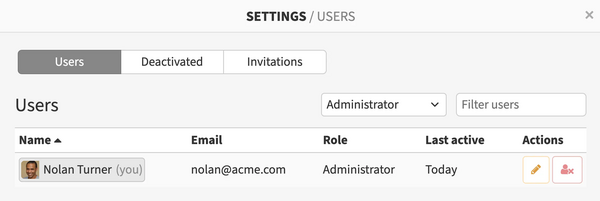
- A new combined interface has been proposed for the server administrator. control panel Users can view information about deactivated users and invitations sent to new users. The settings now display user avatars in addition to names. New options have been added to define permissions for sending direct messages. Profile fields can now be marked as mandatory by the administrator if desired. Channel management capabilities have been expanded.

- The invitation has been reworked to introduce new users to the platform's main features.
- A more familiar terminology for messengers has been adopted—streams have been renamed to channels.
- The ability to automatically send project-related announcements to users has been provided, such as notifications about changes in new versions. These announcements will be sent to the 'Zulip updates' thread in the channel selected by the server administrator.
- Zulip server now includes tools for generating thumbnails to speed up the preview of uploaded images.
- Optimizations have been made to enhance scalability servers in large organizations with thousands of employees.
- Support for deploying the Zulip server on Ubuntu 24.04 has been added, and support for Ubuntu 20.04 has been discontinued.
- Components for integration with Patreon and GitHub Sponsors have been added. Integration with GitHub and Grafana has been improved.

Source: opennet.ru
