

Friday marks the end of the workday. Bad news always arrives on Friday just before the end of the workday.
As you're about to leave the office, a 'ding' rings out as a new email regarding yet another reorganization just landed in your inbox.
Thank you xxxx, yyy starting today you will report to zzzz.
…
And Team Hugh will ensure the availability of our products for people with disabilities.
Oh no! What did I do to deserve this? Do they want me to leave? I have to gear up for a thankless, tough job and try to fix other people's mistakes. This is bound to be a disaster...
That's how accessibility looked a few years ago. Some poor souls got jobs 'cleaning' the user interface to try to make it accessible for people with disabilities.
What this actually meant was quite vague – probably if you could see the focus indicator and navigate fields using tabbing, have some alternative text and a couple of field descriptions, it would be considered that your application was accessible...
But suddenly, 'bugs' began to multiply at an avalanche speed.
Different screen readers (English. Screen Readers) and browsers behaved completely differently.
Users complained that the application was unusable.
As soon as one error was fixed in one place, another appeared elsewhere.
And simply changing and correcting user interface errors required monumental efforts.
I was there. I survived, but we did not 'succeed' – technically we cleaned up a lot, added many field descriptions, roles, and achieved some level of compliance, but no one was happy. Users still complained that they couldn't navigate the application. The manager still complained about the constant stream of bugs. Engineers complained about unclear task assignments, with no clearly defined 'correct' solution that would work in all cases.
On my journey to understanding accessibility, I encountered some blatantly obvious moments.
Perhaps the first realization was that adding accessibility functionality on top of a finished product is challenging. Even more challenging is convincing managers that it's incredibly difficult! No, it's not just a matter of 'adding a few tags' and the user interface will work great. No, it can't be completed in three weeks; even three months won't be enough.
My next moment of truth came when I saw blind users actually using our application. It's SO different from just looking at error messages.
I will return to this again and again, but almost all our 'assumptions' about how people used our application were wrong.
Navigating a complex user interface using keys Tab/Shift+Tab – is terrible! We need something better: keyboard shortcuts and headings.
Isn't losing focus when changing the UI a big issue? Let's think again – it’s incredibly confusing.
I continued, working on various projects for a while, and then we started a new project, with a complex user interface and a clear mandate to finally get accessibility right this time.
So, we took a step back and looked at how we could implement this differently and succeed while making the work process engaging!
Pretty quickly we came to some conclusions:
- We didn’t want UI developers to struggle with aria labels/roles and, of course, with the HTML structure of components. We needed to provide them with the right components that had accessibility built in from the start.
- Accessibility == Usability – meaning it’s not just a technical task. We needed to change the entire design process and ensure that accessibility is considered and discussed before starting the user interface design. It’s essential to initially think about how users might discover any functionality, how they will navigate, and how the 'right-click' from the keyboard will work. Accessibility needs to be an integral part of the design process – for some users, it is much more than just the appearance of the application.
- From the very beginning, we wanted to get feedback from blind users and others with disabilities about the app's ease of use.
- We needed really good ways to catch accessibility regressions.
Well, from an engineering perspective, the first part sounded quite fun – developing the architecture and implementing the component library. And it truly was.
Taking a step back, looking at and thinking of this as a design problem rather than a 'making it work' issue, we introduced some abstractions. The component has a 'Structure' (comprising HTML elements) and 'Behavior' (how it interacts with the user). For example, in the snippets below, we have a simple unordered list. When adding 'behavior' to the list, corresponding roles are assigned so that it functions as a list. We do the same for the menu as well.
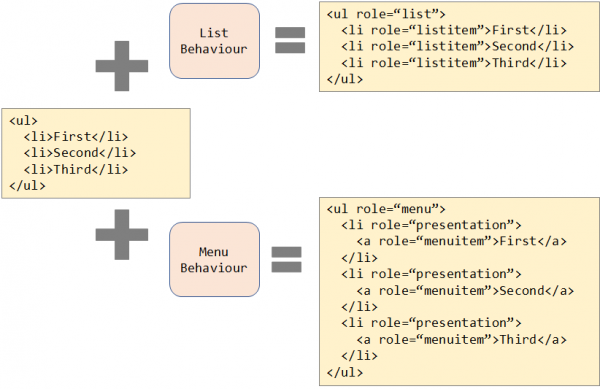
In fact, not only roles are added here, but also event handlers for keyboard navigation.
This already looks much tidier. If we could achieve a clean separation between them, it wouldn't matter how the structure was created; we could apply behaviors to it and ensure proper accessibility.
In action, this can be seen at – the UX library , which is designed and implemented with accessibility in mind from the start.
The second part – changing the approach and processes around design initially scared me: modest engineers attempting to push through organizational changes don’t always end well, but it turned out to be one of the most interesting areas where we made significant contributions to the process. In short, our process was as follows: new features were developed by one team, then our group of leads reviewed/iterated on this proposal, and afterward, once approved, the design was usually handed off to the engineering team. In this case, the engineering team effectively 'owned' the accessibility functionality, as they had to address all related issues.
Initially, it was quite challenging to explain that accessibility and usability are intrinsically linked and that this needed to be addressed at the design stage; otherwise, it led to significant changes and redefining of some roles. However, with support from management and key players, we conveyed this idea and put it into action, ensuring that designs were evaluated for accessibility and usability before being presented to leadership.
These insights were immensely valuable for everyone involved—it was fantastic as a knowledge-sharing exercise on how users interact with web applications. We identified numerous user interface pain points before they were built. Development teams currently have far better specifications for both visual and behavioral aspects of design. Real discussions are lively, energetic, passionate debates about technical aspects and interactions.
We could have made this work even better if blind users and users with disabilities had been present at these (or subsequent) meetings with us—it was challenging to arrange, but now we are truly collaborating with local organizations for the blind and companies that provide external testing to verify user flows in the early stages of development, both at the component level and the user flow level.
Now, engineers have fairly detailed specifications and accessible components they can use for implementation, along with a method for verifying user flows. Partially, the experience has taught us what we consistently overlooked—how we can prevent regression. Similarly, people can use integration or end-to-end tests to verify functionality that we need to detect changes in interactions and user flows, both visual and behavioral.
The definition of visual regression is quite specific; there's little to add to this process, except perhaps ensuring that focus is visible when navigating with the keyboard. More interesting are two relatively new technologies for working with accessibility.
- is a set of tools that can be run both in the browser and as part of the build/test cycle to identify issues.
- Testing the functionality of screen readers was an especially challenging task. With the introduction of access to Accessibility DOM, we finally gained the ability to take snapshots of applications from an accessibility perspective, very similarly to how we do for visual tests, and check them for regression.
So, in the second part of the story, we moved from editing HTML code to working at a higher level of abstraction, changed the design development process, and implemented thorough testing. New processes, new technologies, and new levels of abstraction have completely transformed the understanding of accessibility and what it means to work in this area.
But this is just the beginning.
The next understanding is that blind users drive advanced technology – they benefit the most not only from the changes we've described earlier but also from the fact that new approaches and ideas are made possible through ML/AI. For example, the Immersive Reader technology allows users to present text more easily and clearly. It can be read aloud, sentence structures are grammatically divided, and even word meanings are graphically displayed. This absolutely does not fit into the old understanding of 'making it accessible' – it's a usability function that will help everyone.
With ML/AI, entirely new ways of interacting and working are emerging, and we are excited to be part of the next stages of this advanced journey. Innovation is driven by a shift in thinking – humanity has existed for millennia, machines for hundreds of years, websites for a few decades, and smartphones for even less; technology must adapt to people, not the other way around.
P.S. The article has been translated with slight deviations from the original. As a co-author of this article, I agreed upon these deviations with Hugh.
Only registered users can participate in the survey. , please.
Do you pay attention to the accessibility of your applications?
Yes
No
This is the first time I've heard about application accessibility.
17 users voted. 5 users abstained.
Source: habr.com
