

Google has introduced the first beta version of the open mobile platform Android 14. The release of Android 14 is expected in the third quarter of 2023. To evaluate the new features of the platform, a beta testing program has been proposed. Firmware builds are prepared for Pixel 7/7 Pro, Pixel 6/6a/6 Pro, Pixel 5/5a 5G, and Pixel 4a (5G) devices.
Key innovations in Android 14:
- Work continues on enhancing platform performance on tablets and devices with foldable screens. Development recommendations for applications targeting large screen devices have been updated, and standard interface templates for large screens have been added, addressing applications such as social networking, communications, multimedia content, reading, and shopping. A preliminary release of the Cross device SDK has been proposed, featuring tools for developing applications that work correctly across different device types (smartphones, tablets, smart TVs, etc.) and various form factors.
- The coordination of resource-intensive background tasks, such as downloading large files when connected to WiFi, has been optimized. Changes have been made to the API for launching foreground services and task scheduling (JobScheduler), adding new functionalities for user-initiated tasks related to data transfer. Requirements for specifying the type of foreground services (camera work, data synchronization, multimedia playback, location tracking, microphone access, etc.) have been introduced. The activation conditions for data download have been simplified, for example, to download only when connected via Wi-Fi.
- The internal broadcast message delivery system for applications has been optimized to reduce energy consumption and improve responsiveness. The reception of registered message streams by applications has been enhanced — messages can be queued, merged (for example, a series of BATTERY_CHANGED messages will be aggregated into one), and delivered only after the application exits the cached state.
- Using the exact alarms feature in applications now requires obtaining a separate permission for SCHEDULE_EXACT_ALARM, as utilizing this functionality can negatively impact battery life and lead to increased resource consumption (for scheduled tasks, it is recommended to activate at approximate times). Applications with calendar and clock implementations that use exact time activation must be granted the USE_EXACT_ALARM permission upon installation. Listings in the Google Play Store for applications with USE_EXACT_ALARM permission are only permitted for programs with alarm, timer, and calendar implementations that provide event notifications.
- Font scaling capabilities have been expanded, with the maximum font scaling level increased from 130% to 200%. To ensure that text does not appear overly large at high scaling levels, a non-linear scaling adjustment is now applied automatically (larger text does not scale as much as smaller text).

- A feature has been introduced to specify language settings linked to individual applications. The app developer can now modify localeConfig parameters through a call to LocaleManager.setOverrideLocaleConfig to define the list of languages displayed for the application in the Android settings interface.
- The Grammatical Inflection API has been added to simplify the addition of translations for interface elements that consider languages with a gender system.
- To prevent malicious applications from intercepting intent requests, the new version prohibits sending intents without explicitly specifying a package or internal component.
- The security of Dynamic Code Loading (DCL) has been enhanced — to avoid the injection of malicious code into dynamically loaded executable files, these files must now have permissions that allow only read access.
- Installation of applications that declare an SDK version lower than 23 is prohibited, which will block privilege escalation through bindings to older APIs (API version 22 is prohibited because a new access control model was introduced in version 23 (Android 6.0) that allows on-the-fly requests for access to system resources). Previously installed applications using old APIs will continue to function after the Android update.
- An API Credential Manager has been proposed, and support for Passkeys technology has been implemented, allowing users to authenticate without passwords using biometric identifiers such as fingerprint or facial recognition.
- OpenJDK 17 support has been integrated into Android Runtime (ART), along with the language features and Java classes provided in this version, including record-type classes, multi-line strings, and pattern matching in the 'instanceof' operator.
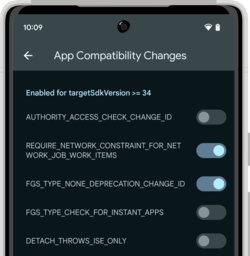
- To facilitate testing of applications considering the changes in the new version of Android, developers have been given the option to selectively enable and disable individual innovations through the Developer section in the configurator or the adb utility.


Source: opennet.ru
