

Jonas Dressler from the GNOME project has published a report on the work done over the past few months to enhance the capabilities of GNOME Shell for use on smartphones and tablets with touchscreens. The work is funded by the German Ministry of Education, which has provided GNOME developers with a grant as part of an initiative to support socially significant software projects.
The current state of development can be seen in the nightly builds of GNOME OS. Additionally, separate builds of the postmarketOS distribution, which include the changes prepared by the project, are being developed. The Pinephone Pro smartphone is used as the platform for testing, but the Librem 5 and Android smartphones supported by the postmarketOS project can also be used for testing.
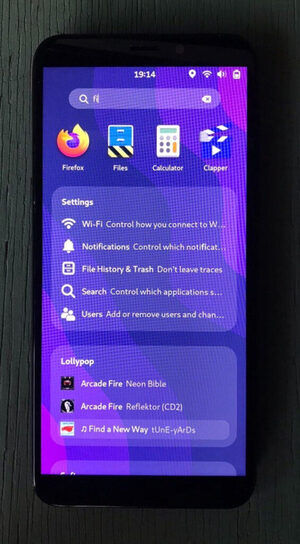
Separate branches of GNOME Shell and Mutter are offered to developers, which collect the existing changes related to creating a fully functional shell for mobile devices. The published code ensures support for navigation using screen gestures, adds an on-screen keyboard, includes code for responsive adjustment of interface elements to screen size, and proposes an optimized navigation interface for installed applications tailored for small screens.
Key achievements compared to the previous report:
- Development of two-dimensional gesture navigation continued. Unlike the interface model governed by gestures in Android and iOS, GNOME implements a unified interface for launching applications and switching between tasks, while Android uses a three-screen division (home screen, application navigation, and task switching), and iOS divides it into two (home screen and task switching).
The integrated interface implemented in GNOME has eliminated the confusing spatial model and the use of unclear gestures, such as 'swipe on the screen, stop, and wait without lifting your finger.' Instead, a common interface for viewing available applications and switching between active applications is proposed, activated by simple swipe gestures (you can switch between thumbnails of running applications with a vertical swipe gesture and scroll through the list of installed applications with a horizontal swipe gesture).
- When searching, information is displayed in a single column, similar to the search in the GNOME desktop environment.

- The on-screen keyboard has completely redesigned its input organization using gestures, which is closer to the input methods practiced in other mobile operating systems (for example, a pressed key is released once another key is pressed). The heuristics for determining moments that require the on-screen keyboard to be displayed have improved. The emoji input interface has been revamped. The keyboard layout has been adapted for use on smaller screens. New gestures for hiding the on-screen keyboard have been added, along with automatic hiding when attempting to scroll.
- The screen displaying the list of available applications has been adapted for portrait mode, a new catalog display style has been proposed, and the margins have been increased to simplify tapping on smartphones. Grouping capabilities for applications have been provided.
- An interface for quickly changing settings (Quick Settings screen) has been proposed, consolidated into a single drop-down menu with an interface for displaying a list of notifications. The menu is called up by a swipe gesture from top to bottom and allows individual notifications to be dismissed using horizontal swipe gestures.
Future plans:
- The transition of prepared changes and the new API for gesture management into the main GNOME framework (scheduled to be implemented as part of the GNOME 44 development cycle).
- Creation of an interface to handle calls during screen lock.
- Support for emergency calls.
- The ability to use the built-in vibration motor of phones to create a tactile feedback effect.
- An interface for unlocking the device with a PIN code.
- The ability to use extended layouts for the on-screen keyboard (for example, to simplify URL input) and to adapt the layout for the terminal.
- Redesign of the notification system, grouping notifications, and enabling actions from notifications.
- Adding a flashlight feature to the quick settings screen.
- Support for rearranging workspaces in overview mode.
- Implementing changes that will allow for rounded corners on thumbnails in overview mode, transparent panels, and the ability for apps to render in the area beneath the top and bottom panels.
Source: opennet.ru
