

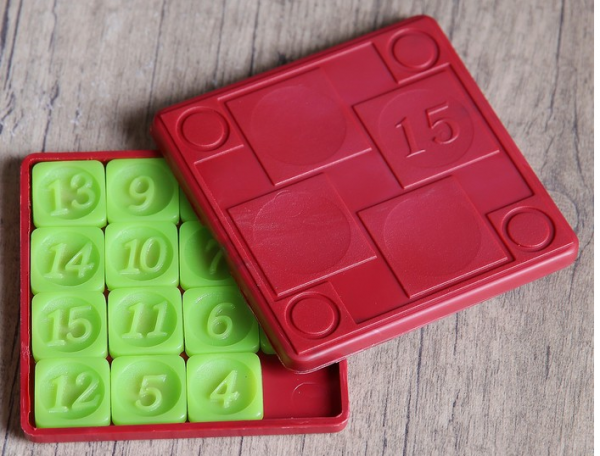
"Fifteen" or "Fifteen Puzzle" is a great example of a simple logical game that is popular worldwide. To solve the puzzle, you need to arrange the numbered squares in order from smallest to largest. It's not easy, but it's interesting.
In today's tutorial, we will show you how to develop the "Fifteen Puzzle" in Java 8 using Eclipse. For UI development, we will be using the Swing API.
Reminder: for all readers of 'Habr' - a discount of 10,000 rubles when enrolling in any Skillbox course with the promo code 'Habr'.
Skillbox recommends: Online educational course .
Game Design
At this stage, we need to define the properties:
- Size — the size of the game field;
- nbTiles — the number of tiles on the field. nbTiles = size * size — 1;
- Tiles — the fifteen puzzle, which is represented as a one-dimensional array of integers. Each tile will have a unique value in the range of [0, nbTiles]. Zero represents the empty square;
- blankPos — the position of the empty square.
Game Logic
We need to define the reset method used to initialize a new game position. This is where we set the value for each element of the tile array. Then we put blankPos in the last position of the array.
We also need a shuffle method to shuffle the array of tiles. We do not include the empty tile in the shuffling process to keep it in its original position.
Since only half of the possible starting positions of the puzzle are solvable, we need to check the result of the shuffling to ensure that the current arrangement is indeed solvable. To do this, we define the isSolvable method.
If a tile has a tile with a higher value preceding it, it is considered an inversion. When the empty tile is in its position, the number of inversions must be even for the puzzle to be solvable. Thus, we count the number of inversions and return true if the number is even.
Next, it's essential to define the isSolved method to check if our Game Of Fifteen arrangement is solved. First, we look at where the empty tile is. If it's in the starting position, then the current arrangement is new and has not been solved before. Then we iterate through the tiles in reverse order, and if a tile's value differs from its corresponding index + 1, we return false. Otherwise, at the end of the method, it's time to return true because the puzzle is already solved.
Another method to define is newGame. It's required to create a new instance of the game. To do this, we reset the game board, shuffle it, and continue until the game position is solvable.
Here is a sample code with the key logic of the sliding puzzle:
private void newGame() {
  do {
    reset(); // reset to initial state
    shuffle(); // shuffle
  } while(!isSolvable()); // keep going until grid is solvable

  gameOver = false;
}

private void reset() {
  for (int i = 0; i  1) {
    int r = RANDOM.nextInt(n--);
    int tmp = tiles[r];
    tiles[r] = tiles[n];
    tiles[n] = tmp;
  }
}

// Only half permutations of the puzzle are solvable/
// Whenever a tile is preceded by a tile with a higher value, it counts
// as an inversion. In our case, with the blank tile in the solved position,
// the number of inversions must be even for the puzzle to be solvable
private boolean isSolvable() {
  int countInversions = 0;

  for (int i = 0; i < nbTiles; i++) {
    for (int j = 0; j  tiles[i])
        countInversions++;
    }
  }

  return countInversions % 2 == 0;
}

private boolean isSolved() {
  if (tiles[tiles.length - 1] != 0) // if blank tile is not in the solved position => not solved
    return false;

  for (int i = nbTiles - 1; i >= 0; i--) {
    if (tiles[i] != i + 1)
      return false;
  }

  return true;
}
Finally, we need to program the movement of the tiles in the array. This code will be called later via a callback to respond to cursor movements. Our game will support multiple tile movements simultaneously. Thus, after converting the pressed position on the screen into a tile, we obtain the position of the blank tile and look for the direction of movement to support multiple tile shifts at once.
Here is a sample code:
// get position of the click
int ex = e.getX() - margin;
int ey = e.getY() - margin;

// click in the grid ?
if (ex < 0 || ex > gridSize  || ey < 0  || ey > gridSize)
  return;

// get position in the grid
int c1 = ex / tileSize;
int r1 = ey / tileSize;

// get position of the blank cell
int c2 = blankPos % size;
int r2 = blankPos / size;

// we convert in the 1D coord
int clickPos = r1 * size + c1;

int dir = 0;

// we search direction for multiple tile moves at once
if (c1 == c2  &&  Math.abs(r1 - r2) > 0)
  dir = (r1 - r2) > 0 ? size : -size;
else if (r1 == r2 && Math.abs(c1 - c2) > 0)
  dir = (c1 - c2) > 0 ? 1 : -1;

if (dir != 0) {
  // we move tiles in the direction
  do {
    int newBlankPos = blankPos + dir;
    tiles[blankPos] = tiles[newBlankPos];
    blankPos = newBlankPos;
  } while(blankPos != clickPos);

tiles[blankPos] = 0;
Developing the UI with Swing API
It's time to work on the interface. First, we take the Jpanel class. Then we draw the tiles on the board — to calculate the size of each, we will use the data provided in the game constructor parameter:
gridSize = (dim - 2 * margin);
tileSize = gridSize / size;
Margin is also a parameter set in the game constructor.
Now we need to define the drawGrid method to render the grid and tiles on the screen. We analyze the tile array and convert the coordinates to user interface coordinates. Then we draw each tile with the corresponding number in the center:
private void drawGrid(Graphics2D g) {
  for (int i = 0; i < tiles.length; i++) {
    // we convert 1D coords to 2D coords given the size of the 2D Array
    int r = i / size;
    int c = i % size;
    // we convert in coords on the UI
    int x = margin + c * tileSize;
    int y = margin + r * tileSize;

    // check special case for blank tile
    if(tiles[i] == 0) {
      if (gameOver) {
        g.setColor(FOREGROUND_COLOR);
        drawCenteredString(g, "u2713", x, y);
      }

      continue;
    }

    // for other tiles
    g.setColor(getForeground());
    g.fillRoundRect(x, y, tileSize, tileSize, 25, 25);
    g.setColor(Color.BLACK);
    g.drawRoundRect(x, y, tileSize, tileSize, 25, 25);
    g.setColor(Color.WHITE);

    drawCenteredString(g, String.valueOf(tiles[i]), x , y);
  }
}
Finally, we will override the paintComponent method from the JPane class. Then we will use the drawGrid method, followed by the drawStartMessage method to display a message suggesting to click to start the game:
private void drawStartMessage(Graphics2D g) {
  if (gameOver) {
    g.setFont(getFont().deriveFont(Font.BOLD, 18));
    g.setColor(FOREGROUND_COLOR);
    String s = "Click to start new game";
    g.drawString(s, (getWidth() - g.getFontMetrics().stringWidth(s)) / 2,
        getHeight() - margin);
  }
}

private void drawCenteredString(Graphics2D g, String s, int x, int y) {
  // center string s for the given tile (x,y)
  FontMetrics fm = g.getFontMetrics();
  int asc = fm.getAscent();
  int desc = fm.getDescent();
  g.drawString(s,  x + (tileSize - fm.stringWidth(s)) / 2,
      y + (asc + (tileSize - (asc + desc)) / 2));
}

@Override
protected void paintComponent(Graphics g) {
  super.paintComponent(g);
  Graphics2D g2D = (Graphics2D) g;
  g2D.setRenderingHint(RenderingHints.KEY_ANTIALIASING, RenderingHints.VALUE_ANTIALIAS_ON);
  drawGrid(g2D);
  drawStartMessage(g2D);
}
Responding to user actions in the UI
To ensure the game progresses smoothly, it is necessary to handle user actions in the UI. For this, we add the MouseListener implementation to the JPanel and the code to move the tiles, as shown above:
addMouseListener(new MouseAdapter() {
  @Override
  public void mousePressed(MouseEvent e) {
    // used to let users interact on the grid by clicking
    // it's time to implement interaction with users to move tiles to solve the game !
    if (gameOver) {
      newGame();
    } else {
      // get position of the click
      int ex = e.getX() - margin;
      int ey = e.getY() - margin;

      // click in the grid ?
      if (ex  gridSize  || ey  gridSize)
        return;

      // get position in the grid
      int c1 = ex / tileSize;
      int r1 = ey / tileSize;

      // get position of the blank cell
      int c2 = blankPos % size;
      int r2 = blankPos / size;

      // we convert in the 1D coord
      int clickPos = r1 * size + c1;

      int dir = 0;

      // we search direction for multiple tile moves at once
      if (c1 == c2  &&  Math.abs(r1 - r2) > 0)
        dir = (r1 - r2) > 0 ? size : -size;
      else if (r1 == r2 && Math.abs(c1 - c2) > 0)
        dir = (c1 - c2) > 0 ? 1 : -1;

      if (dir != 0) {
        // we move tiles in the direction
        do {
          int newBlankPos = blankPos + dir;
          tiles[blankPos] = tiles[newBlankPos];
          blankPos = newBlankPos;
        } while(blankPos != clickPos);

        tiles[blankPos] = 0;
      }

      // we check if game is solved
      gameOver = isSolved();
    }

    // we repaint panel
    repaint();
  }
});
The code is placed in the GameOfFifteen class constructor. At the very end, we call the newGame method to start a new game.
Full game code
The last step before seeing the game in action is to put all the code elements together. Here's what you'll get:
import java.awt.BorderLayout;
import java.awt.Color;
import java.awt.Dimension;
import java.awt.Font;
import java.awt.FontMetrics;
import java.awt.Graphics;
import java.awt.Graphics2D;
import java.awt.RenderingHints;
import java.awt.event.MouseAdapter;
import java.awt.event.MouseEvent;
import java.util.Random;

import javax.swing.JFrame;
import javax.swing.JPanel;
import javax.swing.SwingUtilities;

// We are going to create a Game of 15 Puzzle with Java 8 and Swing
// If you have some questions, feel free to read comments ;)
public class GameOfFifteen extends JPanel { // our grid will be drawn in a dedicated Panel

  // Size of our Game of Fifteen instance
  private int size;
  // Number of tiles
  private int nbTiles;
  // Grid UI Dimension
  private int dimension;
  // Foreground Color
  private static final Color FOREGROUND_COLOR = new Color(239, 83, 80); // we use arbitrary color
  // Random object to shuffle tiles
  private static final Random RANDOM = new Random();
  // Storing the tiles in a 1D Array of integers
  private int[] tiles;
  // Size of tile on UI
  private int tileSize;
  // Position of the blank tile
  private int blankPos;
  // Margin for the grid on the frame
  private int margin;
  // Grid UI Size
  private int gridSize;
  private boolean gameOver; // true if game over, false otherwise

  public GameOfFifteen(int size, int dim, int mar) {
    this.size = size;
    dimension = dim;
    margin = mar;

    // init tiles
    nbTiles = size * size - 1; // -1 because we don't count blank tile
    tiles = new int[size * size];

    // calculate grid size and tile size
    gridSize = (dim - 2 * margin);
    tileSize = gridSize / size;

    setPreferredSize(new Dimension(dimension, dimension + margin));
    setBackground(Color.WHITE);
    setForeground(FOREGROUND_COLOR);
    setFont(new Font("SansSerif", Font.BOLD, 60));

    gameOver = true;

    addMouseListener(new MouseAdapter() {
      @Override
      public void mousePressed(MouseEvent e) {
        // used to let users to interact on the grid by clicking
        // it's time to implement interaction with users to move tiles to solve the game !
        if (gameOver) {
          newGame();
        } else {
          // get position of the click
          int ex = e.getX() - margin;
          int ey = e.getY() - margin;

          // click in the grid ?
          if (ex  gridSize  || ey  gridSize)
            return;

          // get position in the grid
          int c1 = ex / tileSize;
          int r1 = ey / tileSize;

          // get position of the blank cell
          int c2 = blankPos % size;
          int r2 = blankPos / size;

          // we convert in the 1D coord
          int clickPos = r1 * size + c1;

          int dir = 0;

          // we search direction for multiple tile moves at once
          if (c1 == c2  &&  Math.abs(r1 - r2) > 0)
            dir = (r1 - r2) > 0 ? size : -size;
          else if (r1 == r2 && Math.abs(c1 - c2) > 0)
            dir = (c1 - c2) > 0 ? 1 : -1;

          if (dir != 0) {
            // we move tiles in the direction
            do {
              int newBlankPos = blankPos + dir;
              tiles[blankPos] = tiles[newBlankPos];
              blankPos = newBlankPos;
            } while(blankPos != clickPos);

            tiles[blankPos] = 0;
          }

          // we check if game is solved
          gameOver = isSolved();
        }

        // we repaint panel
        repaint();
      }
    });

    newGame();
  }

  private void newGame() {
    do {
      reset(); // reset in initial state
      shuffle(); // shuffle
    } while(!isSolvable()); // make it until grid be solvable

    gameOver = false;
  }

  private void reset() {
    for (int i = 0; i  1) {
      int r = RANDOM.nextInt(n--);
      int tmp = tiles[r];
      tiles[r] = tiles[n];
      tiles[n] = tmp;
    }
  }

  // Only half permutations of the puzzle are solvable.
  // Whenever a tile is preceded by a tile with higher value it counts
  // as an inversion. In our case, with the blank tile in the solved position,
  // the number of inversions must be even for the puzzle to be solvable
  private boolean isSolvable() {
    int countInversions = 0;

    for (int i = 0; i < nbTiles; i++) {
      for (int j = 0; j  tiles[i])
          countInversions++;
      }
    }

    return countInversions % 2 == 0;
  }

  private boolean isSolved() {
    if (tiles[tiles.length - 1] != 0) // if blank tile is not in the solved position ==> not solved
      return false;

    for (int i = nbTiles - 1; i >= 0; i--) {
      if (tiles[i] != i + 1)
        return false;
    }

    return true;
  }

  private void drawGrid(Graphics2D g) {
    for (int i = 0; i  {
      JFrame frame = new JFrame();
      frame.setDefaultCloseOperation(JFrame.EXIT_ON_CLOSE);
      frame.setTitle("Game of Fifteen");
      frame.setResizable(false);
      frame.add(new GameOfFifteen(4, 550, 30), BorderLayout.CENTER);
      frame.pack();
      // center on the screen
      frame.setLocationRelativeTo(null);
      frame.setVisible(true);
    });
  }


}
Finally, let's play!
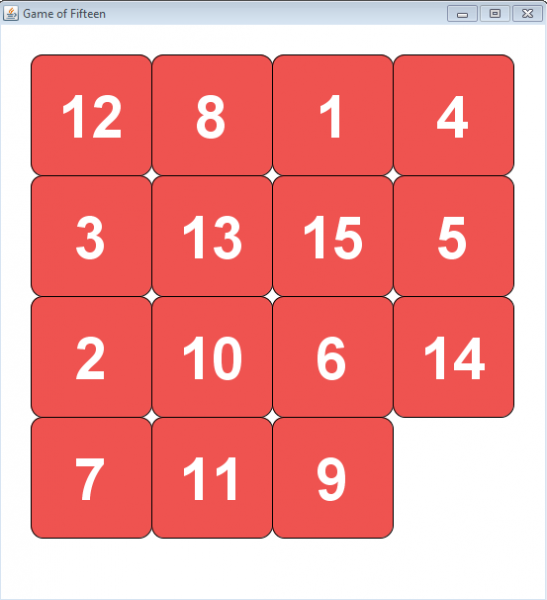
It's time to start the game and see it in action. The field should look like this:
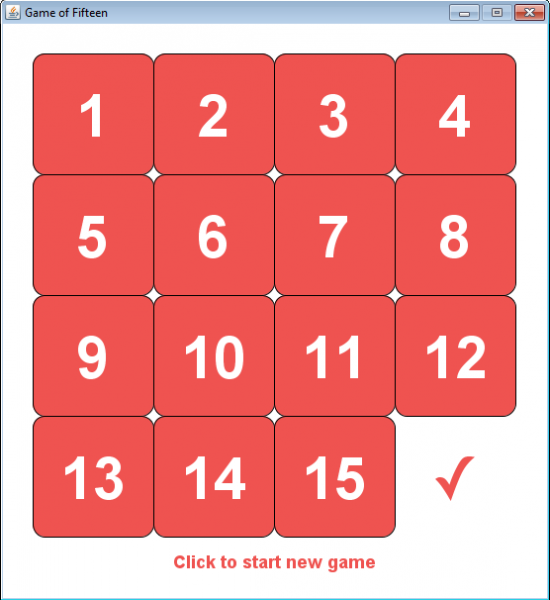
Let's try to solve the puzzle. If everything goes well, we get this:
That's it. Did you expect more? 🙂
Skillbox recommends:
- Practical Course .
- Applied Online Course .
- Two-Year Practical Course .
Source: habr.com
