

Google has released the web browser Chrome 100. Simultaneously, a stable version of the open-source project Chromium, which serves as the foundation for Chrome, is available. The Chrome browser is distinguished by the use of Google logos, a system for sending notifications in the event of a crash, modules for playing protected video content (DRM), an automatic update installation system, and the transmission of RLZ parameters during searches. The next release, Chrome 101, is scheduled for April 26.
Key changes in Chrome 100:
- With the browser reaching version number 100, which consists of three digits instead of two, issues may arise on some websites that use incorrect libraries for parsing the User-Agent value. In case of any problems, there is a setting 'chrome://flags##force-major-version-to-minor' that allows reverting the User-Agent header output to version 99 while actually using version 100.
- Chrome 100 is marked as the last version with full User-Agent content. In the next release, information in the User-Agent HTTP header and JavaScript parameters navigator.userAgent, navigator.appVersion, and navigator.platform will begin to be curtailed. The header will only retain information about the browser name, major browser version, platform, and device type (mobile, PC, tablet). To obtain additional data, such as the exact version and extended platform data, the User Agent Client Hints API will need to be used. For websites that find the new information insufficient and are not yet ready to transition to User Agent Client Hints, the full User-Agent will be available until May 2023.
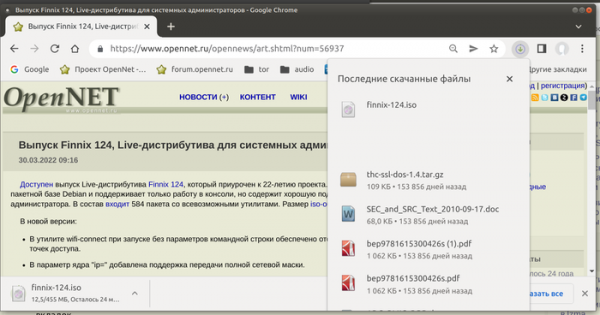
- An experimental feature has been added to display a download indicator in the address bar, which, when clicked, shows the status of downloading and downloaded files, similar to the chrome://downloads page. To activate the indicator, the setting 'chrome://flags#download-bubble' is provided.

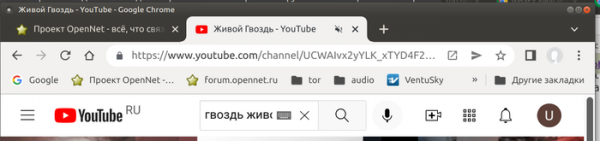
- The ability to mute sound by clicking on the playback indicator shown on the tab button has been restored (previously, sound could be muted through the context menu). To enable this feature, the setting 'chrome://flags#enable-tab-audio-muting' has been added.

- A setting has been added for disabling the Google Lens service for image search (the 'Find Image' option in the context menu) using 'chrome://flags/#enable-lens-standalone'.
- When sharing a tab, the blue border now highlights only the part of the tab that contains the content being shared with another user, rather than the entire tab.
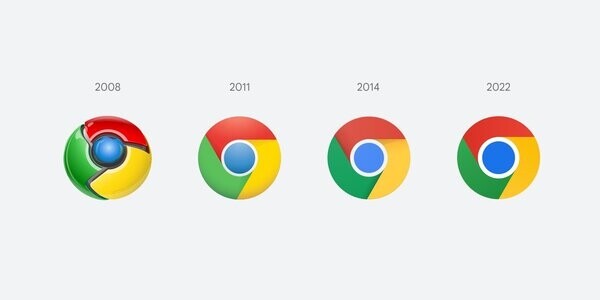
- The browser logo has been changed. The new logo differs from the 2014 version with a slightly larger circle in the middle, more vibrant colors, and no shadows at the edges between the colors.

- Changes in the Android version:
- Support for the 'Lite' data-saving mode has been discontinued, which reduced the bitrate when loading videos and applied additional image compression. This mode was removed due to the decreasing costs of mobile network tariffs and the development of other methods to reduce data usage.
- The ability to perform actions with the browser from the address bar has been added. For example, you can type 'clear history' and the browser will suggest going to the history clearing form, or 'edit passwords' and the browser will open the password manager. This feature was implemented for desktop systems in Chrome version 87.
- Support for signing into a Google account by scanning a QR code displayed on another device has been implemented.
- A confirmation dialog will be displayed when attempting to close all tabs at once.
- On the new tab page, a switch has been added to toggle between viewing RSS feeds (Following) and recommended content (Discover).
- The use of TLS 1.0/1.1 protocols in the Android WebView component has been discontinued. Support for TLS 1.0/1.1 was removed in the Chrome 98 release, and a similar change has now been applied to mobile applications using the WebView component, which will no longer be able to connect to servers that do not support TLS 1.2 or TLS 1.3.
- When verifying certificates using the Certificate Transparency mechanism for certificate confirmation, it is now required to have signed SCT records (signed certificate timestamp) in any two logs supported by different operators (previously a record was required in the Google log and in the log of any other operator). Certificate Transparency facilitates the maintenance of independent public logs of all issued and revoked certificates, which allow for an independent audit of all changes and actions by certificate authorities, and enable tracking of any attempts to secretly create counterfeit records.
For users who have enabled Safe Browsing mode, SCT record auditing in Certificate Transparency logs is activated by default. This change will result in additional requests being sent to Google to confirm the correctness of the log's operation. Verification requests are sent very rarely, approximately once every 10,000 TLS connections. If problems are detected, information concerning the problematic certificate chain and SCT will be transferred to Google (only publicly shared data about certificates and SCT is transmitted).
- When Enhanced Safe Browsing mode is activated and the user is signed into their Google account, tokens linked to the Google account are now included in the incident data sent to servers Google, enhancing protection against phishing, malicious activity, and other online threats. For sessions in incognito mode, such data is not transmitted.
- The desktop version of Chrome has introduced the ability to dismiss warnings regarding the use of compromised passwords.
- The Multi-Screen Window Placement API has been added, allowing you to obtain information about monitors connected to the computer and organize the placement of windows on specified screens. With the new API, you can also accurately select the position of displayed windows and determine transitions to fullscreen mode initiated by the Element.requestFullscreen() method. Examples of applications using the new API include presentation software (displaying on a projector while showing notes on a laptop screen), financial applications and monitoring systems (placing charts on different screens), medical applications (displaying images on separate high-resolution screens), games, graphic editors, and other types of multi-window applications.
- In the Origin Trials mode (experimental features that require separate activation), support for accessing Media Source Extensions from dedicated workers has been implemented, which can be used, for example, to enhance the performance of buffered multimedia playback by creating a MediaSource object in a dedicated worker and streaming the results to the HTMLMediaElement in the main thread. The Origin Trial allows working with the specified API from applications loaded from localhost or 127.0.0.1, or after registration and obtaining a special token that is valid for a limited time for a specific site.
- The Digital Goods API has been stabilized and made available to all, designed to simplify the organization of purchases from web applications. It provides integration with product distribution services and offers a wrapper over the Android Play Billing API in Android.
- The AbortSignal.throwIfAborted() method has been added, enabling the handling of signal interruption considering the state of the signal and the reason for its interruption.
- The HIDDevice object has been enhanced with the forget() method, allowing users to revoke the granted access permissions to the input device.
- Support for the value 'plus-lighter' has been added to the CSS property mix-blend-mode, which defines the blending method for overlaying elements, highlighting intersections of two elements that share common pixels.
- The NDEFReader object has been updated with the makeReadOnly() method, allowing use of NFC tags in read-only mode.
- The WebTransport API designed for sending and receiving data between a browser and a server has added the option serverCertificateHashes for authenticating the connection to the server using a certificate hash without using Web PKI (for example, when connecting to server or a virtual machine not on the public network).
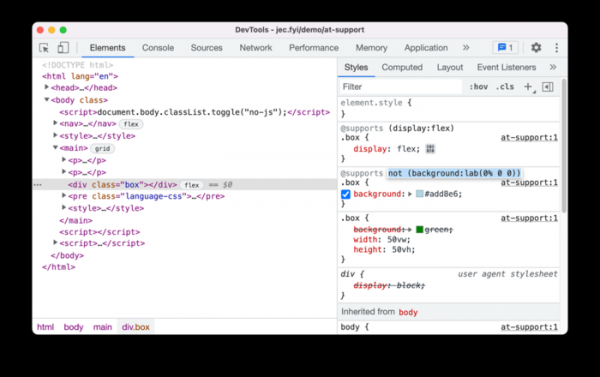
- Improvements have been made to the web developer tools. The capabilities of the Recorder panel have been expanded, allowing users to record, replay, and analyze user actions on the page. When viewing code during debugging, property values are displayed when hovering over classes or functions. The User-Agent list for emulated devices has been updated to version 13_2_3 for the iPhone. The CSS styles navigation panel now allows for viewing and editing '@supports' rules.

In addition to new features and bug fixes, the new version addresses 28 vulnerabilities. Many of these vulnerabilities were identified through automated testing with tools like AddressSanitizer, MemorySanitizer, Control Flow Integrity, LibFuzzer, and AFL. No critical issues that could bypass all levels of browser protection and execute code on the system outside the sandbox environment were found. As part of the bug bounty program for this release, Google awarded 20 prizes totaling $51,000 (one prize of $16,000, two prizes of $7,000, three prizes of $5,000, and one prize each of $3,000, $2,000, and $1,000. The amount for 11 prizes has yet to be determined.
Source: opennet.ru
