

Google has released version 108 of the Chrome web browser. At the same time, a stable release of the open-source project Chromium, which serves as the basis for Chrome, is available. The Chrome browser differs from Chromium by using Google logos, having a crash reporting notification system, modules for playing protected video content (DRM), an automatic update installation system, constant Sandbox isolation, providing keys to Google API, and transmitting RLZ parameters during searches. For those who need more time to update, the Extended Stable branch is separately supported, lasting for 8 weeks. The next release, Chrome 109, is scheduled for January 10.
Key changes in Chrome 108:
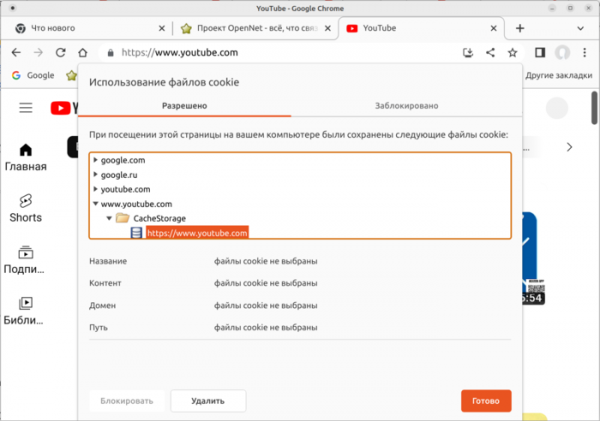
- The layout of the Cookie and site data management dialog has changed (accessed through the Cookie Files link after clicking the lock in the address bar). The dialog has been simplified and now displays information broken down by site.

- Two new browser optimization modes have been introduced — Memory Saver and Energy Saver, which can be found in the performance settings (Settings > Performance). The modes are currently available only on ChromeOS, Windows, and macOS platforms.
- In the password manager, the ability to attach notes to each saved password has been added. Like the password, the note is shown on a separate page only after authentication.
- The Linux version now uses the built-in DNS client by default, which was previously used only in Windows, macOS, Android, and ChromeOS versions.
- On Windows, when installing Chrome, a shortcut to launch the browser is now automatically pinned to the taskbar.
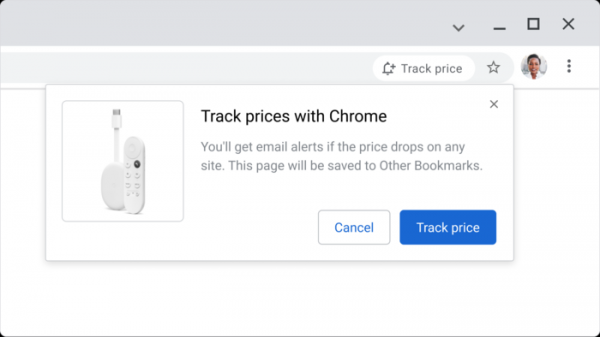
- The ability to track price changes for selected products in certain online stores (Shopping List) has been added. When the price drops, the user receives a notification or email (in Gmail). Adding a product to track is done by clicking the 'Track price' button in the address bar while on the product page. Tracked products are saved along with bookmarks. This feature is available only to users with an active Google account, with synchronization enabled and the 'Web & App Activity' service activated.

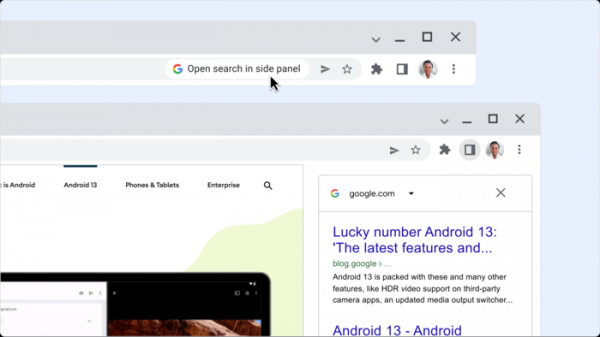
- The ability to view search results in a sidebar while simultaneously browsing another page has been enabled (in one window, both the content of the page and the search result can be viewed). After navigating to a website from the Google search results page, an icon with the letter 'G' appears before the address input field, which, when clicked, opens a sidebar with the results of the previously made search.
- In the File System Access API, which allows web applications to read and write data directly to files and directories on the user's device, the methods getSize(), truncate(), flush(), and close() in the FileSystemSyncAccessHandle object have been switched from an asynchronous to a synchronous execution model, similar to the read() and write() methods. This change allows for a fully synchronous FileSystemSyncAccessHandle API, enhancing the performance of applications based on WebAssembly (WASM).
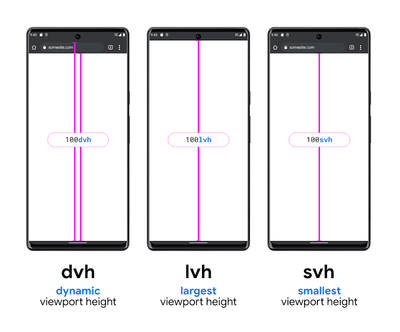
- Support for additional viewport sizes—'small' (s), 'large' (l), and 'dynamic' (d)—has been added, along with related data sizes—'*vi' (vi, svi, lvi, and dvi), '*vb' (vb, svb, lvb, and dvb), '*vh' (svh, lvh, dvh), '*vw' (svw, lvw, and dvw), '*vmax' (svmax, lvmax, and dvmax), and '*vmin' (svmin, lvmin, and dvmin). The proposed units allow elements' sizes to be tied to the smallest, largest, and dynamic viewport size proportionally (the size changes depending on the visibility, hiding, and state of the toolbars).

- Support for variable color vector fonts in the COLRv1 format (a subset of OpenType fonts that includes a layer with color information alongside vector glyphs) has been enabled.
- To check for color font support in CSS rules, the functions font-tech() and font-format() have been added to @supports, and the function tech() has been added to @font-face.
- An API for Federated Credential Management (FedCM) has been proposed, allowing the creation of integrated identification services that ensure privacy and operate without cross-site tracking mechanisms, such as third-party cookie processing.
- The ability to apply the existing CSS property 'overflow' to replaced elements rendered outside their content has been provided, which, in conjunction with the object-view-box property, can be used to create images with custom shadows.
- CSS properties break-before, break-after, and break-inside have been added to control the behavior of breaks during fragmented output across individual pages, columns, and regions. For example, "figure { break-inside: avoid;}" will prevent page breaks inside a figure.
- The CSS properties align-items, justify-items, align-self, and justify-self now allow for the use of the value "last baseline" for alignment relative to the last baseline in flex or grid layouts.
- A new event ContentVisibilityAutoStateChanged has been added, which is triggered for elements with the property "content-visibility: auto" when the rendering state of the element changes.
- Access to the Media Source Extensions API is now available in the context of workers, which can be used, for example, to enhance the performance of buffered media playback by creating a MediaSource object in a separate worker and streaming the results to an HTMLMediaElement in the main thread.
- The HTTP header Permissions-Policy, used for delegating permissions and enabling advanced capabilities, now allows the use of masks, such as "https://*.bar.foo.com/".
- Outdated APIs window.defaultStatus, window.defaultstatus, ImageDecoderInit.premultiplyAlpha, navigateEvent.restoreScroll(), and navigateEvent.transitionWhile() have been removed.
- Improvements have been made to the web developer tools. The Styles panel now includes hints for inactive CSS properties. The Recorder panel features automatic selector detection for XPath and text. The debugger now allows step-by-step traversal of comma-separated expressions. The settings have been expanded in "Settings > Ignore List".
In addition to new features and bug fixes, the new version addresses 28 vulnerabilities. Many of the vulnerabilities were identified through automated testing tools like AddressSanitizer, MemorySanitizer, Control Flow Integrity, LibFuzzer, and AFL. No critical issues were found that would allow bypassing all browser security layers and executing code on the system outside of the sandbox environment. As part of the vulnerability reward program for this release, Google has paid out 10 rewards totaling $74,000 (one reward of $15,000, one of $11,000, one of $6,000, five rewards of $5,000, three rewards of $3,000 and $2,000, and two rewards of $1,000). The amount of 6 rewards is yet to be determined.
Source: opennet.ru
