

Google has released version 113 of the Chrome web browser. The stable release of the free project Chromium, which underlies Chrome, is also available simultaneously. The Chrome browser differs from Chromium by incorporating Google logos, a crash notification system, modules for playing protected content (DRM), an automatic update installation system, constant Sandbox isolation, the provision of keys for Google API, and the transmission of RLZ parameters during searches. For those who need more time to update, a separate Extended Stable branch with an 8-week support period is maintained. The next Chrome release, version 114, is scheduled for May 30.
Key changes in Chrome 113:
- Support for the WebGPU graphics API and the WGSL (WebGPU Shading Language) shader language is enabled by default. WebGPU provides a software interface similar to Vulkan, Metal, and Direct3D 12 for performing GPU-side operations, such as rendering and computations, and allows the use of shader language for writing GPU-side programs. Currently, WebGPU support is only enabled in builds for ChromeOS, macOS, and Windows; support for Linux and Android will be activated later.
- Performance optimization efforts have continued. Compared to version 112, the speed for the Speedometer 2.1 test has increased by 5%.
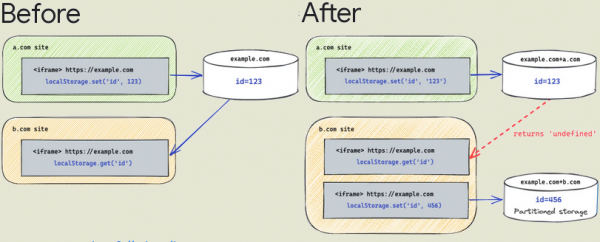
- Users are gradually being enabled for the Storage Partitioning mode, Service Workers, and communication APIs, which, during page processing, are separated based on domains, isolating third-party handlers. This mode blocks tracking methods that monitor user movements between websites, based on storing identifiers in shared storages and areas not intended for persistent information storage ("Supercookies"), for instance, working through the assessment of the presence of specific data in browser caches. Initially, all resources during page processing were stored in a shared namespace (same-origin), regardless of the source domain, allowing one site to determine resource loading from another site through local storage manipulations, the IndexedDB API, or checking for data presence in the cache.
When segmenting by the key used to extract objects from the cache and browser storages, a separate attribute is attached that defines the link to the primary one domain, from which the main page is opened, limiting the scope for tracking scripts, for example, those loaded via iframe from another site. To forcibly activate segmentation without waiting for the standard activation, the setting "chrome://flags/#third-party-storage-partitioning" can be used.

- A mechanism called First-Party Sets (FPS) has been proposed, which allows defining the relationship between different sites of the same organization or project for shared cookie processing between them. This feature is useful when one site is accessible through different domains (for instance, opennet.ru and opennet.me). Cookies for such domains are completely separated, but with FPS they can now be linked into a common storage. To enable FPS, use the flag "chrome://flags/enable-first-party-sets."
- A significant optimization has been made to the software implementation of the AV1 video encoder (libaom), allowing for increased performance of web applications using WebRTC, such as video conferencing systems. A new speed mode 10 has been added, suitable for devices with limited CPU resources. When testing the Google Meet application on a channel with a bandwidth of 40 kbps, the AV1 Speed 10 mode achieved a 12% increase in quality and a 25% performance boost compared to the VP9 speed 7 mode.
- With enhanced browser protection (Safe Browsing > Enhanced protection) enabled to detect malicious activity on the part of Google in extensions, telemetry data about the operation of browser extensions installed not from the Chrome Store has been collected. Such data includes hashes of the extension files and the contents of manifest.json.
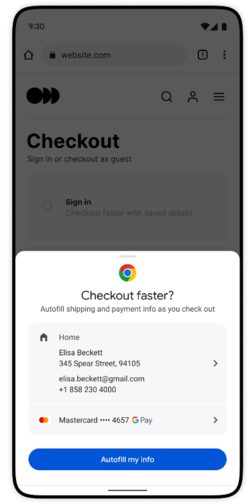
- Some users have additional features enabled for auto-filling forms, aimed at quickly completing delivery addresses and payment details when making purchases at certain online stores.

- The structure of the menu displayed when clicking on the "three dots" icon has been restructured. The items "Extensions" and "Chrome Web Store" have been moved to the first level of the menu.
- A new feature has been added to translate only a selected portion of the page rather than the entire page (the translation is initiated from the context menu). There is a setting for managing the inclusion of partial translation: "chrome://flags/#desktop-partial-translate."
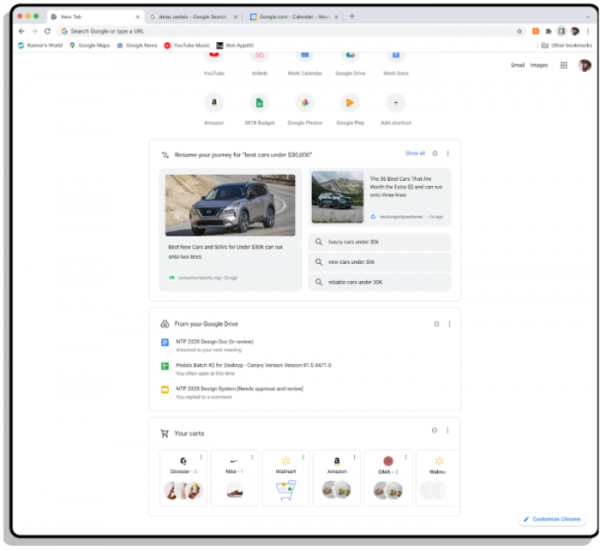
- On the page displayed when opening a new tab, a feature has been added to resume interrupted tasks ('Journey'), allowing you to continue your search from where you left off.

- The Android version has implemented a new service page at "chrome://policy/logs" for debugging policies set by administrators for users in a centralized management system.
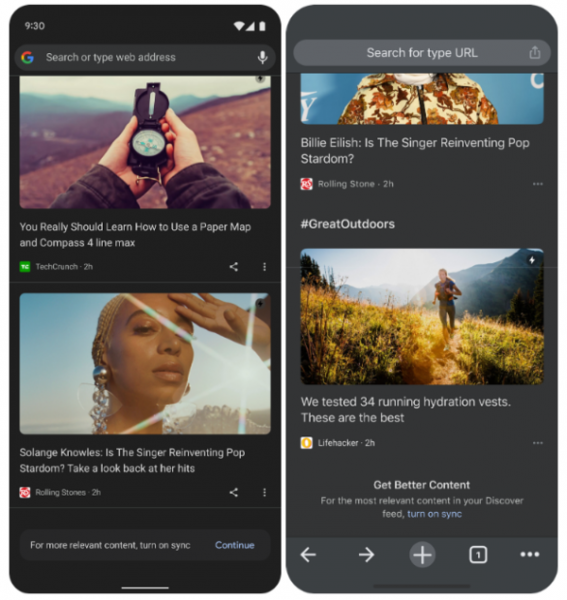
- In the build for the Android platform, the ability to display more personalized content in the recommended content section (Discover) has been implemented. Additionally, users not signed into a Google account can now customize preferred types of recommendations (for example, they can hide content from certain sources).

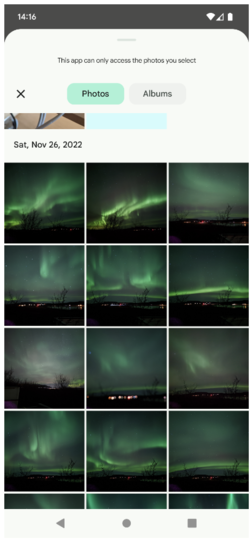
- In the Android platform version, a new interface for selecting multimedia files for uploading photos and videos has been proposed (replacing its own implementation with the standard Android Media Picker interface).

- CSS has implemented the standard syntax for the image-set() function, which allows selecting an image from a set of options with different resolutions that best fits the current screen parameters and network connection bandwidth. The previously supported call with the prefix -webkit-image-set(), which offered a Chrome-specific syntax, has now been replaced with the standard image-set.
- CSS has added support for new media queries (@media) overflow-inline and overflow-block, allowing you to determine how content overflow will be handled beyond the initial boundaries of a block.
- CSS has added an update media query, allowing for style definitions when printing or displaying on slow (e.g., e-book screens) and fast (regular monitors) screens.
- CSS has introduced the linear() function for applying linear interpolation between a specified number of points, which can be used to create complex animations, such as bouncing and stretching effects.
- The Headers.getSetCookie() method now allows extraction of values from multiple Set-Cookie headers sent in a single request without merging them.
- The WebAuthn API has added a largeBlob extension for storing large binary data related to credentials.
- The Private State Token API has been enabled for distinguishing users without using cross-site identifiers.
- Websites are prohibited from setting the document.domain property to apply same-origin conditions to resources loaded from different subdomains. If a communication channel between subdomains needs to be established, the postMessage() function or the Channel Messaging API should be used.
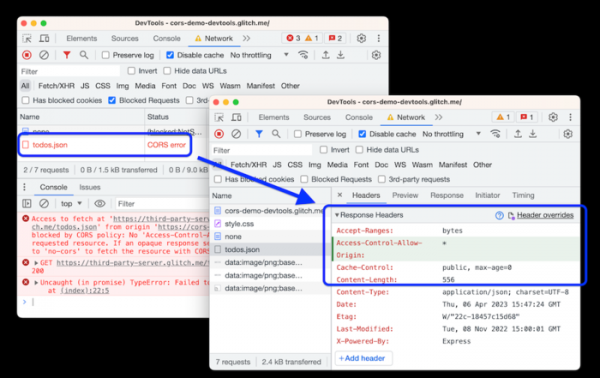
- Improvements have been made to the web development tools. The network activity inspection panel now includes the ability to override or create new HTTP response headers returned by the web server (Network > Headers > Response Headers). Additionally, there's a feature to edit all overrides in one place via the .headers file in the Sources > Overrides section and create replacements by mask. Debugging of applications using web frameworks Nuxt, Vite, and Rollup has been enhanced. CSS issue diagnostics in the Styles panel have also improved (errors in property names and assigned values are now separately marked). The web console has been updated to provide auto-completion recommendations on pressing Enter (not just when pressing Tab or the right arrow key).

In addition to new features and bug fixes, the latest version has resolved 15 vulnerabilities. Many of the vulnerabilities were identified through automated testing with tools such as AddressSanitizer, MemorySanitizer, Control Flow Integrity, LibFuzzer, and AFL. No critical issues were found that would allow bypassing all levels of browser protection and executing code outside of the sandbox environment. Under the bug bounty program for this release, Google has awarded 10 prizes totaling $30,500 (including one prize of $7,500, one for $5,000, one for $4,000, two prizes of $3,000, three awards of $2,000, and two prizes of $1,000).
Source: opennet.ru
