

Google has released version 118 of its web browser Chrome. At the same time, a stable release of the open-source project Chromium, which serves as the foundation for Chrome, is available. Chrome differs from Chromium in its use of Google logos, a system for sending crash notifications, modules for playing protected content (DRM), an automatic update installation system, constant enforcement of Sandbox isolation, provision of keys to Google API, and the transmission of RLZ parameters during searches. For those who need more time to update, an Extended Stable branch is maintained, with support lasting 8 weeks. The next release, Chrome 119, is scheduled for October 31.
Key changes in Chrome 118:
- Preparation has begun for the removal of support for third-party cookies in Chrome, which are set when visiting sites other than the current page's domain. Such cookies are used to track user movements across websites in advertising network code, social media widgets, and web analytics systems. These changes are part of the Privacy Sandbox initiative, aimed at reaching a compromise between users' need for privacy and the desire of advertising networks and sites to track visitor preferences.
In Chrome 118, the developer tools now provide a warning when sending cookies that will fall under future restrictions. A command line option "—test-third-party-cookie-phaseout" and a setting "chrome://flags/#test-third-party-cookie-phaseout" have also been added to forcibly enable the blocking for testing purposes. The actual blocking of third-party cookies will begin in the first quarter of 2024 and during the testing period will cover only 1% of Chrome users until the third quarter. After the third quarter of 2024, the blocking coverage will be increased to 100%.
Instead of tracking cookies, the following APIs are proposed:
- FedCM (Federated Credential Management) allows for the creation of unified identification services that ensure privacy and work without third-party cookies.
- Private State Tokens allow for differentiating between users without using cross-site identifiers and sharing user authentication information across different contexts.
- Topics (critique) enables determining user interest categories that can be used to highlight groups of users with similar interests without identifying individual users using tracking cookies. Interests are computed based on the user's activity in the browser and stored on the user's device. Using the Topics API, an ad network can obtain general information about individual interests without having information about specific user activity.
- Protected Audience, a solution for retargeting tasks and assessing one's own audience (working with users who have previously visited the site).
- Attribution Reporting, allows for evaluating advertising effectiveness metrics such as clicks and conversion (a purchase on the site after clicking).
- Storage Access API, can be used to request user permissions to access the Cookie storage if third-party Cookies are blocked by default.
- Support for the ECH (Encrypted Client Hello) mechanism is enabled for all users, which continues the development of ESNI (Encrypted Server Name Indication) and is used to encrypt information about TLS session parameters, such as the requested domain name. The key difference between ECH and ESNI is that in ECH, instead of encrypting individual fields, the entire TLS ClientHello message is encrypted, which helps to block leaks through fields not covered by ESNI, such as the PSK (Pre-Shared Key) field. There is a setting to manage the enabling of ECH: "chrome://flags#encrypted-client-hello".
- When enhanced browser protection (Safe Browsing > Enhanced protection) is enabled, there is a possibility to remotely disable malicious extensions installed outside the official extension store. The decision to remove them is made on Google's servers based on manual review or after triggering the automated malware detection system.
- With standard browser protection (Safe Browsing > Standard protection) enabled, security checks of open URLs are performed in real-time based on data sent to servers partial hashes of the URLs opened by the user to Google. To exclude matches an IP address the user and a hash; the data is sent through an intermediary proxy. Previously, the checks were conducted by downloading a local copy of the unsafe URL list to the user's system. The new scheme allows for more prompt blocking of malicious URLs.
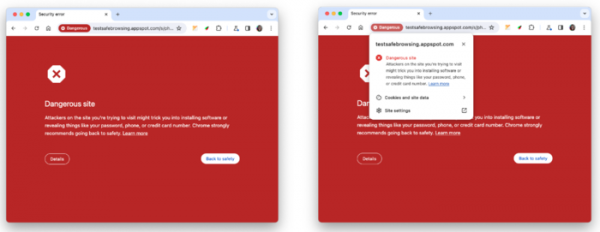
- The design of pages displayed when attempting to open a site deemed unsafe during checks via the Safe Browsing mechanism has been improved.

- In the telemetry sent to Google servers when enhanced browser protection (Safe Browsing > Enhanced protection) is enabled, requests from extensions to the chrome.tabs API are now taken into account. Data is collected to identify malicious activity and rule violations in extensions.
- When enhanced browser protection (Safe Browsing > Enhanced protection) is enabled, support for deep scanning of encrypted ZIP and RAR archives on Google's side is provided (the user is prompted for the decompression password, after which the contents are sent for checking to Google servers).
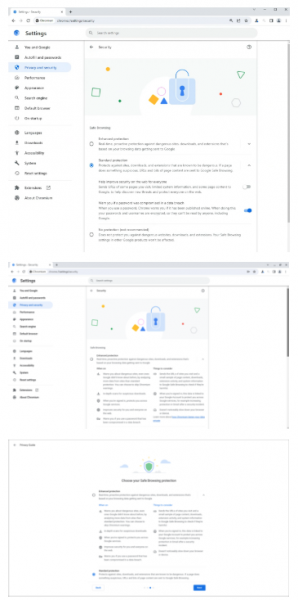
- The configurator and privacy policy guidance have been updated with new text explaining the essence of Safe Browsing protection levels and links to relevant articles for additional information. Descriptions of standard protection, disabling protection, and password compromise warnings have been simplified.

- The Quests section (price tracking in online stores) on the new tab page has been updated with information on discount availability. The discount indicator may also appear in the address bar when opening product pages from online stores tracked by the Google service.
- In accordance with the RFC-6265bis specification, all cookies containing control characters set via JavaScript are now blocked. Previously, cookies with null characters, carriage returns, and line breaks were truncated at the problematic character instead of being blocked, which could be exploited for malicious purposes in certain situations. To disable this new behavior, the option "—disable-features=BlockTruncatedCookies" can be used.
- Service Workers registered with extensions are now allowed to access the WebUSB API.
- The need for users to activate the ability to display dialogs for payment requests and confirmations has been eliminated.
- Decoding ASCII characters represented as codes "%xx" has been discontinued. For instance, previously "http://example.com/" was decoded to "http://example.com/A" before being recorded in url.href, but now it will remain as "http://example.com/".
- The ability to vertically align text in web form elements such as select, meter, progress, button, textarea, and input has been added. Text positioning in forms is set using the CSS property writing-mode, which can take values vertical-rl or vertical-lr for vertical display.
- Support for non-standard keywords in the CSS property "appearance" has been discontinued: inner-spin-button, media-slider, media-sliderthumb, media-volume-slider, media-volume-sliderthumb, push-button, searchfield-cancel-button, slider-horizontal, sliderthumb-horizontal, sliderthumb-vertical, and square-button. Statistics were collected to assess the demand for these keywords, which were found to be used in only 0.001% of cases.
- A CSS rule @scope has been added that binds CSS styles based on the proximity of the style definition to the elements. The @scope rule can be applied to bypass the typical arrangement of styles based on the order of element occurrence or to adjust the style of a component without affecting the styles of nested elements. For example, for nested divs: <div class="»lightpink-theme»"> <a href="/en/»/#»">I’m lightpink!</a> <div class="»pink-theme»"> <a href="/en/»/#»">Different pink!</a> </div> </div> all content will be colored lightpink due to the style block 'lightpink-theme' affecting the entire parent div. Using @scope allows changing the visibility and applying the 'pink-theme' style to the nested div based on the proximity of the style definition rather than the order in the code: @scope (.pink-theme) { a { color: hotpink; } } @scope (.lightpink-theme){ a { color: lightpink; } }
- Support for the media query (@media) 'scripting' has been added, allowing the accessibility of script execution (for example, in CSS, it can be checked whether JavaScript support is enabled).
- Support for the media query prefers-reduced-transparency has been added, allowing for detection of changes in the system settings that govern the reduction of transparency or semi-transparency effects (for example, the 'Reduce transparency' mode in macOS used to enhance text readability).
- CSS now supports new values 'float: inline-start', 'float: inline-end', 'clear: inline-start', 'clear: inline-end', 'resize: block', 'resize: inline', which govern the logical positioning of elements (to support languages that are written not top-to-bottom and left-to-right, logical positioning involves the concepts of start, end, and direction of the text).
- The CSS property 'transform-box' now supports values stroke-box, content-box, and border-box, allowing for changes to the reference area calculation for transformation operations, for instance, to implement advanced graphic effects.
- The ability to focus on scroll blocks while navigating using the keyboard has been added (for example, focus can be set to scroll by pressing the Tab key and scrolling with the arrow keys).
- Improvements have been made to web developer tools. The Sources panel has been enhanced; instead of the 'Filesystem' section, a 'Workspace' tab has been provided, through which changes made via the developer tools can be synchronized with the source files.
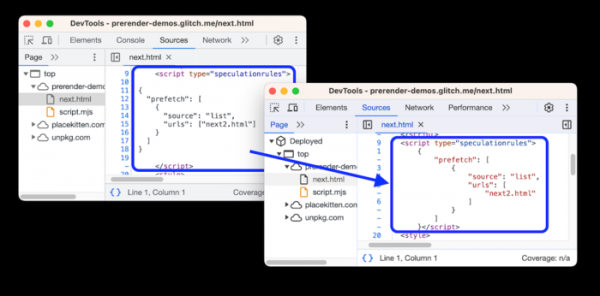
The ability to change the order of tabs in the Sources panel by dragging and dropping them has been provided. JavaScript code embedded in script elements with types module, importmap, and speculationrules has been formatted. Syntax highlighting has been added for scripts of type importmap and speculationrules.

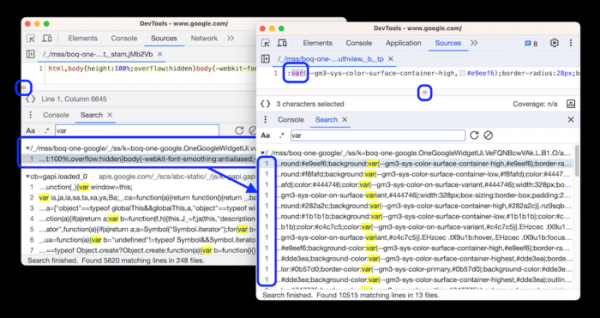
The Elements panel in the Styles tab now includes a dedicated section for custom properties, allowing you to define your own CSS properties without the need for JavaScript. In search results, all matches are displayed in the line instead of just the first match, which is convenient when searching in JavaScript files that have been minified (clicking on a result opens the file in the editor and scrolls vertically and horizontally to show the found position).

In addition to new features and bug fixes, the latest version addresses 20 vulnerabilities. Many of these vulnerabilities were identified through automated testing using tools such as AddressSanitizer, MemorySanitizer, Control Flow Integrity, LibFuzzer, and AFL. Among other things, this release fixes the critical vulnerability CVE-2023-5218, which is related to accessing memory after it has been freed (Use after free) in the site isolation mechanism. This vulnerability allows bypassing all browser security levels and executing code on the system outside the sandbox environment. As part of the bug bounty program for this release, Google has awarded 14 prizes totaling $30,500 (one prize of $6000, two prizes of $5000, two prizes of $3000, one prize of $2000, six prizes of $1000, and one prize of $500). The amount of one reward is still to be determined.
Source: opennet.ru
