

Google Inc. release of the web browser . At the same time, the stable release of the open-source project , which serves as the foundation for Chrome. The Chrome browser features the use of Google logos, a crash notification system, the ability to load Flash plugins on demand, modules for playing protected video content (DRM), an automatic update installation system, and the transmission of RLZ parameters during searches. The next release of Chrome 77 is scheduled for September 10.
:
- By default, a protection mode against third-party Cookie transmission is activated, which sets the value "SameSite=Lax" by default when the SameSite attribute is absent in the Set-Cookie header, limiting Cookie transmission for insertions from third-party sites (though sites can still override this limitation by explicitly setting the SameSite value to None when setting Cookies). Until now, the browser transmitted Cookies on any request to a site with set Cookies, even if initially opened from another site, with access being indirect through loading images or via iframe. In 'Lax' mode, Cookie transmission is blocked only for cross-site subrequests, such as image requests or content loading via iframe, which are often used to organize CSRF attacks and to track user movements between sites.
- The playback of Flash content is disabled by default. Until the release of Chrome 87, expected in December 2020, Flash support can be restored in settings (Advanced > Privacy and Security > Site Settings) with subsequent explicit confirmation of the operation to play Flash content for each site (the confirmation is remembered until the browser is restarted). The complete removal of code to support Flash is synchronized with the previously announced plan by Adobe to cease support for Flash technology in 2020.
- For enterprises, a file search capability has been added to the address bar for Google Drive storage.
- Implementation has started in Chrome of unacceptable advertisements that interfere with content perception and do not meet the criteria established by the Coalition for Better Ads.
- An adaptive mode for switching to a new page has been implemented, where the clearing of the current content and the display of a white background now occur after a slight delay instead of immediately. For fast-loading pages, this clearing only causes flickering and does not provide useful feedback to inform the user of the start of the new page’s loading. In this new release, if a page loads quickly and fits within a small delay, it is seamlessly replaced at its location, replacing the previous one (for example, this is convenient when transitioning to other pages on the same site that have similar styling and color schemes). If it takes a noticeable amount of time to display a page, the screen will be cleared beforehand, just as before;
- The criteria for determining user activity on the page have been tightened. Chrome now allows pop-up notifications and the playback of intrusive video/audio content only after user actions on the page. In this new release, pressing Escape, hovering over a link, or touching the screen are no longer considered interactions activating the page (an explicit click, text entry, or scrolling is required);
- the media query ‘prefers-color-scheme’ that enables sites to determine the use of a dark theme in the browser and automatically apply dark styling for the viewed site.
- When the dark theme is activated in builds for Linux, the address bar is now displayed in dark color;
- the ability to detect whether a page is opened in incognito mode through manipulations with the FileSystem API, which was previously used by some publications to enforce paid subscriptions in cases of anonymous page views without cookie retention (to prevent users from using private mode to bypass the mechanism for providing free trial access). Previously, when operating in incognito mode, the browser blocked access to the FileSystem API to prevent data from persisting between sessions, which allowed JavaScript to check the possibility of saving data via the FileSystem API and infer incognito activity from failures. Now access to the FileSystem API is not blocked, and content is cleared after the session ends;
- new calls in
API Payment Request and Payment Handler. A new method, changePaymentMethod(), has been added to the PaymentRequestEvent object, and a new event handler, paymentmethodchange, has been introduced to the PaymentRequest object. These enhancements allow payment-collecting platforms or web applications to respond to changes in the payment method chosen by the user. The new release also simplifies testing applications that use self-signed certificates within the payment-related APIs. A new command-line option, ‘—ignore-certificate-errors’, has been added to ignore certificate verification errors during development. - In the address bar next to the bookmark addition button for web applications running in Desktop Progressive Web Apps (PWA) mode, a shortcut for installing the web application to function as a standalone program;
- For mobile devices, the ability to manage the display of a mini panel prompting the addition of the app to the home screen has been introduced. For PWA applications, the mini panel is automatically displayed by default upon the first visit to the site. The developer can now opt out of displaying this panel and implement their own installation invitation by setting up an event handler
beforeinstallprompt and binding a preventDefault() call to it; - The update check frequency for installed PWA applications in the Android environment has been increased. WebAPK updates are now checked daily instead of every three days as before. If a change in any key property is detected in the manifest during this check, the browser will download and install the new WebAPK;
- In the API the ability to programmatically read and write images via the clipboard using the navigator.clipboard.read() and navigator.clipboard.write() methods has been added;
- Support for a group of HTTP headers has been implemented (Sec-Fetch-Dest, Sec-Fetch-Mode, Sec-Fetch-Site, and Sec-Fetch-User), which allow additional metadata about the nature of the request (cross-origin request, request via img tag, etc.) to be sent for the server to take measures to protect against certain types of attacks (for example, it is unlikely that a link to a money transfer handler would be set through an img tag, so such requests can be blocked without being forwarded to the application);
- A function has been added , which initiates a programmatic form data submission similar to clicking on a submit data button. This function can be used when developing custom form submission buttons for which calling form.submit() is insufficient because it does not trigger interactive parameter checks, generate a 'submit' event, and pass the data bound to the submit button;
- A function has been added to IndexedDB, , which allows committing transactions tied to the IDBTransaction object without waiting for the event handlers in all related requests to complete. Using commit() increases the throughput of write and read requests in the storage and explicitly controls the completion of the transaction;
- In the Intl.DateTimeFormat function, options such as , have been added to request locale-specific date and time display styles;
- The method BigInt.prototype.toLocaleString() has been modified to format numbers according to locale, while the method Intl.NumberFormat.prototype.format() and the formatToParts() function have been adapted to support input values of type BigInt;
- The API is now permitted in all types of Web Workers, which can be used to select optimal parameters when creating a MediaStream from a worker;
- A method has been added , which returns only already fulfilled or rejected promises, ignoring promises that are pending;
- The option ‘—disable-infobars’ has been removed, which was previously used to hide pop-up warnings in the Chrome interface (the rule CommandLineFlagSecurityWarningsEnabled is suggested to hide security-related warnings);
- In the interface for working with blobs, methods text(), arrayBuffer(), and stream() for reading specific types of data;
- The CSS property ‘white-space:break-spaces’ has been added, defining that any sequence of spaces leading to line overflow should be broken;
- Work has begun on cleaning up flags in chrome://flags, for example, A flag to disable the "ping" attribute, allowing website owners to track clicks from their pages. When clicking a link with the "ping=URL" attribute in the "a href" tag, browsers can no longer disable the sending of an additional POST request to the specified URL in the attribute with information about the click. The purpose of blocking ping is negated since this attribute exists. in the HTML5 specifications, and there are many workarounds to achieve the same effect (such as passing through a redirect link or intercepting clicks with JavaScript handlers);
- The flag to disable , where pages from different hosts are always loaded in separate process memory, each of which employs its own sandbox.
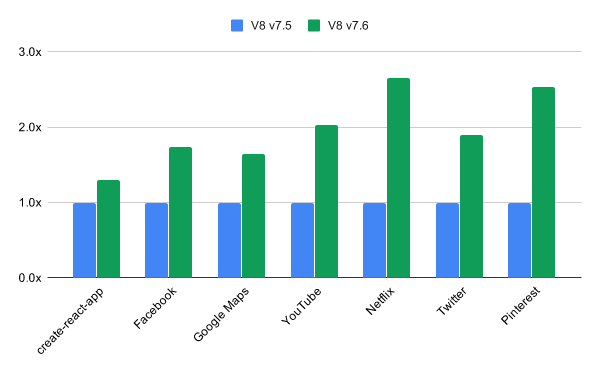
- The V8 engine has significantly improved JSON scanning and parsing performance. For popular web pages, the execution of JSON.parse is noted to be up to 2.7 times faster. The conversion of unicode strings has been greatly accelerated; for example, the performance of String#localeCompare, String#normalize calls, and certain Intl API methods has nearly doubled. The performance of operations on frozen arrays has also been significantly optimized with operations like frozen.indexOf(v), frozen.includes(v), fn(…frozen), fn(…[…frozen]), and fn.apply(this, […frozen]).

56 vulnerabilities. AddressSanitizer , , , and . No critical issues have been found that allow bypassing all browser security levels and executing code outside the sandbox environment. As part of the bug bounty program for the current release, Google has paid out 16 rewards totaling $23,500 (one reward of $10,000, one reward of $6,000, two rewards of $3,000, and three rewards of $500). The amount for 9 rewards is yet to be determined.
Source: opennet.ru
