

Google Inc. release of the web browser . At the same time, the stable release of the open-source project , which serves as the foundation for Chrome. The Chrome browser features the use of Google logos, a crash notification system, the ability to load Flash plugins on demand, modules for playing protected video content (DRM), an automatic update installation system, and the transmission of RLZ parameters during searches. The next Chrome 78 release is scheduled for October 22.
:
- A separate notation for sites with EV (Extended Validation) certificates has been added. Information about the use of EV certificates is now displayed only in the dropdown menu shown when clicking on the secure connection icon. The name of the company verified by the certification authority associated with the EV certificate will no longer be displayed in the address bar;
- Handlers for sites have been better isolated. Protection has been added for cross-site data, such as Cookies and HTTP resources that are obtained from third-party sites controlled by attackers. Isolation works even if the attacker discovers a bug in the drawing process and attempts to execute code in its context;
- A new welcome page for new users has been added (chrome://welcome/), displayed instead of the standard new tab interface after the first launch of Chrome. The page allows adding popular Google services (GMail, YouTube, Maps, News, and Translate) to bookmarks, pinning shortcuts to the new tab page, connecting to a Google account to enable Chrome Sync, and setting Chrome as the default browser on the system.
- The new tab page menu displayed in the upper right corner has been updated to include the ability to upload a background image and new options for selecting a theme and customizing the shortcut block for quick access (most visited sites, manual user selection, and hiding the shortcut block). These settings are currently positioned as experimental and require activation through the flags 'chrome://flags/#ntp-customization-menu-v2' and 'chrome://flags/#chrome-colors-custom-color-picker';
- Animation for the site icon in the tab header has been introduced, signaling that the page is in the process of loading;
- The flag '--guest' has been added, allowing Chrome to be launched from the command line in guest mode (without signing in to a Google account, without recording browser activity to disk, and without saving the session);
- The cleanup of flags in chrome://flags, started in the previous release, has continued. Instead of flags for adjusting browser behavior, it is now recommended to use rule sets;
- A 'Send to your devices' button has been added to the context menu of the page, tabs, and address bar, allowing you to send a link to another device using Chrome Sync. After selecting the target device linked to the same account and sending the link, a notification will appear on the target device to open the link.
- The Android version features a completely redesigned downloads page, where buttons have replaced the dropdown menu for filtering the overall list by content type, and thumbnails of downloaded images now span the full width of the screen.
- New metrics for assessing content loading and rendering speed in the browser, enabling web developers to determine how quickly the main content of the page becomes accessible to users. Previously offered rendering control tools only indicated the start of rendering but did not reflect the overall readiness of the page. Chrome 77 introduces a new API. , allowing you to measure the rendering time of large (noticeable to users) elements in the viewport, such as images, videos, block elements, and background of the page;
- Added API , providing information about the delay before the first user interaction (e.g., a key press on the keyboard or mouse, click, or cursor movement). The new API is a subset of the EventTiming API, allowing for additional insights to measure and optimize interface responsiveness.
- New features for forms that simplify the use of custom non-standard form controls (custom input fields, buttons, etc.). The new 'formdata' event allows JavaScript handlers to add data to the form at the time of submission without the need to store data in hidden input elements.
The second innovation is the support for creating custom elements associated with forms that act as built-in form controls, including supporting features such as input validation and initiating data submission to the server. The property formAssociated is proposed to mark an element as an interface component of a form, and to access additional form control methods such as setFormValue() and setValidity(), the call attachInternals() has been added.
- In strict tracking protection mode (experimental features requiring separate activation) a new API has been added , allowing users to select entries from their address book and transmit specific details about them to a website. The request defines a list of properties to retrieve (e.g., full name, email, phone number). These properties are explicitly displayed to the user, who makes the final decision whether to transmit the data or not. The API can be used, for example, in a webmail client to choose recipients for an outgoing email, in a web application with VoIP capabilities to initiate a call to a specific number, or in a social network to search for already registered friends.
The Origin Trial allows working with the specified API from applications loaded from localhost or 127.0.0.1, or after registering and obtaining a special token that is valid for a limited time for a specific site.
- For forms, an attribute "", has been implemented to define the behavior when pressing the Enter key on the virtual keyboard. The attribute can take values enter, done, go, next, previous, search, and send;
- A rule has been added , which governs access to the "document.domain" property. By default, access is allowed, but if it is denied, an attempt to change the "document.domain" value will result in an error;
- In the Performance API, the call has been added , which allows tracking changes in the position of DOM elements on the screen.
- The size of the HTTP header "Referer" is limited to 4 KB, and if this value is exceeded, the content is trimmed to just the domain name;
- The url argument in the function registerProtocolHandler() is restricted to only using http:// and https:// schemes and now does not allow the "data:" and "blob:" schemes.
- In the method Support has been added for formatting units of measurement, currencies, scientific and compact notations (for example, ‘Intl.NumberFormat(‘en’, {style: ‘unit’,
unit: ‘meter-per-second’}); - New CSS properties have been added. to manage scrolling behavior when reaching the logical boundary of the scroll area;
- For the CSS property white-space support for the break-spaces value;
- In Service Workers support for HTTP Basic authentication and the display of a standard dialog for entering login credentials;
- The Web MIDI API can now only be used in the context of a secure connection (https, local file, or localhost);
- The WebVR 1.1 API has been deprecated, replaced by the API Protocol handlers registered via the registerProtocolHandler() and unregisterProtocolHandler() methods can now operate only in a secure context (when accessed via HTTPS).
- In the developer tools the ability to copy CSS properties of a DOM node to the clipboard via the context menu triggered by a right-click on the node in the DOM tree. An interface (Show Rendering/Layout Shift Regions) has been added to track layout shifts due to the absence of placeholders for ads and images (when viewing, the loading of the next image shifts the text down). The audit panel has been updated to release Automatic switching to a dark theme in DevTools is enabled when using a dark theme in the OS. In the network inspection mode, an indication of resource loading from the prefetch cache has been added. In the Application panel, support for displaying push notifications and alerts has been added. In the web console, private class fields are now displayed during object preview;
- In the JavaScript engine V8, statistics storage for operand types passed to different operations has been optimized (allowing for optimizing the execution of these operations according to specific types). To reduce memory consumption, type tracking vectors are now allocated in memory only after a certain amount of bytecode is executed, which excludes optimization for functions with a short lifespan. This change allows for saving 1–2% memory in the desktop version and 5–6% for mobile devices.
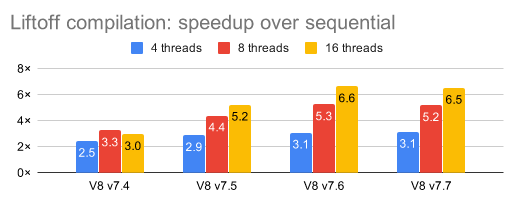
The scalability of background WebAssembly compilation has been improved — the more CPU cores in the system, the greater the benefits from added optimizations. For example, on a 24-core Xeon computer, the compilation time of the demo application Epic ZenGarden has been halved.

56 vulnerabilities. AddressSanitizer , , , and . One problem (CVE-2019-5870) is marked as critical, meaning it allows bypassing all browser security levels and executing code in the system outside of the sandbox environment. Details about this critical vulnerability are still , it is only known that it may lead to accessing already freed memory areas in multimedia data processing code. As part of the vulnerability reward program for this release, Google has paid out 38 rewards totaling $33,500 (one reward of $7,500, four rewards of $3,000, three rewards of $2,000, four rewards of $1,000, and eight rewards of $500). The amount of 18 rewards has not yet been determined.
Source: opennet.ru
