

Google Inc. release of the web browser . At the same time, the stable release of the open-source project , which serves as the foundation for Chrome. The Chrome browser features the use of Google logos, a crash notification system, the ability to load Flash plugins on demand, modules for playing protected video content (DRM), an automatic update installation system, and the transmission of RLZ parameters during searches. Chrome
:
- performs A new real-time phishing detection technology has been introduced. Previously, checks were performed by accessing locally loaded Safe Browsing blacklists, which were updated approximately every 30 minutes, proving insufficient, especially in the context of frequent domain switching by attackers. The new method allows for on-the-fly URL checks with preliminary verification against whitelists that include hashes of thousands of trusted popular sites. If the site being opened is not in the whitelist, the browser checks the URL on Google's server by transmitting the first 32 bits of the SHA-256 hash of the link, removing any potential personal data. According to Google, this new approach increases the efficiency of warning outputs for new phishing sites by 30%.
- A new real-time phishing detection technology has been introduced. Previously, checks were performed by querying locally downloaded Safe Browsing blacklists, which were updated approximately every 30 minutes—insufficient for instances where attackers frequently switch domains. The new method allows for on-the-fly URL checks with a preliminary verification against whitelists that include hashes of thousands of trusted popular sites. If the site being accessed is not in the whitelist, the browser checks the URL on Google's server by transmitting the first 32 bits of the SHA-256 hash of the link, from which any personal data is removed. Google's estimates suggest that this new approach can improve the efficiency of warning notifications for new phishing sites by 30%.
- A proactive protection against the transmission of Google account credentials and any passwords saved in the password manager through phishing pages has been added. When attempting to enter a saved password on a site where this password is usually not applied, the user will receive a warning about the potentially dangerous action.
- An unsafe connection indicator is now displayed for connections using TLS 1.0 and 1.1. Full support for TLS 1.0 and 1.1 in Chrome 81, scheduled for March 17, 2020.
- The ability to freeze inactive tabs has been added, allowing for the automatic unloading of tabs that have been in the background for more than 5 minutes and are not performing significant actions. The adequacy of a tab for freezing is determined based on heuristics. Management of enabling this feature is done through the flag "chrome://flags/#proactive-tab-freeze".
- blocking of mixed content on pages opened over HTTPS to guarantee that pages opened via https:// contain only resources loaded through a secure communication channel. Although the most dangerous types of mixed content, such as scripts and iframes, are already blocked by default, images, audio files, and videos could still be loaded over http://. The previously used mixed content indicator for such inserts has been deemed ineffective and misleading, as it does not provide a clear assessment of the page's security. For example, through image substitution, an attacker could insert tracking cookies, attempt to exploit vulnerabilities in image handlers, or commit forgery by replacing the presented information in the image. To disable the mixed component blocking, a special setting has been added, accessible through the menu that appears when clicking on the lock symbol.
- An experimental feature has been added to share clipboard content between the desktop and mobile versions of Chrome. In instances of Chrome linked by the same account, it is now possible to access the clipboard content of another device, including sharing the clipboard between mobile and desktop systems. Clipboard content is encrypted using end-to-end encryption, preventing access to the text on Google servers. The feature can be activated through the options chrome://flags#shared-clipboard-receiver, chrome://flags#shared-clipboard-ui, and chrome://flags#sync-clipboard-service.
- In the address bar at certain moments (for example, when saving a password), with synchronization of the profile turned off, the current Google account name is displayed alongside the avatar, so the user can successfully identify the currently active account.
- Enabled for 1% of users DNS over HTTPS (DoH). This experiment only involves users whose system settings already specify DNS providers that support DoH. For example, if a user has DNS 8.8.8.8 set in their system settings, the Google DoH service (https://dns.google.com/dns-query) will be activated in Chrome; if the DNS is 1.1.1.1, then the Cloudflare DoH service (https://cloudflare-dns.com/dns-query), and so on. To manage the activation of DoH, the setting chrome://flags/#dns-over-https is provided. Three modes of operation are supported: 'secure', 'automatic', and 'off'. In 'secure' mode, hosts are determined only based on previously cached secure values (obtained via a secure connection) and requests through DoH, with no fallback to regular DNS. In 'automatic' mode, if DoH and the secure cache are unavailable, data can be retrieved from the unsafe cache and through traditional DNS. In 'off' mode, the general cache is checked first, and if no data is found, the request is sent through the system DNS.
- An experimental feature has been added Caching of the rendered content when navigating back and forth using buttons, which significantly reduces delays during such navigation by fully caching the entire page, eliminating the need for re-rendering and resource loading. The optimization is especially noticeable in the mobile version, where the performance increase during navigation reaches 19%. This mode can be enabled using the option "chrome://flags#back-forward-cache."
- The setting "chrome://flags/#omnibox-ui-hide-steady-state-url-scheme-and-subdomains," which allowed the protocol to be displayed in the address bar (now all links are always shown without https:// and http://, as well as without "www.").
- In Windows builds, a sandbox isolation mode for the audio playback service has been enabled. A property called AudioSandboxEnabled is suggested for managing the inclusion of isolation.
- In the centralized administration tools for enterprises, it is now possible to define rules that specify the amount of memory that a browser instance can consume before background tabs begin to unload. Memory released after a tab is unloaded becomes available for use, and the content of the tab is reloaded when switching back to it.
- In Linux, a built-in certificate verification handler has been implemented, replacing the previously used NSS system. This built-in handler continues to use the NSS store for verification but imposes stricter requirements when processing incorrectly encoded and separately certified certificates (all certificates must now be certified by a certificate authority).
- In the version for the Android platform the ability to assign adaptive icons for installed web applications operating in Progressive Web Apps (PWA) mode. Adaptive icons can adjust to the interface used by the device manufacturer, for example, being round, square, or having rounded corners.
- API , providing access to components for creating virtual and augmented reality. The API standardizes the operation with various classes of devices, from desktop virtual reality headsets like Oculus Rift, HTC Vive, and Windows Mixed Reality, to mobile-based solutions such as Google Daydream View and Samsung Gear VR. Applications where the new API can be applied include programs for viewing videos in 360°, systems for visualizing three-dimensional spaces, creating virtual cinemas for video presentation, and conducting experiments in creating 3D interfaces for shops and galleries;
- In Origin Trials mode (experimental features that require separate ) several new APIs are proposed. The Origin Trial allows the specified API to work with applications loaded from localhost or 127.0.0.1, or after registration and obtaining a special token that is valid for a limited time for a specific site.
- For all HTML elements, the attribute 'rendersubtree' has been proposed, ensuring the handling of the DOM element's display. When the attribute is assigned the value 'invisible', the content of the element will not be rendered and checked, allowing for optimized rendering. When the value 'activatable' is set, the browser will remove the invisible attribute, render the content, and make it visible.
- A new API option has been added based on the Promise mechanism, providing a safer way to manage screen auto-lock disabling and transitioning devices into power-saving modes.
- The possibility of applying the attribute for all HTML and SVG elements that can receive input focus has been implemented.
- For images and videos the calculation of the aspect ratio based on the Width or Height attributes, which can be used to determine the size of the image using CSS at a stage when the image is not yet loaded (solving the problem of page reconstruction after image loading).
- A new CSS property has been added , which automatically sets the size of a variable font in optical coordinates 'if the font supports them. The mode allows you to choose the optimal glyph shape for the specified size, for example, using more contrasting glyphs for headings.
- A new CSS property has been added , allowing any symbols to be used instead of dots in lists, for example, "-", "+", "★", and "▸".
- In case Worklet.addModule() cannot be executed, an object with detailed information about the nature of the error is now returned, which allows for a more accurate assessment of the cause of the error (network connection issues, incorrect syntax, etc.).
- Processing of <script> elements has been stopped when moving them between documents. When transferring between documents, the execution of related script events 'error' and 'load' has also been disabled.
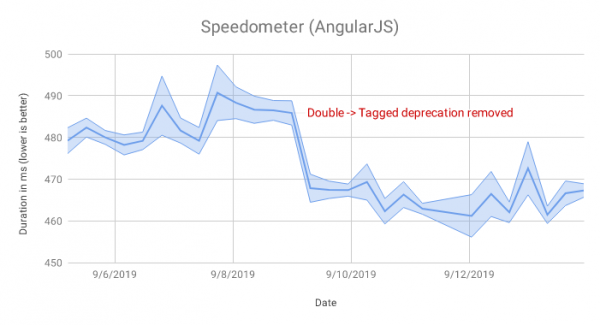
- In the JavaScript engine V8 to handle changes in the representation of fields in objects, resulting in AngularJS code execution within the Speedometer test suite becoming 4% faster.

- V8 has also optimized the handling of getters defined in built-in APIs such as Node.nodeType and Node.nodeName in the absence of an IC (inline caching) handler. This change has reduced IC runtime costs by about 12% during Backbone and jQuery tests from the Speedometer suite.
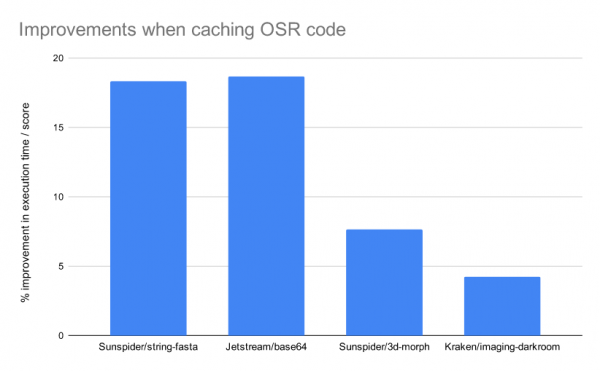
- Caching of the results from the OSR (called on-stack replacement) mechanism, which substitutes optimized code during function execution (allowing optimized code to be used for long-running functions without waiting for them to be restarted), has been ensured. OSR caching allows optimization results to be used even upon a function's re-invocation, without the need for re-optimization.
In some tests, the changes allowed peak performance to rise by 5–18%.
- Changes to web development tools:
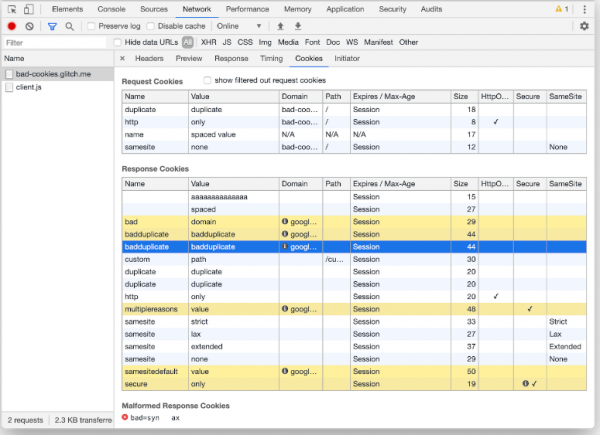
- to identify the causes of request blocking or Cookie delivery.
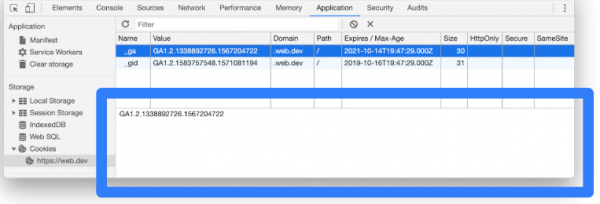
- In the Cookie list block, a quick view of the value of the selected Cookie can now be accessed by clicking on a specific row.

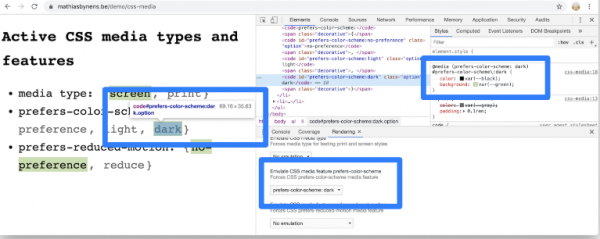
- The ability to simulate different settings for media queries prefers-color-scheme and prefers-reduced-motion has been added (for example, to check the page's behavior under a dark system theme or with disabled animated effects).

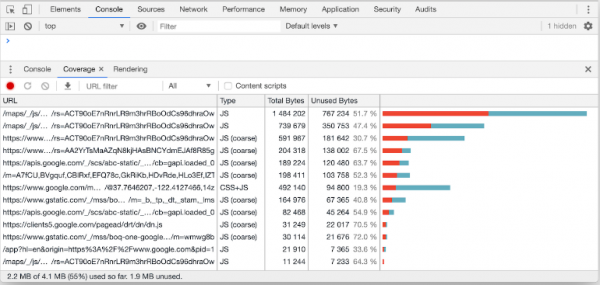
- The layout of the Coverage tab has been updated, allowing for assessment of used and unused code. A filtering option has been added to categorize information by type (JavaScript, CSS). Code usage information has also been included in the display of the source text.

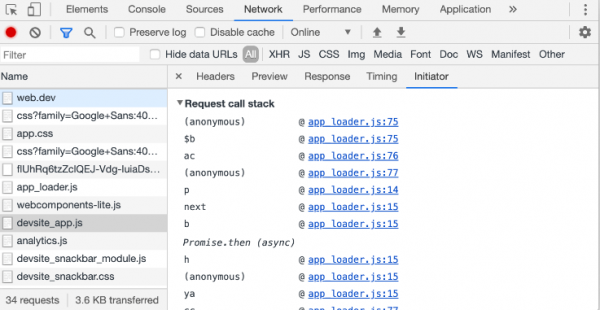
- Added the ability to debug the reasons for requesting a specific network resource after recording network activity (you can view the trace of the JavaScript code that led to the resource loading).

- A setting has been added under 'Settings > Preferences > Sources > Default Indentation' to define the type of indentation (2/4/8 spaces or tab) in the code displayed in the Console and Sources panels.

- In the Cookie list block, a quick view of the value of the selected Cookie can now be accessed by clicking on a specific row.
In addition to new features and bug fixes, the new version addresses 51 vulnerabilities. Many of these vulnerabilities were identified through automated testing using tools like AddressSanitizer, MemorySanitizer, Control Flow Integrity, LibFuzzer, and AFL. Two issues (CVE-2019-13725, a use-after-free in code supporting Bluetooth, and CVE-2019-13726, a heap overflow in the password manager) are marked as critical, meaning they can bypass all browser protection levels and execute code on the system outside of the sandbox environment. This is the first time two critical issues have been identified in a single development cycle in Chrome. The first vulnerability was discovered by researchers from Tencent Keen Security Lab and at the Tianfu Cup competition, while the second was found by Sergey Glazunov from Google Project Zero.
As part of the bug bounty program for this release, Google has paid out 37 rewards totaling $80,000 (one reward of $20,000, one of $10,000, two of $7,500, four of $5,000, one of $3,000, two of $2,000, two of $1,000, and eight of $500). The amount of 15 rewards has yet to be determined.
Source: opennet.ru
