

Google has released version 89 of the Chrome web browser. At the same time, a stable release of the free project Chromium, which serves as the foundation for Chrome, is available. The Chrome browser features Google's logos, a notification system for crashes, modules for playing protected video content (DRM), an automatic update installation system, and the transmission of RLZ parameters during searches. The next release of Chrome, version 90, is scheduled for April 13.
Key changes in Chrome 89:
- The Android version of Chrome will now only run on devices certified by Play Protect. In virtual machines and emulators, Chrome for Android can be used only if a permissible device is being emulated, or the emulator is developed by Google. You can check whether the device is certified in the Google Play app under the settings section (the status "Play Protect certification" is shown at the bottom of the settings page). For uncertified devices, such as when using third-party firmware, users are offered to register their devices to run Chrome.
- For a small percentage of users, the default opening of websites via HTTPS is enabled when entering hostnames in the address bar. For instance, entering the host example.com will by default open the site https://example.com, and if problems arise during opening, it will fall back to http://example.com. To manage the default use of "https://", a setting "chrome://flags#omnibox-default-typed-navigations-to-https" is proposed.
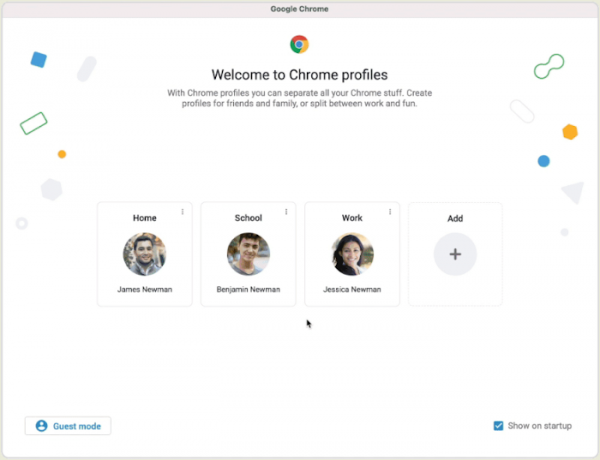
- Profile support has been enabled, allowing different users to share their accounts while using a single browser. For example, profiles can be used to organize access for family members or to separate work and personal sessions. A user can create a new Chrome profile and set it to activate when connecting to a specific Google account, enabling different users to share bookmarks, settings, and browsing history. When trying to log into an account linked to another profile, the user will be prompted to switch to that profile. If the user is linked to multiple profiles, they will have the option to choose the desired profile. It's possible to associate different color schemes with each profile for visual separation of users.

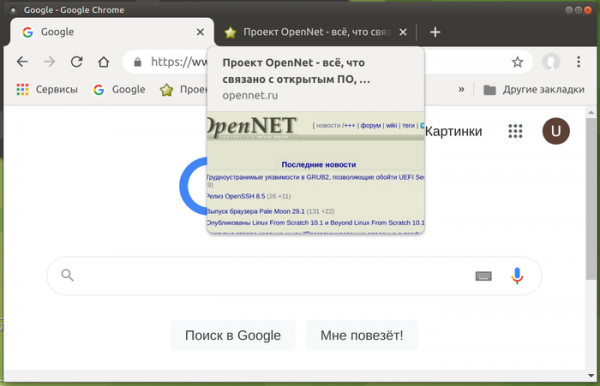
- Thumbnail previews for content are shown when hovering over tabs in the top bar. Previously, tab content previews were disabled by default and required changing the setting at "chrome://flags/#tab-hover-cards".

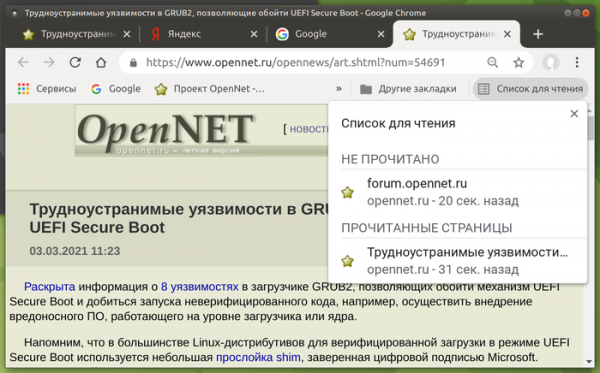
- The 'Reading List' feature is enabled for some users, which, when activated, provides a second button 'Add to Reading List' next to the 'Add Bookmark' button when clicking the star in the address bar. Additionally, a 'Reading List' menu appears in the top right corner of the bookmarks bar, listing all previously added pages. When a page from the list is opened, it is marked as read. Pages in the list can also be manually marked as read or unread, or removed from the list.

- For users signed into a Google account without enabling Chrome Sync, access to payment methods and passwords stored in the Google account is provided. This feature is enabled for some users and will gradually be extended to others.
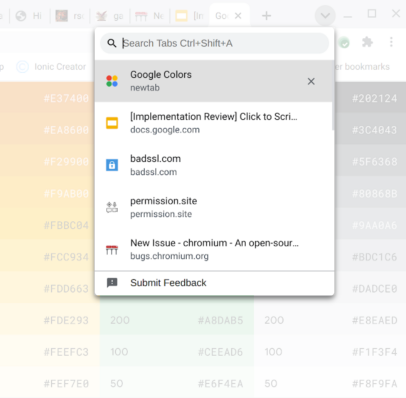
- Quick tab search support has been enabled, which previously required activation through the flag "chrome://flags/#enable-tab-search". Users can view a list of all open tabs and quickly filter for the desired tab, regardless of whether it is in the current or a different window.

- For all users, the handling of individual word input in the address bar as attempts to access internal sites has been discontinued. Previously, when entering a single word in the address bar, the browser would first attempt to determine the presence of a host with that name in DNS, assuming the user was trying to open a subdomain, and then redirect the request to the search engine. Thus, the owner of the DNS server specified in the user's settings received information about single-word search queries, which was considered a privacy violation. For businesses using internet hosts without a subdomain (e.g., "https://helpdesk/"), an option has been provided to revert to the old behavior.
- The ability to pin a version of an extension or application has been introduced. For example, to use only verified extensions in an enterprise, the administrator can configure Chrome to use its own URL for downloading updates instead of the URL specified in the extension's manifest via the new ExtensionSettings policy.
- On x86 systems, processor support for SSE3 instructions, which have been supported by Intel processors since 2003 and by AMD processors since 2005, is now required for the browser to function.
- Additional APIs have been added, aimed at providing functionality that can replace third-party cookies used for tracking user movements between sites in advertising network code, social media widgets, and web analytics systems. The following APIs have been proposed for testing:
- Trust Token for separating users without using cross-site identifiers.
- First party sets — allows related domains to declare themselves primary so that the browser can consider this relationship in cross-site requests.
- Schemeful Same-Site to extend the concept of same-site to different URL schemes, i.e., http://website.example and https://website.example will be treated as one site during cross-site requests.
- FLOC for determining the user’s interests category without individual identification and without tying it to the history of visits to specific sites.
- Conversion Measurement for assessing user activity after clicking on an advertisement.
- User-Agent Client Hints for replacing User-Agent and selectively delivering data about specific browser and system parameters (version, platform, etc.).
- The Serial API has been added, allowing websites to read and write data through a serial port. This API has been introduced to enable the creation of web applications for direct control of devices such as microcontrollers and 3D printers. Access to peripheral devices requires explicit user confirmation of permissions.
- The WebHID API has been added for low-level access to HID devices (Human Interface Devices, keyboards, mice, gamepads, touchpads), allowing the implementation of logic to work with HID devices in JavaScript for handling rare HID devices without specific drivers in the system. The new API is primarily aimed at supporting gamepads.
- The Web NFC API has been added, enabling web applications to read and write NFC tags. Examples of using this new API in web applications include providing information about museum exhibits, conducting inventories, obtaining data from conference participant badges, etc. Tag sending and scanning is done using NDEFWriter and NDEFReader objects.
- The Web Share API (navigator.share object) has been extended beyond mobile devices and is now available to users on desktop browsers (currently only for Windows and Chrome OS). The Web Share API provides tools for sharing information on social networks, allowing for the generation of a unified button for posting to social networks used by the visitor or organizing data transfer to other applications.
- Support for decoding AVIF image format (AV1 Image Format) has been included in the Android versions and the WebView component, utilizing intraframe compression technologies from the AV1 video encoding format (AVIF support was added to desktop versions starting from Chrome 85). The container for distributing compressed data in AVIF is fully analogous to HEIF. AVIF supports both HDR (High Dynamic Range) images and Wide-gamut color space, as well as standard dynamic range (SDR).
- A new Reporting API has been added to obtain information about violations of safe usage rules on the privileged operations page, defined through the COOP (Cross-Origin-Opener-Policy) header, which also allows COOP to be switched to a debugging mode that operates without blocking rule violations.
- The performance.measureUserAgentSpecificMemory() function has been added to determine the amount of memory spent during page processing.
- To comply with web standards, all 'data:' URLs are now treated as potentially trustworthy, i.e., part of a secure context.
- Support for byte streams has been added to the Streams API, which are specifically optimized for efficient transmission of arbitrary byte sets and minimize the number of data copying operations. The output of the stream can be written to primitives like strings or ArrayBuffer.
- Support for the full syntax of the 'filter' property has been implemented in SVG elements, allowing functions such as blur(), sepia(), and grayscale() to be applied to both SVG and non-SVG elements simultaneously.
- In CSS, the pseudo-element '::target-text' has been implemented, which can be used to highlight a fragment that was navigated to via text (scroll-to-text) with a different style than that used by the browser when highlighting search results.
- CSS properties for controlling border radius have been added: border-start-start-radius, border-start-end-radius, border-end-start-radius, border-end-end-radius.
- The CSS property forced-colors has been added to determine whether the browser on the page applies a user-defined limited color palette.
- The CSS property forced-color-adjust has been added to disable forced color limitations for specific elements, allowing full color management through CSS.
- In JavaScript, the use of the await keyword at the top level in modules is now allowed, enabling a smoother integration of asynchronous calls into the module loading process without the need to wrap them in 'async function'. For example, instead of (async function() { await Promise.resolve(console.log('test')); }()); you can now write await Promise.resolve(console.log('test'));
- The V8 JavaScript engine has accelerated function calls when the number of passed arguments does not match the parameters defined in the function. When the number of arguments differs in non-JIT mode, performance increased by 11.2%, and using JIT TurboFan increased it by 40%.
- A significant number of minor improvements have been made in web developer tools.
In addition to new features and bug fixes, the new version addresses 47 vulnerabilities. Many of these vulnerabilities were identified through automated testing using tools like AddressSanitizer, MemorySanitizer, Control Flow Integrity, LibFuzzer, and AFL. No critical issues were found that could bypass all layers of browser protection and execute code on the system outside of the sandbox environment. However, it is noted that one of the fixed vulnerabilities (CVE-2021-21166), related to the lifespan of objects in the sound subsystem, has the characteristics of a 0-day issue and was exploited prior to the fix. As part of the bug bounty program for this release, Google awarded 33 prizes totaling $61,000 (two prizes of $10,000, two prizes of $7,500, three prizes of $5,000, two prizes of $3,000, four prizes of $1,000, and two prizes of $500). The value of 18 of the rewards has not yet been determined.
Source: opennet.ru
