

Google has introduced the release of the web browser Chrome 90. At the same time, a stable version of the open-source project Chromium, which serves as the foundation for Chrome, is available. The Chrome browser features Google logos, a notification system in case of crashes, modules for playing protected video content (DRM), an automatic update system, and transmission of RLZ parameters during searches. The next release, Chrome 91, is scheduled for May 25.
Key changes in Chrome 90:
- For all users, opening websites by default via HTTPS is enabled when entering hostnames in the address bar. For example, when entering the host example.com, the site https://example.com will be opened by default, and if there are issues, it will roll back to http://example.com. A setting for managing the default usage of "https://" is provided at "chrome://flags#omnibox-default-typed-navigations-to-https".
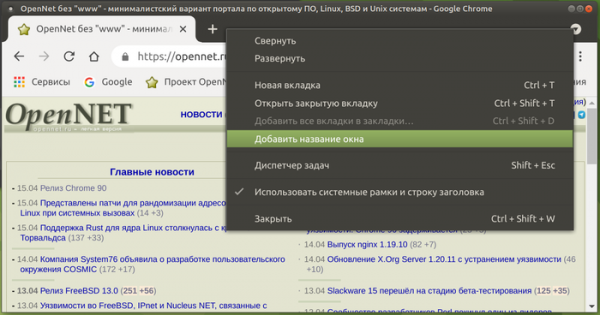
- The ability to assign different labels to windows has been implemented for clearer separation in the desktop panel. Support for changing the window name will simplify organization when using separate browser windows for different tasks, such as having distinct windows for work tasks, personal interests, entertainment, and saved materials. The name can be changed through the "Add window title" option in the context menu that appears when right-clicking on an empty area in the tab bar. After changing the name, the chosen title will be displayed in the applications panel instead of the site's name from the active tab, which can be useful when opening the same sites in different windows linked to separate accounts. The link will be retained between sessions, and after restarting, the windows will be restored with the chosen names.

- Added the ability to hide the Reading List without having to change settings in chrome://flags (chrome://flags#read-later). Now, you can use the 'Show Reading List' option at the bottom of the context menu displayed when right-clicking on the bookmarks bar. Recall that in the previous release, some users experienced a second button 'Add to Reading List' appearing alongside the 'Add Bookmark' button when clicking the star in the address bar, and a 'Reading List' menu appears on the right of the bookmarks bar listing all previously added pages. When opening a page from the list, it will be marked as read. Pages in the list can also be manually marked as read or unread, or removed from the list.
- Support for network partitioning has been added to protect against tracking methods that track user movement between sites using identifiers stored in areas not designed for persistent storage ('Supercookies'). Since cached resources are stored in a shared namespace regardless of the original domain, one site can detect resource loading from another site by checking the presence of that resource in the cache. The protection is based on network partitioning, which involves adding additional bindings to shared caches. domain, from which the main page was opened, limiting the cache reach for tracking scripts to only the current site (a script from an iframe will not be able to check if a resource was loaded from another site). The cost of partitioning is a decrease in caching efficiency, leading to a slight increase in page load time (up to 1.32%, but for 80% of sites only 0.09-0.75%).
- The blacklist of network ports has been updated to block sending HTTP, HTTPS, and FTP requests to protect against NAT slipstreaming attacks, which allow establishing a network connection when opening a specially prepared webpage in the browser. server attacker to any UDP or TCP port on the user's system, regardless of the use of an internal address range (192.168.x.x, 10.x.x.x). The restricted ports now include 554 (RTSP protocol) and 10080 (used in Amanda backup and VMWare vCenter). Ports 69, 137, 161, 554, 1719, 1720, 1723, 5060, 5061, and 6566 have already been blocked.
- Initial support for opening PDF documents with XFA forms in the browser has been added.
- A new settings section 'Chrome Settings > Privacy and security > Privacy sandbox' has been enabled for some users, allowing management of API FLoC parameters aimed at determining user interest categories without individual identification and unrelated to the history of visits to specific sites.
- A clearer notification with a list of permitted actions is now displayed when a user connects to a profile with centralized management enabled.
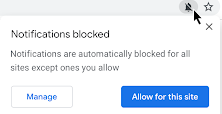
- The permissions request interface has been made less intrusive. Requests that the user is unlikely to approve are now automatically blocked with a corresponding indicator shown in the address bar, allowing the user to navigate to the permissions management interface for each site.

- Support for Intel CET (Intel Control-flow Enforcement Technology) extensions has been enabled for hardware protection against exploits built using Return-Oriented Programming (ROP) techniques.
- Work towards adopting inclusive terminology in the browser has continued. The file 'master_preferences' has been renamed to 'initial_preferences' to avoid offending users who perceive the word master as a reference to the historical slavery of their ancestors. For compatibility, support for 'master_preferences' will remain in the browser for some time. The browser has already eliminated the use of the terms 'whitelist', 'blacklist', and 'native'.
- In the Android version, when enabling the 'Lite' data-saving mode, there is a reduction in the bitrate when loading videos over mobile networks, which will lower costs for users with data-based plans. The 'Lite' mode also provides image compression for images requested from publicly available resources (that do not require authentication) via HTTPS.
- A video encoder in the AV1 format has been added, specifically optimized for use in video conferencing based on the WebRTC protocol. Using AV1 in video conferences enhances compression efficiency and allows streaming over channels with a bandwidth of 30 kbps.
- In JavaScript, the at() method has been implemented in the Array, String, and TypedArrays objects, allowing for relative indexing (the array index is specified as a relative position), including the use of negative values relative to the end (for example, 'arr.at(-1)' will return the last element of the array).
- In JavaScript, a property '.indices' has been added to regular expressions, containing an array of the initial and final positions of matching groups. This property is populated only when executing a regular expression with the flag '/d'. const re = /(a)(b)/d; const m = re.exec('ab'); console.log(m.indices[0]); // 0 — all matching groups // → [0, 2] console.log(m.indices[1]); // 1 — first matching group // → [0, 1] console.log(m.indices[2]); // 2 — second matching group // → [1, 2]
- Performance optimization has been carried out for 'super' properties (for example, super.x) that utilize inline caching. The performance of using 'super' is now close to that of accessing regular properties.
- The call to WebAssembly functions from JavaScript has been significantly accelerated through the use of inline expansion. This optimization remains experimental and requires running with the flag ‘—turbo-inline-js-wasm-calls’.
- The WebXR Depth Sensing API has been added, enabling the detection of distances between objects in a user's environment and the user's device, for instance, to create more realistic augmented reality applications. Recall that the WebXR API allows for the unification of work with various classes of virtual reality devices, from stationary 3D headsets to mobile-based solutions.
- The WebXR AR Lighting Estimation capability has been stabilized, allowing for the identification of ambient lighting parameters during WebXR augmented reality sessions, providing models with a more natural appearance and a more harmonious integration with the user's environment.
- Several new APIs have been added in Origin Trials (experimental features requiring separate activation), which are currently limited to the Android platform. Origin Trial implies the possibility of working with the specified API from applications loaded from localhost or 127.0.0.1, or after registration and obtaining a special token that is valid for a limited time for a specific site.
- The method getCurrentBrowsingContextMedia() allows for the capture of a MediaStream video stream reflecting the content of the current tab. Unlike the similar method getDisplayMedia(), calling getCurrentBrowsingContextMedia() presents the user with a simple dialog to confirm or block the operation of transmitting video from the tab's content.
- The Insertable Streams API allows for manipulation of raw multimedia streams transmitted through the MediaStreamTrack API, such as data from a camera and microphone, screen capture results, or intermediate decoding data from a codec. Raw frames are represented using WebCodec interfaces, after which a stream is formed similar to that generated by the WebRTC Insertable Streams API based on RTCPeerConnections. Practically, this new API allows for the implementation of functionalities such as applying machine learning methods for real-time object identification or annotation, or for adding effects, such as background removal, before encoding or after decoding by a codec.
- The ability to package resources into Web Bundles for more efficient loading of a large number of related files (CSS styles, JavaScript, images, iframes). Among the drawbacks in the current support for JavaScript file packaging (webpack), which they aim to address in Web Bundle: the entire bundle can settle in the HTTP cache, but not its constituent parts; compilation and execution can only begin after the full bundle is loaded; additional resources, such as CSS and images, must be encoded as JavaScript strings, leading to increased size and the execution of another parsing stage.
- Support for exception handling in WebAssembly.
- The Declarative Shadow DOM API has been stabilized to create new root branches in the Shadow DOM, for example, to separate an imported third-party style of an element and its associated DOM subtree from the main document. The proposed declarative API allows for detaching DOM branches using only HTML without the need to write JavaScript code.
- In the CSS property aspect-ratio, which explicitly ties the aspect ratio to any element (for automatic calculation of the missing size when only height or width is specified), interpolation of values during animation has been implemented (smoothly transitioning from one aspect ratio to another).
- The ability to reflect the state of custom HTML elements in CSS through the pseudo-class ':state()' has been added. This functionality is implemented similarly to how standard HTML elements change their state based on user interaction.
- The CSS property 'appearance' has gained support for the value 'auto', which is set by default for and , and additionally on the Android platform for , , , , and .
- The CSS property 'overflow' has been enhanced with support for the value 'clip', which, when set, truncates any content that exceeds the boundaries of the block at the limit of overflow without allowing scrolling. The value that defines how far content can extend beyond the actual boundaries of the block before truncation begins is set using the new CSS property 'overflow-clip-margin'. Compared to 'overflow: hidden', using 'overflow: clip' provides higher performance.


- The new Permissions-Policy header has replaced the HTTP Feature-Policy header for managing delegation of powers and enabling enhanced capabilities, which now supports structured field values (for example, you can specify 'Permissions-Policy: geolocation=()' instead of 'Feature-Policy: geolocation 'none').
- Protection against using Protocol Buffers for attacks caused by speculative execution in processors has been strengthened. This protection is implemented by adding the MIME type 'application/x-protobuffer' to the list of never sniffed MIME types, which is processed through the Cross-Origin Read Blocking mechanism. Previously, the MIME type 'application/x-protobuf' had already been included in such a list, but 'application/x-protobuffer' was overlooked.
- The File System Access API has implemented the ability to offset the current position in a file beyond its end, filling in the resulting gap with zeros during subsequent writes via the FileSystemWritableFileStream.write() call. This feature allows for the creation of sparse files with gaps and significantly simplifies organizing writing to a file of streams with unordered incoming data blocks (such as is practiced in BitTorrent).
- A StaticRange constructor has been added, implementing lightweight Range types that do not require updating all related objects with each change to the DOM tree.
- The ability to specify width and height parameters for elements has been implemented <source>, specified within the element <picture>. This feature allows for calculating the aspect ratio for elements <picture>, similar to how it is done for <img>, <canvas> and <video>.
- Non-standard support for RTP Data Channels has been removed from WebRTC, and it is recommended to use SCTP-based data channels instead.
- The navigator.plugins and navigator.mimeTypes properties now always return an empty value (after the end of Flash support, these properties are no longer needed).
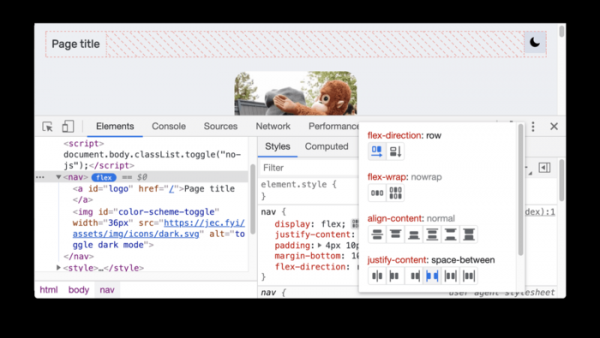
- A large number of minor improvements have been made to the web developer tools and a new tool for debugging CSS flexbox has been added.



In addition to new features and bug fixes, the new version has resolved 37 vulnerabilities. Many of these vulnerabilities were identified through automated testing using tools like AddressSanitizer, MemorySanitizer, Control Flow Integrity, LibFuzzer, and AFL. There are no critical issues that allow bypassing all levels of browser protection and executing code on the system outside of the sandbox environment. As part of the vulnerability reward program for this release, Google has paid out 19 bounties totaling $54,000 (one bounty of $20,000, one of $10,000, two of $5,000, three of $3,000, one of $2,000, one of $1,000, and four of $500). The amounts for 6 rewards are yet to be determined.
It is worth noting that yesterday, after the release of the corrective version 89.0.4389.128 but before Chrome 90 was launched, another exploit was published that used a new zero-day vulnerability that was not fixed in Chrome 89.0.4389.128. It is still unclear whether this issue has been addressed in Chrome 90. As in the first case, the exploit targets only one vulnerability and does not contain code to bypass sandbox isolation (when running Chrome with the ‘--no-sandbox’ flag, the exploit allows notepad to be launched upon opening a webpage on Windows). The vulnerability related to the new exploit affects the WebAssembly technology.
Source: opennet.ru
