

Google has released web browser Chrome 92. At the same time, a stable release of the open-source project Chromium is available, which serves as the foundation for Chrome. The Chrome browser is distinguished by the use of Google logos, a notification system in case of crashes, modules for playing protected video content (DRM), an automatic update installation system, and the transmission of RLZ parameters during searches. The next release of Chrome 93 is scheduled for August 31.
Key changes in Chrome 92:
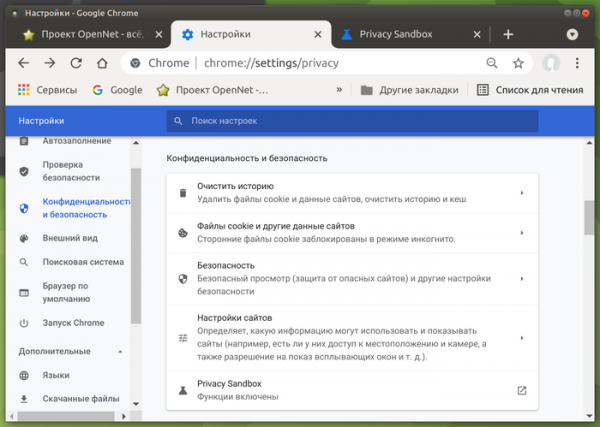
- Settings have been added to manage the enabling of Privacy Sandbox components. Users are now able to disable the FLoC (Federated Learning of Cohorts) technology developed by Google to replace tracking cookies with 'cohorts' that allow grouping users with similar interests without identifying individuals. Cohorts are calculated on the browser side using machine learning algorithms applied to browsing history data and content opened in the browser.

- For desktop users, back-forward cache is enabled by default, providing instant navigation when using the 'Back' and 'Forward' buttons or when navigating to previously viewed pages of the current site. Previously, back-forward cache was only available in builds for the Android platform.
- Site and extension isolation has been strengthened in separate processes. Previously, the Site Isolation mechanism ensured that sites were isolated from each other in different processes, as well as separating all extensions into a single process. In the new release, browser extensions are now isolated from each other by moving each extension into its own process, creating an additional barrier to protect against malicious extensions.
- Significantly improved performance and efficiency in phishing detection. The speed of phishing detection based on local image analysis has increased up to 50 times in half of the cases, and in 99% of cases, it was at least 2.5 times faster. On average, the classification time for phishing images has decreased from 1.8 seconds to 100 ms. Overall CPU load generated by all rendering processes has decreased by 1.2%.
- The blocked network ports list now includes ports 989 (ftps-data) and 990 (ftps). Previously, ports 69, 137, 161, 554, 1719, 1720, 1723, 5060, 5061, 6566, and 10080 had already been blocked. For the ports on the blacklist, HTTP, HTTPS, and FTP requests are blocked to protect against NAT slipstreaming attacks, which allow the establishment of a network connection from the attacker's server to any UDP or TCP port on the user's system when a specially crafted webpage is opened in the browser, despite the use of private address ranges (192.168.x.x, 10.x.x.x).
- A requirement for two-factor verification by the developer has been introduced when publishing new extensions or version updates in the Chrome Web Store.
- The browser will now disable already installed extensions if they are removed from the Chrome Web Store directory due to rule violations.
- When sending DNS queries using traditional DNS servers, in addition to 'A' and 'AAAA' records for identification, (the key to connect to is specified, and iroh finds the associated host and establishes an encrypted connection using the QUIC protocol). Direct P2P connections are established whenever possible, but if not, it falls back to using relays, which are also employed for host discovery by keys. You can run your own relay or connect to public relays supported by the community. the 'HTTPS' DNS record is now also queried, which transmits parameters that speed up the establishment of HTTPS connections, such as protocol settings, TLS ClientHello encryption keys, and a list of alias subdomains.
- JavaScript dialogs window.alert, window.confirm, and window.prompt are prohibited from being called from iframe blocks loaded from domains, domains different from the current page's domain. This change will protect users from abuses related to attempts to present third-party notifications as requests from the main site.
- The new tab page now displays a list of the most requested documents saved in Google Drive.
- The ability to change the name and icon for PWA (Progressive Web Apps) has been provided.
- For a small random number of web forms related to entering an address or credit card number, the display of autofill recommendations will be disabled as an experiment.
- In the desktop version, the image search option (the 'Search Image' item in the context menu) has been switched to use Google Lens instead of the regular Google search engine. When clicking the corresponding button in the context menu, the user will be redirected to a separate web application.
- In the interface of the 'incognito' mode, links to the browsing history are hidden (the links are useless, as they lead to a placeholder informing that the history is not being collected).
- New commands have been added that can be entered in the address bar. For example, typing 'safety check' will bring up a quick access button to the password and extension security check page, and for accessing security and sync settings, you can type 'manage security settings' and 'manage sync'.
- Specific changes in the Chrome version for Android:
- A new customizable button called 'Magic Toolbar' has been implemented in the panel, displaying different shortcuts selected based on the user's current activity, including links that might be needed at that moment.
- The implementation of the on-device machine learning model for detecting phishing attempts has been updated. When phishing attempts are detected, in addition to showing a warning page, the browser will now send to the Safe Browsing external service information about the version of the machine learning model, the computed weight for each category, and a flag indicating the use of the new model.
- The setting 'Show suggestions for similar pages when a page can't be found' has been removed, which previously recommended similar pages based on sending a request to Google if the page was not found. This setting had already been removed from the desktop version.
- The application of site isolation in separate processes has been expanded. For resource consumption reasons, only selected large sites were previously isolated in separate processes. In the new version, isolation will also apply to sites where the user has logged in through OAuth authentication (for instance, via a Google account) or that set the HTTP header Cross-Origin-Opener-Policy. For those wishing to enable isolation in separate processes for all sites, the setting 'chrome://flags/#enable-site-per-process' is provided.
- The built-in mechanisms in the V8 engine to protect against side-channel attacks, such as Spectre, have been disabled, as they are deemed less effective than site isolation in separate processes. In the desktop version, these mechanisms were disabled back in the Chrome 70 release.
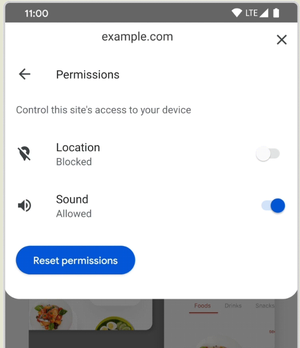
- Access to website permission settings has been simplified, such as access to the microphone, camera, and location detection. To view the permission list, simply click on the lock icon in the address bar, and then select the 'Permissions' section.

- Several new APIs have been added in Origin Trials (experimental features that require separate activation). Origin Trials allow the specified API to be used from applications loaded from localhost or 127.0.0.1, or after registration and obtaining a special token, which is valid for a limited time for a specific site.
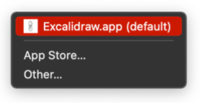
- The API File Handling allows web applications to register as file handlers. For example, a web application operating in PWA (Progressive Web Apps) mode with a text editor can register itself as a handler for '.txt' files, after which it can be used in the system file manager to open text files.

- The API Shared Element Transitions allows the use of built-in effects provided by the browser that visualize state changes in the interface in single-page (SPA) and multi-page (MPA) web applications.
- The API File Handling allows web applications to register as file handlers. For example, a web application operating in PWA (Progressive Web Apps) mode with a text editor can register itself as a handler for '.txt' files, after which it can be used in the system file manager to open text files.
- The @font-face CSS rule now includes the size-adjust parameter, allowing the scaling of glyph sizes for a specific font style without changing the value of the CSS property font-size (the area under the character remains the same, but the size of the glyph in that area changes).
- In JavaScript, the at() method has been implemented in Array, String, and TypedArray objects, allowing for relative indexing (the relative position is specified as the array index), including the ability to specify negative values from the end (for example, 'arr.at(-1)' will return the last element of the array).
- The JavaScript constructor Intl.DateTimeFormat has added the 'dayPeriod' property, which allows displaying an approximate time of day (morning, evening, day, night).
- When using SharedArrayBuffers, which allow the creation of arrays in shared memory, it now requires the definition of the HTTP headers Cross-Origin-Opener-Policy and Cross-Origin-Embedder-Policy, without which the request will be blocked.
- The API Media Session has added actions 'togglemicrophone', 'togglecamera', and 'hangup', allowing websites implementing video conferencing systems to attach their own handlers for the picture-in-picture interface buttons to toggle the microphone, toggle the camera, and end the call.
- The API Web Bluetooth has added the ability to filter found Bluetooth devices by manufacturer and product IDs. The filter is set via the 'options.filters' parameter in the Bluetooth.requestDevice() method.
- The first stage of trimming the content of the HTTP header User-Agent has been implemented: a warning about the deprecation of navigator.userAgent, navigator.appVersion, and navigator.platform is now displayed in the DevTools Issues tab.
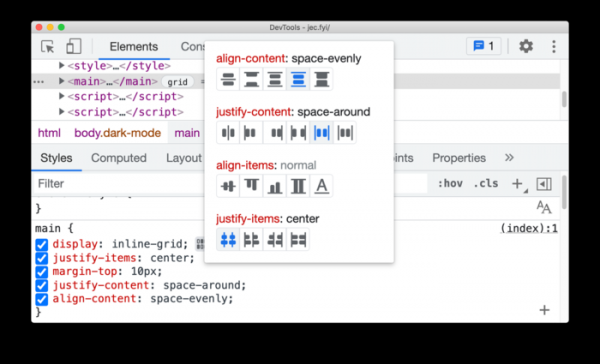
- A batch of improvements has been made to the tools for web developers. The web console now allows for the overriding of 'const' expressions. In the Elements panel, quick viewing of details for iframe elements is available through the context menu by right-clicking on the element. CORS (Cross-Origin Resource Sharing) error debugging has been enhanced. The network activity inspection panel now includes the ability to filter network requests from WebAssembly. A new CSS Grid editor ('display: grid' and 'display: inline-grid') with a preview function for changes has been proposed.

In addition to new features and bug fixes, the latest version has resolved 35 vulnerabilities. Many of these vulnerabilities were identified through automated testing using tools such as AddressSanitizer, MemorySanitizer, Control Flow Integrity, LibFuzzer, and AFL. No critical issues that would allow bypassing all levels of browser protection and executing code outside the sandbox environment were found. As part of the bug bounty program for this release, Google has awarded 24 bounties totaling $112,000 (two awards of $15,000, four awards of $10,000, one award of $8,500, two awards of $7,500, three awards of $5,000, one award of $3,000, and one award of $500). The amounts for 11 rewards have not yet been determined.
Source: opennet.ru
