

Google has announced the release of the web browser Chrome 93. At the same time, the stable release of the open-source project Chromium, which forms the basis of Chrome, is available. The Chrome browser is distinguished by the use of Google logos, a notification system for crashes, modules for playing protected video content (DRM), an automatic update installation system, and the transmission of RLZ parameters during searches. The next release, Chrome 94, is scheduled for September 21 (development has transitioned to a 4-week release cycle).
Key changes in Chrome 93:
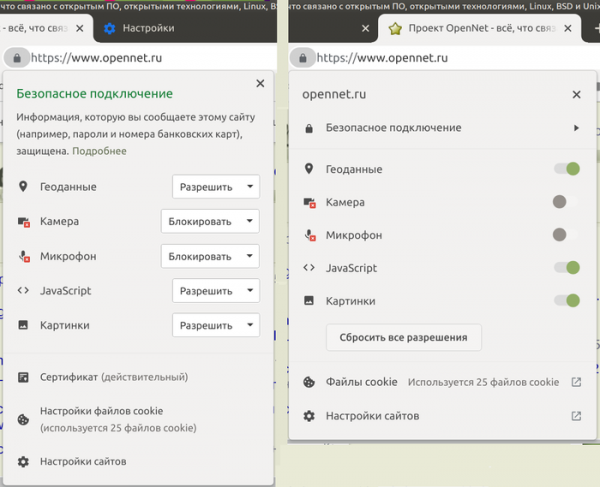
- The design of the page info block has been upgraded, supporting nested blocks, and dropdown lists with access rights have been replaced with switches. The most important information is prioritized in the lists. This change is not enabled for all users; to activate it, you can use the setting ‘chrome://flags/#page-info-version-2-desktop’.

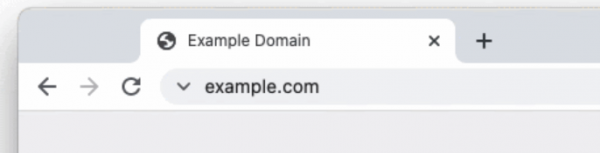
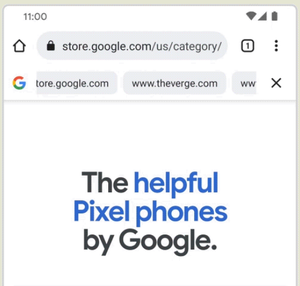
- For a small percentage of users, as an experiment, the indicator for a secure connection in the address bar has been changed to a more neutral and unambiguous symbol (the padlock has been replaced with a ‘V’ sign). For connections established without encryption, the ‘not secure’ indicator continues to be shown. The reason for this change is mentioned as many users associate the padlock indicator with trusting the website's content rather than perceiving it as a sign of an encrypted connection. According to a Google survey, only 11% of users understand the meaning of the padlock icon.

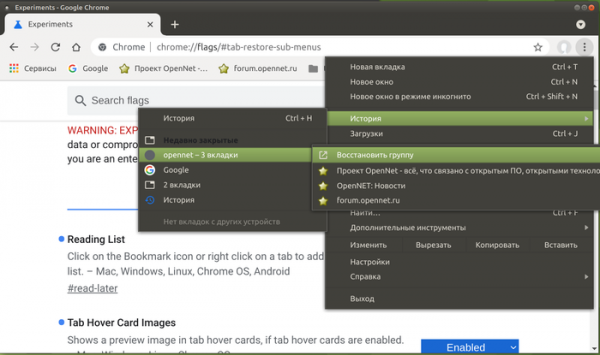
- In the list of recently closed tabs, the contents of closed tab groups are now displayed (previously, only the group's name was shown without detailing the content), allowing users to restore either the entire group or individual tabs from the group at once. This feature is not activated for all users, so enabling it may require changing the setting ‘chrome://flags/#tab-restore-sub-menus’.

- New settings DefaultJavaScriptJitSetting, JavaScriptJitAllowedForSites, and JavaScriptJitBlockedForSites have been implemented for enterprises, allowing management of the JIT-less mode that disables JIT compilation during JavaScript execution (only the Ignition interpreter is used) and prohibits the allocation of executable memory during code execution. Disabling JIT may be beneficial for enhancing security when working with potentially dangerous web applications, at the cost of reducing JavaScript performance by approximately 17%. Notably, Microsoft has gone even further by introducing an experimental 'Super Duper Secure' mode in the Edge browser, allowing users to disable JIT and activate JIT-incompatible hardware protection mechanisms such as CET (Control-flow Enforcement Technology), ACG (Arbitrary Code Guard), and CFG (Control Flow Guard) for processes that handle web content. If the experiment is successful, it may lead to its integration into the main version of Chrome.
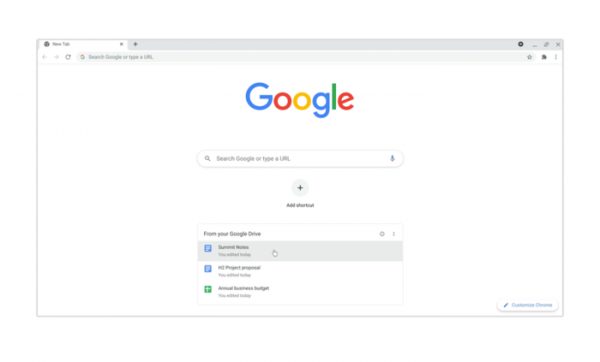
- The new tab page features a list of the most sought-after documents saved in Google Drive. The content of the list corresponds to the Priority section in drive.google.com. You can manage the visibility of Google Drive content using the settings 'chrome://flags/#ntp-modules' and 'chrome://flags/#ntp-drive-module'.

- New information cards have been proposed for the new tab page to help find recently viewed content and related information. The cards are designed to simplify the continuation of work with information that was interrupted, for example, they can help locate a recipe that was recently found online but was lost after closing the page, or continue shopping selections in stores. As an experiment, users are offered two new cards: 'Recipes' (chrome://flags/#ntp-recipe-tasks-module) for finding cooking recipes and showing recently viewed recipes; 'Shopping' (chrome://flags/#ntp-chrome-cart-module) for reminders about items selected in online stores.
- The Android version includes optional support for a continuous search panel (chrome://flags/#continuous-search), allowing users to keep recent Google search results in view (the panel continues to show results after navigating to other pages).

- An experimental quote sharing mode has been added to the Android version (chrome://flags/#webnotes-stylize), allowing users to save a selected part of a page as a quote and share it with others.
- When publishing new add-ons or updates in the Chrome Web Store, developers are now required to use two-factor authentication.
- Google Account users have the option to save payment information in their Google account.
- In incognito mode, when the data clearing option is activated, a new confirmation dialog has been implemented explaining that clearing data will close the tab and end all sessions in incognito mode.
- Due to compatibility issues with the firmware of some devices, support for a new key agreement method introduced in Chrome 91, which is resistant to brute-force attacks on quantum computers and based on using the CECPQ2 (Combined Elliptic-Curve and Post-Quantum 2) extension in TLSv1.3, has been temporarily disabled. This method combines the classical key exchange mechanism X25519 with the HRSS scheme based on the NTRU Prime algorithm developed for post-quantum cryptosystems.
- Ports 989 (ftps-data) and 990 (ftps) have been added to the list of blocked network ports to prevent ALPACA attacks. Previously, to protect against NAT slipstreaming attacks, ports 69, 137, 161, 554, 1719, 1720, 1723, 5060, 5061, 6566, and 10080 were already blocked.
- Support for algorithms based on 3DES has been discontinued in TLS. Specifically, the cipher suite TLS_RSA_WITH_3DES_EDE_CBC_SHA, which is vulnerable to the Sweet32 attack, has been removed.
- Support for the Ubuntu 16.04 distribution has been discontinued.
- It is now possible to use the WebOTP API across different devices linked through a shared Google account. WebOTP allows web applications to read one-time confirmation codes sent via SMS. This change allows users to receive a confirmation code on a mobile device using Chrome for Android and apply it on a desktop system.
- The User-Agent Client Hints API has been expanded, developed as a replacement for the User-Agent header. User-Agent Client Hints allows for selective delivery of data about specific browser and system parameters (version, platform, etc.) only after a request. proxy serverThe user, in turn, can determine what information may be shared with website owners. When using User-Agent Client Hints, the browser identifier is not transmitted without explicit request, and by default, only basic parameters are indicated, making passive identification more difficult.
The new version introduces support for the Sec-CH-UA-Bitness parameter to return data about the platform's bitness, which can be used to deliver optimized binary files. By default, the Sec-CH-UA-Platform parameter is sent with general information about the platform. In the UADataValues output returned by the getHighEntropyValues() call, generalized parameters are provided by default if detailed variants cannot be returned. The NavigatorUAData object has added the toJSON method, allowing constructs like JSON.stringify(navigator.userAgentData).
- Stabilized and offered by default is the possibility of bundling resources into packages in the Web Bundle format, suitable for organizing more efficient loading of a large number of accompanying files (CSS styles, JavaScript, images, iframe). Among the disadvantages in the existing support for packages for JavaScript files (webpack), which are attempted to be resolved in Web Bundle: the HTTP cache may store the package itself, but not its constituent parts; compilation and execution can only begin after the complete loading of the package; additional resources, such as CSS and images, must be encoded as JavaScript strings, increasing size and requiring another parsing stage.
- The WebXR Plane Detection API has been enabled, providing information about flat surfaces in a virtual 3D environment. This API allows for the avoidance of resource-intensive processing of data obtained via MediaDevices.getUserMedia() by using custom implementations of computer vision algorithms. It is worth noting that the WebXR API helps unify interactions with various classes of virtual reality devices, from stationary 3D headsets to mobile-based solutions.
- Several new APIs have been added in Origin Trials (experimental features that require separate activation). Origin Trials allow the specified API to be used from applications loaded from localhost or 127.0.0.1, or after registration and obtaining a special token, which is valid for a limited time for a specific site.
- A Multi-Screen Window Placement API has been proposed, allowing windows to be positioned on any display connected to the current system, as well as saving the window position and maximizing the window when necessary. For instance, using the specified API, a web application for presenting can organize the display of slides on one screen while showing notes for the presenter on another.
- Support for the 'credentialless' parameter has been added to the Cross-Origin-Embedder-Policy header, which controls the Cross-Origin isolation mode and allows defining secure usage rules for privileged operations on the page, disabling the transmission of credentials-related information such as Cookies and client certificates.
- For standalone web applications (PWAs, Progressive Web Apps) that manage window content rendering and input processing, an overlay with window control elements, such as a title area and expand/collapse buttons, has been provided. The overlay expands the editable area to the entire window and allows adding custom elements to the title area.

- The ability to create PWA applications that can be used as URL handlers has been added. For example, the application music.example.com can register itself as a handler for the URL https://*.music.example.com, and all transitions from external applications via these links, such as from messengers and email clients, will lead to the opening of this PWA application instead of a new browser tab.
- The ability to load CSS files using the 'import' expression has been provided, similar to loading JavaScript modules, which is convenient when creating custom elements and allows avoiding style assignments in JavaScript code. import sheet from './styles.css' assert { type: 'css' }; document.adoptedStyleSheets = [sheet]; shadowRoot.adoptedStyleSheets = [sheet];
- A new static method AbortSignal.abort() has been introduced, returning an AbortSignal object that is already set to the aborted state. Instead of multiple lines of code to create an AbortSignal object in the aborted state, it is now possible to manage it with a single line: 'return AbortSignal.abort()'.
- Support for the keywords start, end, self-start, self-end, left, and right has been added to the Flexbox element, complementing keywords center, flex-start, and flex-end with additional capabilities for simplified positioning of flex elements.
- The Error() constructor now includes a new optional property 'cause', which allows errors to be easily linked together. const parentError = new Error('parent'); const error = new Error('parent', { cause: parentError }); console.log(error.cause === parentError); // → true
- The HTMLMediaElement.controlsList property has been updated to support the noplaybackrate mode, which allows disabling elements of the provided browser interface for changing the playback speed of multimedia content.
- The Sec-CH-Prefers-Color-Scheme header has been added, allowing for the transmission of preferred user color scheme data during request sending, which is used in the 'prefers-color-scheme' media queries. This enables the site to optimize the loading of CSS related to the selected scheme and avoid visible switches from other schemes.
- The Object.hasOwn property has been added, representing a simplified version of Object.prototype.hasOwnProperty, implemented as a static method. Object.hasOwn({ prop: 42 }, 'prop') // → true
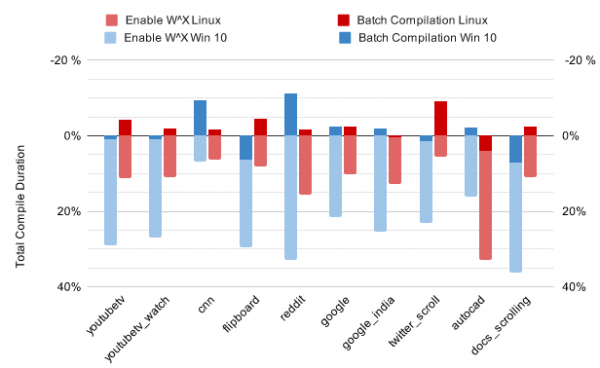
- The Sparkplug JIT compiler, designed for very fast execution of raw compilation, now includes a batch execution mode for operations, allowing for reduced overhead from switching memory pages between write and execution modes. Sparkplug now compiles multiple functions at once and calls mprotect once to change the access rights for the entire group. This new mode significantly reduces compilation time (up to 44%) without negatively impacting JavaScript execution performance.

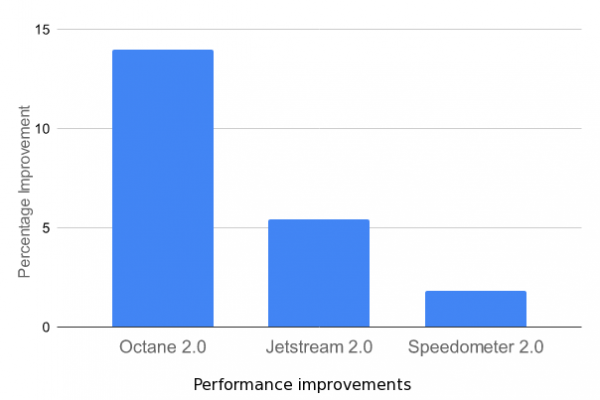
- In the Android version, the built-in protection mechanisms against side-channel attacks in the V8 engine, such as Spectre, have been disabled, as they are considered less effective than isolating sites in separate processes. In the desktop version, these mechanisms were already disabled in Chrome 70. Disabling unnecessary checks has allowed performance to increase by 2-15%.

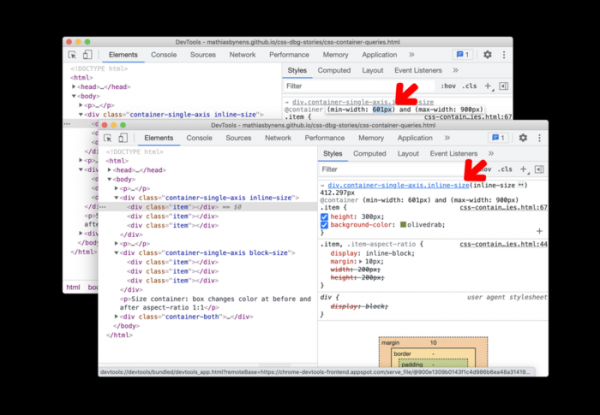
- Improvements have been made to the developer tools. In the style sheet inspection mode, the ability to edit queries formed using the @container expression has been provided. In the network inspection mode, a preview of resources in the Web bundle format has been implemented. The web console's context menu now includes options for copying lines as JavaScript or JSON literals. Error debugging related to CORS (Cross-Origin Resource Sharing) has been simplified.

In addition to new features and bug fixes, the latest version has addressed 27 vulnerabilities. Many of the vulnerabilities were identified through automated testing using tools such as AddressSanitizer, MemorySanitizer, Control Flow Integrity, LibFuzzer, and AFL. No critical issues that would allow bypassing all levels of browser protection and executing code outside the sandbox environment have been found. As part of the bounty program for discovering vulnerabilities in this release, Google has paid out 19 rewards totaling $136,500 (three rewards of $20,000, one reward of $15,000, three rewards of $10,000, one reward of $7,500, three rewards of $5,000, and three rewards of $3,000). The amount of five rewards has not yet been determined.
Source: opennet.ru
