

The release of web browser Firefox 113 has occurred, and an update for the long-term support branch — 102.11.0 has been formed. The Firefox 114 branch has entered the beta-testing stage, with its release scheduled for June 6.
Key innovations in Firefox 113:
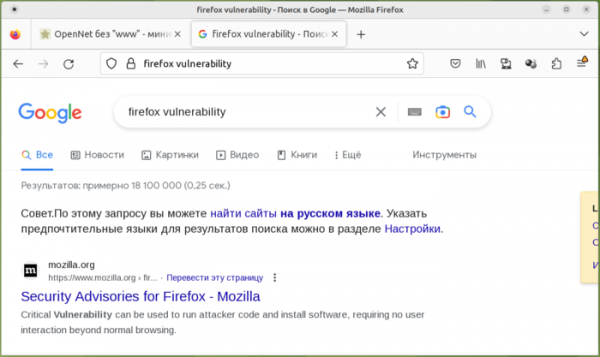
- The address bar now displays the entered search query instead of the search engine's URL (i.e., the keywords are shown in the address bar not only while typing but also after submitting to the search engine and displaying results related to the entered keywords). This change only applies when accessing search engines directly from the address bar. If the query is entered on the search engine’s site, the URL will be displayed in the address bar. Leaving search keywords in the address bar simplifies sending refined search queries, as it avoids the need to scroll back to the input area while viewing results.

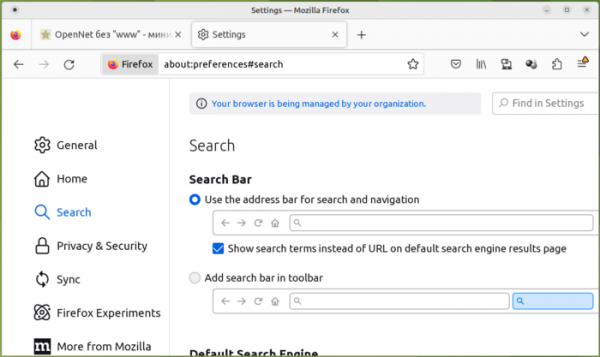
To manage this behavior, a special option has been proposed in the search settings section (about:preferences#search), and in about:config the parameter "browser.urlbar.showSearchTerms.featureGate".
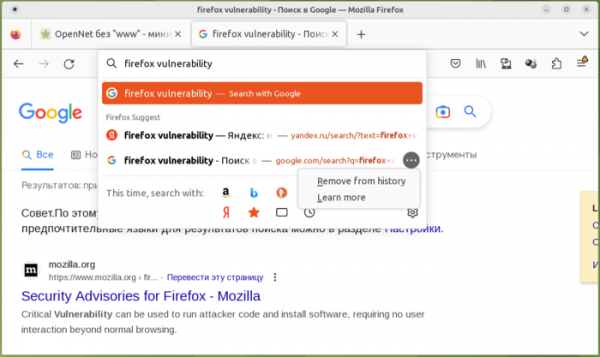
- A context menu has been added to the drop-down list of search suggestions, activated by clicking the button "…". The menu provides the option to remove the search query from the browsing history and disable the display of sponsored links.
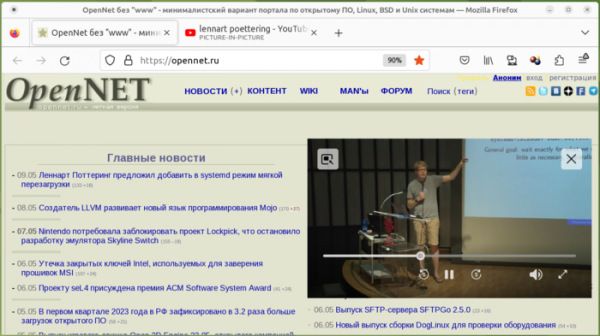
- An improved implementation of the Picture-in-Picture video viewing mode has been proposed, which includes buttons for rewinding 5 seconds forward and backward, a button for quickly expanding the window to full screen, and a fast rewind slider with position and duration indicators for the video.

- When viewing pages in private browsing mode, there is enhanced blocking of third-party cookies and isolation of the browser storage used in tracking visits.
- When filling in passwords in registration forms, the reliability of automatically generated passwords has increased, now including special characters.
- Support for animated images (AVIS) has been added in the implementation of the AVIF (AV1 Image Format), which employs intraframe compression technologies from the AV1 video encoding format.
- The engine supporting technologies for people with disabilities (accessibility engine) has been redesigned. Performance, responsiveness, and stability for working with screen readers, single sign-on interfaces, and accessibility frameworks have been significantly increased.
- When importing bookmarks from Safari and Chromium-based browsers, support for importing associated bookmark images (favicons) has been added.
- The sandbox isolation of processes interacting with the GPU on the Windows platform has been tightened. For Windows systems, the ability to drag content from Microsoft Outlook with the mouse has been implemented. In Windows builds, a stretching visual effect is enabled by default when attempting to scroll beyond the end of a page.
- In the macOS builds, access to the Services submenu is provided directly from Firefox's context menu.
- In scripts utilizing the Worklet interface (a simplified version of Web Workers that provides access to low-level rendering and audio processing stages), support for importing JavaScript modules using the 'import' expression has been added.
- Support for certain functions defined in the CSS Color Level 4 specification—color(), lab(), lch(), oklab(), and oklch()—which are used to specify colors in the sRGB, RGB, HSL, HWB, LHC, and LAB color spaces has been enabled by default.
- The color-mix() function has been added in CSS, allowing the mixing of colors in any color space based on a specified percentage (for example, to add 10% blue to white, you can specify 'color-mix(in srgb, blue 10%, white);').
- A new CSS property 'forced-color-adjust' has been added to disable forced color restrictions for individual elements, allowing full color management through CSS.
- CSS now supports the media query (@media) 'scripting', enabling the verification of script execution capability (for example, CSS can determine whether JavaScript support is enabled).
- A new syntax for pseudo-classes ':nth-child(an + b)' and ':nth-last-child()' has been introduced, allowing the retrieval of a selector for pre-filtering child elements before applying the main 'An+B' selection logic.
- The Compression Streams API has been added, providing an interface for compressing and decompressing data in gzip and deflate formats.
- Support for the CanvasRenderingContext2D.reset() and OffscreenCanvasRenderingContext2D.reset() methods has been added, designed to reset the drawing context to its original state.
- Support for additional WebRTC features implemented in other browsers has been added: RTCMediaSourceStats, RTCPeerConnectionState, RTCPeerConnectionStats ("peer-connection" RTCStatsType), RTCRtpSender.setStreams(), and RTCSctpTransport.
- Firefox-specific WebRTC features mozRTCPeerConnection, mozRTCIceCandidate, and mozRTCSessionDescription, which have long been deprecated, have been removed. The deprecated attribute CanvasRenderingContext2D.mozTextStyle has also been removed.
- The web developer tools have enhanced the search functionality in files available in the JavaScript debugger. The search panel has been moved to the standard sidebar, allowing results to be seen while editing scripts. Minified results and results from the node_modules directory are displayed. By default, search results in ignored files are hidden. Support for wildcard searching and the use of modifiers during the search has been added (for example, to search case-insensitively or apply regular expressions).
- In the HTML file viewer, a pretty print mode for embedded JavaScript code has been enabled.
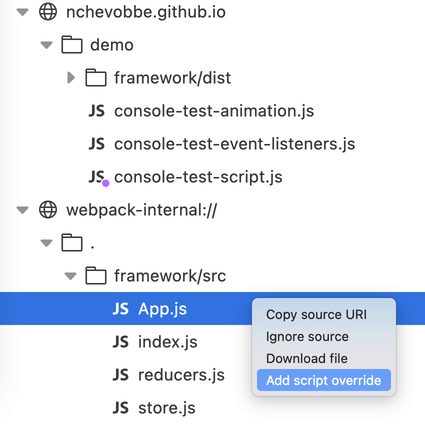
- In the JavaScript debugger, script file overriding is allowed. An option 'Add script override' has been added to the context menu shown for code files, which allows uploading a script file from your computer for editing, after which the edited script will be used for page processing, even after the page is reloaded.

- In the Android version:
- By default, hardware acceleration for decoding AV1 video is enabled; if not supported, a software decoder is used.
- The use of GPU for Canvas2D rasterization has been enabled.
- The interface of the built-in PDF viewer has been improved, making it easier to save open PDF files.
- A problem with video playback in landscape mode has been resolved.
In addition to new features and bug fixes, Firefox 113 addresses 41 vulnerabilities. Out of these, 33 are classified as critical, with 30 vulnerabilities (tracked under CVE-2023-32215 and CVE-2023-32216) stemming from memory management issues such as buffer overflows and dereferencing freed memory areas. These issues could potentially allow an attacker to execute malicious code upon opening specifically crafted pages. Vulnerability CVE-2023-32207 allows bypassing permission requests through forcing a click on a confirmation button via overlaying deceptive content (clickjacking). Vulnerability CVE-2023-32205 allows hiding browser warnings through pop-up overlays.
The beta version of Firefox 114 includes a user interface for managing the exceptions list for 'DNS over HTTPS'. The 'DNS over HTTPS' settings have been moved to the 'Privacy and Security' section. Users can now search bookmarks directly from the 'Bookmarks' menu. The button to open the bookmarks menu can now be added to the toolbar. Selective searching in local browsing history has been added when selecting 'Search History' in the History, Library, or Application menus.
Source: opennet.ru
